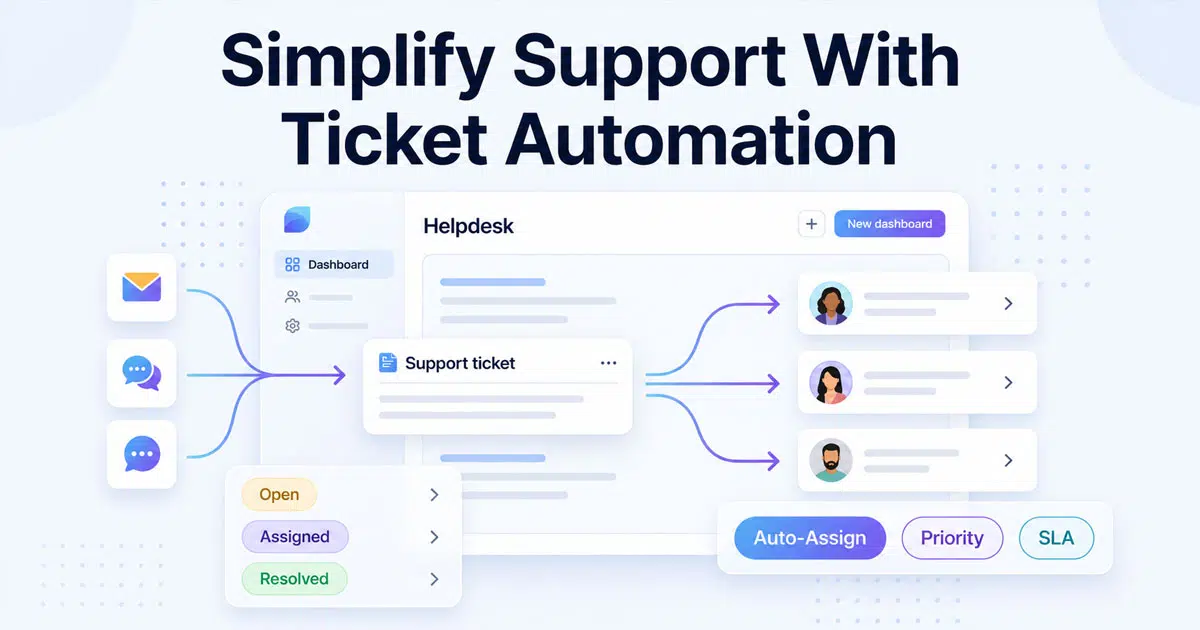
Customer support can quickly become messy when requests arrive from many channels. Emails, chats, and forms often pile up. Agents then spend too much time sorting, assigning, and tracking issues. Slow responses and missed messages can follow. A structured ticket system helps bring order to the chaos.
Ticket automation makes support work faster and easier. The system can automatically create tickets, assign them to the right agent, and prioritize urgent issues. Teams no longer need to handle every step manually. Automation reduces repetitive work and keeps requests organized.
Support teams can focus on helping customers instead of managing queues. Faster responses, better tracking, and smoother workflows become possible with the right automation setup. A platform like EasyDesk can help teams handle support at scale without adding extra complexity.
What Is Ticketing Automation
Ticketing automation uses ticket automation software and artificial intelligence to manage support tickets with less manual effort. A ticketing system can create tickets when incoming requests arrive through email, chat, or forms. Each new ticket includes ticket details such as ticket type, priority level, status, and custom fields. Automation triggers then route tickets to the right team member using smart ticket routing. The ticketing process becomes faster and more organized. Support teams can handle incoming tickets without dealing with repetitive tasks or time-consuming ticket creation.
Automation also improves ticket management and ticket handling across support operations. AI ticketing tools and machine learning analyze ticket volume, common issues, and ticket data to route tickets with better accuracy. Automated responses can acknowledge requests and provide timely responses during business hours or outside of them. Human agents can focus on complex issues instead of repetitive processes. As a result, businesses reduce costs, improve service quality, meet SLA management goals, and deliver a stronger customer experience.
Why Ticket Automation Is Important For Your Support Team
Customer support teams often face high ticket volume and constant incoming requests. Manual ticket handling slows response times and creates confusion. Ticket automation helps teams organize tickets, route requests, and respond faster. A structured ticketing system improves service quality and reduces manual effort.
Faster Ticket Routing
Support teams receive many incoming tickets every day. Manual ticket routing often creates delays. Ticket automation solves that problem through automated ticket assignment and smart ticket routing rules. The system checks ticket type, priority level, and ticket details. It can route tickets to the right team member instantly.
Research from HubSpot shows that 90% of customers rate immediate responses as important for support requests. Automated ticket routing helps achieve that expectation. A new ticket enters the system, and the platform can assign it within seconds. Faster routing reduces response times and improves customer experience. Support agents spend more time solving problems instead of sorting tickets.
Lower Manual Workload
Support teams often deal with repetitive tasks such as ticket creation, ticket assignment, and status updates. Manual processes consume valuable time. Ticket automation handles many of those repetitive processes automatically. Automation triggers can create tickets, assign priority, and route requests without human effort.
Zendesk research shows that workflow automation in customer support can reduce agent workload by nearly 30%. Less manual effort means agents focus on complex issues that require human judgment. Automated responses can acknowledge incoming requests instantly. Support teams no longer waste time on repetitive tasks. Productivity improves across the entire support operation.
Better SLA And Response Control
Service teams must maintain strong SLA management to meet customer expectations. A ticketing system with automation helps track ticket status, priority level, and response deadlines. Automation rules can trigger alerts when a ticket becomes urgent or when response times approach SLA limits.
According to Salesforce, 88% of customers say fast responses improve trust in a company. Ticket automation helps teams reduce customer support response time with automation and meet industry standards for response times. Automated ticket routing and reminders ensure urgent issues receive attention quickly. Support managers gain better control over service management and team performance.
Improved Customer Experience
Customer experience depends heavily on quick and accurate support. Long delays or lost tickets damage trust. Ticket automation ensures every incoming request receives attention. Automated ticket creation captures ticket details and assigns the correct priority level.
Customers benefit from automated responses that confirm their request immediately. The system also routes tickets based on ticket type and urgency. Faster responses lead to stronger customer satisfaction. Studies from Microsoft show that 96% of customers say service quality influences brand loyalty. Automated ticket management software helps support teams maintain consistent service quality.
Clear Insights For Support Performance
Support leaders need data to improve operations. Ticket automation platforms collect data from tickets, requests, and support interactions. Managers can review ticket volume, response times, and resolution speed. AI ticketing tools and machine learning analyze patterns across support tickets.
Reports and dashboards provide actionable insights into common issues and team workload. Managers can adjust automation rules and optimize ticket routing when performance drops. Data-driven support decisions help teams reduce costs and improve service quality. A modern helpdesk platform such as EasyDesk with smarter, secure customer support features also integrates with existing systems to maintain security compliance and operational control.
Essential Features Of Support Ticket Automation
Support teams need more than simple ticket creation. A strong ticketing system must organize incoming tickets, route requests, and maintain service quality. Ticket automation features help teams control ticket volume, reduce manual effort, and maintain fast response times across support operations.
Smart Ticket Routing
Support teams often receive many incoming requests from different channels. Smart ticket routing helps direct each ticket to the right team member. The system checks ticket type, priority level, custom fields, and ticket details. Automation rules then route tickets to the correct department.
Salesforce reports that 79% of customers expect faster support when contacting companies online. Smart ticket routing in #1 ticketing software built for better customer support helps meet that expectation. The system assigns urgent tickets immediately and prevents delays. Support teams avoid confusion and maintain organized ticket handling. Faster routing improves response times and keeps the ticketing process smooth.
Automated Ticket Creation
A reliable ticketing system should create tickets automatically when customers send a request. Emails, chat messages, or form submissions can trigger automated email-to-ticket creation. Each automated ticket stores ticket details such as priority, status, and ticket type.
Research shows that over 60% of support teams use automation to manage ticket creation. Automation triggers reduce manual effort and prevent missing requests. Support teams can capture every incoming ticket without extra work. The platform also records data for better service management and performance tracking.
Priority And SLA Control
Support teams must handle urgent tickets quickly, which requires effective ticket prioritization in customer support. Ticket automation helps assign priority levels based on ticket type and request details. Automation rules can mark tickets as urgent when specific conditions appear. The system also monitors response times and SLA deadlines.
A report from HubSpot shows that 93% of customers expect quick responses from support teams. Ticket SLA management tools help teams stay within response targets. Automated alerts notify agents when a ticket approaches deadline limits. Better priority control improves service quality and customer satisfaction.
Automated Responses
Customers want confirmation after sending a support request. Automated responses help acknowledge incoming tickets immediately. The system sends a message that confirms ticket creation and shares ticket details. Customers feel confident that the request has reached the support team.
Automated responses also provide quick solutions for common issues. For example, the system can share help articles or FAQs automatically. According to Microsoft research, 90% of customers expect consistent support across channels, making an email ticketing system with multi-channel features especially valuable. Automated replies improve customer experience and reduce repetitive processes for human agents.
AI Ticket Analysis
AI ticketing features help support teams understand ticket patterns. Artificial intelligence and machine learning analyze ticket data, ticket volume, and common issues. The system identifies trends that affect support operations.
Gartner predicts that AI will automate up to 30% of customer service interactions by 2030. AI tools can suggest solutions, classify ticket types, and route tickets with higher accuracy. Support managers gain actionable insights from ticket data. Better analysis helps teams reduce costs and improve overall support performance.
Integration With Existing Systems
Support teams often use multiple tools across business operations, so choosing the best ticketing software system for customer support becomes essential. Ticket automation platforms must integrate with existing systems such as CRM, communication tools, and service management software. Integration allows data to move smoothly between systems.
A study from MuleSoft shows that 89% of companies rely on system integration to improve business performance. Integrated ticket automation platforms provide better control over ticket handling and workflow automation. Teams can manage support tickets, customer data, and service requests from one platform. Strong integration also supports security compliance and consistent operations.
How To Implement Ticket Automation In Your Organization
Ticket automation works best when teams follow a clear process. A structured ticketing system helps control ticket volume, route incoming requests, and reduce manual effort. The right setup also improves response times and service quality across support operations.
Define Support Workflow
Support teams must understand their ticketing process before automation begins. Review how incoming tickets arrive, how agents handle requests, and how tickets move through the system. Identify repetitive tasks and common issues that slow ticket handling.
Reports show that over 64% of support leaders say workflow clarity improves service performance, especially for small teams using a smart ticketing tool to keep up. Clear workflows help teams define automation triggers and routing rules. Support managers can map ticket type, priority level, and response expectations. This step creates the foundation for effective ticket management and a better customer experience.
Choose The Right Ticketing System
Organizations need reliable software to support ticket automation. A modern ticketing system should manage ticket creation, ticket routing, and SLA management, and solutions like the best ticket management system EasyDesk are designed with these needs in mind. The platform must also support integration with existing systems and business tools.
Research from Gartner shows that organizations using integrated service management tools improve support efficiency by up to 30%. The right platform can automate ticket handling and track ticket status across teams. Businesses should evaluate features such as AI ticketing, automation rules, and security compliance before selecting a solution.
Create Automation Rules
Automation rules help control how tickets move through the support system and highlight the key differences in manual vs automated ticketing. Teams can create rules that route tickets based on ticket type, priority level, or custom fields. Automation triggers can assign urgent requests to experienced agents.
HubSpot data shows that automation can reduce manual support tasks by nearly 40%. Clear rules ensure that every new ticket follows a structured path. The system can also update ticket status, assign teams, and route requests without manual effort. Proper rule setup improves response times and overall support operations.
Train Support Teams
Support teams must understand how ticket automation works. Training helps agents use the ticketing system effectively. Agents learn how to manage tickets, review ticket details, and respond to incoming requests with confidence.
According to Salesforce research, 70% of service leaders say proper training improves service quality. Human agents still play a key role in resolving complex issues. Automation handles repetitive processes, while agents focus on customer conversations and problem resolution. Well-trained teams ensure automation tools deliver real value.
Track Performance And Improve
Ticket automation requires continuous monitoring, especially during seasonal peaks when common winter issues can break ticket systems. Managers should track metrics such as ticket volume, response times, and SLA performance. Data from support tickets helps identify gaps in the ticketing process.
AI ticketing tools and machine learning can analyze support data and generate actionable insights. Studies from McKinsey show that data-driven support teams improve productivity by up to 25%. Teams can adjust automation rules, refine ticket routing, and improve service quality over time. Regular performance reviews keep support operations efficient and customer satisfaction high.
Best Practices For Streamlining Support With Automation
Success with support ticket automation depends on strategic implementation choices. Organizations automating 80 percent of interactions do so with proven practices that balance efficiency and service quality.
Start With High-Volume Repetitive Tickets
Password resets represent the most straightforward automation win. These requests require zero human judgment and follow similar steps for whatever the requester. Automated systems handle verification, generate secure reset links, and confirm completion in under two minutes rather than hours.
Authentication problems are perfect automation candidates due to high volume and standardized resolution steps. Automated systems verify identity through multiple data points, reset credentials, and restore access without agent involvement. Success rates often exceed 90 percent for standard account recovery scenarios.
Create Clear Escalation Paths
Automation workflows should include uninterrupted pathways to escalate issues to human agents when necessary. Establish clear connections and workflow rules to ensure smooth escalation. Standardize escalation tiers to ensure consistency across multiple environments.
Configure the ticketing system to escalate based on severity or deadline. Send alerts via email and chat platforms to notify the right people when escalation triggers. Review rules when conditions change since ticket volume and team structure move over time.
Maintain The Human Touch For Complex Issues
88 percent of consumers prefer speaking to a live agent for delicate issues. Similarly, 67 percent would abandon a brand after two bad experiences with an AI chatbot. Automation should handle simple, repetitive queries while humans address situations that require emotional intelligence.
Update Your Knowledge Base
Companies see a 40 percent reduction in support tickets with a well-maintained knowledge base. Review customer support tickets to identify recurring issues and update documentation. Monitor usage metrics to identify content gaps and improve automation rules.
Common Mistakes To Avoid With Automated Ticket Resolution
Automated ticket resolution can improve support operations, but poor setup often creates new problems. Weak automation rules, bad ticket routing, or missing ticket details can harm service quality. Support teams must design automation carefully to protect customer experience and maintain fast response times.
Poor Ticket Routing Rules
Incorrect ticket routing often sends incoming tickets to the wrong team. Agents then reassign tickets several times. Response times increase, and customers lose trust. Zendesk reports that over 30% of support delays come from poor ticket routing.
Clear routing rules help teams control ticket handling and reduce confusion.
Solutions
- Define ticket type and priority level clearly.
- Use smart ticket routing based on request data.
- Assign tickets automatically to the correct team.
- Review automation rules regularly
Too Much Automation
Excess automation can create robotic support experiences. Automated responses may handle simple issues but fail with complex requests. Customers often prefer human agents for difficult problems. According to PwC, 59% of customers expect human support for complex issues.
Balanced automation keeps the ticketing process efficient without harming customer satisfaction.
Solutions
- Route complex issues to human agents
- Use automation only for repetitive tasks.
- Allow manual control for urgent tickets.
- Review automation triggers carefully.
Missing Ticket Details
Poor ticket creation can lead to incomplete ticket details. Agents then struggle to understand the request. Extra messages slow ticket handling and increase ticket volume. Research from HubSpot shows that 38% of support delays happen due to missing information.
Complete ticket data improves ticket management and faster problem resolution.
Solutions
- Add required custom fields during ticket creation.
- Capture ticket type and priority level.
- Collect key users and request data.
- Validate forms before ticket submission.
Weak SLA Monitoring
Service teams often forget SLA management when automation runs in the background. Tickets may remain open without alerts. Late responses damage service quality and customer experience. Salesforce reports that 88% of customers expect quick responses from support teams.
Automation should protect SLA performance, not weaken it, which starts when you turn emails into trackable tickets with the right tools.
Solutions
- Set SLA rules for response times.
- Trigger alerts for urgent tickets
- Track ticket status regularly
- Monitor SLA performance through dashboards.
Lack Of Performance Insights
Many teams activate ticket automation but fail to track performance. Without data, managers cannot improve support operations. Ticket volume, response times, and common issues remain hidden. McKinsey research shows that data-driven service teams improve productivity by up to 25%.
Data analysis helps teams refine automation and maintain service quality.
Solutions
- Analyze ticket data and trends.
- Use AI ticketing dashboards for insights.
- Track response times and resolution speed
- Adjust automation rules based on results.
How EasyDesk Helps Streamline Support With Ticket Automation
EasyDesk helps support teams manage incoming requests with a powerful ticketing system. The platform can create tickets automatically when customers send emails, chats, or form requests. Each new ticket includes ticket details such as ticket type, priority level, status, and custom fields. Ticket automation rules then route tickets to the right team member using smart ticket routing. This structured ticketing process helps teams control ticket volume and improve ticket handling across support operations.
Automation features also reduce manual effort and repetitive tasks. EasyDesk can send automated responses, update ticket status, and trigger alerts for urgent tickets. The platform also supports SLA management and integration with existing systems. AI ticketing insights and reports help teams analyze ticket data, identify common issues, and improve response times. As a result, support teams deliver better service quality and stronger customer satisfaction, particularly during busy seasons when streamlining support with ticket automation matters most.
FAQs
Can Ticket Automation Work For Small Support Teams With Limited Resources?
Yes. Ticket automation works well even for small support teams. A simple ticketing system can automate ticket creation, route incoming tickets, and reduce repetitive tasks. Small teams can manage ticket volume more efficiently while improving response times and customer satisfaction.
Does Ticket Automation Improve Response Times for High-Ticket-Volume Support Teams?
Yes. Ticket automation helps route tickets instantly using smart ticket routing and automation rules. The system assigns priority level and directs incoming requests to the right agent. Faster ticket routing helps teams maintain SLA management and deliver timely responses.
Can AI Ticketing Tools Identify Common Customer Support Issues Automatically?
Yes. AI ticketing tools use artificial intelligence and machine learning to analyze ticket data and support tickets. The system reviews ticket details, ticket type, and request patterns. Support teams gain actionable insights that help improve service quality and ticket management.
Does Ticket Automation Replace Human Agents In Customer Support?
No. Ticket automation reduces repetitive processes and manual effort, but human agents still resolve complex issues. Automation handles ticket routing, automated responses, and ticket creation. Agents focus on difficult cases that require judgment and communication.
What Factors Should Businesses Consider Before Choosing Ticket Automation Software?
Businesses should evaluate ticketing system features, integration with existing systems, SLA management tools, and automation rules. Security compliance, reporting dashboards, and AI ticketing capabilities also matter. The right platform should support smooth ticket handling and scalable support operations.



