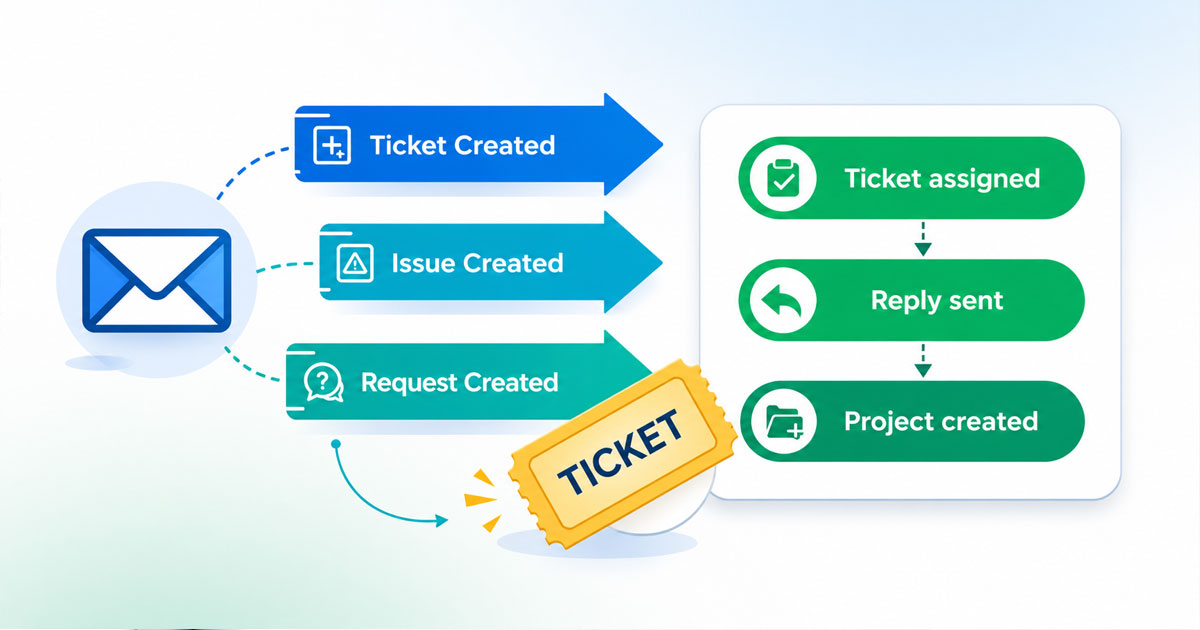
Automated email to ticket conversion helps small businesses control growing customer service operations. Many customer service teams struggle to track incoming emails, customer inquiries, and email requests across multiple communication channels. When a customer sends a support email, the system can automatically convert the email into tickets inside a ticketing system. Every inbound email is automatically converted into structured tickets with clear ticket fields and custom fields.
An email ticketing system connects with your email server and email provider. Incoming customer emails are forwarded and used to create tickets for the right team. Automated ticketing supports ticket assignment, route tickets op basis of criteria such as priority, department, or complex issues. Support teams to better handle incoming tickets, improve response times, and raise customer satisfaction so that customers receive a good customer support experience across various channels, including live chat widget and email support.
What Is Automated Email To Ticket Conversion
Automated email-to-ticket conversion is a process that turns incoming emails into structured tickets inside a ticketing system. When a customer sends a support email, the system automatically converts the message into a trackable request. Each customer query becomes part of a centralized help desk. Automated ticketing removes the need for manual ticket creation and reduces errors in customer service operations.
An email ticketing system connects to your email server and email provider to capture inbound email and email requests. The software can create tickets, assign tickets to the right team, and route tickets based on predefined conditions. Ticket fields and custom fields help organize complex issues across different departments. Automated email to ticket conversion improves ticket management, customer support workflows, response times, operational efficiency, and overall customer satisfaction.
Why Small Business Support Teams Need Automated Email To Ticket Conversion
Small businesses receive a high volume of incoming tickets across multiple channels. Manual handling creates delays and missed customer requests. Automated email to ticket conversion helps customer service teams improve operational efficiency, route tickets correctly, and deliver consistent customer support.
Email Volume Growth
Email support remains a primary channel for customer interactions. Reports show that over 60% of customers prefer email for non-urgent customer inquiries. A growing number of inbound email messages can overwhelm a small support team.
Automated email to ticket conversion ensures incoming customer emails are automatically converted into tickets. The ticketing system captures every customer query. No email request gets lost. Support teams can manage incoming tickets with better visibility and control.
Faster Response Times
Customers expect quick replies. Studies show that 90% of customers expect a response within 24 hours. Slow response times reduce customer satisfaction and damage trust.
An email ticketing system helps assign tickets to the right team instantly. Automated ticketing reduces manual ticket creation and speeds up ticket assignment. Support email requests move directly into the help desk. Faster routing improves the team’s performance and keeps first response times low.
Better Ticket Management
Manual processes create confusion. Emails stay in personal inboxes. Messages get forwarded without structure. That leads to duplicate tickets and missed follow-ups.
Automated email to ticket conversion centralizes ticket management. The system can create tickets with clear ticket fields and custom fields. Complex issues go to different departments based on predefined conditions. Every request stays traceable inside the software.
Support Across Multiple Channels
Customers use various channels. Email, live chat, and other tools create scattered communication. Without omnichannel support, teams struggle to track conversations.
An integrated helpdesk connects email support, live chat widget, and other channels into one platform. The ticketing system converts emails and centralizes customer interactions. Teams manage customer requests from multiple channels without confusion.
Improved Operational Efficiency
Small businesses often operate with limited staff. Manual sorting of incoming emails wastes time. Repetitive tasks slow customer service operations.
Automated ticketing improves operational efficiency. The system can route tickets, assign tickets, and apply predefined conditions automatically. Customer query slips do not happen. Teams focus on solving issues instead of sorting messages.
Higher Customer Satisfaction
Customer satisfaction depends on speed and clarity. Missed or delayed replies frustrate customers. Poor coordination affects the customer support strategy.
Automated email to ticket conversion ensures every customer query enters the ticketing system. The right team receives the request quickly. Clear tracking and detailed analytics help measure team’s performance. Better response and structured ticket management lead to higher customer satisfaction.
How Automated Email To Ticket Conversion Works
Automated email to ticket conversion follows a structured workflow inside a ticketing system. The process captures inbound email, creates tickets, assigns ownership, and tracks every customer query. Each step improves ticket management and customer service operations.
Email Integration Setup
The process starts with email integration. The help desk connects to your email server and email provider. Support email addresses are linked to the ticketing system through secure protocols.
When a customer sends a message, the system detects the inbound email instantly. Most modern email ticketing systems support automatic sync within seconds. Over 70% of small businesses rely on shared inbox integration to manage incoming emails. Integration ensures no email request stays outside the helpdesk software.
Automatic Ticket Creation
Once the system receives incoming customer emails, it converts emails into structured tickets. The message becomes automatically converted into a trackable record. Each ticket contains ticket fields such as subject, sender details, and timestamps.
Attachments and previous messages remain part of the ticket. Automated ticketing reduces manual ticket creation errors by up to 30%, according to industry reports. Every customer query enters the system without human intervention. That step protects customer interactions from loss.
Smart Ticket Assignment
After ticket creation, the system assigns tickets based on predefined conditions. Rules can use keywords, sender type, or custom fields. Complex issues can move to different departments without delay.
Automated email to ticket conversion can route tickets to the right team in seconds. Studies show automated routing improves response times by nearly 40%. Clear ticket assignment avoids confusion and reduces internal email forwarding. Support teams focus on resolution instead of sorting requests.
Workflow And Status Updates
The ticketing system applies automated ticketing workflows after assignment. Status changes reflect progress. The help desk tracks open, pending, and resolved tickets clearly.
Notifications alert the support team when action is required. Escalation rules activate if response times exceed SLA limits. Detailed analytics track incoming tickets and team’s performance. Structured workflows improve operational efficiency and reduce backlog growth.
Reporting And Performance Tracking
Every ticket created through automated email to ticket conversion feeds into reporting dashboards. Managers view ticket volume, resolution time, and customer satisfaction metrics.
Detailed analytics help measure customer service operations across multiple channels. Reports highlight trends in email support and inbound email traffic. Data-driven insights allow teams to adjust customer service workload management and improve customer support quality. Performance visibility turns the system into a strategic asset rather than just software.
Key Features Required In An Email To Ticket System
A reliable email ticketing system needs more than basic ticket creation. Small businesses require automation, visibility, and control across customer service operations. The right key features improve ticket management, customer satisfaction, and overall operational efficiency.
Automatic Ticket Creation
Automatic ticket creation stands at the center of automated email-to-ticket conversion. When inbound email arrives, the system must create tickets instantly without manual effort. Every customer query should automatically be converted into a structured record.
Studies show that support automation tools can reduce manual workload by up to 35%. The ticketing system must capture subject lines, attachments, and sender details. Accurate ticket fields prevent data gaps. Reliable ticket creation ensures no customer requests disappear inside crowded inboxes.
Smart Ticket Assignment
Smart ticket assignment helps route tickets to the right team. Rules based on predefined conditions allow the software to assign tickets using keywords, departments, or custom fields.
Businesses that use automated ticketing report up to 40% faster response times. Clear ticket assignment reduces internal confusion. Complex issues move to different departments without delay. Customer support becomes more organized and measurable.
Multichannel Support Integration
Customers contact support through multiple channels. Email support, live chat, and other platforms generate scattered customer interactions. A strong help desk must unify various channels inside one system.
Multichannel support improves visibility across customer service teams. Over 70% of customers expect seamless communication across channels. Omnichannel support connects inbound email, live chat widget, and other tools. Unified access improves operational efficiency and customer satisfaction.
Workflow Automation And SLA Control
Workflow automation controls how tickets move through the system. Status updates, ticket escalations, and priority rules must function without manual effort. Automated email to ticket conversion works best with structured workflows.
SLA tracking ensures response times stay within targets. Research shows that 90% of customers expect replies within 24 hours. Automated alerts help support teams manage incoming tickets before deadlines pass. Strong workflow logic protects service quality.
Reporting And Detailed Analytics
Detailed analytics provide insight into team’s performance and customer service operations. Managers need visibility into ticket volume, resolution time, and backlog trends.
Data-driven decisions improve customer satisfaction and ticket management. Reports show peak inbound email hours and common customer inquiries. Metrics help optimize staffing and resource allocation. An advanced email ticketing system turns raw tickets into measurable business insights.
Step-by-Step Setup Of Automated Email To Ticket Conversion
A structured setup ensures automated email-to-ticket conversion works without errors. Each step connects your email support channel to the ticketing system. Proper configuration improves ticket management, response times, and overall operational efficiency for customer service teams.
Step 1: Connect Your Support Email
Start with your support email account. Link your email provider to the help desk software through secure email settings. Most platforms support IMAP or direct mailbox integration.
The system connects to your email server and begins tracking inbound email. Every incoming message becomes visible inside the ticketing system. A stable connection prevents lost customer inquiries and ensures reliable automated ticketing from day one.
Step 2: Configure Email Forwarding Rules
Set up forwarding rules if direct integration is not available. Forwarded emails should route automatically to the email ticketing system. This ensures all incoming emails reach one central location.
Clear routing avoids confusion across different departments. Customer requests sent to multiple channels can still convert emails into structured tickets. Proper forwarding protects customer interactions from gaps and delays.
Step 3: Map Ticket Fields And Custom Fields
Define how the system captures data from each email. Map subject lines, sender details, and message content to ticket fields. Add custom fields for priority, department, or issue type.
Structured ticket creation improves clarity. Accurate fields help assign tickets correctly. Organized data supports better reporting and detailed analytics. Clear categorization reduces errors in ticket management.
Step 4: Set Automated Assignment Rules
Create predefined conditions for ticket assignment. Use keywords, email domains, or issue categories to route tickets to the right team. Complex issues can move to specialized agents instantly.
Automated email to ticket conversion becomes more powerful with smart routing. Businesses report up to 40% faster response times after enabling automated ticketing rules. Correct ticket assignment improves team’s performance and customer satisfaction.
Step 5: Test And Monitor Performance
Send test email requests to verify the setup. Confirm that the system creates tickets, assigns ownership, and updates status correctly. Review workflows and SLA alerts.
Track incoming tickets through detailed analytics. Monitor response times and resolution speed. Early testing ensures stable customer support operations. A well-tested system supports scalable help desk performance as email volume grows.
Best Practices For Accurate Email To Ticket Automation
Accurate automated email-to-ticket conversion requires more than basic setup. Small errors can affect ticket management, response times, and customer satisfaction. Clear rules and structured workflows help customer service teams maintain control over incoming emails and customer requests.
Clear Email Structure
Clear email structure improves automated ticketing accuracy. Encourage customers to use specific subject lines and detailed descriptions. A structured format helps the ticketing system detect keywords and priority levels.
Research shows that clear subject lines can improve routing accuracy by up to 25%. Consistent formatting reduces confusion in ticket fields. Organized inbound email makes ticket creation faster and more reliable for the support team.
Defined Routing Rules
Defined routing rules ensure every customer query reaches the right team. Use predefined conditions based on keywords, issue types, or departments. Proper logic prevents misrouted tickets.
Companies that use automated assignment report up to 40% faster response times. Smart routing reduces manual intervention. Customer service operations stay efficient when tickets move automatically across different departments.
Spam And Filter Control
Spam emails can overload the help desk. A strong email ticketing system must filter irrelevant messages before ticket creation. Filters protect ticket management from clutter.
Industry data shows that nearly 45% of inbound email traffic can be spam. Automated email to ticket conversion should include validation checks. Clean incoming tickets improve operational efficiency and protect customer support quality.
Standard Ticket Fields
Standard ticket fields create consistency across tickets. Include priority, category, and source details in every automatically converted request. Custom fields help manage complex issues.
Structured data improves reporting and detailed analytics. Clear categorization helps assign tickets correctly. Accurate fields reduce errors in automated ticketing and improve team’s performance.
Regular Workflow Reviews
Workflow rules require regular evaluation. Business needs change. Customer interactions evolve across multiple channels. Periodic audits prevent outdated logic from affecting ticket assignment.
Teams that review automation quarterly see measurable gains in response times. Adjust rules based on ticket volume and customer requests. Updated workflows protect customer satisfaction and long-term help desk stability.
Performance Monitoring And Analytics
Detailed analytics help measure the accuracy of automated email-to-ticket conversion. Track response times, ticket resolution rates, and reassignment frequency. Data reveals gaps in routing or ticket creation.
Reports show that businesses using analytics improve operational efficiency by over 30%. Monitor trends in incoming customer emails and customer inquiries. Performance tracking turns automation into a strategic asset.
Agent Training And Accountability
Technology alone cannot guarantee accuracy. Customer service teams must understand how the ticketing system works. Clear guidelines help agents manage tickets effectively.
Training improves ticket management quality and reduces reassignment errors. Well-informed agents support smoother customer support workflows. Strong accountability ensures every customer request receives proper attention and timely resolution.
Common Challenges Of Email To Ticket System And Practical Solutions
An email ticketing system improves customer service operations, but it also presents technical and workflow challenges. Small gaps in setup can affect ticket management, response times, and customer satisfaction. Clear solutions help support teams maintain control and operational efficiency.
High Volume Of Incoming Emails
Small businesses often receive more inbound email than expected. Sudden spikes in customer inquiries can overload the help desk. Manual sorting increases delays and missed customer requests.
Solutions:
- Enable automated email to ticket conversion for all support email accounts
- Use predefined conditions to route tickets to the right team
- Set priority-based ticket assignment rules
- Monitor ticket volume through detailed analytics
- Allocate workload across different departments based on ticket trends
Duplicate Ticket Creation
Forwarded messages and repeated email requests can create duplicate tickets. Duplicate records confuse customer service teams and affect team’s performance. Customers may receive multiple responses for the same customer query.
Solutions:
- Activate duplicate detection inside the ticketing system
- Use unique ticket IDs for every automatically converted message
- Configure rules to merge related incoming tickets
- Train agents to check existing tickets before replying
- Review ticket management reports regularly
Misrouted Tickets
Incorrect routing sends tickets to the wrong department. Complex issues may sit unresolved due to poor ticket assignment. Misrouting increases response times and frustrates customers.
Solutions:
- Define clear routing rules based on keywords and custom fields
- Review predefined conditions quarterly
- Use category-based ticket fields for better accuracy
- Set escalation paths for unresolved tickets
- Analyze routing performance using reporting dashboards
Spam And Irrelevant Messages
Spam emails can enter the system through inbound email channels. Irrelevant messages consume storage and reduce operational efficiency. The help desk may become cluttered with low-value tickets.
Solutions:
- Integrate spam filters with the email server
- Restrict ticket creation to verified email domains when possible
- Apply automated filtering rules before ticket creation
- Monitor email traffic patterns through detailed analytics
- Clean up inactive or invalid tickets regularly
Slow Response Times
Delayed replies damage customer satisfaction. Lack of automation in ticket management often causes slow response times. Manual processes reduce efficiency in customer support.
Solutions:
- Enable automated ticketing for instant ticket creation
- Use SLA tracking and alerts inside the ticketing system
- Assign tickets automatically to the right team
- Monitor response time metrics weekly
- Adjust staffing based on incoming customer emails volume
Automated Email To Ticket Conversion Vs Manual Ticket Creation
Small businesses often start with manual ticket creation through shared inboxes. As incoming emails increase, manual processes reduce operational efficiency. Automated email to ticket conversion offers structured ticket management, faster response times, and better customer satisfaction.
| Criteria | Automated Email To Ticket Conversion | Manual Ticket Creation |
|---|---|---|
| Ticket Creation | Automatically converted from inbound email into structured tickets | Agents manually create tickets from incoming emails |
| Speed | Instant ticket creation within seconds | Delays due to manual review and entry |
| Ticket Assignment | Route tickets using predefined conditions and custom fields | Manual ticket assignment based on agent judgment |
| Error Rate | Reduced human error in ticket fields and categorization | Higher risk of missed customer requests or duplicate tickets |
| Response Times | Faster response due to automation and SLA tracking | Slower response times during high email volume |
| Scalability | Handles large volumes of incoming customer emails easily | Struggles as customer inquiries increase |
| Reporting | Detailed analytics and measurable team’s performance | Limited tracking without structured data |
| Customer Satisfaction | Higher consistency and improved customer support experience | Inconsistent service due to manual workflow gaps |
How Automated Email To Ticket Conversion Improves SLA And Response Time
Service Level Agreements define expected response times in customer service operations. Manual workflows often cause delays and missed targets. Automated email to ticket conversion creates structure inside the ticketing system and helps support teams meet SLA commitments consistently.
Instant Ticket Creation
Instant ticket creation removes delays between inbound email receipt and ticket entry. When a customer sends a support email, the system automatically converts it into a structured ticket.
Research shows automation can reduce initial handling time by up to 50%. Faster ticket creation allows customer service teams to act quickly. Immediate visibility inside the help desk protects SLA targets and improves overall response times.
Automated Ticket Assignment
Automated ticket assignment ensures every customer query reaches the right team without delay. Predefined conditions route tickets based on keywords, categories, or custom fields.
Companies using automated ticketing report up to 40% faster first responses. Proper ticket assignment reduces internal transfers. Complex issues move directly to specialized agents. Accurate routing strengthens customer support efficiency.
Priority-Based Routing
Priority rules classify incoming tickets by urgency. The ticketing system can detect high-impact customer requests and escalate them instantly.
Studies show 68% of customers expect urgent issues resolved within hours. Automated email to ticket conversion supports SLA tracking through structured priority fields. Clear categorization ensures critical tickets receive immediate attention.
Real-Time SLA Tracking
Real-time SLA tracking monitors response times against defined targets. Alerts notify the support team before deadlines expire.
Dashboards inside the email ticketing system highlight overdue incoming tickets. Managers gain visibility into team’s performance metrics. Proactive monitoring reduces SLA breaches and protects customer satisfaction.
Reduced Manual Errors
Manual ticket creation often causes missed customer inquiries or incorrect ticket fields. Errors increase response times and harm ticket management.
Automated email to ticket conversion reduces data entry mistakes. Structured ticket fields capture accurate information from incoming customer emails. Fewer errors mean fewer delays. Clean data improves workflow speed and SLA compliance.
Data-Driven Performance Optimization
Detailed analytics provide insight into response times and workload trends. Reports identify peak inbound email hours and bottlenecks in ticket assignment.
Organizations that use performance dashboards improve operational efficiency by over 30%. Data-driven decisions help adjust staffing and workflows. Continuous optimization ensures consistent SLA performance across multiple channels.
Improved Customer Satisfaction
Faster response times directly influence customer satisfaction. Surveys show 89% of customers switch brands after poor support experiences.
Automated email to ticket conversion ensures structured customer interactions and predictable response times. Reliable ticket management builds customer trust. Consistent SLA adherence strengthens long-term customer relationships and loyalty.
Key Metrics To Track After Implementing An Email Ticketing System
An email ticketing system improves structure inside customer service operations. Performance tracking ensures automated email to ticket conversion delivers real results. Clear metrics help support teams measure operational efficiency, response times, and overall customer satisfaction across multiple channels.
First Response Time
First response time measures how quickly the support team replies after ticket creation. Fast replies strongly influence customer satisfaction. Studies show 90% of customers expect a response within 24 hours.
Automated email to ticket conversion reduces delay between inbound email and ticket assignment. The ticketing system records timestamps automatically. Managers can track response times through detailed analytics and improve SLA compliance.
Average Resolution Time
Average resolution time shows how long it takes to close incoming tickets. Long resolution cycles often indicate routing issues or workload imbalance.
Structured ticket fields and custom fields help assign tickets to the right team. Clear categorization reduces delays for complex issues. Reports from help desk software show that automation can reduce resolution time by up to 30%.
Ticket Volume Trends
Ticket volume trends track the number of incoming customer emails and customer requests over time. Sudden increases may affect response times and team’s performance.
Detailed analytics highlight peak inbound email periods. Managers can adjust staffing based on workload patterns. Monitoring ticket volume improves operational efficiency and supports better resource planning.
SLA Compliance Rate
SLA compliance rate measures how often customer service teams meet defined response targets. Missed SLAs reduce trust and customer satisfaction.
Automated ticketing supports real-time SLA tracking. Alerts notify agents before deadlines pass. Clear reporting inside the email ticketing system ensures accountability and protects service quality across multiple channels.
Customer Satisfaction Score
Customer satisfaction score reflects how customers feel after issue resolution. Surveys sent after ticket closure provide measurable customer feedback analysis.
Research shows companies with structured ticket management achieve up to 20% higher satisfaction scores. Automated email to ticket conversion improves consistency in customer support. Reliable workflows and faster response times directly influence positive customer experiences.
How EasyDesk Supports Automated Email To Ticket Conversion
EasyDesk supports automated email-to-ticket conversion with a modern help desk and ticketing system. The platform captures incoming emails from email support and converts them into structured tickets inside a centralized workspace. EasyDesk also offers automated workflows, priority routing, SLA management, and a knowledge base to help support teams stay organized and responsive.
Support teams can link their email channel directly to EasyDesk, so every incoming email becomes a trackable ticket. The system automatically assigns tickets to the right team members based on predefined rules and criteria. EasyDesk also adds priority levels and automatic responses to reduce repetitive tasks, helping teams handle incoming customer emails more efficiently. A centralized dashboard unifies multichannel support across email and live chat. Managers gain detailed analytics to monitor email ticket volumes, track SLA compliance, and improve overall customer service operations without extra complexity. You can enjoy EasyDesk at a suitable price.
FAQs
Can Automated Email To Ticket Conversion Work With Any Email Provider?
Yes. Most email ticketing system platforms connect with major email provider services through IMAP or direct email server integration. Once connected, inbound email messages are automatically converted into tickets inside the help desk.
Does Automated Ticketing Reduce Manual Workload For Support Teams?
Yes. Automated ticketing removes the need for manual ticket creation and repetitive ticket assignment tasks. Customer service teams can focus on resolving customer inquiries instead of sorting incoming emails.
Is Automated Email To Ticket Conversion Suitable For Small Teams?
Yes. Small support teams benefit from structured ticket management and faster response times. Even with limited staff, automation helps route tickets correctly and maintain operational efficiency.
Can The System Handle High Volumes Of Incoming Customer Emails?
Yes. A modern ticketing system can process large volumes of inbound email without delays. Automated workflows and predefined conditions ensure every customer request enters the system without overload.
How Does Automated Email To Ticket Conversion Support Multichannel Communication?
An advanced help desk connects email support, live chat, and other multiple channels into one dashboard. Customer interactions from various channels convert into structured tickets for centralized tracking.
What Security Measures Protect Customer Data In An Email Ticketing System?
Secure email settings, encrypted connections to the email server, and controlled user access protect sensitive data. Audit logs and role-based permissions add another layer of protection for customer support operations.
How Quickly Can A Business Start Using Automated Email To Ticket Conversion?
Setup usually takes a few hours after connecting the support email and configuring ticket fields. Once integrated, incoming tickets start appearing immediately, allowing teams to improve response times and customer satisfaction.



