Holiday seasons bring excitement for customers but often bring pressure for support teams. Customer questions, refund requests, and technical issues rise quickly during peak periods. A digital ticketing platform with more than 5 million users once faced a backlog of over 1,000 tickets. That example shows how fast support requests can stack up when demand spikes.
A strong ticket management system for holiday backlogs helps teams stay in control during busy seasons. For small teams, a smart ticketing tool that helps them keep up makes clear processes, smart automation, and proper ticket prioritization easier to maintain so support stays organized. Preparation before the rush makes a big difference.
A practical approach helps teams clear existing backlogs and stop new ones from growing. Applying targeted tips to simplify holiday support with your helpdesk app alongside the right tools and strategies protects response time and customer satisfaction even during high-volume support periods.
What Is Holiday Ticket Backlogs
Holiday ticket backlogs happen when support requests increase faster than support teams can resolve them. Travel agencies and tour operators often face this during peak holiday bookings. Customers contact support through multiple channels about holiday packages, online booking, travel tickets, or reservation system issues. Without a structured ticket management system for holiday backlogs, support tickets quickly pile up and slow service delivery.
Travel companies rely on booking systems such as tour booking software, travel agent software, and online travel agency software to manage bookings and group travel. High demand for vacation packages, desired package online searches, and ticket booking can overload existing tools. Support teams must manage customers, handle booking engine issues, and maintain service quality.
Modern ticket management platforms use automated workflows, ticket routing, and omnichannel support. These capabilities are central to delivering the best customer support with a #1 ticketing software system. Those features improve operational efficiency, team performance, and customer satisfaction during busy holiday seasons.
How To Prepare Your Ticket Management System For Holiday Backlogs
Holiday seasons bring a sharp rise in support tickets, especially in the travel industry. Travel agencies, tour operators, and travel companies face pressure from holiday bookings, online ticket reservation issues, and package booking questions. A prepared ticket management system keeps support operations organized and protects customer satisfaction during peak demand, especially when it’s powered by a ticketing software built for better customer support.
Review Ticket Flow And Routing Rules
A clear ticket routing structure reduces delays during high support volumes. Support teams must define rules that send support tickets to the right department. Travel businesses often receive requests related to holiday packages, ticket booking, or reservation system errors. Proper ticket management ensures those requests reach the correct agents quickly.
Zendesk research shows that 72% of customers expect immediate service from support teams. Automated ticket assignment helps meet that expectation. The system can route travel ticket issues to booking specialists and package booking questions to tour experts. Role based access controls also help support agents access the right tools without confusion.
Activate Automated Workflows And Reminders
Automation removes pressure from support operations during busy seasons. Automated ticket management software assigns tickets, sends automated reminders, and updates ticket status without manual work. Travel companies receive large numbers of support requests during holiday bookings, especially around group travel and online booking confirmations.
Gartner reports that automation can reduce repetitive tasks by up to 30%. Automated ticket management tools help teams handle customer interaction across multiple channels. Automated alerts also remind agents about pending tickets. That structure keeps service delivery smooth and improves team efficiency during peak travel demand.
Integrate Booking Systems With The Ticketing Platform
Travel agencies often operate multiple systems such as travel agent software, tour booking software, and online travel agency software. Integration between those systems and the ticketing system improves support operations. Agents can view booking details, accommodation details, and prices date-wise from a unified workspace.
Modern travel portal development platforms support integration capabilities with booking engines and reservation systems. McKinsey data shows that companies using integrated systems improve operational efficiency by nearly 20%. Support teams can quickly resolve ticket booking issues, manage bookings, and take advantage of the broader benefits of using a ticketing system when assisting customers who search for a desired package online.
Track Support Metrics And Team Performance
Strong ticket management depends on data visibility. Support leaders must monitor key metrics such as response time, resolution rate, and ticket backlog size. Those metrics reveal gaps in service operations and help teams respond faster to customer requests.
HubSpot reports that companies that track customer support metrics improve customer satisfaction scores by up to 19%. A ticket management system also shows team performance and workload distribution. Travel businesses can identify busy periods related to holiday packages, group bookings, or vacation packages. That insight helps managers allocate agents across different communication channels.
Strengthen Omnichannel Customer Support
Customers contact travel businesses through email, chat, phone, and travel portals. A ticketing system with omnichannel support collects all customer interaction in one unified workspace. Support agents then manage requests from multiple channels without switching tools.
Salesforce research shows that 76% of customers expect consistent service across communication channels. Travel agencies that support online booking, ticket booking, and travel ticket inquiries must respond quickly. A unified support platform helps teams manage customers, resolve support tickets, and maintain service quality even during peak holiday demand.
Essential Features To Activate In Your Ticket Management System
Holiday traffic can push support operations to the limit. Travel agencies, tour operators, and travel companies receive a surge of support tickets during peak holiday bookings. Robust ticketing software for the holiday season with the right features protects service quality, speeds up service delivery, and keeps customer satisfaction stable.
Automated Ticket Routing
Automated ticket routing keeps support requests organized. A ticket management system can send each ticket to the right support team based on category, priority, or issue type. Travel businesses often receive questions about holiday packages, ticket booking, reservation system errors, and accommodation details. Smart routing prevents confusion and delays.
Zendesk data shows that automated ticket routing can reduce resolution time by up to 25%. Support teams quickly receive the right support tickets without manual sorting. Travel companies can direct travel ticket issues to booking specialists and package booking engine problems to technical teams. Following best practices from a dedicated ticket automation software guide, the process improves team efficiency and speeds up customer interaction.
Omnichannel Support Workspace
Customers contact travel agencies through multiple channels such as email, chat, social platforms, and travel portals. A ticketing system with multi-channel customer support and omnichannel capabilities collects all communication in one unified workspace. Agents no longer need to jump between separate tools to respond to support requests.
Salesforce reports that 76% of customers expect consistent service across channels. A centralized ticket management platform helps support teams track online ticket reservation issues, online booking errors, and travel tickets questions in one place. The unified system also improves service operations and keeps communication clear across departments.
Automated Workflows And Alerts
Automated workflows reduce manual work inside support operations. The ticketing system can assign tickets, update ticket status, and trigger automated reminders for pending requests. Travel companies often receive repetitive support tickets related to online travel booking, group bookings, and desired package online inquiries.
According to Gartner, automation can reduce repetitive tasks by nearly 30%. Support agents then focus on more complex problems such as booking system errors or pricing questions. As described in resources on streamlining support with ticket automation, automated alerts also help teams respond quickly when customers report problems with travel agent software or reservation systems.
Role-Based Access Controls
Role-based access controls protect system data and improve internal coordination. Each team member receives permission based on their role. Support agents can view ticket details, while managers track key metrics and team performance. That structure prevents system errors and confusion during high ticket volume.
Travel agencies that manage multiple vacation properties and group travel operations benefit from this feature. The ticket management system connects with backend systems that manage bookings and customer registration. Access control also supports managing travel agents and internal teams without exposing sensitive booking information.
Booking System Integration
Integration between booking systems and ticketing platforms improves operational efficiency. Travel businesses often use travel agent software, tour booking software, and online travel agency software together. Integration allows support teams to view booking data without switching platforms.
McKinsey reports that companies with strong integration capabilities improve productivity by nearly 20%. Agents can access accommodation details, vacation packages, prices date wise, and desired package selections directly inside the ticketing system. That unified view helps teams resolve issues faster and maintain strong customer satisfaction during peak holiday bookings.
Strategies For Clearing Existing Ticket Backlog
You need to take action to clear accumulated support tickets. Your ticket management system for holiday backlogs becomes a powerful tool only when you execute smart strategies that address volume in a systematic way.
Triage And Prioritize Based On Urgency
Ticket triage lets you categorize and prioritize incoming support requests based on urgency and complexity. Build a framework that separates critical issues from routine queries by following ticket prioritization best practices in customer support. Immediate priority covers outages, payment failures, and security issues. High priority has VIP accounts and escalated complaints. Standard priority handles order status questions and policy inquiries. Deferrable covers internal admin tickets and non-urgent feedback.
Automated tagging and scoring help route tickets based on sentiment, customer value, and urgency. Simple questions that AI or self-service can handle shouldn't block agents from resolving payment issues that need human attention. Prioritize tickets based on urgency, age, and complexity. Critical issues get resolved first. Therefore, this triage framework streamlines your support workflow by routing tickets to the right agents and reducing handoffs.
Allocate Additional Support Resources
Large ticket backlog just needs concentrated effort. Set dedicated work sessions where all team members come together and clear as many tickets as possible. Everyone participates, and you can escalate complex tickets while batching similar ones together. Schedule these sessions weekly or on an as-needed basis. Make sure team members from multiple support tiers are available so you don't wait for responses on complex issues.
Go all-hands-on-deck when your backlog grows too large. Take a couple hours and focus on ticket clearing. This effort gains momentum when your organization works together across support operations.
Batch Process Similar Ticket Types
Task batching bundles similar activities together and performs them in dedicated time blocks. This technique minimizes cognitive cost from context switching. Every time you switch from one task type to another, your brain needs 23 minutes to get back into flow. People who switch contexts often experience a 40% loss in productivity.
Group tickets by type, portfolio, or work vertical. Complete each group in one session with breaks between batches. This flow helps you maximize workflow efficiency while delivering more value to customers. Bundle processes together or adjust batch size depending on available resources.
Set Daily Backlog Reduction Targets
Schedule quarterly triage sessions dedicated to deletion and uniting items. Set aggressive targets and eliminate 30-40% of items that have lingered for months. Get into every ticket open longer than three months and ask if it's still relevant. Product priorities move and strategic direction evolves.
Establish clear daily or weekly goals for backlog reduction. Track progress against these targets. Regular touchpoints ensure team members understand why priorities change and how their work connects to broader objectives.
How To Manage Incoming Holiday Tickets To Prevent New Backlogs
Preventing new backlogs matters just as much as clearing old ones. Your ticket management system for holiday backlogs needs real-time monitoring and intelligent routing to handle incoming support requests during peak seasons.
Monitor Volume Patterns And Scale Coverage
Volume forecasting prevents staffing shortages before they happen. Analyze ticket categories to see which issues occur most often and use predictive analytics to plan resources during busy periods. To name just one example, if volume jumps during end-of-quarter reporting for tour operators, pre-schedule extra staffing and check related systems in advance, staying as proactive as guidance on staying organized through winter ticket spikes recommends.
Track peaks and valleys in ticket volume so you can allocate staff and ensure coverage during busy periods while avoiding overstaffing during slower times. This prevents burnout among support agents who may become overwhelmed by sudden ticket surges. Understanding workload patterns and peak support hours helps allocate resources better and ensures adequate support coverage when holiday bookings flood in.
Implement First Response Time Standards
Speed drives customer satisfaction scores. Nearly a third of customers expect businesses to respond to emails in one hour or less. Customers who reach out via social media platforms expect responses within 24 hours, though under two hours is best. Live chat and phone support demand responses in less than one minute.
First response time relates to a positive customer experience. Faster FRTs indicate a more effective response system and customer satisfaction, while slower FRTs indicate the opposite. Customers who have to follow up multiple times before receiving a response can notice a single original problem as multiple problems. Set channel-specific standards based on these expectations to maintain service quality across communication channels.
Use Tags And Labels To Organize Quickly
Ticket tagging creates routing and faster resolution. Tags enable automatic distribution of tickets to the right teams or specialists and reduce response times while ensuring the most qualified personnel handle issues. Effective tagging reduces response times by up to 40% and boosts ticket resolution rates by 30%.
Assign categories like topic, priority level, or department. Status tags show where tickets are in the resolution process and display whether tickets are open, resolved, or closed. Automated ticket tagging using an email ticketing system that turns emails into trackable tickets makes it easier to triage, prioritize, and manage support issues for faster resolution. This becomes critical when 77% of clients believe that fast responses is the best service an organization can offer.
Utilize AI And Automation To Handle Routine Questions
AI automation handles repetitive work that clogs support queues. Tier-1 questions like password resets, tracking questions, and billing clarifications often represent 50-80% of total ticket volume. Automating these interactions with a streamlined ticket automation workflow has immediate, measurable effect on operational efficiency.
AI-powered knowledge bases make self-service effortless by understanding intent and suggesting the right help articles. AI chat deflection uses AI agents to greet customers, resolve simple issues with verified documentation, and escalate complex matters to humans. Businesses report up to 70% reductions in support questions after implementing self-service tools for travel business operations. AI can handle thousands of customer queries at once and eliminates bottlenecks and waiting time entirely.
Performance And Quality Maintenance During High Volume Periods
High ticket volume tests both system capacity and service quality. Common winter issues like automation failures or delayed tickets can strain tools, so your ticket management system for holiday backlogs needs constant monitoring to maintain standards when support requests multiply, as outlined in analyses of common winter issues that break ticket systems.
Track Key Metrics Like CSAT And Resolution Time
Customer satisfaction scores reveal service effectiveness. Industries think over CSAT scores between 75% and 85% as good, while scores above 90% indicate high customer trust and satisfaction. Track resolution time with CSAT because speed alone doesn't guarantee quality. Monitor first response time, average resolution time, and CSAT together for a complete picture of the team's performance.
Conduct Regular Quality Checks On Responses
Quality assurance improves service delivery. Research shows 86% of organizations using QA processes like conversation reviews see improved customer service quality. Regular evaluations give agents constructive feedback that boosts their skills. Manual reviews remain vital even with automation because human specialists interpret complex support cases and give detailed coaching.
Balance Speed With Customer Satisfaction
Monitor both speed and satisfaction metrics to balance them. Track response time and resolution rate to identify improvement areas without compromising service quality. Set clear priorities so critical issues get resolved fast while maintaining quality standards.
Support Your Team And Prevent Burnout
Support agent burnout carries serious consequences. Research reveals 87% of call center workers experience high or very high stress levels on the job. Offer flexible scheduling and time-off options that support employee well-being. Create recognition programs that celebrate wins. Make mental health resources available and foster an environment of peer support.
How EasyDesk Strengthens Ticket Management For Holiday Backlogs
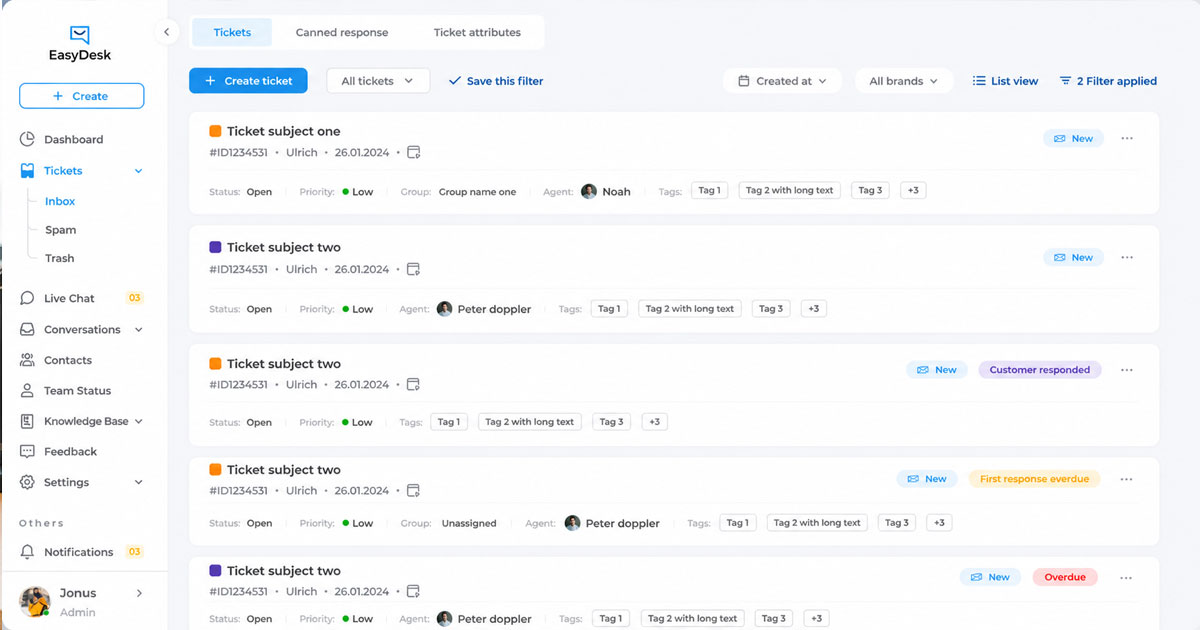
Holiday bookings often bring a sudden rise in support requests for travel companies and travel agencies. EasyDesk as the best ticket management system helps support teams handle that pressure with a powerful ticket management system for holiday backlogs. The platform collects support tickets from multiple channels and organizes them inside a unified workspace. Support agents can quickly review online ticket reservation issues, online booking errors, or travel ticket questions. Automated ticket routing, role-based access controls, and automated workflows improve operational efficiency and reduce delays in support operations.
EasyDesk also connects with booking systems such as travel agent software, tour booking software, and online travel agency software. Agents can view accommodation details, vacation packages, prices date-wise, and desired package selections without switching tools. This reflects the broader EasyDesk helpdesk ticketing software overview and features. The system helps travel businesses manage bookings, manage customers, and track key metrics. Strong ticket management improves team efficiency and protects customer satisfaction during busy holiday bookings.
Travel agencies and tour operators benefit from omnichannel support and integration capabilities inside EasyDesk. Support teams can manage support tickets efficiently using EasyDesk to resolve group bookings, package booking engine errors, and reservation system issues faster. A streamlined backend system also reduces repetitive tasks and improves service delivery across the travel industry.
FAQs
How Does Ticket Management System Integration With Travel Booking Engines Improve Holiday Support Efficiency?
Integration connects the ticketing system with tour booking software, travel agent software, and reservation systems. Support teams can access travel tickets, accommodation details, and prices date wise from a unified workspace. This reduces switching between tools and improves operational efficiency during peak holiday bookings.
Can Automated Ticket Routing Improve Resolution Speed For Complex Holiday Booking Issues?
Yes. Automated ticket routing sends support tickets directly to specialists who handle specific problems such as package booking engine errors or online ticket reservation issues. Faster routing reduces handoffs and improves service delivery across support operations during high-volume travel bookings.
Do Omnichannel Ticketing Platforms Improve Customer Satisfaction During Holiday Travel Surges?
Yes. Omnichannel support connects email, chat, travel portals, and social platforms in one ticket management system. Support teams track customer interaction across multiple channels without losing context. This structure improves response speed and helps maintain strong customer satisfaction scores.
How Do Role Based Access Controls Help Travel Companies Manage Large Support Teams During Holiday Backlogs?
Role based access controls define permissions for agents, managers, and technical teams. Travel companies can manage bookings, customer registration, and ticket data without exposing sensitive information. The structure also supports managing travel agents and improves coordination across service operations.
Can AI Automation Reduce Support Ticket Volume In Travel Booking Systems?
Yes. AI automation handles repetitive tasks such as travel ticket status updates, online booking confirmations, and basic holiday package inquiries. Travel businesses report up to 70% fewer routine support requests after deploying automated workflows and self-service tools within the ticketing system.



