Automated Workflow For Faster Customer Resolution
Automate ticket routing, escalation, and SLA tracking so every request reaches the right agent instantly without manual coordination.
- Automatically assign tickets based on predefined rules
- Route requests by priority, category, or channel
- Trigger escalations for urgent or high-value cases
- Enforce SLA deadlines without manual tracking
- Maintain consistent workflow as ticket volume grows
Support Workflow Complexity Slows Customer Response
Manual support operations create bottlenecks that reduce team efficiency and delay customer resolution.

Manual Ticket Assignment
Support teams often spend excessive time reviewing incoming tickets and manually deciding ownership, which delays responses and creates uneven workload distribution across agents.

Buried Urgent Requests
Without automated routing, high-priority customer issues often remain hidden among routine requests, leading to delayed escalation, missed deadlines, and reduced customer confidence.

Repetitive Admin Work
Agents spend valuable time performing repetitive administrative tasks such as assigning tickets, updating statuses, and sending reminders instead of resolving customer issues.

Inconsistent Handling Process
Manual processes result in inconsistent ticket handling, where different agents follow different steps, causing uneven service quality and unpredictable support experiences.

SLA Tracking Challenges
Tracking response and resolution deadlines manually increases the risk of missed service commitments, delayed follow-ups, and lack of accountability across support teams.

Workflow Visibility Gaps
Managers often struggle to monitor ticket movement across teams, making it difficult to identify workflow delays, overloaded agents, and operational bottlenecks early.
EasyDesk - Automated Workflow For Ultimate Support
EasyDesk turns manual ticket coordination into a structured, rule-driven system. Tickets are assigned, prioritized, and escalated automatically so your team can focus on resolving issues instead of managing queues.

Automated Ticket Assignment
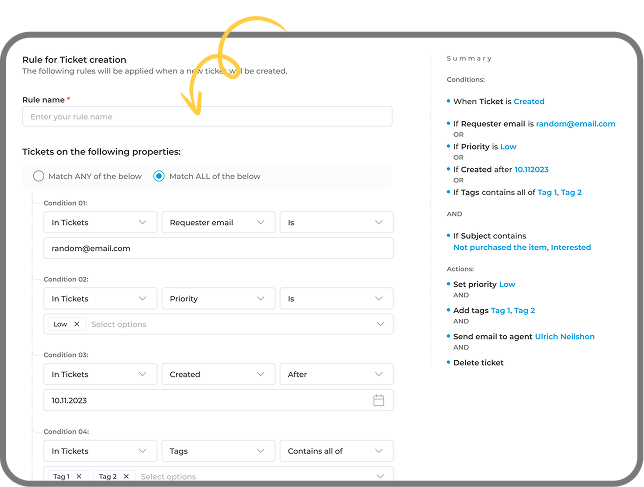
Rules automatically assign tickets based on category, priority, keywords, or channel, ensuring every request reaches the right agent without delay.

Smart Priority Routing
High-priority and urgent tickets are identified instantly and routed correctly, reducing response time and preventing critical issues from being overlooked.

SLA Deadline Tracking
Built-in automation tracks response and resolution deadlines, triggering alerts and escalations to help teams consistently meet service commitments.

Condition-Based Triggers
Workflow rules trigger actions when specific conditions are met, such as status changes or inactivity, keeping tickets moving without manual follow-ups.

Escalation Management
Tickets automatically escalate to senior agents or managers when required, preventing delays and maintaining accountability across support teams.
Real-Time Workflow Visibility
Managers gain clear visibility into ticket flow, workload distribution, and bottlenecks, allowing faster decisions and smoother support operations.
Faster Support Operations Without Manual Coordination
Manual coordination slows teams down. Automated workflows create structure, speed, and accountability across every support request.
60%
FASTER TICKET ROUTING

Faster Response Handling
Automation assigns tickets instantly using predefined rules, reducing routing delays and helping customers receive quicker, more consistent support responses every time.
100%
CLEAR OWNERSHIP

Defined Ticket Responsibility
Every support request is automatically assigned to the right agent or team, eliminating confusion and ensuring complete accountability across your workflow.
24/7
SLA MONITORING

Reliable Deadline Tracking
Built-in SLA timers and automated reminders continuously track response and resolution commitments, helping teams meet deadlines without manual follow-up coordination.
50%
LESS ADMIN WORK

Reduced Manual Coordination
Workflow automation removes repetitive tasks like manual ticket assignment and status updates, allowing agents to focus more on resolving customer issues.
Real-Time
WORKFLOW VISIBILITY

Transparent Ticket Flow
Managers gain instant visibility into ticket movement and workload distribution, enabling faster decisions and smoother operational control across support teams.
Scalable
SUPPORT OPERATIONS

Process Stability At Volume
As ticket volume increases, structured automation maintains consistent routing and prioritization without adding operational complexity or extra administrative effort.
Intelligent Workflow Features That Reduce Support Delays
Rule-Based Ticket Assignment
Incoming requests are routed automatically using conditions like category, urgency, keywords, or channel source. Manual sorting disappears, queues stay organized, and the right agent takes ownership quickly without relying on constant inbox monitoring or coordination.

Priority-Based Routing
High-impact or time-sensitive issues move directly to the appropriate team based on predefined priority rules. Critical tickets no longer sit unnoticed in general queues, helping support teams respond faster and maintain consistent service standards.
Smart Escalation Control
Unresolved tickets escalate automatically when inactivity is detected or deadlines approach within the workflow. Managers receive timely visibility without constant supervision, while accountability remains clear across every stage of the support process.


Status-Driven Workflow Actions
Ticket updates automatically trigger the next action in the workflow, whether notifying teammates, adjusting priorities, or scheduling follow-ups. Support operations stay structured and predictable without requiring additional administrative coordination from agents.
Continuous SLA Monitoring
Response and resolution commitments are tracked automatically from the moment a ticket enters the system. Automated reminders notify teams before deadlines are missed, helping maintain reliable service standards and consistent customer support performance.


Real-Time Workflow Insights
Live dashboards display ticket movement, workload balance, and emerging bottlenecks across teams. Clear operational visibility helps managers make faster decisions, improve coordination, and maintain smooth support performance as ticket volume steadily increases.
Simple Support Workflow From Request To Resolution With EasyDesk
Ticket Captured Automatically
Customer requests from email, chat, or forms instantly convert into structured tickets, ensuring accurate details are logged without manual entry or coordination.
Smart Routing Assigns Ownership
Automation rules analyze ticket context and assign ownership based on category, urgency, or workload, ensuring requests reach the right agent quickly.
SLA Tracking And Workflow Actions
Timers and triggers automatically monitor deadlines, update priorities, send reminders, and escalate issues, keeping every request moving without manual follow-up.
Resolution And Record Management
Once resolved, workflows automatically update status, store conversation history, and maintain organized records for reporting, visibility, and future reference.

Impact Of Automation For Support Stakeholders
Support Teams
Automation removes repetitive coordination tasks like manual ticket assignment and follow-ups, helping agents focus on resolving customer issues faster while maintaining consistent response quality.
Support Managers
Real-time visibility into ticket flow, workload distribution, and SLA performance helps managers monitor operations effectively and quickly address bottlenecks before service levels are affected.
Customer Success Teams
Structured workflows ensure customer issues are tracked consistently, enabling success teams to respond proactively, maintain satisfaction, and prevent recurring problems from escalating.
Operations Leaders
Clear workflow insights and automated processes improve operational efficiency, reduce manual oversight, and support scalable support performance as ticket volumes grow over time.
Proven Workflow Stability For Support Teams
- Every ticket moves through predefined workflow paths
- Ownership stays clear from assignment to closure
- Workflow actions remain fully traceable at all times
- Support data stays unified across channels and teams
- Managers see workflow health without manual reporting

Power Your Support With EasyDesk
Bring structure, clarity, and control to your support operations with automated workflows designed to eliminate manual coordination and reduce delays. EasyDesk helps teams manage every ticket confidently while maintaining consistent response standards across growing support demands.
Frequently Asked Questions
How Does Automated Workflow Route Tickets Accurately?
Routing relies on predefined conditions such as category, urgency, and workload. Within EasyDesk, these rules assign ownership instantly, preventing shared inbox delays and ensuring every request follows a structured, predictable path.
What Happens When Multiple Workflow Rules Apply At Once?
Rule hierarchy determines execution order so critical routing or escalation logic always takes priority. EasyDesk allows administrators to define this structure clearly, preventing conflicts and maintaining consistent workflow behavior.
How Do Workflows Prevent Tickets From Getting Stuck?
Automation continuously monitors inactivity, SLA timelines, and status changes. Triggers automatically initiate reminders, reassignment, or escalation when delays occur, ensuring tickets continue progressing without manual supervision.
Can Automated Workflow Adapt To Changing Support Demand?
Automation rules can be updated as priorities shift or teams expand. Adjustments help maintain operational stability while support volume grows or internal responsibilities change.
How Is Accountability Maintained Across The Workflow?
Every assignment, status update, and rule execution is logged automatically. In EasyDesk, detailed activity history creates full visibility into workflow actions, helping teams maintain accountability and process integrity.