Manage Social Conversations In One Unified Support System
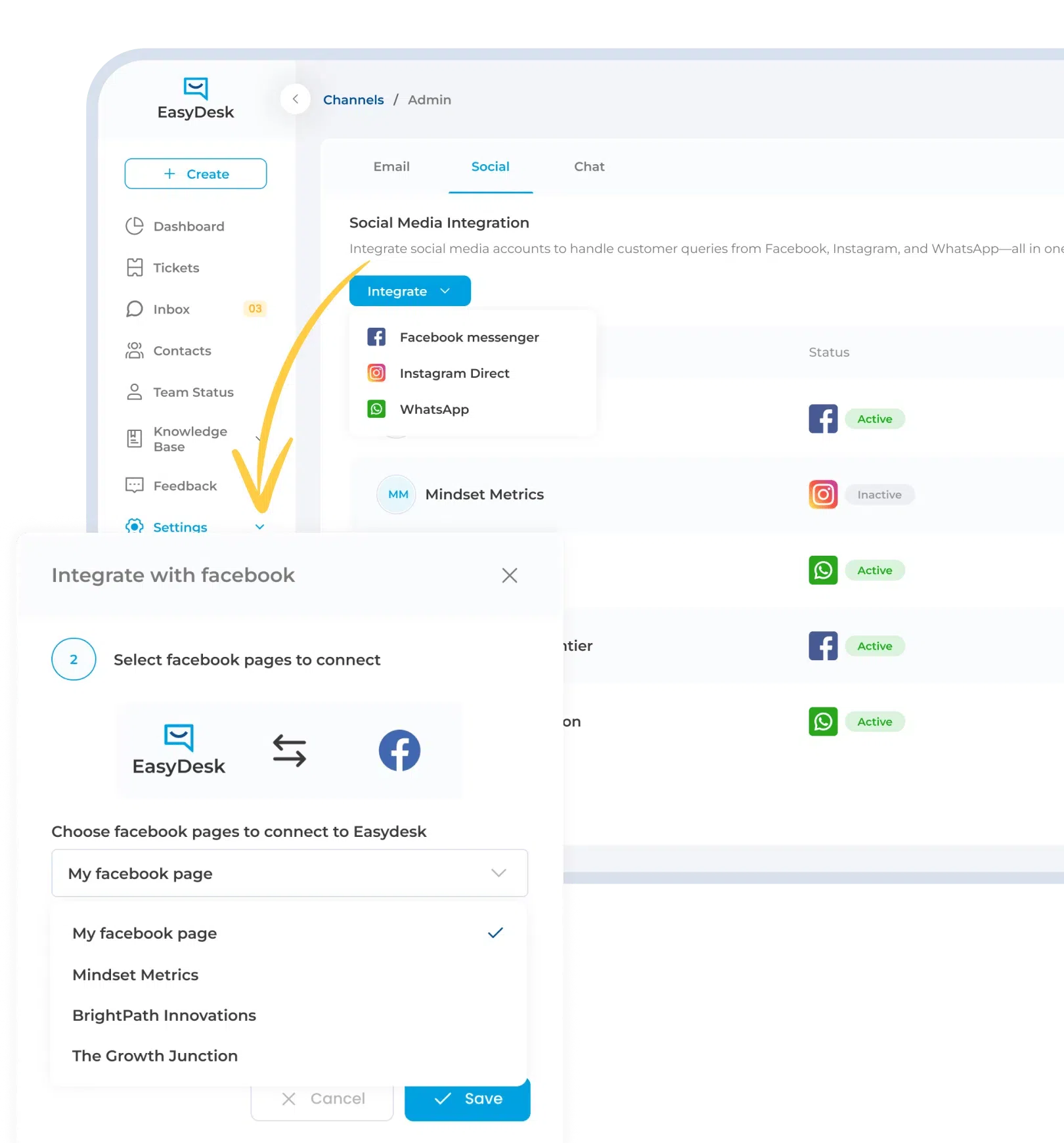
Bring Facebook, Instagram, and WhatsApp conversations into one place so your team can respond faster without switching between platforms or losing context.
- Connect Facebook Messenger, Instagram Direct, and WhatsApp seamlessly
- Convert social messages into organized support conversations
- Assign and manage requests without manual coordination
- Maintain full context across every customer interaction
- Respond faster while keeping communication consistent
Scattered Social Messages Slow Down Customer Response
Handling customer conversations across multiple social platforms creates confusion that delays responses and reduces support efficiency.

Conversations Split Across Channels
Messages come from Facebook, Instagram, and WhatsApp separately. Teams struggle to track conversations in one place, which leads to missed context and delayed responses.

Delayed Response To Messages
Important customer messages get buried across platforms. Teams fail to notice urgent requests on time, which causes slower responses and poor customer experience.

Repetitive Manual Work
Agents switch between multiple tools to manage conversations. Copying messages and updating status manually takes time and reduces focus on resolving customer issues.

Inconsistent Response Experience
Different agents respond differently across platforms. Lack of standard workflow creates inconsistent communication, which affects customer trust and overall support experience.

No Clear Conversation Tracking
Tracking conversations across platforms becomes difficult. Teams cannot follow message history properly, which breaks context and leads to confusion during customer interactions.

Limited Visibility Across Teams
Managers cannot see overall social support performance clearly. Lack of centralized data makes it difficult to identify delays, workload issues, and improve team efficiency
EasyDesk Brings Social Conversations Into One Smooth Workflow
Social messages don’t have to feel scattered or hard to manage. EasyDesk pulls everything together so your team can respond faster with full clarity.

One Shared Inbox For Every Channel
Messages from Facebook, Instagram, and WhatsApp come into one place. Teams reply faster without jumping between tools or losing track of conversations.

Right Person Gets The Right Message
Every conversation gets assigned automatically to the right agent. No confusion, no overlap, just clear ownership from the first response.

Urgent Messages Get Attention First
Important customer messages don’t get buried anymore. Teams can quickly spot what needs attention and respond before small issues turn into bigger problems.

Actions Happen Without Extra Effort
Updates like status changes or follow-ups happen automatically. Teams spend less time managing workflows and more time actually helping customers.

Escalations Feel Natural And Fast
When something needs extra attention, it moves to the right person instantly. No delays, no manual chasing, just smoother problem resolution.

Full Visibility Without The Guesswork
Managers can see what’s happening across conversations in real time. Better visibility helps teams stay aligned and improve response quality every day
Faster Social Support Without Channel Chaos
Handling social conversations should not feel messy or overwhelming. A connected system helps your team respond faster, stay organized, and never miss a message.
65%
FASTER RESPONSE TIME

Faster Message Handling
Automation assigns tickets instantly using predefined rules, reducing routing delays and helping customers receive quicker, more consistent support responses every time.
100%
CLEAR OWNERSHIP

Defined Ticket Responsibility
Every support request is automatically assigned to the right agent or team, eliminating confusion and ensuring complete accountability across your workflow.
24/7
SLA MONITORING

Reliable Deadline Tracking
Built-in SLA timers and automated reminders continuously track response and resolution commitments, helping teams meet deadlines without manual follow-up coordination.
50%
LESS MANUAL WORK

Reduced Platform Switching
Agents no longer jump between different apps to manage conversations. Everything stays in one place, reducing effort and improving overall productivity.
Real-Time
CONVERSATION VISIBILITY

Clear Interaction Tracking
Managers can see conversation flow, response status, and team workload instantly, helping them make better decisions and improve support performance.
Scalable
SUPPORT OPERATIONS

Process Stability At Volume
As ticket volume increases, structured automation maintains consistent routing and prioritization without adding operational complexity or extra administrative effort.
Exceptional Social Media Integration To Reduce Response Delays
Unified Social Message Handling
Messages from Facebook, Instagram, and WhatsApp come into one clean workspace where everything stays organized. Teams no longer switch between platforms, so they keep full context, respond faster, and handle conversations more efficiently without missing important details.
Priority Based Message Routing
Not every message needs the same attention, and that matters for response speed. High priority conversations get routed to the right person instantly, so urgent issues receive faster replies while teams maintain consistent service quality across all interactions.
Smart Escalation Control
Some conversations require extra attention, and EasyDesk makes that process smooth. When situations become complex, messages move to the right team member quickly, keeping full context intact and helping teams resolve issues faster without delays or confusion.
Status Driven Conversation Actions
Small updates should not slow your team down or break the flow. When a conversation changes, the next step happens automatically, keeping assignments, follow ups, and updates aligned so teams can focus on responding instead of managing workflows.
Continuous Response Monitoring
Missed messages can quickly affect customer trust and satisfaction. EasyDesk keeps track of every conversation in real time, helping teams identify pending messages, respond on time, and maintain consistent service without checking multiple platforms repeatedly.
Real Time Conversation Insights
Understanding how your team performs should feel simple and clear. Real time insights show conversation flow, response status, and workload, helping managers identify delays, balance tasks, and improve overall support performance without relying on scattered data.
Simple Social Support Workflow From Message To Resolution
Messages Captured Automatically
Messages from Facebook, Instagram, and WhatsApp get captured instantly and organized into one system. Teams do not need manual entry, which keeps conversations structured, complete, and ready for faster responses without missing important customer details.
Smart Assignment Keeps Ownership Clear
Each incoming message gets assigned to the right team member based on context or workload. Clear ownership helps teams avoid confusion, reduce overlap, and ensure every customer receives a timely and consistent response.
Workflow Actions Keep Conversations Moving
Conversations trigger actions automatically as they progress. Updates, follow ups, and priority changes happen without manual effort, helping teams stay organized and respond faster without breaking the flow of communication.
Resolution And Conversation History Management
Once resolved, conversations stay properly recorded with full history and updates. Teams can easily access past interactions, maintain visibility, and use those insights to improve future responses and overall customer experience.
Impact Of Social Integration For Support Teams
Support Teams
Teams handle conversations across platforms more easily when everything stays in one place. Faster replies, better focus, and consistent communication become natural without switching tools constantly.
Support Managers
Managers get a clear view of conversations and team workload in one place. Spotting delays, balancing tasks, and improving response performance becomes much simpler day to day.
Customer Success Teams
Complete conversation history helps teams understand customers more deeply. Better context leads to proactive responses, stronger relationships, and a more personal support experience.
Operations Leaders
Centralized social support makes operations smoother and more efficient. Clear insights reduce manual work and help leaders scale support systems confidently as customer conversations continue to grow
Consistent Social Support Workflow You Can Rely On
A structured system keeps every conversation organized, trackable, and easy to manage so your team can respond confidently without confusion or delays.
- Every conversation follows a clear path from first message to resolution
- Ownership stays clear across teams from assignment to final response
- Conversation history remains fully visible and easy to track anytime
- Social messages stay unified across channels without scattered context
- Managers see performance clearly without relying on manual tracking
Simplify Social Media Support With EasyDesk
Social conversations keep growing across platforms, but your team needs one clear system to manage them. EasyDesk brings everything together so your team responds faster, stays organized, and delivers consistent support without extra effort.
Frequently Asked Questions
How Does EasyDesk Handle Social Media Messages In One Place?
EasyDesk brings messages from Facebook, Instagram, and WhatsApp into a single inbox. Teams can view, manage, and respond to all conversations without switching platforms or losing context.
Can EasyDesk Automatically Assign Social Conversations To Agents?
EasyDesk assigns incoming messages to the right team members based on rules or workload. Clear ownership helps teams avoid confusion and ensures faster, more consistent responses.
How Does EasyDesk Help Teams Prioritize Important Messages?
EasyDesk allows teams to identify and prioritize important conversations quickly. High-priority messages get attention first, helping teams respond faster and avoid missing critical customer issues.
Can EasyDesk Track Conversation History Across Channels?
EasyDesk stores full conversation history in one place. Teams can easily view past interactions, maintain context, and deliver more personalized and accurate responses.
How Does EasyDesk Improve Social Support Efficiency?
EasyDesk reduces manual work by organizing conversations, automating workflows, and centralizing communication. Teams spend less time managing tools and more time focusing on resolving customer queries efficiently