An email ticketing system gives service teams a smarter way to manage customer inquiries, support requests, and daily communication. Instead of sorting through a crowded inbox, every incoming email turns into a trackable ticket with a clear status, ticket number, and complete history. This helps support teams respond faster, reduce repetitive tasks, and improve customer experience without adding extra workload.
As businesses grow, managing customer data, response time, and customer interactions becomes difficult with manual processes. A structured ticketing system brings order, visibility, and accountability to support operations. In this guide, you will find how email ticketing systems work, the essential features to look for, their core benefits, and best practices to help teams deliver effective customer service.
What Is An Email Ticketing System
An email ticketing system is customer support software that converts incoming emails into organized support tickets. Instead of managing scattered conversations inside a crowded inbox, teams handle every request through a centralized desk system that improves visibility, ticket tracking, and response management.
The system helps businesses manage high email volume, reduce confusion across multi-department workflows, and improve collaboration through internal notes and collision detection. Many platforms also include automation, reporting, and knowledge base access to improve efficiency. Although some tools come with a steep learning curve, modern ticketing systems help support teams deliver faster and more consistent customer service across multiple support channels.
How The Email Ticketing System Works
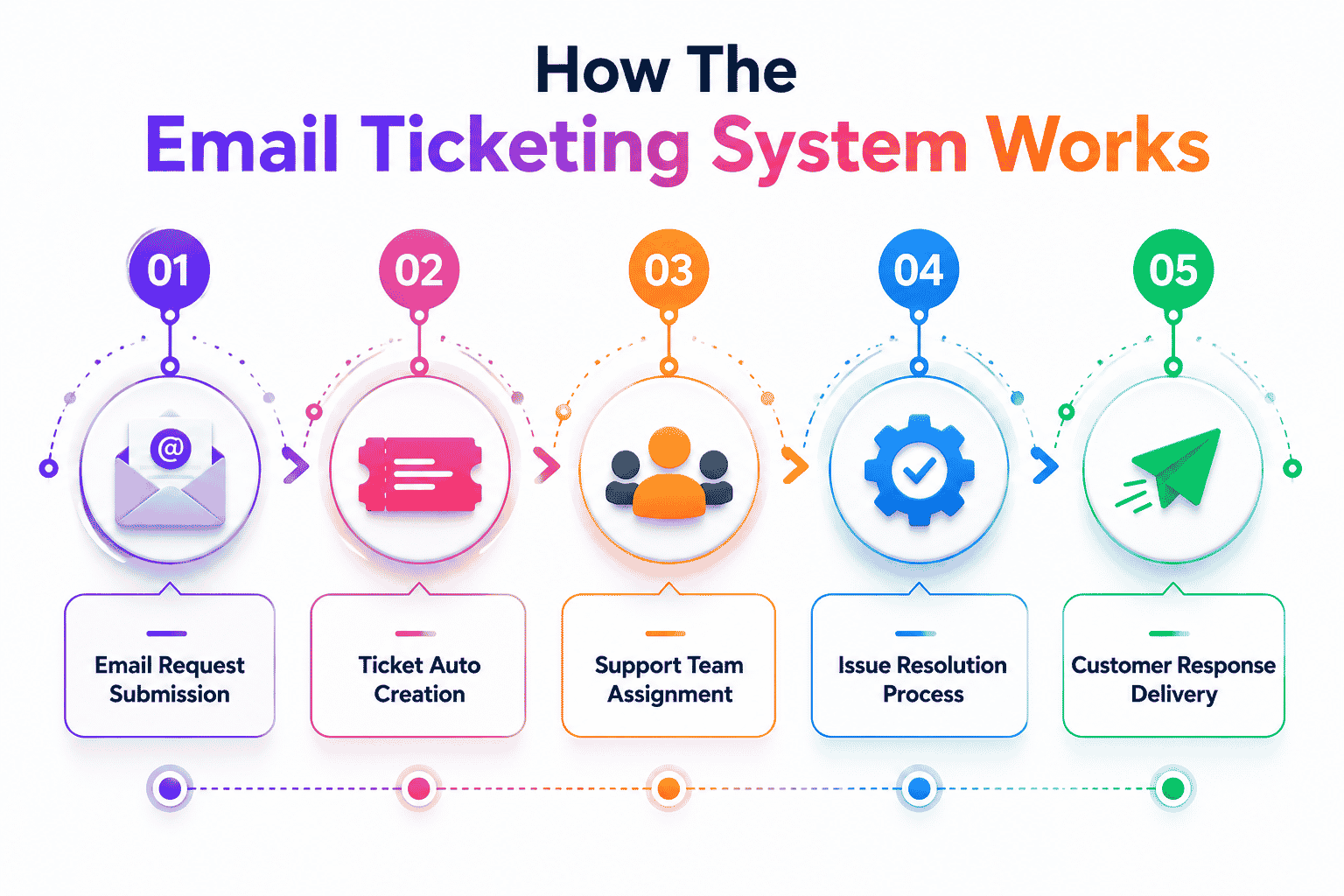
An email ticketing system works by turning incoming emails into organized tickets that teams can track, prioritize, and resolve with clear visibility. It removes confusion created by shared inboxes and gives support teams a structured workflow from the first message to the final reply.
Email Capture Process
The first step starts with capturing all incoming emails. The system constantly monitors the support mailbox and collects every message sent by customers. It pulls sender information, message content, and file attachments directly into the platform without manual intervention. This process ensures nothing slips through, even when the team receives a high volume of support requests. By pulling each message in real time, the email ticketing system works as a central point for all communication, reducing scattered email threads across different agents' inboxes.
Ticket Creation Workflow
Once an email enters the system, it converts that email into a new ticket. The platform assigns a ticket number, applies a timestamp, and records the subject, message content, and attachments. This workflow gives structure to what would normally be a chaotic inbox. Instead of agents manually sorting messages or forwarding them internally, every customer request automatically becomes a trackable ticket. This makes it easier for teams to create, manage, and update requests as they progress through various support stages.
Data Extraction And Logging
The system extracts all relevant details from the email and logs them into the ticket. This includes sender information, past interactions, message text, attached files, and other context needed for accurate problem-solving. Over time, each ticket builds a complete history that support agents can access instantly. This helps teams avoid asking customers the same questions again and again. It also ensures agents always have quick access to data, making the overall communication more reliable and consistent.
Rules And Routing
Predefined rules play a major role in how efficiently the system operates. These rules help categorize, tag, prioritize, and assign tickets automatically to the appropriate support agents. For example, technical issues can go to the IT queue, billing issues to the finance queue, and urgent requests can move directly to high-priority lists. This routing removes the need for manual triage, which is often time-consuming in a shared inbox. With structured rules, the email ticketing system work in a way that brings accuracy and speed to every stage of the support process.
Automation Support Actions
Automation features further reduce repetitive tasks. These automations can handle ticket automation across creation, tagging, and auto-assignment, assign agents to new tickets, send acknowledgement replies, update statuses, add tags, or trigger alerts for delayed tickets. Automation ensures support teams maintain consistent response times even during busy periods. It also removes routine manual steps, allowing agents to focus more on solving customer issues instead of managing inboxes.
Centralized Workspace View
The final part of the workflow is the centralized workspace where all tickets are stored and managed. Agents can see ticket history, attachments, communication logs, and customer details in one place. Instead of jumping between email threads, spreadsheets, or other tools, the team uses a unified dashboard that improves visibility and reduces duplicate responses. This organized workspace enables teams to collaborate better and deliver faster, more accurate replies to customers.
Why Businesses Choose An Email Ticketing System
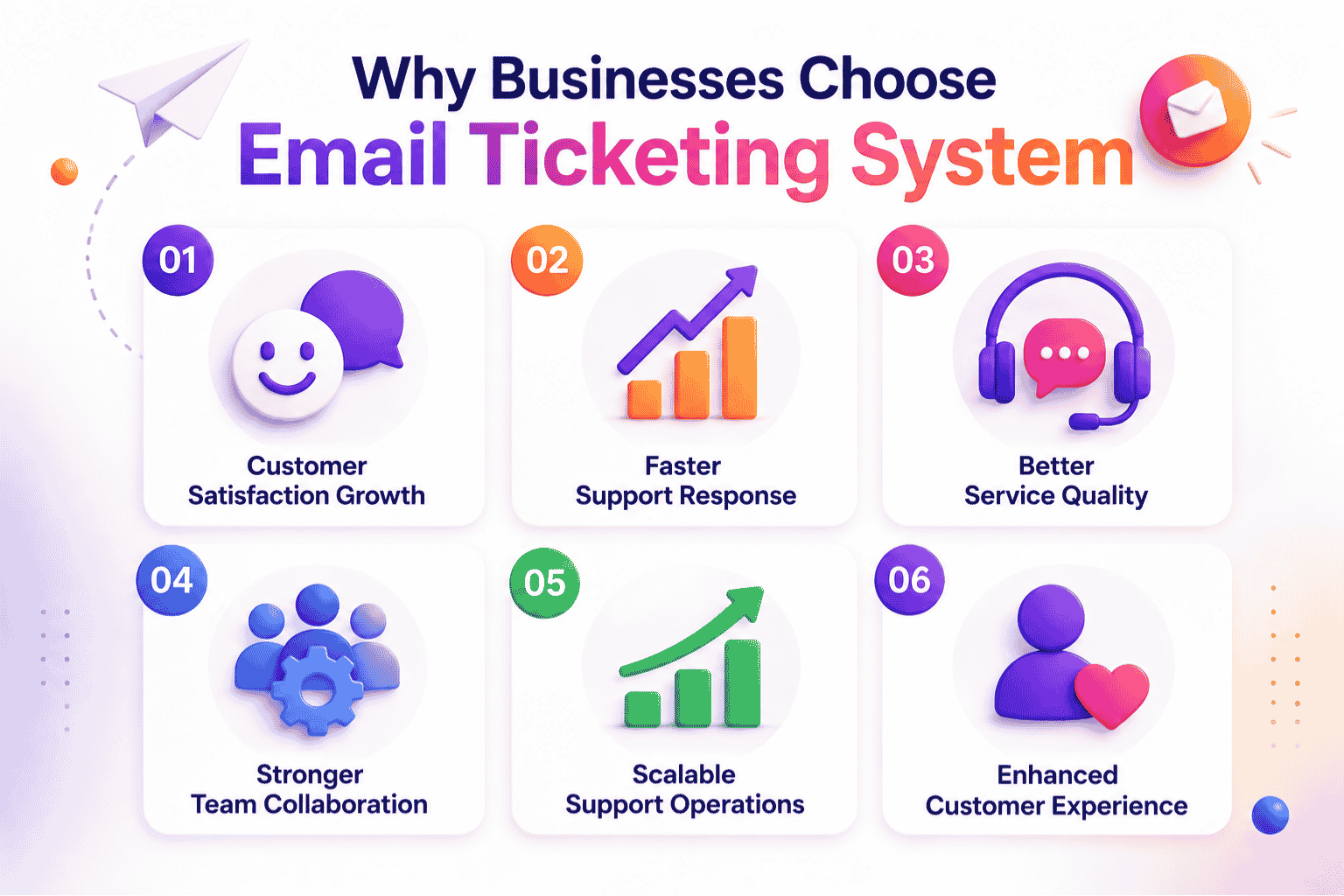
An email ticketing system helps service teams manage customer inquiries in a structured, predictable, and efficient way. As customer expectations rise and support volumes increase, businesses need a system that improves performance, boosts efficiency, and strengthens overall customer experience.
Meeting Customer Expectations
Businesses choose an email ticketing system because it helps them meet customers' expectations consistently. As companies deal with a growing customer base, traditional inboxes fail to keep pace. Customers expect timely responses, organized communication, and clear follow-ups. A ticketing system allows service teams to deliver faster and more reliable support by capturing every inquiry and assigning it to the right agent without delays.
Improving Support Performance
Support teams depend on organized workflows to maintain performance across large volumes of customer inquiries. An email ticketing system helps by structuring every request, applying categories, and making sure high-priority messages get visibility. This improves the overall effectiveness of service teams and reduces the operational stress that comes with a messy inbox. With stronger performance, businesses handle more requests without compromising quality.
Delivering Effective Customer Service
Effective customer service requires teams to respond quickly, track progress, and maintain consistency across every message. An email ticketing system helps service teams do exactly that. It stores past communication, prevents missed messages, and ensures that every customer receives a proper resolution. This strengthens trust and supports long-term customer relationships. Allowing businesses to manage interactions in an organized way leads to better service outcomes.
Driving Team Efficiency
Efficiency is a major reason businesses adopt a ticketing system. Instead of wasting valuable time searching through scattered emails, teams use a unified workspace where every ticket is easy to find and update. Automated email-to-ticket workflows, routing, tagging, and assignment features reduce manual work, enabling businesses to save time and respond faster. This efficiency becomes essential as support workloads grow and teams juggle multiple roles.
Enabling Scalable Operations
As companies attract a growing customer base, managing customer inquiries becomes more complex. A ticketing system enables businesses to scale operations without losing control. Service teams can handle higher volumes, track performance, and identify bottlenecks early. The system grows with the business, giving support teams the structure needed to maintain quality even as demand increases.
Improving Customer Experience
Customer experience improves when responses are timely, accurate, and consistent. An email ticketing system plays a direct role in this by providing service teams with tools to manage and track every interaction. Clear visibility across all tickets ensures no conversation goes unanswered. When businesses deliver dependable support experiences, customers feel valued and stay loyal. This advantage is one of the strongest reasons why businesses choose to implement a ticketing system.
Key Features Of An Email Ticketing System
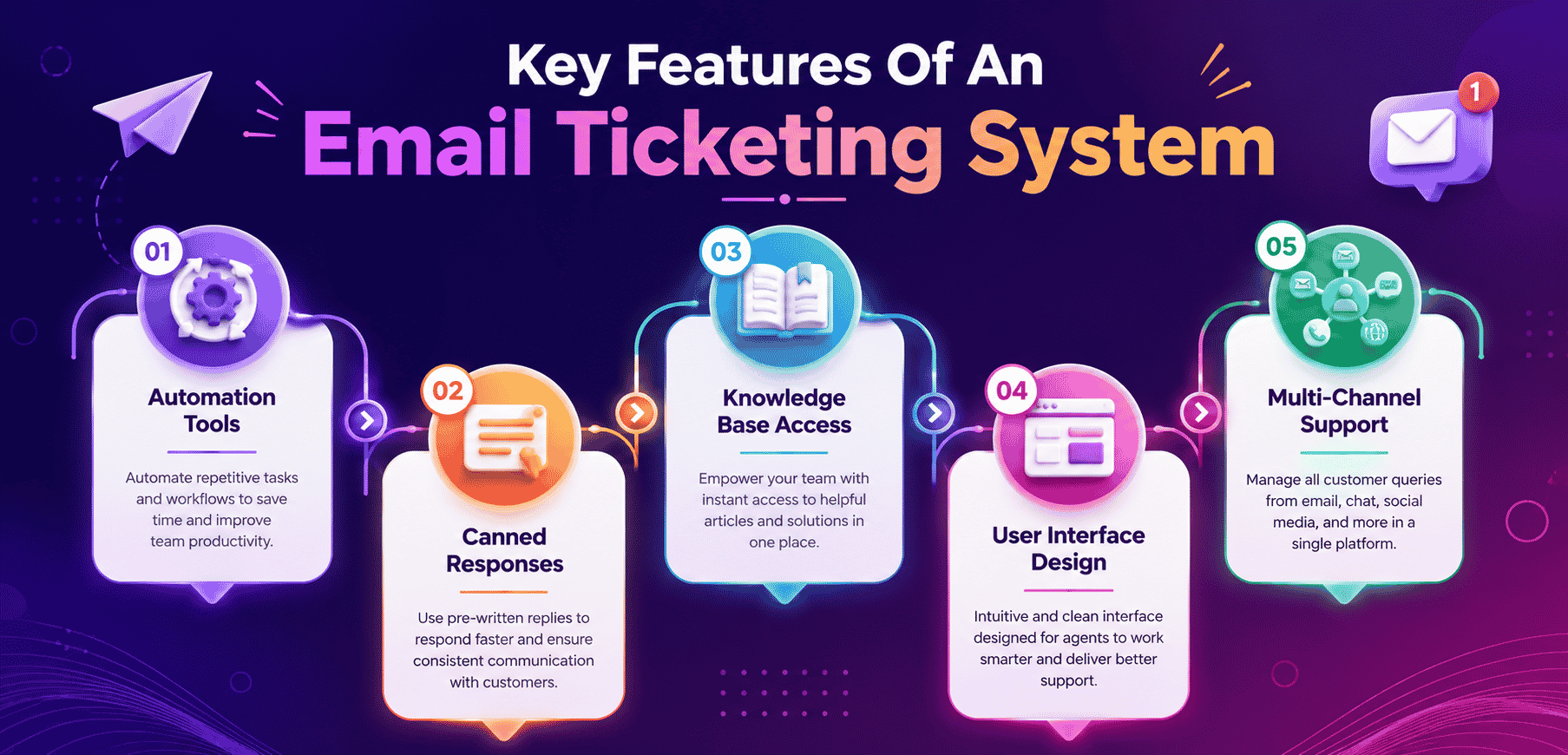
Email ticketing systems offer essential features that help support teams work faster, reduce repetitive tasks, and deliver consistent service. These features improve organization, streamline communication, and provide quick access to customer details across preferred channels and integrated business tools, especially when combined with modern ticketing software and support automation best practices.
Automation Tools
Automation features reduce manual work by handling ticket assignment, tagging, prioritizing, and routing. Instead of sorting messages in the support mailbox, the system applies predefined rules that keep workflows smooth. Automation removes repetitive tasks and gives agents more time to focus on customer issues. It also ensures consistent handling of tickets, which improves accuracy and reduces delays.
Workflow automation improves ticket routing, reduces duplicate tickets, and helps growing support teams stay on the same page. Advanced features within modern ticketing software also support SLA management, collaboration tools, and faster support ticket resolution, especially when teams follow workflow automation best practices in customer support.
Canned Responses
Canned responses give agents ready-to-use replies for common questions. This feature shortens response times and helps teams deliver consistent answers without rewriting the same message repeatedly. With well-prepared templates, agents maintain a professional tone while speeding up communication. Canned responses also help new team members follow established guidelines without learning every detail immediately, when they apply canned responses best practices for faster replies.
Canned responses help maintain a consistent customer experience across every incoming ticket and email account. Within a unified ticketing system, agents use predefined replies to resolve customer issues faster while keeping communication aligned across teams.
Knowledge Base Access
A connected knowledge base helps agents find verified information quickly. This improves accuracy and reduces dependency on internal back-and-forth communication. Agents gain quick access to articles, troubleshooting steps, and product details that help them respond effectively. A strong knowledge base also supports customers who prefer self-service, reducing overall ticket volume and improving efficiency for service teams.
Knowledge base access supports self-service options and improves customer relationship management by giving agents verified customer insights quickly. Connected desk software and other business tools also help teams handle incoming tickets with better accuracy.
User Interface Design
A user-friendly interface plays a major role in the overall experience. Support teams navigate tickets faster when the layout is simple, clear, and organized. A clean interface improves workflow visibility, reduces training time, and makes it easier to track ticket status. With everything in one place, agents switch between tasks smoothly and avoid confusion caused by scattered information across multiple screens.
A clean interface improves ticket tracking and helps support teams manage the same ticket without confusion. User-friendly desk software also supports collaboration tools, workflow automation, and easier navigation across advanced features and paid plans.
Multi-Channel Support
Customers reach support teams through preferred channels such as email, forms, or other business tools. A ticketing system brings all these channels into one dashboard. Whether the message comes from email or another integrated tool, the system captures it as a ticket. This feature ensures no feedback slips through and gives agents a unified view of customer communication, mirroring the benefits of multi-channel customer support software.
Multi-channel support connects existing email infrastructure with other business tools inside one unified ticketing system. This setup improves customer relationship management, organizes incoming tickets, and helps growing support teams stay on the same page consistently.
Integration Capabilities
Modern ticketing platforms connect with other business tools to improve overall performance. Integrations with CRM systems, communication tools, analytics platforms, or internal databases help support teams work without switching screens. These connections gather feedback, synchronize data, and keep customer information up to date. With seamless integration and automated workflow software for smarter support, agents gain a complete picture of customer accounts and provide faster, more informed responses.
Integration capabilities connect ticketing software with sales data, customer insights, and collaboration tools to improve performance. Advanced features also support SLA management, ticket routing, and workflow automation while helping agents resolve customer issues faster.
Major Benefits Of Using An Email Ticketing System
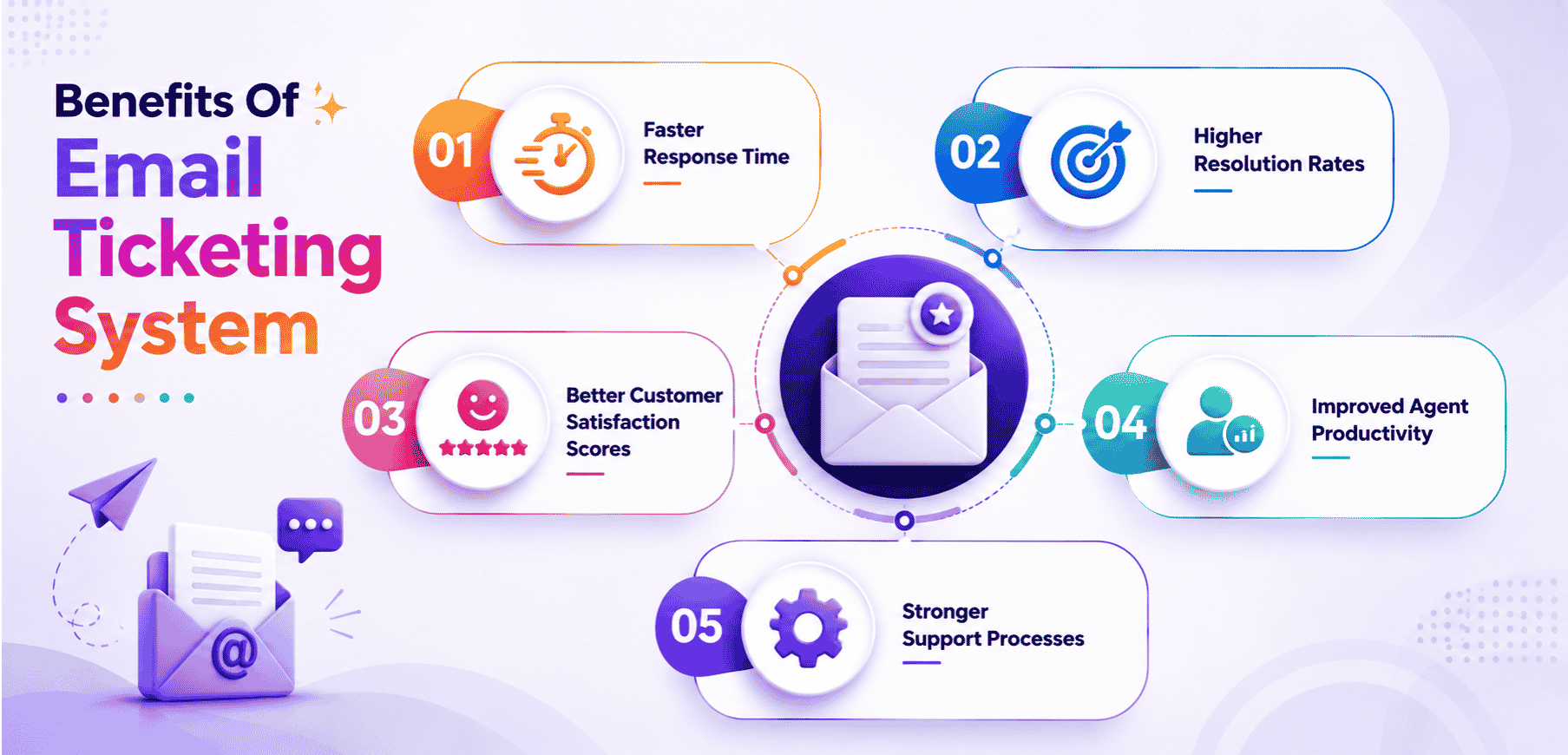
An email ticketing system helps support operations run more smoothly by improving response times, boosting agent productivity, and giving teams the structure they need to handle customer inquiries efficiently. Automated ticket management software to reduce response time further amplifies these benefits, which directly strengthen customer satisfaction and overall support performance.
Faster Response Time
An email ticketing system improves response time by organizing incoming requests and ensuring agents never miss important messages. Instead of searching through a time-consuming inbox, teams work from a structured queue where every ticket has a clear status and priority. This saves valuable time and allows agents to reply faster, which leads to higher customer satisfaction and better support outcomes.
Response templates and automated workflows help agents answer questions quickly without relying on manual processes. Knowledge base integration, ticket routing, and basic features also improve team performance while helping support teams maintain faster communication across multiple languages.
Higher Resolution Rates
Structured workflows and clear visibility help service teams resolve issues more efficiently. With each message recorded as a trackable ticket, agents can follow a consistent process and update progress without losing context. This improves resolution rates across all support operations. The system also helps teams identify areas where issues commonly occur, making it easier to fix recurring problems and improve future performance with more robust ticket creation and management for structured support.
Knowledge base integration and collaboration tools help agents prevent duplicate responses while improving agent performance. Transparent pricing and advanced features within modern ticketing software also help support teams manage complex workflows with greater operational consistency.
Better Customer Satisfaction Scores
When customers receive timely responses and clear communication, customer satisfaction naturally increases. A ticketing system keeps every interaction organized, helping agents deliver accurate replies without missing details. This consistency leads to stronger customer satisfaction scores. Because every ticket has a complete history, agents understand issues quickly and respond with more confidence, strengthening the customer relationship.
Multiple languages support and response templates improve communication quality across global customer bases. Unified ticketing systems also help teams prevent duplicate responses, reduce confusion, and maintain a consistent customer experience through every support interaction and workflow.
Improved Agent Productivity
Agents work more efficiently when repetitive tasks are reduced. An email ticketing system automates routine actions such as assigning tickets, updating statuses, tagging inquiries, and organizing messages. By removing these manual steps, the system enables businesses to improve overall agent productivity. Teams spend less time sorting emails and more time delivering meaningful support that solves customer issues.
Automated workflows reduce dependency on manual processes and improve team performance across support operations. Integration with other business tools, customer relationship management platforms, and collaboration tools also strengthens agent performance and improves ticket handling efficiency.
Stronger Support Processes
A ticketing system brings clarity and structure to support processes, making daily operations easier to manage. With organized queues, detailed records, and performance data, support operations become more predictable and easier to scale. The system helps teams track workload, analyze performance trends, and identify areas where improvements are needed. This creates a healthier and more efficient support environment that benefits both customers and internal teams.
Transparent pricing and scalable paid plans help growing support teams adopt advanced features without operational disruption. Knowledge base integration, workflow automation, and unified ticket tracking also help teams stay on the same page while improving long-term support stability.
Common Support Challenges Solved By Email Ticketing System
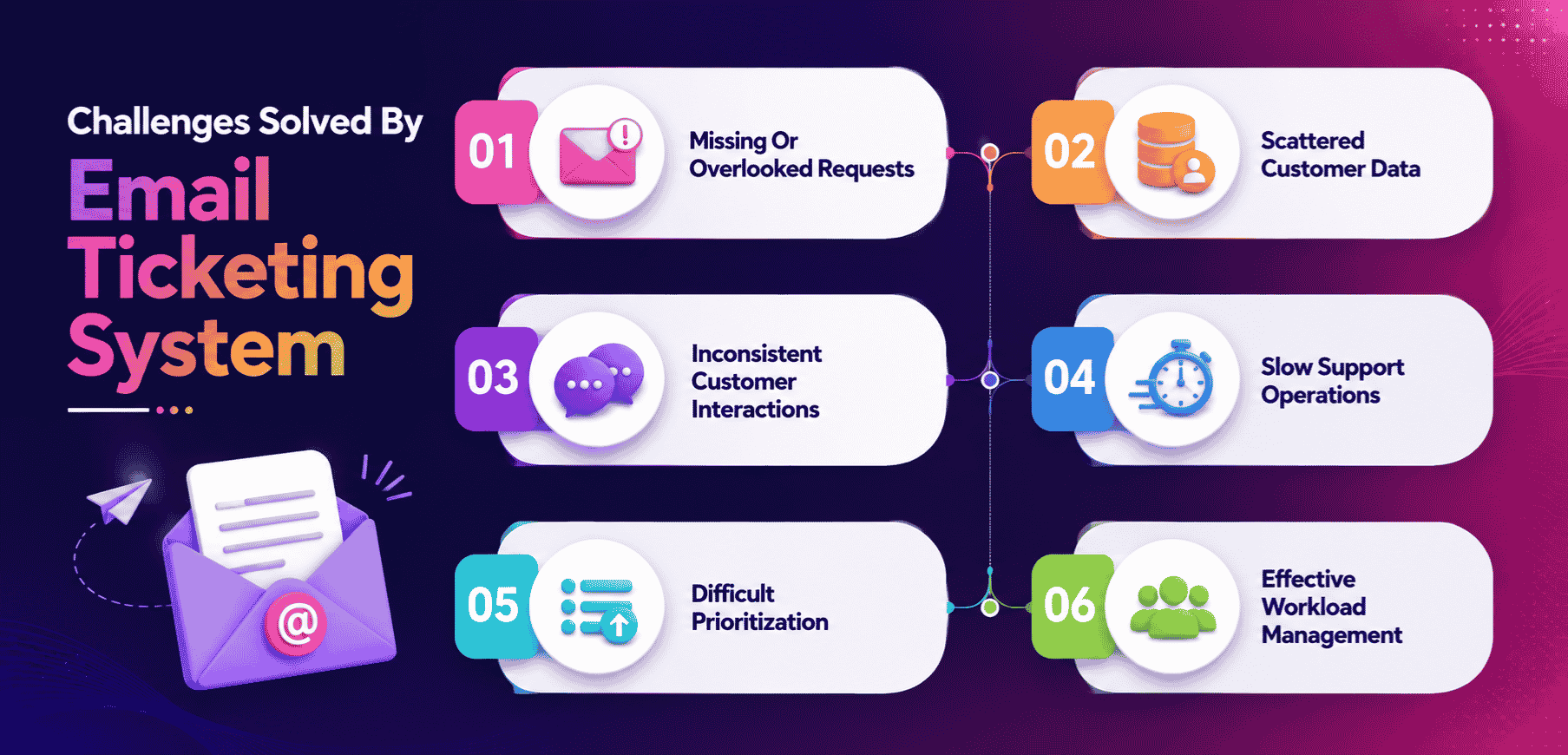
Service teams face multiple challenges when managing customer inquiries through a traditional inbox. An email ticketing system removes these obstacles by organizing support requests, simplifying workflows, and improving visibility across customer data and customer interactions, especially when teams transition from manual vs automated ticketing approaches.
Missing Or Overlooked Requests
A major challenge in support operations is losing track of support requests inside a busy inbox. Emails get buried, forwarded, or accidentally deleted. An email ticketing system prevents this by capturing every message as a trackable ticket. With structured queues and clear status indicators, no request disappears. This ensures customers' expectations are met, and all inquiries receive proper attention, especially when teams streamline customer support with ticket automation.
Scattered Customer Data
Working from an existing one inbox makes customer data difficult to locate. Agents often search through long threads to find key details, which becomes time-consuming and frustrating. A ticketing system stores customer history, past messages, and relevant information inside each ticket. This centralized access helps agents respond accurately and reduces unnecessary delays in managing customer inquiries.
Inconsistent Customer Interactions
Traditional email workflows make consistent communication hard to maintain. Different agents may respond without visibility into previous customer interactions. This leads to repeated questions, conflicting answers, and overall poor customer experience. A ticketing system provides full customer history in one place, helping agents deliver clear, consistent responses every time.
Slow Support Operations
Manual processes inside a shared inbox slow down support operations. Sorting emails, assigning agents, forwarding messages, and tracking status take significant time. A ticketing system solves this by automating key steps and giving teams a structured workflow. With organized queues and built-in tracking, teams move faster and avoid the bottlenecks caused by unstructured email handling.
Difficult Prioritization And Workload Management
When customer inquiries pile up in a simple inbox, prioritizing becomes complicated. Agents struggle to decide what needs immediate attention versus what can wait. A ticketing system organizes tickets by urgency, category, and type, making workload distribution easier. This helps teams manage high volumes without missing important issues or delaying critical support requests.
Best Practices To Use Email Ticketing System
Service teams get the most value from an email ticketing system when they follow clear processes that improve communication, maintain structure, and support timely responses. These best practices help every support team streamline ticket management and deliver better customer experiences.
Organize Ticket Creation
Effective ticket management starts with clean and consistent ticket creation. Every incoming message should convert into a proper ticket with relevant details, file attachments, and customer information included. When ticket creation is standardized, service teams avoid confusion and ensure nothing is missed. This gives agents quick access to context so they respond confidently and accurately, especially when supported by robust ticket automation software for modern teams.
Use Predefined Rules
Predefined rules help guide the workflow and reduce manual sorting. Rules can assign tickets to the right agents, apply categories, set priorities, and trigger auto-responses. This structure keeps communication organized and ensures timely responses. With rules in place, service teams work more efficiently and avoid delays caused by manual decision-making.
Apply Automation Wisely
Automation supports the support team by handling repetitive tasks. Automated tagging, routing, and notifications create smoother workflows. However, automation should enhance communication, not replace it. When used carefully, automation improves speed while keeping the human element intact, ensuring customers still receive thoughtful and helpful responses.
Use Canned Responses
Canned responses help teams respond faster while maintaining accuracy. They are especially useful for common questions, step-by-step guides, and basic troubleshooting. Service teams should regularly update their canned responses to reflect new product changes or improved messaging. This ensures every reply stays relevant and helpful without rewriting the same information repeatedly.
Build A Strong Knowledge Base
A connected knowledge base gives agents quick access to reliable information, reducing dependency on internal back-and-forth communication. Articles, FAQs, and troubleshooting guides help agents answer customer questions efficiently. A strong knowledge base also supports internal training and ensures all team members communicate with the same understanding of the product or service.
Keep Communication Clear
Clear communication is essential for providing timely responses. Agents should maintain a straightforward tone, avoid jargon that customers may not understand, and ensure all details needed for resolution are included. Good communication reduces back-and-forth messages, shortens resolution time, and supports a positive customer experience. This practice benefits both service teams and customers by keeping conversations focused and productive.
Who Should Use An Email Ticketing System
An email ticketing system is useful for any company that manages a steady flow of customer inquiries. It helps teams organize communication, improve response quality, and support a growing customer base with better structure and control.
Companies With Regular Customer Communication
Any business that exchanges frequent messages with customers benefits from an email ticketing system. Companies handling product questions, follow-up requests, or troubleshooting needs gain clearer organization and faster response. Instead of navigating a crowded support mailbox, teams manage each inquiry as a trackable ticket. This structure allows businesses to stay consistent, reduce mistakes, and maintain strong customer relationships.
Customer Service Teams
Customer service teams are one of the primary groups that rely on ticketing systems. They deal with a wide range of customer inquiries, and switching between tools quickly becomes inefficient. A ticketing system helps manage conversations in one place, ensuring each customer receives a complete and accurate response. The system also supports teams with features that make communication smoother, such as canned replies, tagging, and organized ticket lists.
Support Teams Handling Technical Issues
Support teams that manage technical issues, product errors, or troubleshooting requests need structured workflows to stay efficient. A ticketing system provides clarity by assigning each issue a dedicated ticket. This prevents confusion when multiple agents assist the same customer. With detailed logs and controlled workflows, service teams resolve issues faster and maintain accountability across the entire support process.
Sales Teams Managing Follow-Ups
Sales teams often receive inquiries related to pricing, demos, or onboarding. These requests can get lost in a normal inbox, especially when multiple team members share access. Using a ticketing system gives sales teams the tools to manage follow-ups, track progress, and maintain a clear history of customer interactions. This ensures every lead receives timely and accurate responses that support business growth.
Businesses With A Growing Customer Base
A business experiencing growth needs systems that scale. As the customer base expands, managing requests manually becomes difficult. A ticketing system helps businesses handle larger volumes with organization and stability. With features that assign tickets, track response times, and record communication, companies can continue providing high-quality support even as demand increases.
Teams Using Multiple Tools
Teams already using several communication or management tools benefit from integrating them with an email ticketing system. It centralizes customer messages and eliminates the need to switch between platforms to manage requests. By unifying the support mailbox with sales tools, CRM systems, and internal dashboards, teams work more efficiently and maintain consistent communication across all departments through a more cohesive multi-channel customer support approach.
Any Business Needing Better Response Management
Ultimately, any company that wants to manage customer communication more effectively should use an email ticketing system. Whether managing support, sales, or general inquiries, the system strengthens the organization, improves response quality, and helps teams deliver dependable service.
How EasyDesk Can Help You With A Smarter Email Ticketing System
EasyDesk’s customer support platform offers a smarter email ticketing experience by simplifying support processes and improving overall support operations. Its automation features help teams manage tasks faster, reduce manual effort, and boost efficiency across daily workflows.
With a clean, user-friendly interface, agents handle tickets easily without the complexity seen in tools like Zoho Desk. EasyDesk centralizes customer data, giving teams the clarity needed to improve performance and deliver a stronger customer experience as a leading ticket management system for growing businesses. The platform connects smoothly with other business tools, making it easier to manage communication in one place.
EasyDesk also includes a free account option, allowing teams to explore key features without upfront cost. For companies seeking a streamlined, modern ticketing system, EasyDesk offers the balance of simplicity and smart functionality as the #1 ticketing software built for better customer support and one of the best ticketing software systems to enhance customer support.
FAQs
How Does An Email Ticketing System Improve Team Collaboration?
An email ticketing system centralizes conversations, internal notes, and ticket updates within one platform. Features like collision detection, shared visibility, and automated routing help multiple departments work on the same ticket efficiently while reducing duplicate responses, communication gaps, and operational confusion.
What Should Businesses Check Before Choosing A Ticketing System?
Businesses should evaluate workflow automation, integration capabilities, SLA management, scalability, transparent pricing, and knowledge base support before selecting a platform. A reliable system should support existing email infrastructure, improve team productivity, and help growing support teams manage customer interactions efficiently.
What Features Should A Good Email Ticketing System Include?
A good email ticketing system should include workflow automation, canned responses, ticket assignment rules, SLA management, knowledge base integration, file attachment support, and multi-channel communication. Advanced platforms also offer reporting, collaboration tools, collision detection, and integrations with customer relationship management software and other business tools for better operational efficiency.
How Can Email Ticketing Systems Improve Customer Experience?
Email ticketing systems improve customer experience by organizing communication, reducing response delays, and keeping every interaction trackable. Features like automated workflows, response templates, and ticket routing help support teams deliver accurate and timely replies. This structured process increases customer satisfaction, improves consistency, and creates smoother long-term customer relationships overall.
Which Teams Benefit Most From Using An Email Ticketing System?
Customer support teams, sales teams, technical support departments, and service operations benefit significantly from email ticketing systems. Businesses that manage high email volume or complex customer communication gain better organization, ticket visibility, and collaboration. Growing support teams also improve productivity, response management, and overall customer satisfaction through structured workflows.
How Is Email Ticketing System Different From A Shared Inbox?
A shared inbox mainly stores conversations, while an email ticketing system adds structure, automation, and ticket tracking. Ticketing software includes assignment rules, priority tagging, reporting, collision detection, internal notes, and workflow automation. These features help teams manage customer communication efficiently while improving accountability, response consistency, and operational performance.



