Customer support teams handle growing volumes of requests every day, and delays often lead to frustration on both sides. A well-planned ticket escalation process helps teams respond faster, assign the right ownership, and keep service quality consistent. When a support ticket escalation process works correctly, teams can resolve complex issues without confusion or repeated handoffs.
Modern support operations rely on a strong support system that can automate ticket routing and manage ticket routing based on priority, expertise, and urgency. Such an approach helps teams streamline ticket escalation, reduce missed deadlines, and protect customer satisfaction scores. For growing businesses, ticket escalation important discussions often connect directly to performance, trust, and retention.
From everyday customer questions to urgent IT tickets, a structured escalation flow ensures every issue reaches the right team at the right time. Clear steps, real examples, and proven best practices help support teams deliver reliable and efficient service at scale.
What Is A Ticket Escalation Process
A ticket escalation process is the structured method your customer support team uses to transfer unresolved issues to someone with more expertise or authority. When a support agent cannot solve a customer issue within their scope, they move it to a more experienced agent or specialized team. This movement follows predefined rules rather than random forwarding.
The escalation process exists because not every problem can be solved at the first point of contact. Some customer inquiries require specialized technical knowledge, billing access, or management approval. A ticket escalation system ensures these complex issues reach the appropriate team without unnecessary delays or confusion. It keeps your support operations organized and your customers satisfied with the outcome.
Why A Ticket Escalation Process Matters In Customer Support
Without a clear escalation path, support tickets get stuck in inboxes. Customers wait longer than they should. Frustration builds on both sides. A ticket escalation workflow solves this by creating predictable routes for issues that need extra attention. It protects your team’s efficiency and your customers’ patience.
Faster Resolution For Time-Sensitive Customer Issues
Speed matters in customer support. When a customer support request involves a payment failure or a service outage, every minute counts. An effective ticket escalation process gets these high priority tickets to specialists immediately instead of letting them sit with agents who lack the tools to help.
Consider a software company facing a bug that affects multiple users during peak hours. Without escalation rules, the support agent might spend hours trying to troubleshoot something only the engineering team can fix. With a streamlined escalation process, that ticket reaches developers within minutes. Resolution happens faster because the right people get involved at the right time.
Time-sensitive issues also include approaching SLA deadlines. When a ticket breaches its response window, customer dissatisfaction follows quickly. Automated escalation triggers can catch these situations before they become problems, protecting both service quality and customer expectations.
Clear Ownership Across Support Teams
One of the biggest frustrations in customer support happens when nobody knows who owns a ticket. The issue bounces between departments. Nobody takes responsibility. The customer sends follow-up after follow-up asking for updates.
A well structured escalation process assigns ownership at every stage. When a ticket moves from Tier 1 to Tier 2, there is a specific team member responsible for it. This clarity prevents tickets from falling through cracks and ensures someone is always accountable for progress.
Clear ownership also helps your customer support agents feel confident in their roles. They know exactly what types of issues they handle and when to pass something along. This removes the guesswork that leads to either unnecessary escalations or issues staying too long at the wrong level.
Better SLA Compliance Without Manual Effort
Service level agreements define your promises to customers. Meeting them requires constant attention to response times and resolution windows. Manual tracking of every ticket is exhausting and prone to errors.
Ticket escalation ensures SLA compliance by building automatic checkpoints into your workflow. When a ticket approaches its deadline, the system can trigger escalation before a breach occurs. This proactive approach means your team catches problems early rather than reacting to failures.
EasyDesk supports SLA tracking with automated rules that escalate tickets based on time thresholds. This removes the burden of manual monitoring from your agents and lets them focus on solving problems instead of watching clocks.
Higher Customer Trust And Satisfaction Levels
Customers notice when their issues are handled professionally. They appreciate being told exactly who is working on their problem and when they can expect updates. This transparency builds customer trust even when the resolution takes time.
An escalation process improves customer satisfaction by setting proper expectations. Instead of vague responses like “we are looking into it,” your team can say “our billing specialist will review this within two hours.” Specific commitments backed by real processes make customers feel valued.
Research consistently shows that how you handle problems matters as much as the final outcome. A customer whose complex issue was escalated smoothly and resolved thoroughly often becomes more loyal than one who never had a problem at all. Delivering exceptional customer service during difficult situations creates lasting positive impressions.
Improved Support Team Accountability And Focus
Escalation rules do more than help customers. They help your team operate with greater operational efficiency. Frontline agents stay focused on issues they can solve rather than getting stuck on problems beyond their technical skills.
When escalation criteria are clear, agents make faster decisions. They spend less mental energy wondering whether to escalate or keep trying. This focus reduces burnout and helps your team handle higher volumes without sacrificing quality.
Team leads can also use escalation data to identify training opportunities. If certain issue types always escalate, that signals a gap to address. Regular review of escalation trends turns everyday support work into continuous improvement.
When Should A Support Ticket Be Escalated
Knowing when to escalate a ticket is just as important as knowing how. Escalate too early and you overwhelm senior staff with simple issues. Escalate too late and customers suffer through unnecessary delays. The answer lies in defining clear escalation criteria that your entire team understands.
Missed Or Approaching SLA Deadlines
SLA deadlines represent firm commitments to your customers. When a ticket sits unresolved as its deadline approaches, escalation becomes urgent. Your ticketing system should flag these situations automatically and route them to agents with capacity to respond quickly.
Some teams set escalation triggers at 50% of the SLA window. Others escalate when 80% of time has passed. The right threshold depends on your average resolution times and team capacity. The key is having a threshold at all rather than leaving it to chance.
Missed SLAs damage customer relationships and can affect contract renewals with enterprise customers. For high priority requests, even stricter timelines may apply. A payment failure for a major client might warrant immediate escalation regardless of standard SLA windows.
High-Impact Issues Affecting Business Operations
Some problems demand immediate attention because of their scope. When an issue affects critical systems or could impact multiple users, standard workflows are not sufficient. These situations require functional escalation to specialized teams with authority to act.
Examples include security incidents, data integrity concerns, and service outages. A single customer reporting login issues might be routine. Fifty customers reporting the same problem within an hour signals something that needs further investigation at a higher level.
High-impact issues often require coordination across departments. Your support team identifies the problem, engineering investigates the root cause, and management decides on customer communication. An escalation workflow that connects these groups ensures nothing falls through during critical moments.
Repeated Customer Follow-Ups Or Complaints
When a customer sends multiple messages asking for updates, something has gone wrong with your support process. Repeated follow-ups indicate frustration and often signal that the original issue was not handled properly.
Escalation criteria should include rules for tickets with multiple customer replies without resolution. Three unanswered messages or a specific pattern of complaint language can trigger automatic escalation. This catches situations where a ticket needs attention before customer dissatisfaction turns into churn.
Customers who escalate themselves by asking for managers or supervisors represent another trigger. Honoring these requests promptly shows respect for their concerns. Your system should prioritize customer-initiated escalations to demonstrate responsiveness.
Technical Complexity Beyond First-Level Support
Not every issue can be solved with a knowledge base article or canned response. Some customer queries involve technical complexity that requires specialized technical knowledge. Database errors, integration failures, and product bugs often fall into this category.
Frontline agents should be trained to recognize when they have reached the limits of their expertise. Escalating to technical specialists at the right moment saves time for everyone. The alternative is hours of back-and-forth that frustrates the customer and delays resolution.
Complexity triggers should be specific. Rather than vague guidance to “escalate difficult issues,” define what difficult means. Issues involving API errors might go to the integration team. Billing disputes over a certain amount might go to finance. Specificity prevents confusion.
Requests From High-Value Or Enterprise Customers
Customer profile matters for escalation decisions. High-value customers often have contractual expectations for priority support. Enterprise accounts may have dedicated account managers who should be notified about significant issues.
Hierarchical escalation makes sense for VIP customers even when the issue itself is straightforward. The relationship stakes are higher, and the cost of mishandling the situation is greater. Your escalation path should include options for customer-profile-based routing.
EasyDesk supports user-based escalation rules that can identify priority customers and route their tickets accordingly. This ensures that your most important relationships receive appropriate attention without requiring manual intervention on every ticket.
Who Handles Tickets At Each Escalation Level
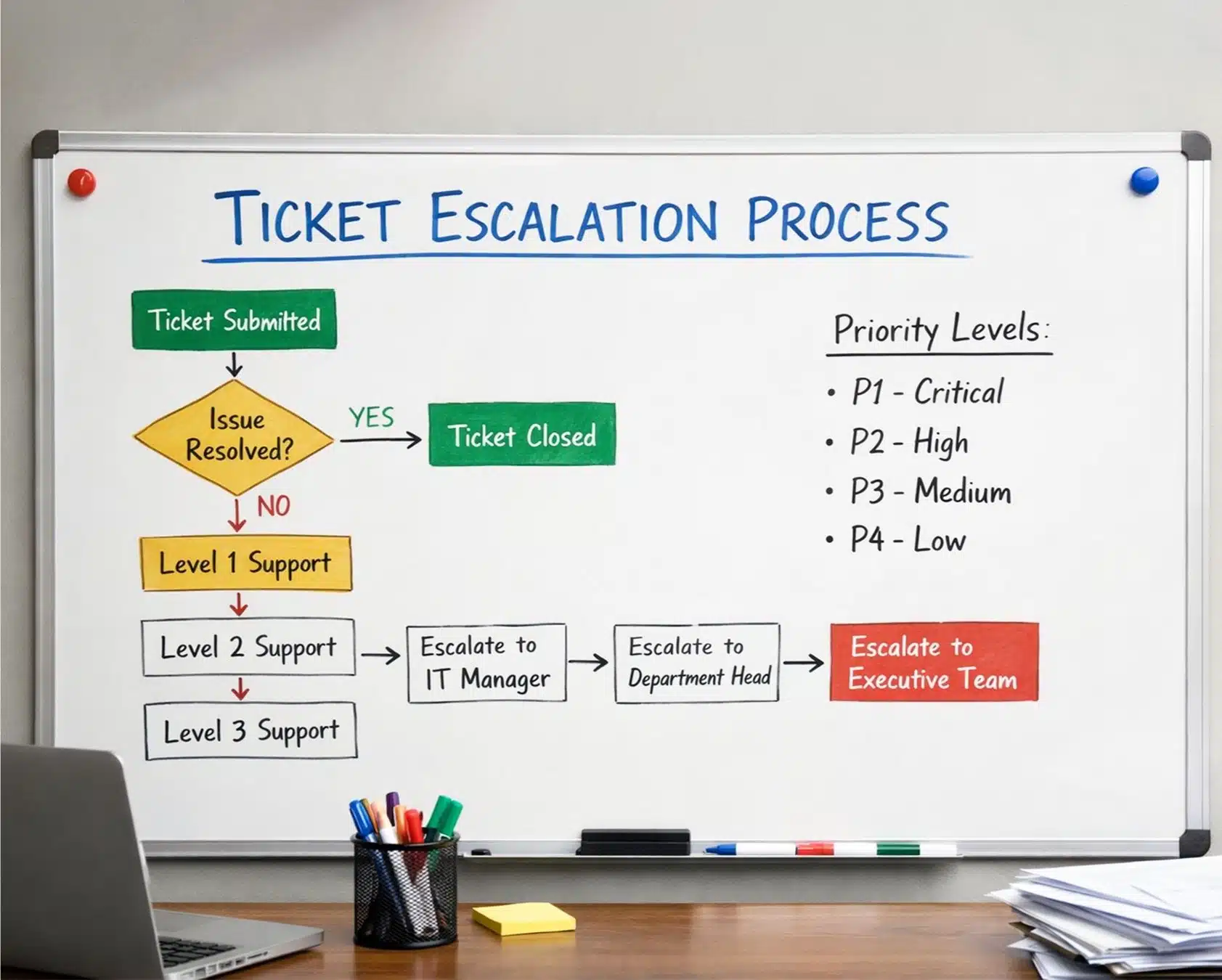
A well structured escalation process requires clear roles at every tier. Each support level has specific responsibilities and capabilities. Understanding this structure helps your team route issues correctly and sets appropriate expectations for resolution.
Frontline Support Agents For Initial Assessment
Tier 1 support handles the first point of contact with customers. These frontline agents receive incoming support tickets, assess the problem, and attempt resolution using available resources. They search the knowledge base, apply canned responses, and perform basic troubleshooting.
Frontline agents serve as gatekeepers for the escalation process. They determine whether an issue can be resolved immediately or needs to move up. This judgment requires training in both product knowledge and escalation criteria.
Most customer inquiries should be resolved at this level. Password resets, billing questions with straightforward answers, and common how-to requests rarely need escalation. Effective Tier 1 support prevents unnecessary escalations by resolving routine issues efficiently.
Senior Support Agents For Advanced Troubleshooting
Tier 2 support consists of experienced agents with deeper product knowledge. They handle escalated tickets that require more investigation than Tier 1 can provide. These agents often have access to additional tools and diagnostic capabilities.
Senior agents bridge the gap between general support and technical specialists. They can handle complex issues that require extended troubleshooting without immediately involving engineering resources. This tier often resolves issues that seem difficult but follow known patterns.
The transition from Tier 1 to Tier 2 should include complete ticket details and context. Senior agents should not repeat questions the customer already answered. Seamless communication between tiers protects the customer experience during handoffs.
Specialists For Product Or Technical Issues
Tier 3 and functional escalation paths lead to subject matter experts. These specialists might be engineers, product managers, or department leads with authority over specific areas. They handle issues that require specialized technical knowledge or system access.
A payment processing issue might escalate to the billing specialist. A complex integration failure might go to the API team. Security concerns route to the security team. Each specialist group handles specific categories of issues within their expertise.
Specialist involvement is expensive in terms of their time and focus. Effective escalation processes protect specialists by ensuring only genuinely complex issues reach them. Clear escalation criteria act as filters that preserve expert bandwidth for problems that truly need it.
Team Leads For Priority And Risk Management
Support team leads handle escalations that involve priority decisions or risk assessment. When an issue could affect the business relationship or requires judgment about resource allocation, leads step in.
Team leads often serve as escalation owners who monitor high priority tickets across the team. They ensure that escalated issues receive appropriate attention and that communication flows properly between tiers. Their oversight prevents tickets from stalling at any level.
Lead involvement is particularly important for issues that might require exceptions to standard policies. Refund requests beyond normal limits, contract modifications, or customer accommodations often need lead approval before agents can proceed.
Management For Critical Or Escalated Customer Cases
Executive escalation represents the highest level and is reserved for critical situations. These include major service outages, legal concerns, significant customer threats to leave, or issues affecting enterprise accounts with substantial revenue impact.
Management escalation typically involves the support director, VP of customer success, or even C-level executives depending on severity. These escalations are rare but essential for situations where business stakes are highest.
Your escalation path should define what qualifies for management attention. Not every unhappy customer needs executive involvement. Clear criteria prevent over-escalation while ensuring that genuinely critical cases receive appropriate seniority.
Ticket Escalation Process: Step By Step
Understanding the flow from ticket creation to resolution helps teams implement consistent practices. Each step builds on the previous one, creating a chain of accountability that protects both customers and agents.
Ticket Creation With Priority And Context
Every escalation begins with proper ticket creation. When a customer submits a support request through email, chat, or social media, the system creates a ticket with relevant details. Initial priority assignment happens based on issue type, customer profile, or keywords in the message.
Context captured at creation determines how smoothly escalation proceeds later. Customer account information, product version, and previous interaction history all matter. The more complete the initial ticket, the less time agents spend gathering basic information.
EasyDesk captures tickets from multiple channels into a unified queue. This consolidation means escalation rules apply consistently regardless of where the customer reached out. Priority levels are assigned automatically based on configurable rules.
Initial Review And First-Level Resolution Attempt
The assigned Tier 1 agent reviews the ticket and begins investigation. They check the knowledge base for similar issues, review the customer’s history, and assess whether they can resolve the problem within their capabilities.
This stage involves active problem-solving, not just reading and forwarding. Agents should exhaust their available options before considering escalation. This might include applying known solutions, gathering additional information from the customer, or consulting internal resources.
Resolution at this stage is always the goal. Every ticket resolved at Tier 1 is one that did not consume senior resources. Effective training and comprehensive documentation help agents handle more issues independently.
Automatic Or Manual Escalation Trigger
When resolution is not possible at the current level, escalation triggers activate. These triggers might be automatic based on system rules or manual based on agent judgment.
Automatic triggers include SLA timer thresholds, specific keywords indicating urgent issues, or customer priority flags. The system recognizes these conditions and initiates escalation without human decision-making. This consistency ensures important signals are never missed.
Manual triggers apply when agents recognize something that automated rules cannot detect. Unusual customer situations, judgment calls about complexity, or relationship factors might prompt an agent to escalate. Both methods serve important purposes in a complete escalation system.
Reassignment To Appropriate Support Tier
Once escalated, the ticket moves to its destination tier or team. The handoff includes all relevant ticket details, actions already taken, and specific notes about why escalation was necessary.
Reassignment should feel seamless from the customer’s perspective. They might receive a notification that a specialist is now handling their case, but they should not need to repeat their entire story. Internal notes and context transfer protect the customer from redundant questioning.
The receiving agent or team takes ownership immediately. Their SLA timers may differ from Tier 1, but accountability begins at reassignment. Clear ownership prevents tickets from sitting in limbo between tiers.
Final Resolution And Customer Confirmation
The escalated team works the issue to resolution using their specialized expertise or authority. They might fix a technical bug, approve a policy exception, or implement a workaround that Tier 1 could not provide.
Resolution includes confirming with the customer that their issue is solved. A ticket should not close until the customer agrees or a reasonable time passes without objection. This confirmation prevents premature closure of issues that only appeared resolved.
Post-resolution activities include updating the knowledge base if the issue revealed something new, tagging the ticket with root cause information, and logging any follow-up actions. These steps turn individual escalations into organizational learning.
Which Common Mistakes Break Ticket Escalation Workflows
Even well-intentioned escalation processes can fail when certain mistakes creep in. Recognizing these pitfalls helps teams avoid them and maintain the team efficiency that good escalation provides.
Unclear Escalation Rules And Responsibilities
Vague criteria create inconsistency. If agents are told to “escalate when needed” without specific guidance, they apply their own judgment. Some escalate frequently while others rarely do. This inconsistency frustrates both customers and higher-tier teams.
Define clear escalation criteria with specific examples. Instead of “complex technical issues,” specify “issues involving database errors, API authentication failures, or server-side processing.” Concrete definitions remove guesswork and create consistency across your support team.
Responsibility confusion causes similar problems. If multiple teams could theoretically handle an escalation, agents hesitate about where to send it. Clear routing rules eliminate this paralysis and keep tickets moving.
Delayed Handoffs Between Support Levels
Slow transitions between tiers undermine the entire point of escalation. A ticket that sits in a queue for hours after escalation loses the time advantage that early identification provided.
Handoff delays often stem from notification failures. If the receiving team does not know a ticket arrived, they cannot act on it. Immediate notifications through email, chat, or dashboard alerts ensure new escalations get attention.
Capacity mismatches also cause delays. If Tier 2 has more escalated tickets than they can handle, queues build up. Regular capacity monitoring helps teams identify when staffing adjustments or process changes are needed.
Lack Of Visibility Across Support Teams
When teams cannot see what other tiers are doing, coordination suffers. Tier 1 might not know whether Tier 2 is actively working their escalated ticket. Customers get conflicting information from different agents.
Visibility requires shared systems and transparent status tracking. Everyone involved in a ticket should see its current state, recent activities, and who owns it. This transparency prevents duplicated effort and keeps communication consistent.
EasyDesk provides shared views across teams with internal comments and ticket linking. This visibility ensures that complex issues involving multiple departments stay coordinated throughout resolution.
Over-Escalation Of Simple Issues
Not every problem needs senior attention. When frontline agents escalate issues they could have handled, several problems follow. Senior resources get overwhelmed. Resolution actually slows down because simple issues wait in longer queues.
Over-escalation often indicates training gaps. Agents escalate because they lack confidence in their ability to handle certain issues. Addressing this requires investment in product training, scenario-based practice, and access to better documentation.
Checklists before escalation can help. Require agents to confirm they checked the knowledge base, attempted basic troubleshooting, and gathered necessary information. These simple steps catch many issues that would otherwise escalate unnecessarily.
Missing Follow-Up After Escalation
Escalation is not the end of responsibility. The originating agent should track whether their escalated ticket progresses appropriately. Customers should receive updates about timeline expectations. Nobody should assume that escalation equals resolution.
Missing follow-up leaves customers wondering what happened to their issue. Days might pass without any communication. By the time someone checks, customer frustration has escalated along with the ticket.
Build follow-up expectations into your escalation workflow. Define who communicates with the customer during escalation, how often updates should occur, and who monitors for stalled tickets. These practices ensure that escalation improves rather than replaces support.
Best Practices For Building A Scalable Ticket Escalation Process
Effective escalation does not happen by accident. It requires deliberate design, consistent implementation, and ongoing refinement. These practices help teams build processes that work today and scale as they grow.
Define Clear Escalation Levels And Criteria
Start with documented escalation tiers that match your actual team structure. Most small to mid-sized teams need two or three tiers rather than enterprise-style five-tier models. Keep it simple and add complexity only when volume demands it.
Escalation criteria should be written down and accessible to everyone. Include specific issue types, SLA thresholds, customer categories, and examples. New agents should be able to read these criteria and understand exactly when to escalate.
Review criteria quarterly to ensure they still match reality. As your product evolves and your team grows, escalation rules may need adjustment. Outdated criteria cause confusion and inconsistent handling.
Use SLA-Based Automation For Faster Action
Manual escalation works for judgment calls, but automated escalation catches what humans miss. SLA-based triggers ensure that approaching deadlines prompt action without requiring someone to watch every ticket.
Configure your ticketing system to escalate automatically when tickets approach SLA breach. Set thresholds that give the next tier enough time to respond meaningfully. An escalation at 90% of deadline might be too late for complex issues.
Automation should also handle priority-based routing. High priority tickets from enterprise customers might skip Tier 1 entirely. Critical incident keywords might trigger immediate specialist notification. Let the system handle predictable routing so agents focus on problem-solving.
Maintain Internal Notes And Context History
Context transfer makes or breaks escalation quality. The receiving agent needs to understand what has been tried, what the customer said, and why escalation was necessary. Without this information, they start from scratch.
Require internal notes on every escalation. Make it a mandatory field that cannot be bypassed. Agents should summarize the issue, list troubleshooting steps already taken, and explain their escalation reasoning.
Complete context history also helps with pattern recognition. When reviewing escalation trends, detailed notes reveal whether issues share root causes that could be addressed systematically.
Monitor Escalation Metrics Regularly
What gets measured gets managed. Track escalation rate as a percentage of total tickets. Monitor time to escalation to see how quickly issues are identified as needing higher-tier handling. Measure resolution time after escalation to find bottlenecks.
Compare metrics across time periods to spot trends. A sudden spike in escalations after a product update might indicate a bug or documentation gap. Gradual increases might signal training needs or growing product complexity.
Share metrics with the team. When agents see how escalation affects overall support performance, they make better decisions about when to escalate. Transparency creates shared ownership of process improvement.
Train Teams On Ownership And Accountability
Escalation processes work when everyone understands their role. Training should cover not just when to escalate but why the process matters. Agents who understand the impact of good escalation make better judgment calls.
Include escalation scenarios in onboarding for new support team members. Practice exercises help agents develop confidence in their decisions. Role-playing difficult situations builds the skills needed for real customer interactions.
Accountability means following up on escalated issues until resolution. Even after handing off a ticket, agents should care about the outcome. This attitude ensures that escalation is a handoff rather than a handoff and forget.
How EasyDesk Simplifies Ticket Escalation For Support Teams
EasyDesk brings the structure your support team needs without adding unnecessary complexity. Multi-channel intake consolidates tickets from email, chat, and social media into one queue where consistent escalation rules apply. Automated workflows route high priority tickets to the right tier based on SLA timers, keywords, or customer profile.
SLA tracking in EasyDesk monitors response and resolution targets across customer segments and ticket types. When thresholds approach, automatic escalation keeps your team ahead of breaches. Internal comments and ticket linking maintain context when issues move between tiers, ensuring seamless communication throughout resolution.
Reporting dashboards show escalation rate, time metrics, and satisfaction scores by tier. These insights help you adjust staffing and processes based on real data rather than guesswork. Start your 14-day free trial to build and test your own escalation paths with real tickets.
FAQs
What Is The Purpose Of A Ticket Escalation Process
The purpose is ensuring customer issues reach people with the right expertise or authority to resolve them. Not every problem can be solved at first contact. Escalation creates a structured path for complex issues to move efficiently through your organization. It protects SLA compliance, prevents tickets from getting stuck, and ensures that customers receive timely manner responses from qualified team members. Without escalation, difficult issues would either overwhelm frontline agents or sit unresolved indefinitely.
How Does Ticket Escalation Improve Customer Satisfaction
Escalation improves customer satisfaction by reducing resolution times for complex issues and keeping customers informed throughout the process. When customers know their issue has been transferred to a specialist, they feel confident that progress is happening. Proper escalation also means customers do not need to repeat their story to every new person. The context transfers with the ticket, creating a smoother customer experience even when multiple team members get involved.
When Should Automated Ticket Escalation Be Used
Automated escalation works best for predictable triggers like SLA deadlines, priority levels, or specific issue categories. If a rule can be clearly defined, automation applies it consistently without human oversight. Use automation for time-based triggers when tickets age beyond thresholds. Use it for keyword-based routing when specific terms indicate that certain departments should handle the issue. Manual escalation remains appropriate for nuanced situations requiring human judgment about customer relationships or unusual circumstances.
Who Decides Ticket Priority During Escalation
Priority decisions typically follow established rules at ticket creation, with adjustments possible during escalation. Initial priority is determined by automated classification based on issue type, customer tier, or urgency indicators. During escalation, receiving agents or team leads may adjust priority based on new information. For critical situations, management involvement might override standard priority levels. The key is having documented guidelines so priority decisions are consistent rather than arbitrary.
Which Support Teams Benefit Most From A Ticket Escalation System
Every customer support team benefits, but growing teams see the biggest impact. Startups and small businesses often lack formal processes, leading to inconsistent handling. Implementing a ticket escalation system creates the structure needed to scale without losing quality. SaaS companies with technical products benefit because many issues require specialist knowledge. Teams handling enterprise customers benefit from priority routing that protects important relationships. Any team struggling with stuck tickets, missed SLAs, or unclear ownership will see immediate improvement from proper escalation.