Work feels simple until tasks start piling up. One team waits for approvals. Another repeats the same work. Soon, delays become normal and no one knows where the process breaks. That is where workflow mapping becomes valuable. It gives teams a visual view of tasks, decisions, and responsibilities so everyone stays aligned.
A workflow map shows how work actually moves from start to finish. It helps businesses uncover bottlenecks, remove inefficiencies, and spot opportunities for automation. In many cases, mapping a process reveals 30 to 40 hidden steps that teams never realized existed. With a clear workflow in place, organizations can improve collaboration, standardize operations, and build processes that scale as they grow.
What Is Workflow Mapping?
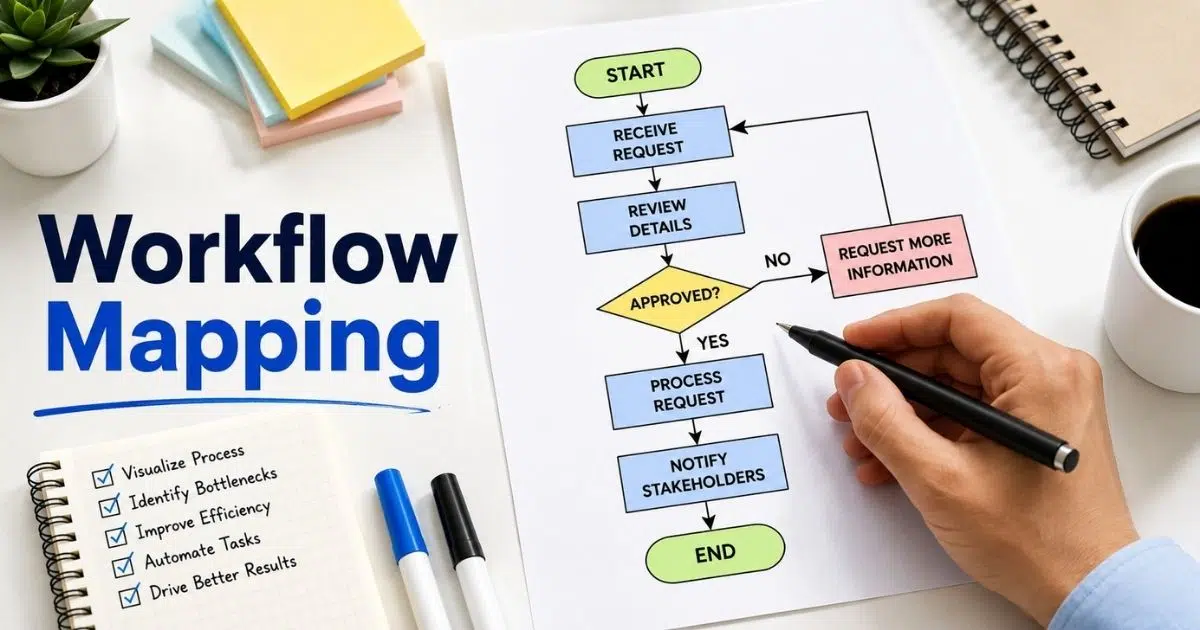
Workflow mapping is the practice of creating a visual representation of how work moves through a business process. It shows the process flow, tasks, decision points, and people involved from the start point to the end points. Unlike a high-level process map that provides a broad overview, a detailed process map captures specific process steps, inputs and outputs, and responsibilities. Businesses use workflow process mapping and business process mapping to simplify complex workflows, improve process documentation, and keep stakeholders involved on the same page.
By mapping workflows, teams can identify bottlenecks, remove unnecessary steps, and track progress more effectively. A workflow diagram or process flowchart also helps process owners communicate processes across different departments. Whether you create maps with process mapping software or use basic flowchart techniques, rendered process maps support continuous improvement, streamline operations, and reveal opportunities for automation in repetitive tasks and critical processes.
Why Is Workflow Mapping Important For Businesses?
Modern businesses handle dozens of tasks every day. Without a clear system, work slows down and mistakes happen. Workflow mapping gives teams a visual view of how work moves across people and departments. It creates clarity, improves accountability, and helps businesses operate more efficiently.
Eliminate Bottlenecks Faster
Workflow mapping helps teams see where work gets stuck. A delayed approval process or an extra review step can slow the entire process. A clear workflow map highlights bottlenecks before they become costly problems.
Teams can also identify inefficiencies and remove unnecessary tasks. Many businesses discover hidden delays only after mapping workflows. Research shows companies that automate and optimize workflows can improve productivity by 20–25%.
Improve Team Alignment
Teams often work in silos. One department may not know what another team is doing. Workflow mapping puts everyone on the same page by clearly defining tasks, decisions, and responsibilities.
A visual process flow improves communication across departments. Employees understand who owns each step and what comes next. This clarity strengthens accountability and reduces confusion in cross-functional work.
Standardize Business Processes
Different teams often complete the same work in different ways. That creates errors and inconsistent results. Workflow mapping helps businesses standardize processes across the organization.
Standard workflows support compliance and quality control. They also make process changes easier to manage. When every team follows the same process, businesses scale operations without losing consistency.
Reveal Automation Opportunities
Many companies still rely on repetitive manual work. Process mapping helps identify tasks that can be automated, such as approvals, notifications, and data entry. This saves time and reduces human error.
Recent studies show 94% of companies perform repetitive tasks, while 66% of knowledge workers report higher productivity after automation. Workflow maps act as the foundation for smarter automation initiatives, including social media integration in customer support where automated routing and tracking are critical.
Support Growth And Training
Growth becomes difficult when processes exist only in people's heads. Detailed workflow maps create documentation that new employees can follow with ease. This shortens training time and improves onboarding.
Clear workflows also support continuous process improvement. Teams can review maps regularly, track performance, and refine operations over time, which is critical when planning holiday helpdesk setups for small support teams. Businesses that optimize workflows stay agile as customer needs and market conditions change.
Benefits Of Workflow Mapping
Workflow mapping does more than document tasks. It helps teams understand how work moves across people, systems, and departments, just as case studies of improving response time for growing teams show in practice. A clear map reveals what works, what slows down progress, and where improvements can create lasting value.
Boost Operational Efficiency
Businesses often lose time because of hidden delays and unclear responsibilities. Workflow mapping creates a visual path for every task and decision. Teams can quickly see how work moves from start to finish.
A clear workflow reduces confusion and speeds up execution. It also helps teams remove extra steps that add no value. Studies show companies that automate and optimize workflows can improve productivity by 20% to 25%. This gives teams more time for meaningful work.
Expose Hidden Bottlenecks
Problems rarely appear where businesses expect them. Workflow maps reveal bottlenecks, duplicate work, and delays across departments. Even a simple process can contain 30 to 40 hidden steps that slow progress.
Visualizing workflows helps teams identify inefficiencies before they grow into larger issues. Employees can see where approvals stall or where handoffs fail. Research shows 67% of knowledge workers spend over three hours daily on manual coordination tasks.
Strengthen Team Collaboration
Teams perform better when everyone understands their role. Workflow mapping clarifies tasks, responsibilities, and decision points. Every employee knows who owns each step and what happens next.
This shared visibility keeps teams on the same page. Cross-functional departments work together more effectively because expectations are clear, which is especially valuable for small teams using smart ticketing tools. Strong collaboration reduces errors, improves accountability, and creates smoother operations across the business.
Support Automation Efforts
Many businesses still rely on repetitive tasks such as data entry and approvals. Workflow mapping helps identify automation opportunities before new tools are introduced. A clear process is easier to automate than a messy one.
Recent reports show that over 65% of businesses now use workflow automation in some form. About 90% of employees say automation improves their jobs and productivity. Workflow maps create the foundation for smarter automation initiatives, such as ticket creation and management for structured support.
Improve Training And Compliance
New employees learn faster when processes are clearly documented. Detailed workflow maps serve as training guides and reduce onboarding time. Teams follow the same process instead of relying on guesswork.
Standardized workflows also support compliance and quality control. Businesses can review maps regularly and update them when processes change, much like tuning a help desk that improves support behind the scenes. This creates consistency across teams and helps organizations maintain high standards as they grow.
7 Simple Steps To Create Effective Workflow Mapping
A clear workflow map turns scattered tasks into a structured process. It helps teams understand how work moves across departments and systems. Follow these seven steps to create a process map that improves visibility, removes delays, and supports better decisions.
Step 1: Define The Process Scope
Start with a specific process instead of mapping the entire organization. Define the start point, end points, goals, and stakeholders involved. A high level map helps teams see the big picture before creating a detailed process map.
Business analysts often begin with critical processes such as customer onboarding or the approval process. A clear scope keeps the mapping process focused and prevents confusion. This step also helps teams track progress as process changes happen over time.
Step 2: Gather Input From Teams
People closest to the work know where delays happen. Ask frontline employees, process owners, and different departments to share insights about the current process. Their input reveals hidden workflows and alternate paths.
Many organizations miss important details when only managers participate. Teams that collaborate stay on the same page and create more accurate process documentation. Studies show companies with strong collaboration are 20% more productive than others.
Step 3: List Tasks And Decisions
Write down every process step in a logical sequence. Include tasks, approvals, inputs and outputs, and each decision point. This creates a visual representation of how work moves through the entire process.
A process mapping example may reveal 30 to 40 activities in one workflow. Many businesses discover unnecessary steps and repetitive tasks only after mapping workflows. This makes it easier to identify bottlenecks and identify inefficiencies before they grow.
Step 4: Choose Standard Symbols
Use process mapping symbols to ensure everyone understands the map. Ovals show the start and end points. Rectangles represent actions, while diamonds indicate a decision point. Arrows show the direction of the tasks flow.
Standard symbols help teams communicate processes across locations and departments. Whether you use a basic flowchart, process flowchart, or workflow diagram, consistency creates clarity. Static diagrams often create confusion when symbols vary.
Step 5: Select The Right Map Type
Different processes need different formats. A SIPOC diagram works well for inputs and outputs, while swimlane diagram clarifies cross-functional processes. Value stream mapping and stream mapping support lean management and value chain analysis.
Complex workflows may require BPMN or process model and notation standards. A business process model helps teams understand system interactions and workflow forward. Project management teams often build process maps based on complexity and business goals.
Step 6: Review And Improve The Flow
Examine the process flow carefully. Look for delays, duplicate work, and gaps in accountability. A detailed map often reveals a complex process that was hidden from view.
Rendered process maps make it easier to compare the current process with a new process. Teams can streamline operations and support continuous improvement through regular reviews. Research shows process optimization can reduce operational costs by up to 30%.
Step 7: Digitize And Maintain The Map
Use process mapping software and process mapping tools to keep workflows updated. Digital maps adapt faster than paper documents. They also support process workflows, automation, and business process mapping initiatives.
Review workflow mapping regularly as more processes evolve. A detailed process supports audits, training, and compliance. Businesses that visualize workflows effectively adapt faster to change and maintain consistent results across the organization.
Common Workflow Mapping Symbols And Types
Workflow maps become useful only when everyone reads them the same way. Standard symbols and map types create clarity across teams and systems. The right format helps businesses understand processes faster, communicate changes clearly, and improve decision-making.
Core Workflow Symbols
Every workflow map uses a set of common symbols. Ovals mark the start and end of a process. Rectangles show tasks or actions. Diamonds represent a decision point, while arrows move the workflow forward and connect process steps.
Standard symbols create a universal language for teams. They make a workflow diagram easier to read across different departments. Consistent process mapping symbols also help businesses communicate processes clearly and reduce confusion in complex workflows.
Flowcharts And High-Level Maps
A basic flowchart works best for simple and sequential work. It provides a visual representation of tasks and decisions without too much detail. A high-level process map gives leaders a broad view of a business process and key outcomes.
A high-level map is useful when executives need quick insights. Teams often use flowcharts to create a process map before building a more detailed process. This approach helps organizations understand different processes without getting lost in details.
Detailed And Swimlane Maps
A detailed process map captures every task, role, and dependency in a process flow. It includes inputs and outputs, approval paths, and process owners. Such maps support audits, compliance, and process documentation.
Swimlane diagrams work well for cross-functional processes. They show who owns each specific task and how work moves between teams. Businesses use a detailed map to identify bottlenecks and streamline operations across the entire organization.
Value Stream And SIPOC Maps
Value stream mapping focuses on the value chain and removes waste from operations. It is widely used in lean management to improve efficiency and reduce delays. Stream mapping helps businesses understand where value is created and lost.
A SIPOC diagram outlines suppliers, inputs and outputs, processes, and customers. It gives teams a clear view of a specific process before work begins. Many organizations use SIPOC to align stakeholders involved and improve process improvement efforts.
BPMN And Process Models
Businesses with automation goals often use Business Process Model and Notation, or BPMN. This process model and notation standard creates maps that systems can understand. A business process model supports automation, integration, and better control of complex process workflows.
Unlike static diagrams, BPMN captures alternate paths and system interactions. Business analysts use rendered process maps to analyze the current process and design a new process when needed. Research shows organizations that standardize processes can improve efficiency by up to 30%, according to industry studies.
Workflow Mapping Best Practices
A workflow map is only useful when it stays clear, accurate, and easy to update. The right approach helps teams reduce errors and improve collaboration. Strong workflow mapping practices also support automation, compliance, and long-term process improvement.
Start With Clear Goals
Every workflow mapping project needs a clear purpose. Define what you want to improve before creating the map. Focus on a specific business process rather than the entire workflow. A narrow scope makes complex workflows easier to understand.
Clear goals help teams measure results later. They also keep stakeholders involved from the start. Businesses that align processes with goals make better decisions and adapt faster to change. Strong planning creates better workflow mapping outcomes.
Use Standard Symbols
Standard symbols make workflow maps easier to read. Ovals mark start and end points. Rectangles show tasks, while diamonds represent a decision point. Arrows connect steps and show process flow across teams.
Consistent symbols help everyone stay on the same page. Employees across different departments can understand the map without extra explanation. Research shows standardized processes improve efficiency and reduce errors across organizations.
Include Frontline Teams
Employees who perform daily work know the process best. Ask process owners and frontline teams to review each workflow map. Their feedback often reveals hidden delays and unnecessary steps.
Cross-functional input creates more accurate process documentation. Teams can identify bottlenecks before they affect customers or operations. Better collaboration also improves accountability across the entire organization and strengthens process workflows.
Keep Maps Simple
A detailed process map should explain work clearly, not create confusion. Avoid clutter and break a complex process into smaller sections when needed. A clean workflow diagram helps teams understand tasks faster.
Simple maps also make training easier. New employees can learn work flows without spending hours on documentation. Studies show companies using automation and clear workflows report higher productivity and fewer manual errors.
Review Maps Regularly
Business needs change over time. Workflow mapping should evolve as process changes happen. Review each map regularly to ensure it reflects the current process and new business requirements.
Regular updates support continuous improvement and compliance. Teams can track performance, improve efficiency, and adapt to more processes as they grow. More than 65% of businesses now use workflow automation, showing how quickly operations continue to evolve.
Common Mistakes To Avoid In Workflow Mapping
Even the best workflow maps can fail when teams overlook key details. Small mistakes often lead to delays, confusion, and poor decisions. Avoiding common errors helps businesses build accurate workflows that support automation, collaboration, and long-term growth.
Ignore Frontline Feedback
Teams that perform the work understand the process best. Yet many businesses create workflow maps without speaking to frontline employees. This often leads to incomplete process documentation and missed process steps.
Employees can reveal hidden bottlenecks, alternate paths, and repetitive tasks. Their input helps identify inefficiencies before they affect results. A workflow map built without real users rarely reflects the entire process or day-to-day operations.
Map The Ideal Process
Many teams document how work should happen instead of how it actually happens. This creates gaps between the workflow map and the current process. As a result, automation efforts may fail.
Focus on the real process first. Include delays, approvals, and exceptions. A realistic workflow mapping exercise exposes unnecessary steps and creates a stronger foundation for process improvement and future process changes.
Overcomplicate The Map
A complex workflow map can confuse teams instead of helping them. Too many symbols, notes, or details make the process hard to follow. Clarity matters more than decoration.
Use standard process mapping symbols and maintain a clear process flow. Break large workflows into smaller sections when needed. Research shows employees process visual information much faster than text, making simple maps easier to understand and use.
Skip Regular Reviews
Business operations change often. New tools, policies, and customer needs affect how work happens. A workflow map that stays unchanged quickly becomes outdated.
Review workflow maps regularly to ensure accuracy. Update process changes and responsibilities when needed. Continuous improvement depends on keeping documentation current. Businesses that adapt workflows faster often improve efficiency and reduce operational risks.
Forget Automation Opportunities
Many organizations stop after creating a workflow map. They miss the chance to automate repetitive tasks and streamline operations. A map should guide action, not just document work.
Use workflow mapping to identify bottlenecks and areas suitable for automation. Studies show that workflow automation can reduce manual work by up to 30%, helping teams save time and improve productivity, especially when paired with automated workflow software for support or a comprehensive customer support platform. A good workflow map supports growth and better decision-making.
Top Workflow Mapping Tools For Businesses
The right tool can make workflow mapping faster and more accurate. Businesses use different platforms to document processes, improve collaboration, and automate repetitive work. Choosing the right software depends on team size, workflow complexity, and automation needs.
EasyDesk For Workflow Automation
EasyDesk helps teams create workflow maps and automate routine support workflows from one platform. Teams can manage approvals, assign responsibilities, and track progress without switching tools. This reduces delays and improves visibility across the business process.
A centralized platform also keeps everyone on the same page. Businesses can update workflows as process changes happen and maintain clear helpdesk ticket documentation. Organizations that automate workflows often see productivity gains of 20% or more, according to industry research.
Lucidchart For Visual Mapping
Lucidchart is popular for creating flowcharts and workflow diagrams. Teams can build process maps using drag-and-drop tools and standard process mapping symbols. The platform supports collaboration across different departments, much like smarter centralized helpdesk setups support alignment in customer support workflows.
Business analysts often use Lucidchart for process mapping and project management. Teams can create a detailed process map, share updates, and review workflows together. Visual tools like this help organizations keep remote support teams aligned and understand complex workflows more easily.
Microsoft Visio For Enterprise Teams
Microsoft Visio is widely used by large organizations. It supports process flowcharts, swimlane diagrams, and Business Process Model and Notation (BPMN). Teams can create detailed maps for audits, compliance, and process improvement, similar to how modern IT help desk software structures and tracks support workflows.
Visio also integrates with Microsoft tools already used by many businesses. This makes workflow mapping easier for enterprise teams, just as customer support software that improves response time simplifies and accelerates support workflows. Research shows that companies using integrated digital tools improve collaboration and operational efficiency.
Miro For Team Collaboration
Miro offers a flexible workspace for workflow mapping and brainstorming. Teams can visualize workflows, map cross-functional processes, and gather feedback in real time, similar to how teams manage support tickets efficiently in a shared system. Remote teams often use Miro to collaborate across locations.
The platform supports process diagrams, high-level maps, and value stream mapping exercises. Teams can quickly update workflows as business needs change, much like updating processes in advanced ticketing software for better customer support. Better collaboration often leads to faster decisions and stronger process outcomes.
Bizagi For Advanced Process Modeling
Bizagi focuses on automation and business process mapping. It supports process model and notation standards and helps organizations design complex process workflows, similar to how SLA tracking software improves response time by structuring and monitoring service processes. Businesses use it to connect systems and streamline operations.
The platform is useful for organizations with advanced automation goals. Teams can identify bottlenecks, optimize workflows, and improve critical processes using tools such as SLA management for support teams. Industry reports show that workflow automation continues to grow as businesses seek greater efficiency and scalability.
How EasyDesk Helps Teams Build Smarter Workflows
EasyDesk helps teams move beyond static workflow maps and turn processes into action. Instead of juggling spreadsheets, emails, and manual approvals, teams can manage everything in one place. A centralized system creates visibility, improves accountability, and keeps work moving without delays.
With EasyDesk, teams can design workflows, assign tasks, and automate repetitive support work with ease. Real-time tracking helps managers identify bottlenecks before they affect performance. Teams stay on the same page because every task, decision, and approval follows a clear path. As processes evolve, workflows can be updated quickly to match new business needs. This flexibility supports continuous improvement, simplifies collaboration across departments, and helps organizations manage feedback and roadmaps without losing efficiency.
FAQs
Can Workflow Mapping Improve Employee Productivity?
Yes, workflow mapping can significantly improve productivity. It gives teams a visual representation of tasks, responsibilities, and decision points. Employees spend less time searching for information and more time completing work.
Is Workflow Mapping Useful For Small Businesses?
Yes, workflow mapping is valuable for businesses of all sizes. Small teams often rely on manual processes that become difficult to manage as they grow. A workflow diagram creates structure and improves accountability.
How Often Should Businesses Update Workflow Maps?
Businesses should review workflow maps whenever process changes occur or at regular intervals. A map that reflects the current process stays useful and accurate over time.
What Is The Difference Between Workflow Mapping And Value Stream Mapping?
Workflow mapping focuses on tasks, decisions, and people involved in a business process. Value stream mapping focuses on the value chain and identifies waste across a process.
Can Workflow Mapping Support Digital Transformation?
Yes, workflow mapping plays a key role in digital transformation. It helps businesses create a process map, analyze process steps, and discover automation opportunities.