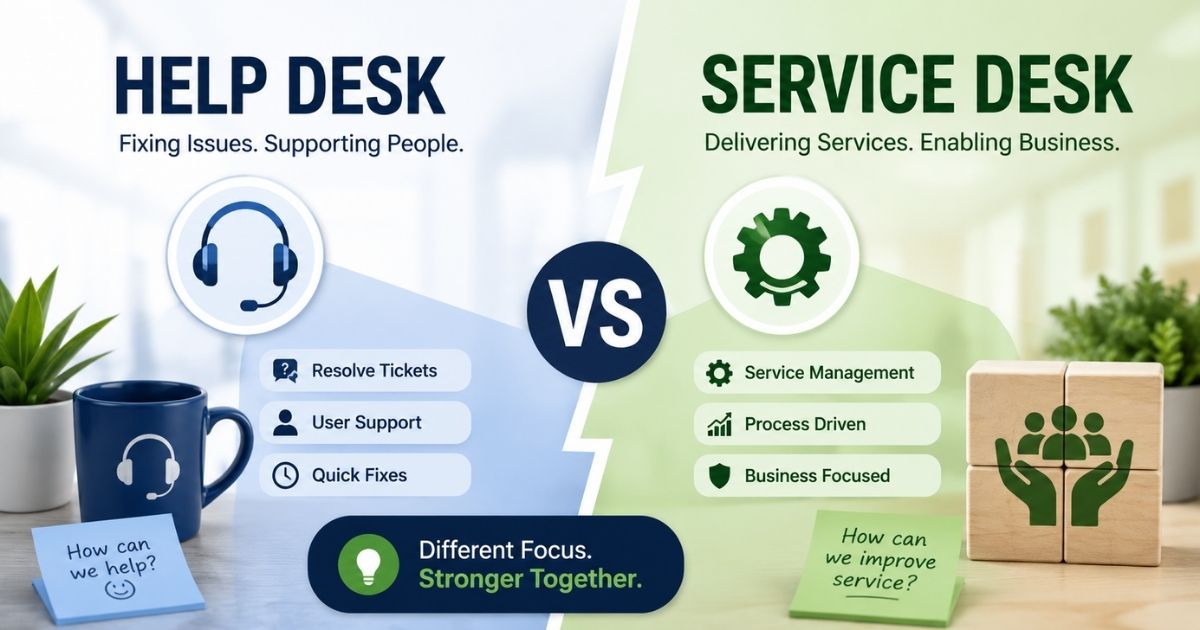
Help desk and service desk sound interchangeable, but they solve different problems. A help desk handles service request fulfillment for quick, everyday issues like password resets or software glitches. A service desk solution goes further, managing end-to-end service delivery across an entire organization, not just fixing problems as they arise.
An IT service desk acts as a single point of contact between employees and every internal service provider, covering incidents, requests, and changes under one structured process. While a help desk focuses on speed, a service desk focuses on consistency, strategy, and long-term service lifecycle management, from request to resolution to review.
Choosing between a help desk vs service desk depends on how complex your operations are, and this guide breaks down exactly which one fits your team.
What Is a Help Desk
A help desk is the first point of contact for technical support. Most help desks run on a simple ticketing system. A user submits a request, an agent picks it up, and the ticket closes once the issue is fixed. Speed is the priority. Reset a password, unlock an account, fix a printer, and move to the next ticket.

Help desks are reactive by nature. They respond to problems after they happen instead of preventing them. This makes a help desk the right fit for small teams, startups, and any business that mainly needs fast, reliable technical support without deep IT process management.
What Is a Service Desk
A service desk covers everything a help desk does, then adds structured IT service management on top. It handles incident management, service request management, change management, and asset management under one system.

Instead of only reacting to problems, a service desk follows a defined service lifecycle. Many teams model their service desk around ITIL, the Information Technology Infrastructure Library that outlines best practices for managing IT services from request to resolution to long-term improvement.
A service desk also works as a single point of contact between IT and the rest of the business. It connects day to day tickets to bigger goals like uptime targets, service level agreements, and long-term planning for company systems.
Help Desk Vs Service Desk: Key Differences
The core difference comes down to scope. A help desk solves individual problems as they come in. A service desk manages the full service lifecycle, including the tools, processes, and policies behind those problems. Here is how the two compare side by side.
Aspect | Help Desk | Service Desk |
|---|---|---|
Purpose | Fix individual technical issues fast | Manage the full IT service lifecycle |
Approach | Reactive | Proactive and strategic |
Scope | Break or fix support, password resets, basic troubleshooting | Incident, request, change, and asset management |
Framework | Often informal and ticket based | Usually aligned with ITIL best practices |
Tools | Ticketing system | Full service desk software with SLA and asset tracking |
Metrics | Resolution time and tickets closed | SLA compliance and user satisfaction |
Best For | Small teams and startups | Growing IT departments and enterprises |
Reactive Vs Proactive Support
A help desk waits for something to break. Someone submits a ticket, an agent responds, and the issue gets closed. A strategic service desk works differently. It uses problem management to spot patterns behind repeated tickets and fix root causes before they resurface. This shift changes how it operations function day to day, moving teams from constant firefighting toward planning around actual business objectives instead of reacting to whatever lands in the queue next.
Ticketing System Vs Full Service Management
Most help desks run on a single ticketing system built for logging and closing requests. A service desk model covers far more ground. It applies structured service management processes across incidents, changes, assets, and requests, giving teams one system that supports full service lifecycle management rather than isolated ticket handling. The difference shows up fast once request volume grows past what a basic queue was ever meant to handle.
Team Structure And Ownership
Help desk teams are usually generalists, handling whatever comes in without much specialization. Service desk support looks different. Tiered ownership separates first-response staff from specialists who manage escalations, changes, and vendor coordination. This structure supports typical service desk operations at scale, where clear ownership prevents tickets from bouncing between people with no one accountable for the outcome.
Scope Of IT And Business Coverage
A help desk mostly stays inside IT, fixing logins and hardware requests. Service desk services extend well past that boundary, connecting HR, facilities, and finance requests into one coordinated system. Because coverage spans departments, not just tech tickets, the desk becomes a shared resource that any service provider across the business can plug into, rather than a purely technical support line.
Cost And Resource Requirements
A help desk costs less to run, but that lower price tag comes with limits on reporting, automation, and scale. Building a full service desk needs a bigger investment in tools, staffing, and training. For growing companies, that upfront cost usually pays off through fewer repeat tickets and clearer visibility into where support time actually goes, which matters once support becomes tied to business objectives, not just ticket counts.
Help Desk Vs Service Desk: Core Features Compared
Software is where the difference becomes obvious. Help desk tools focus on ticket creation and resolution. Service desk platforms add the features IT teams need to run technology like a business function instead of a support line.
Feature | Help Desk | Service Desk |
|---|---|---|
Ticket Management | Core function | Included, tied to SLA priority |
Knowledge Base | Basic help articles | Full self-service knowledge management |
SLA Management | Rarely built in | Standard feature |
Asset Management | Not included | Tracks hardware, software, and licenses |
Change Management | Not included | Built-in workflow for approvals |
Self-Service Portal | Limited or none | Available for requests and tracking |
Reporting | Ticket volume and response time | Full service metrics and SLA compliance |
Automation | Basic ticket routing | Advanced workflow and approval automation |
Ticket Management
Ticket management looks similar on the surface, but depth is what separates them. Help desk tools handle ticket creation and closure for immediate technical issues, nothing more. A service desk builds ticket management into a larger structure, linking every ticket to SLA priority, asset records, and change history. This is where service desk vs help desk stops being a naming difference. Service desk staff work from full context instead of an isolated ticket, which shortens resolution time and improves service quality across every request that comes through.
Knowledge Base
A help desk knowledge base usually means a short list of basic articles, enough to answer repeated questions but not much else. Service desks take a different route. Self-service options expand into full knowledge management, letting employees resolve customer service issues without waiting for user support. Platforms like Jira Service Management build this directly into the workflow, tying articles to ticket categories automatically. The result is fewer repetitive tickets reaching service desk staff, freeing them to focus on issues that actually need a proactive and strategic approach.
SLA Management
SLA management rarely exists in a real form in help desk tools. Response expectations are informal, and priority is often decided ticket by ticket. A service desk offers SLA management as a standard feature, not an add-on, with priority tiers tied directly to ticket type and business impact. Since service desks follow ITIL practices, SLA tracking becomes measurable rather than assumed. That structure gives leadership visibility into service quality and turns response time into a metric instead of a guess, strengthening operational efficiency across the board.
Asset Management
Asset management is where the gap becomes obvious fast. Help desk software typically has no concept of hardware, software, or license tracking; it exists purely to manage tickets, even though help desk software can significantly improve overall support efficiency. A service desk changes that entirely. It tracks devices, software licenses, and lifecycle status alongside every ticket, so service desk staff see the full picture before touching an issue. This connection between assets and requests is a core piece of Jira service management and similar platforms, and it directly supports operational efficiency across IT operations.
Change Management
Change management rarely has a place in a basic help desk setup. Requests to update systems or approve changes usually happen outside the tool entirely, through email or verbal approval. A service desk includes built-in workflows for this, routing change requests through approvals before anything gets touched. This is a clear marker of help desk vs service desk maturity. Because service desks follow the ITIL structure, change management becomes traceable and auditable, reducing risk while supporting a proactive and strategic approach to IT operations that is further strengthened by ticket automation software.
Self Service Portal
Self service on a help desk is limited at best, often just a form to submit a ticket. A service desk offers a real self service portal, letting employees track requests, check status, and resolve simple issues without contacting user support directly. This shift matters because self service options reduce ticket volume for immediate technical issues while improving the employee experience, especially when combined with a well-structured helpdesk setup. Service desk staff can then spend more time on complex customer service issues instead of repetitive status update requests.
Reporting
Reporting on a help desk typically stops at ticket volume and response time, useful but shallow compared with dedicated SLA management software. A service desk offers full service metrics, covering SLA compliance, asset trends, and recurring issue patterns across departments. This depth is what separates service desk vs help desk reporting in practice. With tools like jira service management or a robust SLA management system, service desk staff get dashboards built for decision-making, not just tracking. That visibility supports operational efficiency and gives leadership the service quality data they actually need.
Automation
Automation on a help desk usually means basic ticket routing, sending requests to the right queue. A service desk takes automation much further, handling approval workflows, escalation rules, and change coordination without manual steps. Because service desks follow ITIL guidelines, automation ties directly into SLA and asset data instead of running in isolation. This is where a proactive and strategic approach becomes visible day to day, cutting manual work for service desk staff while keeping service delivery consistent at scale.
When To Use A Help Desk Vs A Service Desk

The right choice depends on company size, IT complexity, and how much process you actually need. A help desk that tries to do too little will frustrate users. A service desk that adds too much process too early will slow a small team down.
Choose A Help Desk If You Are A Small Team Or Startup
Small teams do not need change management workflows or a full service catalog. They need fast answers and often start with a free helpdesk ticket system. A help desk keeps things simple: log a ticket, fix the issue, close it out. This keeps overhead low while the business is still figuring out its support volume.
Choose A Service Desk If IT Is Becoming A Core Function
Once a company depends on internal systems, software, and infrastructure to operate, IT stops being a side function. A service desk gives IT teams the structure to manage incidents, plan changes safely, and track assets across a growing organization.
Consider Both If You Support External Customers Too
Some businesses run internal IT support and customer-facing support side by side. In that case, a full-service platform that covers ticketing, self-service, and service management for both audiences keeps teams from juggling multiple disconnected tools.
Business Scenario | Best Fit | Why |
|---|---|---|
Startup or small team | Help desk | Low ticket volume, simple issues, minimal process needed |
Growing IT department | Service desk | Needs incident, change, and asset management as systems scale |
Enterprise with ITIL requirements | Service desk | Requires SLA tracking, compliance, and a formal service lifecycle |
Supports employees and customers | Full-service platform | Needs help desk speed and service desk structure in one system |
Signs You Have Outgrown Your Help Desk

A few warning signs show up long before anyone admits the support system is failing. Here's how to tell your help desk solutions have hit their ceiling, and what that means for your team.
Response Times Keep Slipping
Users experiencing technical difficulties used to get answers within the hour. Now tickets sit untouched for a full day, sometimes longer. This isn't a staffing problem alone; it's a sign your help desk was never built to handle current volume. As new service requests pile up faster than agents can close them, overall service quality drops, and customer satisfaction follows close behind. When response time becomes unpredictable instead of consistent, it's usually the clearest signal that your current setup can't scale with your business goals anymore.
Recurring Issues Never Get Fixed
The same user issues keep coming back week after week, closed temporarily but never actually resolved. A basic help desk logs and closes tickets without digging into why problems repeat. Without root-cause tracking, agents keep applying the same fix to the same complaint, over and over. This cycle quietly drains time that could go toward new service requests instead. If nobody on your team can explain why a problem keeps resurfacing, that's not a training gap, it's a structural limitation of the tool itself.
Teams Track Requests In Spreadsheets
When ticket volume outgrows what the help desk can organize, teams start building workarounds. Spreadsheets fill in the gaps, tracking requests, owners, and deadlines by hand. It works for a while, until someone forgets to update a row, and a request quietly falls through. This kind of manual tracking signals that your support system has already been outgrown, even if nobody has said it directly. Manual tracking doesn't scale with growing teams, and it puts customer satisfaction at risk every time something slips.
No Visibility Into Ticket Trends
Basic help desk reporting shows ticket counts and close times, nothing deeper. There's no way to see which issues repeat most, which departments generate the most load, or where users experiencing technical difficulties cluster. Without that visibility, leadership makes decisions based on guesswork instead of data. This gap becomes a real problem once support needs to align with business goals, not just close tickets one at a time.
IT Requests Now Outnumber Everything Else
A help desk built for simple password resets and basic troubleshooting starts buckling once IT requests dominate the queue. Complex requests need context, ownership, and follow-up that basic ticketing tools were never designed to handle. When IT tickets crowd out every other request type, it's a clear sign your desk solutions need to expand beyond simple ticket logging into something built for real operational scale.
What To Look For In Service Desk Software
Not every service desk tool fits every team. Before switching, compare platforms against the features that actually matter for your support volume and IT complexity.
What To Check | Why It Matters | Risk If Skipped |
|---|---|---|
SLA and escalation rules | Keeps response times predictable | Missed deadlines and unhappy users |
Asset and inventory tracking | Gives IT visibility into hardware and software | Untracked devices and license overspend |
Change approval workflow | Prevents risky updates from breaking systems | Outages from unreviewed changes |
Self-service portal | Cuts routine request volume | Agents buried in repeat tickets |
Reporting and dashboards | Shows leadership real service performance | No data to guide improvements |
Integration with existing tools | Avoid creating another data silo | Duplicate work across systems |
Common Myths About Help Desk And Service Desk

Confusion between these two terms leads to real buying mistakes. Before you choose a tool, it helps to clear up a few misconceptions that show up again and again in vendor pitches and comparison articles about what help desk software is used for.
Myth: A Help Desk Is Just A Cheaper Service Desk
Price difference exists, but that's not the actual distinction. A help desk runs on a break-fix model, built to resolve immediate user issues and close tickets fast. A service desk covers a broader scope, connecting assets, changes, and SLAs into one structured system. Cost reflects the difference in desk functions, not a discount version of the same tool. Choosing based on price alone usually means outgrowing the system within a year, since desk operations built for simple fixes were never designed to scale into full-service management.
Myth: You Need ITIL Certification To Run A Service Desk
ITIL informs how service desk operations are structured, but certification isn't a requirement to start. Many teams adopt ITIL-aligned practices gradually, applying SLA tracking and change workflows without a formal credential. What actually matters is whether desk operations follow a repeatable process instead of ad hoc fixes. A help desk technician can absolutely work within a service desk model without holding a certification personally; the framework shapes the tool and process, not the individual's paperwork.
Myth: Automation Removes The Need For Human Agents
Automation handles routing, approvals, and repetitive steps, but it doesn't replace judgment. A help desk technician still needs to interpret context, calm a frustrated end user, and make decisions automation can't cover. What changes is where time goes. Instead of manually triaging every request, agents focus on complex cases while automation clears the simple ones. Desk functions shift toward higher-value work, not disappear entirely. Any vendor pitch suggesting full staff replacement is selling a version of automation that doesn't match how support teams actually operate day to day.
How EasyDesk Covers Both Sides Of Support
EasyDesk sits comfortably between the two models. On the help desk side, it handles ticket creation and management, live chat, and multi-channel support, so immediate user issues get resolved fast across email, chat, and social. On the service desk side, it adds SLA management, automated workflows, and a self-service knowledge base, giving teams the structure typically expected from a service desk without the enterprise overhead, powered by EasyDesk features for smarter, secure support.
Eden AI adds smart triage and instant ticket summaries, cutting manual sorting work for agents, while SLA management for support teams keeps service levels on track. For teams that need fast resolution and process consistency without running two separate systems, EasyDesk covers both needs in one platform.
Frequently Asked Questions
What Is The Main Difference Between A Help Desk And A Service Desk?
A help desk resolves immediate technical issues through ticket creation and closure. A service desk manages the full service lifecycle, covering SLAs, assets, and changes alongside tickets. The difference isn't size or price; it's scope: one fixes problems, the other manages how support connects to broader business operations.
Can A Small Business Use A Service Desk Instead Of A Help Desk?
Yes, if request volume and complexity justify it. Many small businesses start with a help desk and outgrow it as ticket types diversify. A lightweight service desk model works fine at small scale, as long as the tool doesn't add unnecessary process overhead for a team that mostly needs fast, simple resolution.
Is ITSM The Same As A Service Desk?
No. ITSM is the broader framework covering how IT services are planned, delivered, and improved. A service desk is one part of ITSM, the front-facing point where users submit requests and report issues. Every service desk supports ITSM goals, but ITSM includes far more than the desk itself.
Does A Service Desk Replace Ticketing Software?
Not exactly, it expands on it. A service desk still uses a ticketing system underneath, but wraps it with SLA tracking, asset records, and approval workflows, often supported by a secure, transparent customer support platform. Ticketing remains the core mechanism; the service desk adds structure and context so tickets connect to the bigger operational picture.
Which Is Better For A Growing Company, Help Desk Or Service Desk?
It depends on request complexity, not just headcount. A growing company juggling recurring issues, multiple departments, and compliance needs usually benefits from a service desk. If requests stay simple and repetitive, a help desk may still be enough for a while longer.
Can Help Desk And Service Desk Tools Work Together?
Yes. Many organizations run a help desk for immediate user issues while a service desk handles structured IT operations behind it. Integration between the two keeps ticket data consistent, letting simple requests resolve quickly while complex ones flow into formal service management processes.