High-volume customer support becomes challenging when businesses receive large numbers of customer inquiries every day. Many call center and contact center teams manage hundreds of inbound calls and requests across multiple channels. When systems cannot keep up with more calls, response delays often create frustrated customers and lead to a poor customer experience.
Modern customers expect quick responses and clear communication from support teams. Meeting customer expectations requires organized workflows, reliable support tools, and well-prepared agents who can handle different types of requests. Teams that focus on speed and clarity can still deliver good customer service even during busy periods.
A structured support strategy also improves customer satisfaction rates while reducing operational pressure. Efficient systems help businesses manage more calls, respond to customer inquiries faster, and maintain consistent support quality across every interaction.
High Volume Customer Support
High volume refers to any period when incoming calls and support requests exceed what your customer support team can realistically handle within normal response windows. This varies by company size. A five-person team might feel overwhelmed at 250 tickets daily, while larger operations handle thousands without strain. The key indicator is whether your average wait times are climbing and backlogs are growing for more than two or three consecutive days.
In practice, most support leaders define high call volume as a 10 to 20 percent increase above your 30 day rolling average. When first response time doubles or triples compared to your baseline, you are in high-volume territory. Modern teams track this at the ticket volume level because chat, in app messages, and social DMs now represent primary contact points alongside traditional phone lines.
High Volume Customer Support Challenges For Growing Teams
When your business grows, your customer support volume grows with it. This creates specific challenges that can undermine customer experience if left unaddressed. Here are the most common pain points support teams face during increased call volume periods.
Rising Ticket Volume Across Multiple Channels
Customers expect to reach you through their preferred communication method. That means your team juggles phone calls, live chat, email, social media DMs, and web forms simultaneously. Research shows that chat lets agents handle multiple conversations at once, while phone lines tie each agent to a single interaction. Without a unified system, tickets fall through the cracks. Agents waste time switching between platforms, and customers receive inconsistent responses. A successful marketing campaigns launch might drive 300 percent more inquiries overnight, and disconnected tools simply cannot keep up.
Slow Response Time During Peak Requests
During volume spikes, average wait times climb rapidly. What used to be a 30 minute first response becomes 4 hours, then 24 hours. Customers sitting in call queues or waiting for email replies grow impatient. Industry standard benchmarks suggest that anything beyond 1 hour for chat and 4 hours for email starts hurting customer satisfaction. Long wait times lead to repeat contacts, compounding the problem further.
Limited Visibility Into Customer Conversations
When support teams lack a centralized view, they cannot see what happened in previous customer interactions. An agent on chat might not know the customer already called twice yesterday. This forces customers to repeat themselves, creating frustration and damaging customer trust. Without historical data from past conversations, agents cannot provide personalized support or spot patterns that indicate deeper product issues.
Agent Workload And Team Burnout
Handling 80 to 100 tickets per day for more than a week leads to burnout. Agents start rushing through responses, skipping documentation, and making errors. Context switching between channels adds cognitive load. Dissatisfied customers compound stress levels. Eventually, your best people leave, creating knowledge gaps that slow down the entire team. Protecting agents means managing workload distribution intelligently.
Inconsistent Customer Support Experience
When volume overwhelms your team, quality service suffers. Responses become robotic. Canned answers get sent without personalization. Complex issues get bumped around between agents because nobody has time for thorough investigation. Customers notice the difference between rushed replies and thoughtful support. This inconsistency damages brand reputation and drives negative publicity through bad reviews on platforms like G2 or Trustpilot.
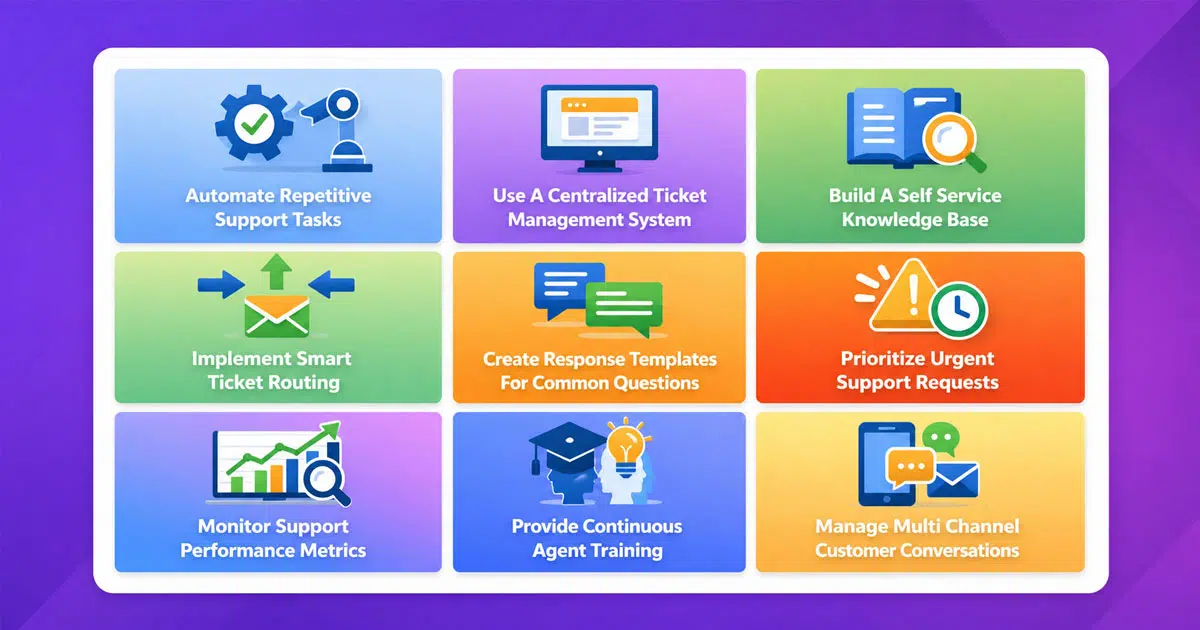
9 Effective Ways To Manage High Volume Customer Support
Managing high volume customer support requires a combination of smart processes, the right tools, and well trained people. No single tactic solves everything, but these nine approaches work together to help your team effectively manage high demand periods.
1. Automate Repetitive Support Tasks
Automation handles routine work so agents focus on complex issues requiring human judgment. Set up workflow triggers that automatically tag tickets based on subject lines or keywords. Create rules that send instant responses acknowledging receipt and setting expectations. According to research, AI powered tools can provide instant responses for common questions, freeing human agents for higher value conversations. Automation also reduces errors during high volume periods when rushed agents might skip steps.
2. Use A Centralized Ticket Management System
A unified inbox brings every channel into one place. Email, chat, social media messages, and phone system logs all flow into the same queue. Agents see complete conversation history without switching between platforms. This eliminates missed calls and dropped calls that happen when information lives in disconnected tools and highlights the benefits of using a ticketing system for organized, scalable support. Centralization also gives managers real time visibility into backlog size and team performance.
3. Build A Self Service Knowledge Base
A comprehensive knowledge base can deflect 20 to 40 percent of repetitive questions. Articles covering password resets, billing updates, and common feature questions let customers help themselves. Include screenshots, step by step instructions, and last updated dates to build trust. Well designed self service customer support options reduce stress on your team while giving customers faster answers outside business hours.
4. Implement Smart Ticket Routing
Routing systems automatically direct tickets to the right agent or team based on issue type, customer tier, or language. A payment failure ticket goes straight to billing specialists. Enterprise customers get priority over trial users. This intelligent triage prevents bottlenecks and ensures high value calls reach experienced agents quickly. Ticket automation software and call routing rules can cut average handling time significantly by matching issues with the right expertise from the start.
5. Create Response Templates For Common Questions
Canned responses speed up replies for frequently asked questions. Build templates for refund policies, shipping timelines, and common troubleshooting steps. The key is personalizing greetings and closing lines so responses feel human. A good template handles 80 percent of the response, while agents add the remaining 20 percent for context. This maintains quality while dramatically increasing throughput, especially when you follow canned responses customer support best practices.
6. Prioritize Urgent Support Requests
Not every ticket deserves the same urgency. Payment failures, login blocks, and service interruptions need immediate attention. Minor UI questions can wait. Create clear ticket prioritization rules based on impact (how many customers affected) and urgency (is the customer blocked from using your product). Tags like “Critical” or “High Impact” help agents identify high priority items instantly during call volume surges.
7. Monitor Support Performance Metrics
Tracking the right numbers helps you catch problems early. Focus on first call resolution rate, average wait, backlog size, and customer satisfaction scores. Daily check ins with these metrics let managers adjust staffing before SLA breaches occur. Real time dashboards show whether your team is keeping up or falling behind. Data driven forecasts based on historical data help predict upcoming peak periods.
8. Provide Continuous Agent Training
Upskilling agents reduces repeat contacts and improves first call resolution. When agents know the product deeply, they solve problems faster. Regular training sessions covering new features, updated processes, and soft skills keep the team sharp. Poorly trained agents create backlogs because they cannot resolve issues independently. Investing in training pays back through higher efficiency during volume spikes.
9. Manage Multi Channel Customer Conversations
Customers reach out through whichever channel is convenient. Your team needs to handle all of them without losing context. When a customer starts on chat and follows up via email, agents should see the complete customer journey. Omnichannel support keeps every interaction connected. This prevents customers from repeating themselves and ensures consistent responses regardless of platform.
Role Of Automation In Handling Large Support Volumes
Automation transforms how support teams handle increased demand. Rather than throwing more agents at the problem, smart automation multiplies what each person can accomplish during high volume periods.
Automated Ticket Categorization
When a ticket arrives, automation reads the subject line and content to apply appropriate tags. A message about billing gets tagged “Billing” and routed accordingly. Messages mentioning specific features get categorized for product specialists. This happens instantly, saving agents the manual triage work that consumes time during volume spikes. Accurate categorization also improves reporting, helping you spot trends across topics.
Automated Ticket Assignment
Once categorized, tickets can route automatically to available agents with matching skills. Round robin distribution prevents any single person from getting overwhelmed. Load balancing considers current workload before assigning new tickets. This kind of automated ticket assignment keeps work flowing evenly across your customer service teams, preventing burnout while maintaining consistent response times.
Workflow Triggers For Ticket Actions
Triggers fire based on specific conditions. When a ticket sits unresolved for 4 hours, send an internal alert. When a customer replies after an agent response, reopen the ticket automatically. When an issue gets tagged “Urgent,” escalate to senior staff immediately. These workflow automation triggers ensure nothing falls through the cracks, even when agents are handling dozens of conversations simultaneously.
Automated Customer Notifications
Keep customers informed without manual effort. Send confirmation when a ticket is received. Notify when status changes from “Open” to “In Progress.” Alert customers when their issue is resolved. These automated updates, especially when powered by customer support software that improves response time, reduce anxiety and prevent customers from sending follow up messages asking for status updates. Fewer follow ups mean lower overall volume.
Automated Escalation Processes
Some issues need manager attention. Automation can escalate based on customer tier, issue severity, or time elapsed. If a high value customer waits beyond your SLA threshold, alert a supervisor automatically. If sentiment analysis detects an angry customer, flag for immediate human review. As part of broader ticket automation software capabilities, this prevents potential customers from becoming lost revenue due to slow handling of critical situations.
Multi Channel Support For High Ticket Volume
Providing customers with multiple contact options is no longer optional. Modern support requires meeting people where they already communicate. Understanding what multi-channel customer support is helps clarify how these setups manage high volumes effectively.
Unified View Of Customer Conversations
A shared inbox consolidates every channel into one interface. Agents see emails, chat transcripts, social messages, and phone call notes in a single timeline. This unified view, powered by multichannel helpdesk software, eliminates the need to switch between platforms. When call volumes surge, agents do not waste time hunting for context across disconnected systems.
Consistent Communication Across Channels
Customers expect the same quality service regardless of how they reach you. Multi channel support ensures your messaging stays consistent whether someone calls your phone lines or sends a social DM. Templates and internal documentation help maintain uniformity. Consistency builds customer trust and reduces confusion during service disruptions when customers may try multiple channels.
Faster Responses Across Platforms
Chat and messaging allow agents to handle multiple conversations simultaneously. Research shows that while phone calls tie agents to single interactions, chat enables multitasking that significantly cuts average wait times. During peak periods, shifting simple questions to chat frees phone capacity for complex issues requiring detailed conversation.
Context Continuity During Conversations
When a customer switches from chat to email mid conversation, agents need to see what already happened. Multi channel systems maintain continuity by linking interactions to customer profiles. This prevents customers from repeating information, reducing customer frustration and shortening resolution times. Context continuity is especially valuable for complex issues that span multiple contacts.
Efficient Channel Management For Support Teams
Managers need visibility into performance across every channel. Multi channel dashboards show which platforms have the longest queues, which agents handle which channels, and where bottlenecks form. This visibility, usually delivered through a modern helpdesk system, enables quick decisions about reallocating resources. During unexpected surges, managers can redirect agents to overloaded channels before customer satisfaction drops.
Key Metrics To Track High Volume Customer Support Performance
Measuring the right indicators helps you understand whether your team is keeping pace with demand. These five metrics provide essential visibility during high volume periods.
First Response Time
First response time measures how quickly customers hear back after submitting a request. During normal periods, targets might be 1 hour for chat and 4 hours for email. When this metric doubles or triples, you are in high volume territory. Tracking first response time helps you identify when to activate surge protocols before customer experience suffers significantly.
Ticket Resolution Time
Resolution time tracks how long it takes to fully solve an issue from first contact to closure. High volume periods naturally extend this metric as backlogs grow. Watching resolution trends helps you understand whether your team is keeping up or falling further behind. A widening gap between new tickets and resolved tickets signals trouble.
Customer Satisfaction Score
CSAT surveys capture how customers feel about their support experience. Scores dropping below targets like 4.5 out of 5 indicate problems. During volume spikes, rushed responses often correlate with declining satisfaction. Monitoring CSAT in real time lets you catch quality issues before they become widespread. Maintaining service quality matters more than pure speed in building long term loyalty.
Agent Productivity Metrics
Tickets handled per agent per day reveals individual and team capacity. Baseline understanding helps you recognize when agents are overextended. Industry benchmarks vary, but tracking your own patterns matters more than external comparisons. When productivity drops despite high effort, investigate whether agents face system issues, training gaps, or simply unsustainable volume.
Ticket Volume Trends
Tracking volume over time reveals patterns. Monday mornings might consistently spike. Month end brings billing questions. Product launches drive feature inquiries. Understanding these trends enables accurate forecasting and proactive staffing adjustments. Historical data makes future peak periods predictable rather than surprising.
High Volume Customer Support Best Practices
Beyond specific tactics, certain practices distinguish teams that thrive during high volume from those that struggle. These habits build resilience before surges occur.
Structured Ticket Management Processes
Clear processes reduce chaos during peak periods. Document how tickets should be tagged, prioritized, and escalated. Define ownership rules so nothing sits unclaimed. Establish response time targets for different issue categories. A well configured help desk supports these processes so that when volume spikes, well documented workflows guide consistent behavior without requiring constant manager intervention.
Collaboration Across Support Teams
Support cannot operate in isolation. Product teams need visibility into common complaints that might indicate bugs. Sales needs to know when support is overwhelmed so they can set realistic expectations. Marketing should coordinate campaign timing to avoid overwhelming support with sudden surges. Cross department collaboration, supported by the right helpdesk setup, prevents problems that create unnecessary volume.
Clear Internal Support Documentation
Internal wikis and runbooks help agents find answers quickly. When a new hire encounters an unfamiliar issue, clear documentation provides guidance without requiring senior agent assistance. Good internal docs reduce training time and improve first call resolution rates. Keep documentation updated as products and processes evolve.
Regular Workflow Optimization
What worked last quarter might not work today. Regularly review automation rules, routing logic, and response templates. Analyze which canned responses get used most and which need updates. Examine escalation patterns to identify training opportunities. Applying smarter helpdesk setups and continuous improvement keeps your processes aligned with current realities.
Continuous Customer Service Improvement
High volume periods reveal weaknesses in your support operation. After each surge, conduct retrospectives to identify what worked and what failed. Use customer feedback to spot recurring pain points. Partner with product teams to fix issues driving repeat contacts. Choosing helpdesk software for small growing businesses that can evolve with these learnings helps treat support as a learning function rather than a cost center and builds lasting improvements.
EasyDesk Helps Manage High Volume Customer Support
Growing businesses often receive support requests from more customers across multiple channels. EasyDesk is a secure, transparent customer support platform that helps teams manage rising demand, organize conversations efficiently, and maintain consistent support quality even when ticket volume increases across communication platforms.
Smart Call Routing And IVR Support
EasyDesk improves support efficiency with structured call routing and an integrated ivr system. Incoming calls move to the appropriate agent based on request type, which helps support teams manage more calls without confusion. Shorter hold music time and faster routing also reduce delays and help agents respond to customer inquiries more effectively during busy support periods.
Real Time Analytics For Support Performance
EasyDesk offers real time analytics that give managers clear visibility into support activity. Teams can monitor request trends, response times, and ticket flow across channels. Such insights help leaders quickly identify performance gaps, allocate resources during traffic spikes, and maintain stable service quality when customer demand increases.
Tools That Support Growing Customer Demand
Customer support demand naturally rises as businesses attract more customers. EasyDesk organizes requests from different channels in one system, allowing agents to handle more calls and inquiries efficiently. Automated workflows and other EasyDesk features reduce repetitive tasks and highlight positive aspects of organized support operations that improve overall productivity.
Better Support Experience For Customers
A structured support system helps businesses respond faster and reduce service delays. Ticketing software built for better customer support like EasyDesk helps support teams manage conversations smoothly, which prevents confusion and improves communication quality. Faster responses and clear support processes help keep customers happy and strengthen long term customer relationships even during high volume support situations, as shown when EasyDesk improved response time for a growing team.
Frequently Asked Questions
What Causes High Volume Customer Support Requests
Several factors trigger volume spikes. Service interruptions from outages or maintenance create immediate surges as customers seek updates. Product launches and successful marketing campaigns bring new users with onboarding questions. Billing changes like subscription price updates generate confusion. Even internal causes like switching CRM tools or launching features without updated help center articles contribute. Understanding your specific triggers helps you prepare before volume overwhelms capacity.
How Can Businesses Reduce Customer Support Ticket Volume
Prevention works better than reaction. Build a comprehensive knowledge base covering common questions so customers can self serve. Use onboarding flows to guide new users through setup without requiring support contact. Analyze repeat contact reasons to identify product issues worth fixing. Proactive communication during known service disruptions reduces incoming calls asking for updates. Teams that invest in deflection can cut volume spikes by up to 24 percent according to industry research.
Which Tools Help Manage Large Ticket Volumes
Helpdesk platforms that centralize multi channel support into unified inboxes are essential. Look for automation features including ticket routing, workflow triggers, and canned responses. SLA tracking ensures accountability. Real time dashboards provide visibility into queue depth and team performance. Knowledge base builders enable self service. AI powered tools add capabilities like sentiment analysis and predictive volume forecasting. EasyDesk combines these features specifically for startups and SMBs, with transparent customer support plans that can scale with demand.
Why Does Automation Improve Customer Support Efficiency
Automation handles repetitive tasks that consume agent time. Ticket categorization happens instantly without manual review. Routing sends issues to the right specialist automatically. Customer notifications keep people informed without agent effort. Escalation rules ensure critical issues get attention. By removing mechanical work, workflow automation in customer support lets human agents focus on conversations requiring judgment, empathy, and problem solving. This multiplies what each team member can accomplish.
How Does Multi Channel Support Help Teams Handle Large Ticket Volumes
Multi channel support gives customers options while giving agents efficiency. Chat and messaging allow handling multiple conversations simultaneously, unlike phone calls that lock agents into single interactions. Unified views prevent context loss when customers switch channels. Consistent templates ensure quality across platforms. Managers gain visibility into which channels need resources. The result is higher throughput without proportionally increasing headcount during volume spikes when powered by multichannel helpdesk software.



