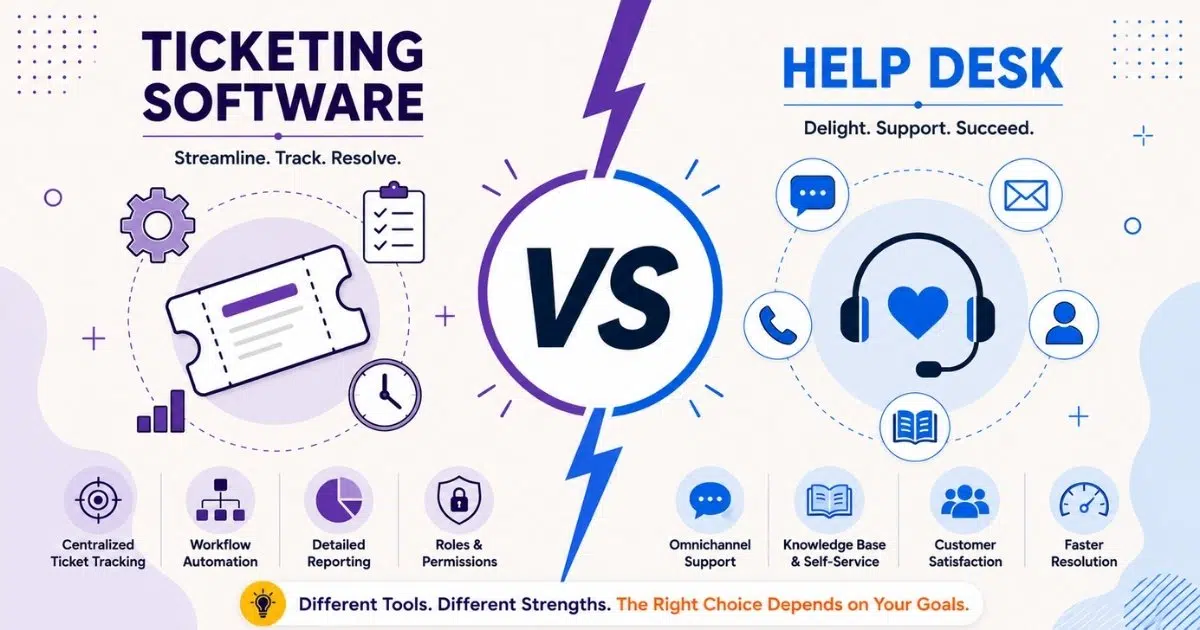
Businesses often compare ticketing software vs help desk platforms when support teams start handling larger volumes of customer and internal requests. While both systems manage desk tasks and technical problems, their primary focus differs across workflows, automation features, and communication channels.
A traditional help desk usually supports internal IT and reactive support, while modern ticketing systems offer comprehensive features, detailed tracking, and deeper integration with other systems.
Companies also evaluate help desk performance, service level agreement management, and cost-effective scaling before choosing a platform. Understanding the service desk approach behind each solution helps businesses improve operational efficiency, streamline support processes, and deliver faster responses across departments and customer interactions.
What Is A Help Desk
A help desk is both a support function and a type of desk software. As a function, it gives users a central place to ask for help. As software, it helps support teams receive, assign, respond to, and resolve user requests through email, phone, live chat, portals, and sometimes social media.
Help desks typically offer multi-channel support, allowing users to seek assistance through various means such as email, phone, and live chat, whereas ticketing systems focus on converting inquiries into tickets for tracking and management. Help desks provide multi-channel support, allowing users to seek assistance through various methods such as email, phone, live chat, or social media, ensuring immediate and personalized support. Omnichannel support unifies inquiries across email, chat, phone, and social media into a single conversation thread.
What Is Ticketing Software
Ticketing software is the system that converts emails, forms, chat messages, alerts, or API calls into structured tickets. Modern platforms highlight many benefits of using a ticketing system, as ticketing systems convert incoming inquiries into tickets with unique IDs, enabling support teams to efficiently monitor and resolve issues while providing real-time updates on ticket status. Each ticket usually includes status, priority, owner, requester, category, history, and next steps.
A ticketing system can serve it teams, HR, legal, finance, facilities, and operations. It is especially useful when multiple departments need to manage user requests, route approvals, and keep detailed tracking of every change. Both help desks and ticketing systems utilize ticketing platforms to log, track, and manage user requests, creating accountability and providing documentation for future reference and analysis.
Key Differences Between Ticketing Software And Help Desk
Ticketing software vs help desk is best understood as backbone versus experience. Most help desk platforms include ticketing, but not every ticketing platform delivers broader support, self service options, or polished user support.
Aspect | Ticketing Software | Help Desk | Example Use Case |
|---|---|---|---|
Primary Goal | Track and manage service requests | Provide support and resolve user issues | Internal approvals versus customer support |
Scope | Workflows, queues, ownership, and status | Ticketing plus channels, knowledge, SLAs, and communication | Facilities work orders versus live chat support |
Typical Users | IT, HR, legal, finance, and operations teams | Agents, customers, employees, and managers | Back office workflows versus user-facing support |
Channels | Email, forms, APIs, and system alerts | Email, phone, live chat, portal, and social media | Monitoring alert versus customer inquiry |
Automation | Deep automation for routing, approvals, and escalations | Auto replies, SLA alerts, suggestions, and macros | Onboarding flow versus quick response template |
Reporting | Volume, backlog, aging, and team performance | Resolution, CSAT, channel performance, and customer satisfaction scores | Operations backlog versus support experience |
Best For | High request volume and complex workflows | Comprehensive support across multiple channels | Internal service delivery versus external customer care |
Scope And Objectives
Ticketing software focuses on structuring work items, assigning owners, and keeping detailed tracking. A help desk focuses on how people experience support, including speed, clarity, and user satisfaction. Help desks focus on resolving specific user issues quickly, whereas service desks encompass a broader scope that includes service management, optimization, and strategic alignment with business goals.
Help desks are typically a user-facing part of a broader service desk strategy. In the information technology infrastructure library, support functions often connect incident management, request fulfillment, change management, problem management, and asset management into a wider service management model.
Features And Functionality
Help desks often include multi channel support, a self service portal, knowledge bases, live chat, canned responses, SLA timers, feedback surveys, and advanced analytics. Advanced analytics in help desk systems offer deeper reporting to track agent performance, resolution times, and customer satisfaction.
Ticketing software focuses more on custom fields, queues, ticket routing, approvals, audit history, reporting tools, integrations, and advanced features for workflow control, which is why many teams look for the best ticket management system when volumes and complexity increase. Buyers should compare required capabilities carefully so they do not overbuy a full help desk when basic ticket management is enough.
Users And Stakeholders
Help desk users include agents, employees, customers, and managers who care about fast answers and clear communication. Ticketing software stakeholders can also include back office teams that rarely speak directly with end users but still need to manage internal requests.
An IT director might use the ticketing system to see which request types are growing, which teams are overloaded, and where staff should be reassigned. The primary focus should match business objectives, not just tool preferences.
Service Management And ITSM Alignment
A help desk primarily provides reactive support to address immediate technical issues, while a service desk takes a proactive approach to improve overall service delivery and prevent future incidents. While help desks focus on reactive support to resolve immediate issues, they may lack the proactive measures that service desks implement to prevent future incidents, which can be a limitation for organizations seeking long-term solutions.
Ticketing software may support incident management and service requests, but it may not include full ITSM modules. Tools such as Jira Service Management can be used as help desk, ticketing, or service desk solutions when extended with the right processes.
Automation And Integrations
Help desks often prioritize auto replies, knowledge suggestions, SLA breach alerts, and user-facing communication. Ticketing systems often go deeper into multi-step approvals, monitoring integrations, identity workflows, and cross-team escalation rules, making automated workflow software for smarter support especially valuable as operations scale.
For example, a high-priority infrastructure alert can create a ticket automatically, notify the on-call engineer, update status pages, and link the incident to affected assets. This is where existing tools, asset management databases, chat platforms, and monitoring systems become critical.
Licensing, Costs, And Scalability
Ticketing systems are typically simpler and more cost-effective, making them a good fit for smaller organizations or those with limited resources, while help desks, though more expensive and complex, offer greater functionality for businesses with broader support needs. Many tools offer free trials, a free plan, and paid plans, but the real cost includes setup, training, integrations, and future growth.
A small startup may begin with lightweight ticketing, then move toward a full help desk as customer volume, support processes, and broader support needs increase. Evaluate three to five year cost, not only first-year license pricing.
Benefits And Limitations Of Ticketing Software
Ticketing software is often the foundation for organized support operations. Choosing the #1 ticketing software built for better customer support turns scattered messages into accountable work, helps teams track ownership, and improves operational efficiency when processes are clearly defined.
Operational Efficiency Gains
Ticketing systems are particularly beneficial for managing high volumes of requests, as they streamline workflows and enhance productivity by organizing service requests in an efficient manner. Teams that learn how to manage support tickets efficiently using EasyDesk find ticketing systems particularly useful for managing high volumes of requests and tracking internal IT issues, while help desks are more oriented towards providing immediate and personalized support to users.
Teams can measure first response time, resolution time, backlog, queue age, and SLA performance. Standard templates for repetitive tasks such as password resets, software access, or laptop requests reduce manual effort and help agents work faster.
Structured ticket management also helps organizations maintain accountability across support teams and departments. Better workflow visibility improves resource planning, reduces missed requests, and supports faster decision-making when request volumes increase during busy operational periods.
Support For Cross Department Workflows
Ticketing software works well when a request touches multiple departments. Robust ticket creation and management for structured support ensures employee onboarding can require HR, IT, security, facilities, and finance to complete related tasks while preserving one shared history.
This is difficult to manage with disconnected desk solutions. Shared queues, consistent fields, and permission controls help multiple departments collaborate without exposing sensitive HR or legal data unnecessarily.
Cross-functional collaboration also becomes easier when departments follow standardized request processes and approval paths. Centralized ticket tracking reduces communication gaps, improves workflow transparency, and ensures every team involved can monitor task progress without duplicate updates.
Reporting And Continuous Improvement
Ticketing data can reveal recurring technical issues, overloaded queues, peak request periods, and weak handoffs. When powered by the best customer support ticketing software system, managers can use data-driven insights to justify automation, staffing changes, or better documentation.
For example, if VPN tickets spike every Monday morning, the team can review configuration, publish clearer guidance, or improve proactive support. Without clean categories and consistent tagging, however, reports can mislead teams and reduce service quality.
Consistent reporting also helps businesses identify long-term operational patterns and service bottlenecks before they escalate into larger problems. Organizations that regularly review ticket analytics often improve service quality, strengthen SLA compliance, and optimize support team performance over time.
Constraints For User Experience
Standalone ticketing software may expose only basic forms and email updates. Users may feel support is slow or unclear if they cannot see status, browse knowledge articles, or use live chat support for real-time conversations.
A common solution is to add a help desk front end on top of the ticketing engine. An EasyDesk helpdesk ticketing software approach lets users see an intuitive interface while support teams keep the structured workflows they need.
Limited customer-facing features may also affect satisfaction when users expect faster communication and self service access. Businesses handling external customer support often adopt multi channel support software for customer service, combining ticketing software with portals, chat tools, and automated notifications to improve the overall support experience.
Scalability And Governance Considerations
Flexible schemas, audit logs, approvals, and role-based access make ticketing software scalable. But as volumes grow, unmanaged queues, duplicate categories, and conflicting automations can create confusion.
Teams should define request catalogs, naming rules, permissions, and ownership early. Otherwise, a once-simple ticketing system can become cluttered and hard to trust.
Strong governance practices help organizations maintain clean workflows, accurate reporting, and secure access controls as support operations expand. Businesses that establish clear ticket management standards early usually avoid operational complexity and maintain long-term system reliability.
Benefits And Limitations Of Help Desk Platforms
A help desk wraps ticketing with user-facing support, clear communication, and self service. It is often the better fit when the goal is to provide immediate help across multiple channels.
Benefits Of Help Desk Platforms | Limitations Of Help Desk Platforms |
|---|---|
Unified communication across multiple channels | Limited workflow customization in some platforms |
Faster response and issue resolution times | Complex approvals may require external tools |
Better customer satisfaction and support consistency | Advanced integrations may need extra configuration |
Self service portals reduce ticket volume | Training and onboarding take time |
Knowledge management improves agent efficiency | User adoption challenges can slow implementation |
Strong alignment with service desk operations | Higher costs from add-ons and scaling |
Centralized ticket tracking and customer history | Rigid fields and workflows may frustrate teams |
Improved SLA tracking and reporting visibility | Migration from legacy systems can be difficult |
Unified Support Experience
A help desk gives agents a single view of email, chat, phone notes, portal tickets, and social messages. Users do not need to repeat the same story when they switch channels.
Help desks provide immediate assistance to users facing technical issues, which can lead to faster issue resolution and improved employee satisfaction. Consistent templates, customer history, and related tickets also improve customer satisfaction.
Centralized communication also helps managers monitor response quality, identify recurring technical problems, and maintain service consistency across teams. Better visibility into customer interactions allows support leaders to improve workflows, reduce delays, and strengthen overall help desk performance.
Self Service And Knowledge Management
Self service options are a major help desk advantage. Strong knowledge base and canned responses for faster support mean users can search FAQs, guides, and troubleshooting articles before opening a ticket.
Knowledge management works best when common support requests become clear, plain-language articles. For example, publishing VPN setup instructions can reduce future tickets and help new agents answer consistently.
Well-structured knowledge bases also reduce ticket volume during peak periods and improve operational efficiency for support teams. Businesses that invest in updated self service content often lower support costs while giving users faster access to reliable solutions.
Alignment With Service Desk And IT Teams
Help desks support it teams by formalizing incident handling, request fulfillment, and escalation. As part of service desk operations, they can connect with monitoring, assets, and change calendars.
A service desk can use help desk trends to plan reliability improvements, capacity upgrades, and training. In this model, desks focus on immediate support while the broader service desk improves long-term outcomes.
Clear alignment between help desk software and service desk operations also improves accountability across multiple departments. Shared visibility into incidents, approvals, and technical support activities helps teams coordinate faster responses while supporting broader business objectives and compliance requirements.
Constraints Around Flexibility
Some help desk platforms are easy to launch but harder to customize. Fixed fields, limited approvals, or rigid workflows can frustrate teams with specialized requirements.
If legal approvals, HR privacy, or complex procurement workflows cannot be modeled, teams may return to spreadsheets. Buyers with complex workflows should validate customization depth before committing.
Limited flexibility can also create integration challenges with existing tools and other systems already used across the organization. Businesses with advanced automation requirements should review workflow controls, reporting tools, and API capabilities before selecting a help desk platform.
Cost, Training, And Adoption
Help desk value depends on adoption. Guides on how the right helpdesk setup boosts customer support emphasize that agents need training, users need clear request categories, and leaders need to reinforce the help desk as the first place to ask for help.
Costs may include per-agent licenses, chat add-ons, analytics, migration, and implementation support. A phased rollout usually works better than replacing all legacy desk tools at once.
Successful adoption also depends on continuous onboarding, performance reviews, and communication between support teams and leadership. Organizations that prioritize training and measurable service level agreement goals often achieve stronger long-term returns from their help desk investment.
How To Choose Between Ticketing Software And Help Desk
Choosing between ticketing software and a help desk system depends on whether the priority is basic issue tracking or comprehensive, omnichannel customer support. If your primary goal is to provide comprehensive support to users across multiple channels, a help desk is the better choice, while a ticketing system may be sufficient if your focus is on efficiently managing and resolving service requests.
Assessing Support Scope And Complexity
List every team that will use the system, including IT, HR, facilities, finance, and external support. Estimate monthly volume, peak periods, approval steps, privacy rules, and escalation needs.
For organizations dealing with a high volume of inquiries, a ticketing system can help streamline workflows and improve resolution times, whereas a help desk is more suitable for those requiring a centralized platform to handle diverse support functions.
Clear assessment of operational complexity also helps businesses avoid underpowered tools that fail during growth periods. Companies with multiple departments and layered approvals often benefit from platforms that support scalable workflows and centralized visibility.
Evaluating User Experience Requirements
Ask whether users expect portals, live chat, mobile access, or mostly email support. Customer-facing teams often need polished help desk experiences, while internal workflow teams may accept simpler forms.
Field staff may prefer mobile-friendly access, while developers may prefer chat and API-connected workflows. Start with critical journeys such as onboarding, incident reporting, and access requests.
User expectations also vary across departments, locations, and support environments. Businesses should review how employees and customers interact with support teams daily before selecting platforms that shape long-term service experiences and communication standards.
Reviewing Existing Tools And Integrations
When choosing between a help desk and a ticketing system, consider existing tools; if you already use communication platforms or a knowledge base, integrating a ticketing system may complement your existing setup.
Document identity providers, HR systems, asset inventories, monitoring tools, CRM, chat apps, and development platforms. Strong integrations reduce manual work and make support processes easier to maintain.
Well-connected systems also improve reporting accuracy, automation reliability, and operational efficiency across support workflows. Businesses that prioritize integration planning early often reduce implementation delays and avoid disconnected support processes later.
Balancing Budget, Timeline, And Risk
Tight timelines may favor a ready-to-use help desk with standard workflows. Limited budgets may start with basic ticketing and add self-service, automation, and service catalogs later.
A practical approach is to launch core incident handling first, then improve every quarter. Compare total cost of ownership, including internal time, training, consulting, data migration, and future modules.
Decision makers should also account for future scaling costs, vendor support quality, and operational risks during implementation. Careful planning helps organizations avoid rushed deployments that create workflow disruption or low user adoption rates.
Defining Long-Term Service Management Vision
Think beyond the first year. If you plan to adopt change management, problem management, richer asset management, or enterprise service management, choose a platform that can grow.
A three-year roadmap helps align support teams, IT leaders, HR, operations, and executives around future service delivery instead of only solving today’s queue problem.
Long-term planning also helps businesses maintain platform consistency as operational requirements evolve across departments. Organizations with a clear service management strategy usually achieve stronger scalability, governance, and process standardization over time.
When Combining Both Approaches Works Best
Many organizations use a help desk as the visible layer and ticketing software as the operational engine. Users see a simple portal, while backend teams manage approvals, escalations, and cross-department workflows.
This hybrid model is useful when you need both a strong user experience and deep automation. It also reduces data silos because different teams can work from one shared ticketing core.
Combined approaches also help organizations balance customer satisfaction with operational control across large support environments. Businesses that unify help desk interfaces with structured ticketing workflows often achieve better collaboration, reporting accuracy, and service consistency.
Which Option Fits Common Use Cases Better
There is no universal winner in ticketing software vs help desk. The better option depends on volume, channels, service maturity, and the type of support you provide.
Internal IT Support And Service Desk Operations
Internal IT usually benefits from an integrated help desk and ticketing system. Many teams look for the best IT help desk software for modern teams so level-one agents can use a help desk interface, while infrastructure and security teams manage advanced queues, alerts, and incident workflows.
Asset management integration is especially valuable because agents can connect devices, licenses, applications, and previous incidents directly to tickets.
Customer Support And External Service Teams
Customer support teams usually need a help desk because customers expect fast updates across multiple channels. Branded portals, chat widgets, status visibility, and customer satisfaction scores are important.
Ticketing software still matters underneath because high-volume customer inquiries need routing, prioritization, ownership, and reporting.
HR, Facilities, And Non IT Service Teams
HR and facilities often use ticketing software for onboarding, leave questions, workspace requests, maintenance, and policy support. They may not need a full technical support help desk, but they do need privacy controls and clear request forms.
Where employee experience is important, a simple help desk front end can make internal support feel more approachable.
Project And Engineering Workflows
Engineering teams often use ticketing as structured work tracking rather than traditional help desk software. A support incident may become a linked bug, feature request, or reliability task.
This connection helps service issues influence product roadmaps, architecture decisions, and future release planning.
Small Businesses And Growing Startups
Small businesses often start with a shared inbox, free plan, or lightweight help desk, but smarter helpdesk setups for smoother support quickly become important as complexity grows. That can work while volumes are low and processes are simple.
As the company grows, missed messages and unclear ownership become costly. Choosing cost-effective tools that scale into paid plans and advanced features can prevent disruptive replacement later.
Why Businesses Choose EasyDesk For Modern Support Management
EasyDesk helps businesses bring support requests, conversations, and ticket management into one organized help desk. This EasyDesk helpdesk ticketing software is built for support teams that want faster responses, clearer ownership, and less manual work without adding unnecessary complexity, while EasyDesk features for smarter, secure customer support ensure the platform remains easy to adopt and govern.
EasyDesk includes automated workflows, ticket creation and management, canned responses, a built-in knowledge base, multi-channel support, SLA management, feedback tracking, roadmaps, changelogs, live chat, and social media integration. As a comprehensive EasyDesk customer support platform with robust ticket creation and management, these features help teams centralize customer interaction, prioritize work, and reduce repetitive tasks.
The platform also supports customer satisfaction by giving agents better visibility and helping users receive timely, consistent answers; many teams see how customer support software improves response time by 3X when they adopt EasyDesk. For growing teams, EasyDesk offers a practical way to manage support operations with an intuitive interface and reliable workflows, as shown in case studies on how EasyDesk improved response time for a growing team.
Frequently Asked Questions
Can I Use Ticketing Software Without A Formal Help Desk
Yes. Many teams start with ticketing software to centralize requests while still communicating through email or chat. This works well for internal workflows with moderate volume. The limitation is visibility. Users may not have a portal, self-service options, or knowledge articles, so transparency can suffer as expectations rise, which is why understanding how a help desk improves support behind the scenes becomes important as service expectations grow.
Is A Service Desk Different From A Help Desk
Yes. A help desk focuses on resolving incidents and user requests quickly. A service desk has a broader scope that includes service management, change management, problem management, asset management, and alignment with business objectives. Many desk solutions can operate as either, depending on modules, processes, and maturity, and understanding the philosophy behind EasyDesk as secure, transparent customer support can help clarify which model fits your organization.
How Do Asset Management And Ticketing Work Together
Asset management links tickets to laptops, servers, software licenses, applications, or other assets. This helps agents diagnose issues faster and identify patterns. If many incidents relate to the same device model or software version, teams can plan replacements, updates, or training more confidently.
What Metrics Should I Track In A New Help Desk Or Ticketing System
Start with ticket volume, first response time, resolution time, backlog age, SLA compliance, and user satisfaction scores. As maturity grows, add recurrence rates, channel performance, cost per ticket, and team performance. Reliable reporting depends on consistent categories, clean data, and clear ownership.
How Long Does It Typically Take To Implement These Systems
A simple help desk or ticketing setup can often go live in a few weeks if requirements are clear. More complex implementations involving multiple departments, asset links, data migration, and advanced automation may take several months. Plan time for process design, integrations, testing, training, and phased rollout to reduce disruption.



