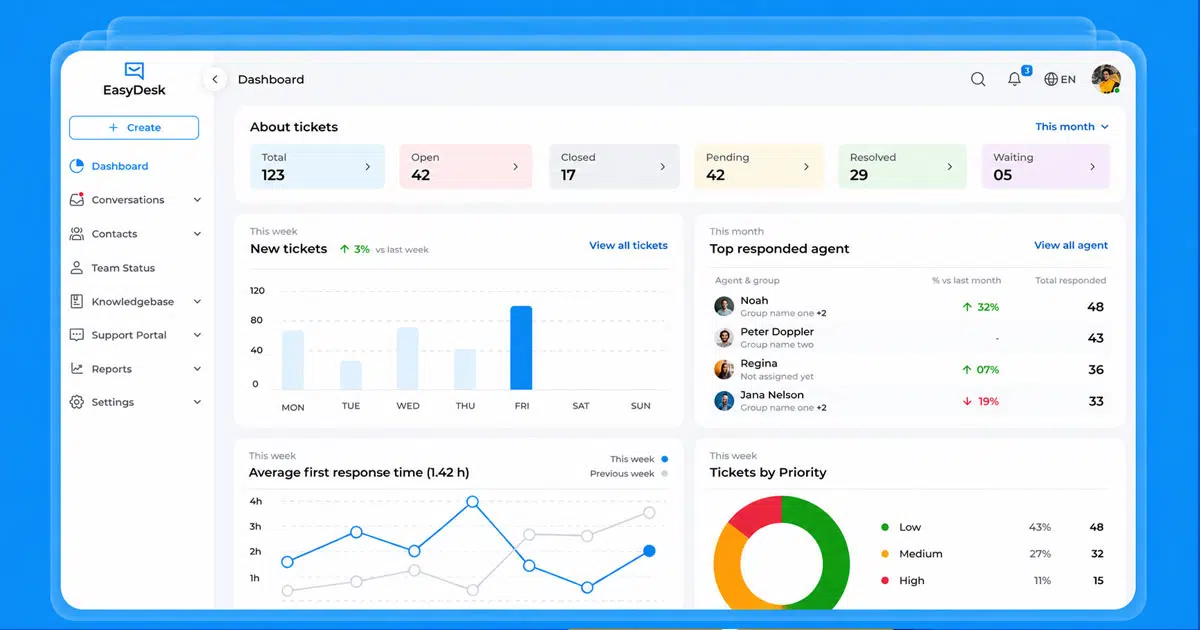
Customer support systems must handle thousands of customer interactions every day across websites, chat, and other communication channels. Businesses also need reliable security service to protect support systems from spam and malicious bots that can overload helpdesk tools. Modern platforms include security verification processes that confirm each request and ensure verification successful before tickets enter the system. A single platform connected to secure servers allows teams to manage conversations, monitor activity, and track responses such as respond ray id for system validation. When the platform verifies requests automatically and filters bot traffic, support teams can focus on real customer issues. EasyDesk delivers those capabilities while improving response speed and support organization.
What Is Customer Service Software
Customer service software transforms raw inquiries from emails, chats, social media, and calls into trackable tickets with assigned priorities, owners, and timelines. These tools use smart routing based on issue severity, customer type, or agent expertise to prevent duplicate efforts and ensure urgent cases get immediate attention.
Research shows that 77% of consumers prioritize response speed when evaluating service quality. Modern helpdesk solutions address this by significantly reducing response times through automation and centralized communication. The system converts every customer request into a structured ticket, making it easier for teams to manage workloads and maintain accountability. Whether handling IT incidents, order queries, or subscription issues, a helpdesk management system removes the chaos of scattered conversations and gives teams control over their support operations.
What Is EasyDesk?
EasyDesk is a cloud based helpdesk platform available at easydesk.app, built specifically for ticketing, multi-channel support, and automation. It unifies conversations from email, live chat, WhatsApp Business, and social media into one inbox, automating ticket creation, assignment, and status updates without manual effort while emphasizing secure, transparent customer support.
The platform features workflow rules for routing, internal notes for team collaboration, and real-time dashboards for performance tracking. Unlike complex legacy systems, EasyDesk offers a clean interface that helps high-volume teams respond quickly while maintaining full context on every customer conversation. With pricing starting at $35 per month and a 14-day free trial, it provides flexible options for businesses at different stages of growth. Support agents can manage multiple chats simultaneously, and the built-in knowledge base helps customers find answers independently.
Top Benefits Of Using EasyDesk As Customer Service Software
EasyDesk delivers structured efficiency for support teams handling growing ticket volumes. Studies indicate that 81% of customers repurchase after positive service experiences, making reliable support tools essential for business growth. Here are the core benefits that make EasyDesk valuable for customer service operations.
1. Centralized Ticket Management
Scattered customer requests across email threads, social messages, and chat logs create confusion and missed opportunities. EasyDesk solves this by converting every inquiry into a prioritized ticket with clear ownership and timelines.
The ticket management system uses smart routing to match each request with the right agent based on expertise, workload, or issue type. This prevents duplicates and ensures high-priority tickets get immediate focus, illustrating many benefits of using a ticketing system for structured, organized support. Every ticket displays the full context of past interactions, so agents never ask customers to repeat information they already provided.
For growing support teams managing hundreds of requests weekly, this centralized approach maintains accountability. Managers can track progress on any ticket instantly, and escalation rules ensure nothing falls through the cracks. The structure removes guesswork from daily support work and keeps everyone aligned on what needs attention, which is why EasyDesk is often considered the best ticket management system choice for many teams.
2. Faster Customer Response Time
Speed matters in customer service. With 77% of consumers rating quick responses as their top priority, delays directly impact customer satisfaction and retention. EasyDesk helps teams improve response time by 3X through automation and streamlined workflows.
Automatic ticket routing sends requests to available agents immediately, eliminating manual sorting. Canned responses let agents reply to common questions in seconds while keeping messages accurate and on-brand. Service level agreements built into the platform set clear expectations for response and resolution times, with visual timers showing agents exactly when deadlines approach.
Live chat handles real-time conversations directly on your website, resolving issues before they become formal tickets. The combination of automation and instant communication channels means customers spend less time waiting and more time getting solutions, showcasing key live chat benefits for customer experience.
3. Automated Support Workflows
Manual tasks drain productivity. EasyDesk automates repetitive processes like ticket categorization, assignment rules, and standard notifications, freeing agents to focus on solving actual problems.
Workflow rules use simple logic to distribute tickets automatically with automated assignment across the team. When a billing question arrives, the system can automatically tag it, assign it to the finance queue, set an appropriate SLA, and send an acknowledgment to the customer. These processes happen instantly without anyone clicking a button.
For teams handling routine tasks like feedback surveys or status updates, automation handles the busywork. As your organization scales, you can add more sophisticated rules without adding headcount, making the platform genuinely flexible for different growth stages and aligning with modern ticket automation software best practices.
4. Unified Multi Channel Inbox
Customers reach out through whichever channel feels convenient to them. Some prefer email, others use WhatsApp, and many start conversations on your website chat. EasyDesk brings all these channels into a single interface where agents see every message in one place.
This unified inbox means conversations maintain full context even when a customer switches from chat to email mid-conversation. Agents respond from one platform without toggling between tools or losing track of what was already discussed. Tags and filters help organize tickets by channel, urgency, or topic, giving teams quick access to exactly what they need.
The smoother experience benefits both sides. Customers get consistent service regardless of how they contact you, and agents work more efficiently without the cognitive load of managing multiple applications.
5. Real Time Live Chat Support
Website visitors often have questions that need immediate answers. EasyDesk includes built-in live chat that lets support agents engage with customers directly, managing multiple conversations simultaneously without losing context.
Chat conversations convert to tickets automatically when needed, preserving the full history for future reference. Agents can use canned responses during chats to handle common queries quickly, while automation takes care of routine tasks in the background. This combination reduces agent workloads while maintaining fast, helpful communication.
Real-time chat prevents many issues from escalating into formal support tickets, saving time for both customers and your team. The feature integrates seamlessly with the rest of the platform, so chat history appears alongside email and social messages in the unified inbox, complementing EasyDesk’s broader ticket automation software capabilities.
6. Better Team Collaboration
Support rarely happens in isolation. Complex issues often require input from product, engineering, or billing teams. EasyDesk facilitates this collaboration through internal notes and auto-assignment features that keep everyone aligned without confusing the customer.
Internal notes let team members share context, suggestions, or updates behind the scenes. When an issue needs handoff to another department, the receiving agent sees the full ticket history and previous internal discussions. This eliminates the back-and-forth emails asking what already happened.
Auto-assignment rules ensure tickets reach the right people immediately. Priority settings help teams focus on urgent cases first, and shared visibility means managers always know who is working on what. The result is faster resolutions with less rework, similar to the gains delivered by automated ticket management software.
7. Insightful Support Analytics
Data drives improvement. EasyDesk provides customizable reports and real-time dashboards that track response times, ticket volumes, resolution rates, and SLA compliance. These metrics reveal patterns that help teams identify bottlenecks and refine their processes.
Managers can filter reports by agent, channel, issue type, or time period to pinpoint exactly where improvements are needed. Feedback integration captures customer sentiment directly within the platform, providing qualitative insights alongside the numbers.
This data-driven approach supports informed decisions about staffing, training, and workflow adjustments. Instead of guessing what works, teams can measure results and iterate based on actual performance data, taking full advantage of EasyDesk’s smarter customer support features.
What Features Make EasyDesk Efficient For Customer Support
EasyDesk combines several integrated tools that work together to create efficient support operations. Here is what makes the platform stand out for teams seeking productivity without complexity, echoing principles from a helpdesk setup that boosts customer support.
Unified Customer Inbox
All customer channels feed into one centralized workspace. Email, live chat, WhatsApp Business, and social media messages appear in a single view, giving agents complete visibility into every conversation. This prevents messages from getting lost across different tools and ensures consistent responses regardless of how customers reach out.
The inbox displays full conversation history, so agents understand the context before responding. Quick filters sort tickets by status, priority, or channel, helping teams focus on what matters most at any moment.
Smart Ticket Management
Every ticket in EasyDesk has a clear owner, priority level, and status. The system assigns tickets automatically based on rules you configure, preventing overlap where multiple agents respond to the same request. SLA timers track deadlines visually, alerting agents before breaches occur, reinforcing its role as a ticketing software built for better support.
Tags and custom fields let teams categorize tickets for easy filtering and reporting. This structure brings clarity to busy support queues and ensures nothing gets overlooked.
Workflow Automation Tools
Custom automation rules handle repetitive tasks instantly. Set conditions for ticket routing, automatic status updates, follow-up reminders, and escalations. When configured, these workflows run continuously without manual intervention, forming the backbone of smarter helpdesk setups for smoother support.
Teams start with simple rules and add complexity as they grow. The flexible system adapts to different support processes without requiring technical expertise to configure.
Internal Team Collaboration
Internal notes keep team discussions separate from customer-facing messages. Agents share context, ask questions, or loop in specialists without cluttering the ticket thread visible to customers. Assignment features ensure smooth handoffs when issues move between departments.
This behind-the-scenes organization speeds up resolutions and maintains professional communication with customers throughout.
Real Time Support Reports
Dashboards update continuously with performance metrics like average response time, tickets resolved, and SLA compliance rates. Managers identify trends, spot underperforming areas, and make data-informed adjustments to workflows.
Reports can be filtered by various criteria, enabling detailed analysis of support operations. This visibility supports ongoing improvement rather than reactive troubleshooting.
How EasyDesk Setup Works For Support Teams
Getting started with EasyDesk takes minimal time compared to complex enterprise systems. The platform emphasizes simplicity, letting teams launch organized support operations quickly.
Create Support Inbox
The first step involves setting up your central support workspace. This inbox becomes the foundation where all customer requests arrive as tickets. Configuration options let you customize how tickets appear, what information gets captured, and how the queue organizes itself.
The setup process guides users through essential choices without overwhelming technical decisions. Most teams complete initial inbox creation within minutes.
Connect Communication Channels
Next, integrate the channels your customers use. EasyDesk connects with email, WhatsApp Business, live chat for your website, and social media platforms through straightforward integration processes, including tools that turn emails into trackable tickets.
Each connected channel automatically routes incoming messages to your unified inbox. APIs handle the technical connections, but the setup interface keeps the process accessible for non-technical users.
Add Support Agents
Invite team members and assign appropriate roles. Role-based access controls who can view, edit, or manage different aspects of the system. Agents get access to their ticket queues while managers see broader dashboards and configuration options.
Scaling the team is straightforward. Add new agents as your company grows without disrupting existing workflows or permissions.
Configure Ticket Automation
Set up rules that automate routine processes. Define conditions for automatic assignment, priority setting, tagging, and customer notifications. Start with basic rules and expand as you identify more opportunities for automation.
Common configurations include routing tickets by keyword, assigning VIP customers to specific agents, and triggering escalations when SLAs approach breach. These rules activate the efficiency benefits that make EasyDesk valuable, similar to broader ticket automation software guides for modern teams.
Launch Knowledge Base
Create articles that answer frequently asked questions. The built-in knowledge base lets customers find solutions independently, reducing ticket volume for common issues and helping teams simplify holiday support with your helpdesk app during peak seasons.
Organize articles by category, making them searchable from your website. Update content regularly to reflect product changes, policy updates, or newly identified common questions.
Best Practices Improve Customer Service With EasyDesk
Implementing EasyDesk is the first step. These practices help teams maximize the platform benefits and continuously improve their support operations, especially for those choosing helpdesk software for small businesses.
Organize Tickets With Tags
Tags categorize tickets for quick filtering and detailed reporting. Create consistent tagging conventions that the entire team follows. Common approaches include tags for issue type, product area, urgency level, and customer segment.
Well-organized tags make it easy to identify patterns. If one product area generates disproportionate support volume, tags reveal this trend clearly in reports.
Use Automation Rules
Start automating early. Even simple rules like auto-assigning tickets based on channel or sending acknowledgment emails save hours weekly. Review ticket patterns regularly and add new rules that address repetitive manual work.
Automation compounds over time. Each new rule reduces agent workload and speeds up response times, directly impacting customer satisfaction, mirroring how customer support software improves response time overall.
Maintain Knowledge Base
An outdated knowledge base frustrates customers more than no knowledge base at all. Schedule regular reviews of existing articles. Update content when products change, remove outdated information, and add new articles for emerging common questions.
Monitor which articles get viewed most frequently and which searches return no results. This data guides content planning and ensures the knowledge base serves actual customer needs.
Track Support Metrics
Review performance dashboards regularly, not just during quarterly reviews. Weekly check-ins on response times, resolution rates, and SLA compliance help teams catch issues before they become serious problems.
Compare metrics across time periods to identify improvement trends or emerging concerns. Use this data in team discussions to celebrate wins and address challenges collaboratively.
Encourage Team Collaboration
Promote the use of internal notes and proper handoff procedures. When agents share context generously, colleagues resolve issues faster. Recognize team members who contribute to collaborative problem-solving.
Regular team meetings to discuss challenging tickets build collective knowledge and strengthen the support culture. Collaboration tools only help if the team commits to using them consistently.
Where EasyDesk Fits Across Different Industries
EasyDesk adapts to various business environments through its flexible features and scalable structure. Here is how different industries benefit from the platform and how broader help desk software is used across sectors.
SaaS Customer Support
Software companies handle subscription queries, feature requests, bug reports, and onboarding questions. EasyDesk tracks full ticket histories, helping agents understand each customer relationship over time. Feedback integration captures product improvement suggestions directly within support conversations.
SLA tracking ensures premium customers receive priority attention, while automation handles routine subscription inquiries efficiently.
Ecommerce Order Support
Online retailers manage order status questions, shipping issues, returns, and product inquiries across multiple channels. EasyDesk unifies these conversations, showing agents the full communication history regardless of whether the customer first contacted via email, chat, or social media.
Automation rules route order-related tickets appropriately and send status updates to customers automatically.
IT Helpdesk Management
IT teams log hardware faults, software issues, access requests, and system incidents. EasyDesk provides the structure to track each issue through resolution with clear ownership and escalation paths.
SLA tracking ensures critical incidents receive immediate attention while routine requests follow standard processes. The security features protect sensitive internal information appropriately.
Startup Customer Support
Early-stage companies often start with free or starter plans and scale as they grow. EasyDesk offers flexible pricing that matches startup budgets while providing professional support capabilities from day one.
Small teams benefit from automation handling tasks that would otherwise require additional hires. As the company grows, the platform scales without requiring migration to new tools.
Service Business Support
Agencies, consultancies, and service providers manage ongoing client relationships across multiple projects. EasyDesk maintains full client history in one place, enabling personalized communication based on past interactions.
Internal notes facilitate coordination between team members working on the same client account, ensuring everyone stays informed.
How EasyDesk Helps Businesses Benefit From Modern Helpdesk Software
Modern helpdesk software transforms how businesses handle customer support. EasyDesk delivers these benefits through thoughtfully designed features that work together seamlessly.
Centralized Customer Support Management
EasyDesk organizes all customer requests in one workspace, eliminating the chaos of scattered conversations across email inboxes, chat tools, and social platforms. Every interaction becomes a trackable ticket with clear ownership, status, and history. This centralization gives managers complete visibility into support operations without needing separate tracking systems or complicated spreadsheets.
Automated Ticket Handling And Routing
Automation rules distribute tickets to appropriate agents instantly based on configurable criteria. This removes manual sorting and ensures requests reach the right people without delays. Escalation rules protect against missed deadlines, and automatic notifications keep customers informed throughout the resolution process.
The efficiency gains compound as ticket volumes grow, allowing teams to scale support capacity without proportionally increasing costs.
Faster Customer Communication Across Channels
Speed improvements come from multiple sources working together. The unified inbox eliminates tool-switching. Canned responses accelerate replies to common questions. SLA timers keep deadlines visible. Live chat resolves issues in real time. Together, these features help teams respond up to 3X faster than traditional email-based support.
Customer experience improves when responses arrive quickly and consistently across every communication channel.
Data Driven Support Performance Insights
Real-time dashboards and customizable reports reveal exactly how support operations perform. Teams track response times, resolution rates, ticket volumes, and SLA compliance continuously. This data supports informed decisions about staffing, training, and process improvements.
Instead of guessing what works, businesses using EasyDesk make decisions based on actual performance metrics.
EasyDesk brings everything growing support teams need into one straightforward platform. Start your 14-day free trial at easydesk.app and experience how centralized, automated customer support transforms your team’s productivity.
Frequently Asked Questions
Does EasyDesk Support Third Party Integrations
Yes, EasyDesk integrates with external tools and channels through APIs. Connect WhatsApp Business, social media platforms, and other communication channels to unify all customer messages in one inbox. These integrations allow your support workflow to incorporate existing business tools without requiring complete system changes.
Can EasyDesk Support Remote Teams
EasyDesk works well for remote and distributed teams. The cloud based platform provides access from any modern browser, enabling agents to work from anywhere with internet connectivity. Real-time collaboration features like internal notes and shared ticket views keep remote team members aligned without requiring physical proximity, supporting remote support teams to stay aligned.
Does EasyDesk Offer Mobile Support Access
Mobile access supports agents managing support on the go. The platform design accommodates mobile workflows, particularly useful for small teams where responsiveness matters outside traditional office hours. WhatsApp Business integration also enables continuous mobile-to-platform connectivity for customer conversations.
How Secure Customer Data Remains In EasyDesk
Security protects customer information through cloud based infrastructure with role-based access controls. Internal notes keep sensitive team discussions separate from customer-visible conversations. Only authorized users access specific tickets and data based on their assigned permissions, maintaining appropriate protection throughout support operations.
What Factors Matter When Choosing Helpdesk Software
Prioritize multi-channel support, automation capabilities, analytics features, ease of setup, and scalability when evaluating helpdesk options. Consider whether the platform fits your current team size while accommodating future growth. EasyDesk addresses these factors with flexible plans ranging from free starter options to premium tiers with advanced features, as outlined in its transparent customer support pricing plans, and delivers some of the best customer support with #1 ticketing software, making it suitable for businesses at various stages.



