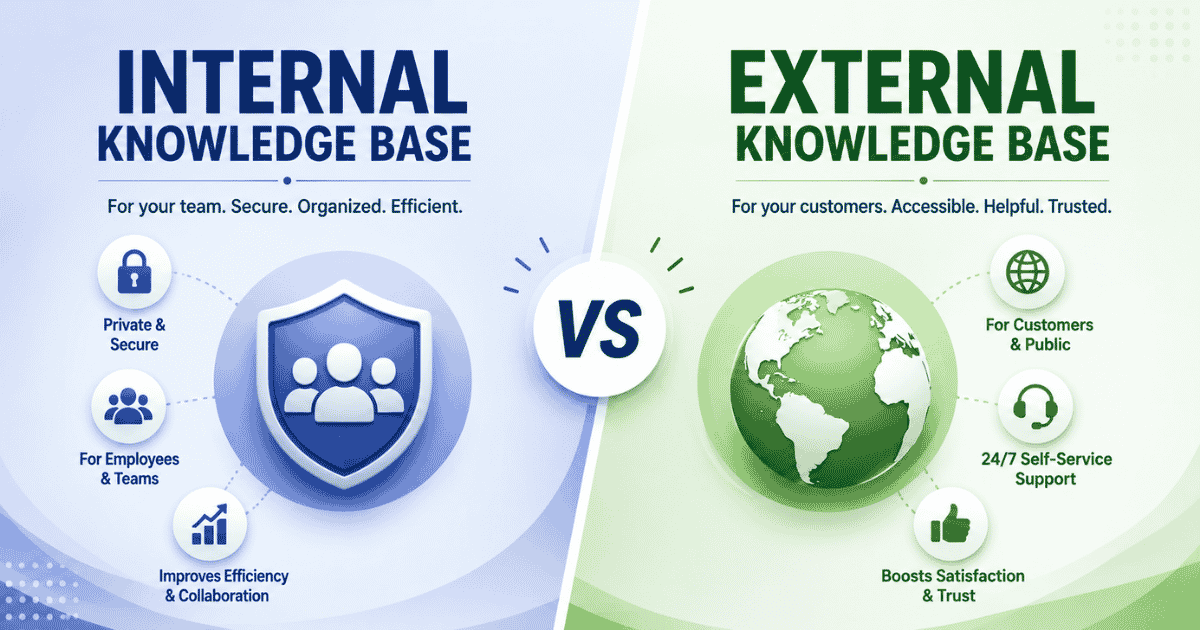
Choosing between an internal knowledge base vs external knowledge base is a common challenge for growing teams. Both types of knowledge base systems serve different purposes, but selecting the right one first can improve productivity, customer experience, and overall knowledge management. An internal knowledge base helps employees access internal processes, company policies, training materials, and operational documentation in one place. An external knowledge base, on the other hand, allows customers to find answers, solve issues, and access product information without contacting support.
Understanding the role of internal and external knowledge is essential for businesses that want to scale efficiently. While some organizations need stronger employee documentation, others benefit more from customer self-service resources. A well-structured knowledge base supports collaboration, reduces repetitive questions, and keeps important information accessible. This guide compares both approaches to help your team determine which solution should come first.
What Is An Internal Knowledge Base
An internal knowledge base is a centralized knowledge base solution for growing teams that stores company information, processes, and documentation for employees. An internal knowledge base solution helps teams access internal knowledge, such as policies, procedures, and training and onboarding materials, from a single location. It supports self-service for employees, reducing dependency on managers and experienced staff for everyday questions. Departments such as HR, IT, and customer support teams use this knowledge base solution to improve productivity, maintain consistency, and ensure employees can quickly find the information they need.
What Is An External Knowledge Base
An external knowledge base is a customer-facing platform that provides external knowledge to users through articles, FAQs, guides, and troubleshooting content, making it a core part of effective self-service customer support. It helps customers get quick access to accurate and up to date information without contacting the support team. The right knowledge base solution improves knowledge sharing between businesses and customers while reducing support requests. By offering self-service resources, an external knowledge base enables users to solve problems independently, improves customer satisfaction, and allows support teams to focus on more complex issues.
Internal Knowledge Base vs External Comparison Table
Comparison Factor | Internal Knowledge Base | External Knowledge Base |
|---|---|---|
Primary Users | Employees, managers, and internal teams | Customers, prospects, and end users |
Access Level | Restricted to authorized employees | Public or customer-accessible |
Purpose | Supports internal operations and collaboration | Provides customer self-service support |
Content Type | Policies, SOPs, internal processes, and training materials | FAQs, product guides, troubleshooting articles, and help documents |
Information Sensitivity | Contains confidential business information | Contains publicly available information |
Ownership | HR, operations, IT, and department teams | Support, customer success, and content teams |
Main Goal | Improve productivity and knowledge sharing | Reduce support tickets and improve customer experience |
Success Metrics | Faster onboarding, employee efficiency, and process consistency | Customer satisfaction, ticket reduction, and self-service usage |
Content Updates | Based on internal changes and company policies | Based on customer questions and product updates |
Example Use Cases | Employee onboarding, internal documentation, and process management | Help centers, support portals, and customer knowledge bases |
Internal Knowledge Base vs External: Key Differences
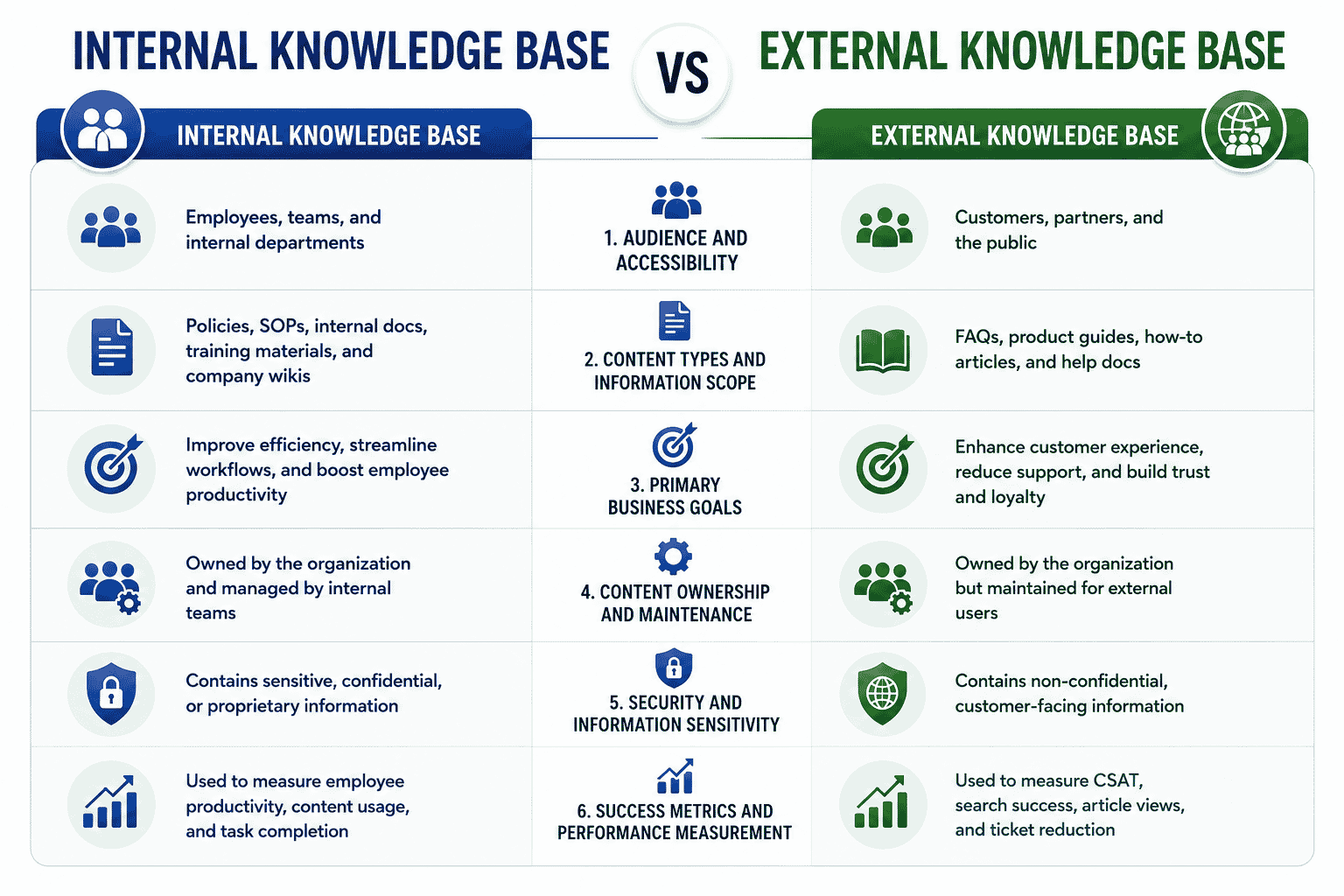
Internal and external knowledge bases serve different purposes, audiences, and goals. Understanding their key differences helps organizations improve employee productivity, enhance customer satisfaction, and choose the right knowledge management approach for long-term business growth.
Audience And Accessibility
One of the key differences between an internal and external knowledge base is the intended audience. An internal knowledge base is designed for employees, managers, and internal teams that need access to company information every day. It stores critical information such as employee handbooks, company policies, project documentation, and operational knowledge that supports daily business operations.
An external knowledge base serves customers, prospects, and users who need assistance with products or services, and it often works alongside a free helpdesk ticket system for smaller or growing teams. It acts as a self-service option that allows users to find answers at their own pace without contacting support agents. Since the audience differs significantly, access permissions also vary. Internal systems remain restricted to authorized employees, while external platforms are publicly available or accessible to customers.
Content Types And Information Scope
Content is another major area where the two systems differ. Internal knowledge bases focus on standard operating procedures, internal processes, project documentation, employee handbooks, and training resources. They help employees understand workflows and maintain consistency across the entire organization.
External knowledge bases contain customer-facing knowledge articles, FAQs, troubleshooting guides, product documentation, and step-by-step instructions. Many organizations also include rich media such as screenshots, videos, and interactive tutorials to improve understanding.
Internal repositories preserve operational knowledge, while external systems focus on customer education and technical support. Both act as a valuable resource, but the information scope depends entirely on the audience.
Primary Business Goals
The primary purpose of an internal knowledge base is to improve employee productivity and collaboration. Easy access to operational knowledge reduces time spent searching for information and allows employees to work more efficiently. Teams can access existing tools, internal procedures, and training materials whenever they need them.
External knowledge bases focus on customer satisfaction and support reduction, playing a key role at the intersection of customer support vs overall customer experience. Customers prefer solving simple issues independently before contacting technical support. A strong self-service option enables organizations to scale efficiently while reducing support costs.
When employees can locate information quickly, operational efficiency improves. When customers find answers independently, support tickets decrease. Both systems support business growth, but their objectives differ significantly.
Content Ownership And Maintenance
Content ownership is another factor that separates internal and external knowledge bases. Internal content is usually maintained by HR teams, department managers, operations teams, and subject matter experts. Internal teams regularly update company policies, employee handbooks, project documentation, and standard operating procedures.
External content is generally managed by customer support teams, content specialists, product teams, and customer success departments. Support agents often contribute knowledge articles based on recurring customer questions and common issues.
Regular maintenance is essential for both systems. Outdated content creates knowledge gaps that affect employee performance and customer experiences. Continuous learning and frequent updates ensure information remains accurate and useful.
Security And Information Sensitivity
Security requirements vary greatly between internal and external systems. Internal knowledge bases contain confidential data, operational knowledge, strategic plans, employee information, and company policies. Access controls help protect critical information and prevent unauthorized use.
External knowledge bases contain publicly available information intended to help customers solve problems. Product documentation, FAQs, troubleshooting content, and technical support articles are designed for broad accessibility.
Organizations must carefully separate internal and external knowledge to avoid exposing sensitive information. Proper permissions, content reviews, and security controls help maintain data protection while allowing employees and customers to access the information they need.
Success Metrics And Performance Measurement
The success of an internal knowledge base is measured through employee productivity, operational efficiency, and onboarding performance. Faster access to information reduces time spent searching for answers and helps employees complete tasks more efficiently. Improved onboarding, fewer repetitive questions, and stronger collaboration demonstrate the value of internal knowledge systems.
External knowledge bases focus on customer satisfaction and support performance. Businesses often measure the number of resolved support tickets, reduced support costs, and customer feedback scores. When customers access step-by-step instructions and solve problems independently, support agents can focus on more complex issues.
Both systems contribute to business operations in different ways. Internal knowledge helps the entire organization work more efficiently, while external knowledge allows businesses to scale efficiently through customer self-service. Understanding these key differences helps organizations choose the right knowledge strategy based on their goals and priorities.
Benefits Of An Internal Knowledge Base

An internal knowledge base helps employees access information quickly, improve collaboration, and maintain consistent processes. As a centralized repository for internal information, it supports teams with the relevant information needed to perform tasks efficiently.
Faster Employee Onboarding
An internal knowledge base gives new employees immediate access to company resources, policies, and procedures. Training documents, login credentials, workflows, and internal content remain available in one location, allowing employees to learn independently. Instead of relying entirely on managers or coworkers, new employees can find relevant information whenever they need it. Faster onboarding reduces confusion and helps employees become productive sooner.
Better Knowledge Sharing
A centralized repository encourages better knowledge sharing across departments. Teams can document processes, troubleshooting tips, project updates, and operational guidelines that benefit the entire organization. Collaborative editing allows employees to update information regularly and contribute their expertise. Internal information remains accessible even when teams work remotely or across multiple locations. Better knowledge sharing improves communication and helps employees make informed decisions.
Reduced Dependency On Individuals
Organizations often rely heavily on experienced employees who hold valuable knowledge. An internal knowledge base reduces this dependency by documenting processes, procedures, and best practices. Internal content remains available even when employees change roles or leave the company. Team members can access information independently without waiting for assistance from specific individuals. This approach minimizes disruptions and ensures business continuity.
Improved Operational Consistency
Operational consistency becomes easier when employees follow documented processes and guidelines. A knowledge base provides the target audience with standardized instructions and approved procedures. Employees can access troubleshooting tips, policies, and operational documentation whenever necessary. While internal and external knowledge bases serve different audiences, internal systems focus entirely on supporting employees and daily operations. Consistent access to relevant information helps teams maintain quality standards, improve productivity, and deliver reliable results across the organization.
Benefits Of An External Knowledge Base

An external knowledge base gives customers immediate access to valuable information, support resources, and product guidance. As a centralized hub for customer education, it helps businesses meet changing business needs while improving support efficiency and customer satisfaction through well-structured knowledge base software and related tools.
24/7 Customer Self-Service
An external knowledge base allows customers to find answers at any time without contacting support teams. Users can access troubleshooting guides, product documentation, and frequently asked questions whenever they need assistance. This always-available support experience helps customers solve problems independently and reduces delays caused by limited support hours when combined with a well-organized knowledge base and canned responses. Easy access to vital information increases customer confidence and improves overall satisfaction.
Lower Support Ticket Volume
Many customer questions involve common issues that can be solved through detailed documentation. Article creation focused on recurring problems allows businesses to address customer concerns before they become support requests. Troubleshooting guides, setup instructions, and product documentation help customers resolve issues independently. As a result, support teams receive fewer repetitive inquiries and can focus on more complex customer problems, which is essential for scalable customer support team operations.
Improved Customer Experience
Customers expect quick and accurate answers when using products or services, which requires a well-designed customer service management system working alongside your knowledge base. An external knowledge base provides valuable information in a structured and easy-to-navigate format. Clear articles, visual guides, and updated content help customers find solutions faster. While internal policies remain inside company systems, customer-facing documentation delivers the information users need without unnecessary delays. Faster problem resolution contributes directly to a better customer experience.
Better SEO Visibility
An external knowledge base can also support organic search visibility. Search engines often index support articles, troubleshooting guides, and educational content, allowing potential customers to discover answers through search results, especially when paired with fast and scalable helpdesk software. Regular article creation helps businesses build a larger content library that addresses various business needs and customer questions. Version control ensures information remains accurate and up to date, making the knowledge base a reliable centralized hub for both existing and potential customers.
Which Knowledge Base Does Your Team Need First?
Choosing the right knowledge base depends on your company's size, operational challenges, and customer expectations. Some teams benefit more from internal documentation, while others need customer-facing resources first. Evaluating business priorities helps determine which knowledge base to prioritize.
Early-Stage Startups
Early-stage startups often benefit from building an internal knowledge base first. Small teams usually rely on shared knowledge that exists in conversations, emails, or individual employees. Documenting processes, onboarding materials, and internal workflows creates a foundation for future growth. Clear documentation helps employees understand responsibilities and maintain consistency as the company expands.
Growing Support Teams
Organizations with growing support teams may prioritize an external knowledge base and align it with an appropriate customer support team structure. As customer inquiries increase, customers need quick access to answers without waiting for assistance, making it vital to choose helpdesk software for small growing businesses that complements your knowledge base. Help articles, video tutorials, and service information allow users to find solutions independently. This approach reduces the workload on support teams and improves response times.
Internal Process Complexity
Companies with complex operations often require an internal knowledge base before creating external resources. Departments such as HR, finance, operations, and IT rely on documented procedures and policies. Internal systems help employees access important information while protecting sensitive information through proper access levels, often working alongside a modern helpdesk system for internal and external requests. Employees can locate documents, procedures, and company guidelines more efficiently, which improves daily operations.
Customer Support Volume Considerations
Customer support volume is another important factor. Businesses receiving large numbers of repetitive questions can benefit greatly from an external knowledge base. Customers can find solutions through articles, FAQs, and tutorials without contacting support. This creates a positive experience while reducing support costs and improving efficiency, especially when paired with thoughtful workflow automation in customer support.
In many cases, the decision depends on immediate business needs. Teams struggling with employee training and internal communication may need an internal knowledge base first. Organizations facing increasing customer inquiries may benefit more from external self-service resources. As companies grow, many eventually adopt both systems to support employees and customers simultaneously.
Can Your Business Use Both Knowledge Bases?
Yes, many businesses benefit from using both internal and external knowledge bases. As organizations grow, supporting employees and customers with separate but connected resources often makes sense. Together, both systems improve communication, knowledge sharing, and overall operational efficiency.
How Internal And External Knowledge Bases Work Together
An internal knowledge base supports employees with company procedures, training materials, company updates, and operational documentation. An external knowledge base helps customers find answers through help articles, product guides, and self-service resources. While the audiences differ, both systems contribute to better information management. Internal teams can use documented knowledge to create accurate customer-facing content, ensuring consistency across all channels.
Sharing Knowledge Across Teams
Employees often gain valuable experience from customer interactions, support requests, and daily operations. Teams can share insights, document lessons learned, and identify common customer challenges, which is especially important for keeping remote support teams aligned and on track. Information collected internally can help create external articles that address recurring questions. Similarly, customer feedback can reveal knowledge gaps that require additional internal documentation. This continuous exchange improves both employee resources and customer support content.
Building A Unified Knowledge Strategy
A unified knowledge strategy connects internal and external information while maintaining appropriate access controls. Businesses can create a single resource for knowledge management that supports both employees and customers. Internal documentation remains available for employees, while customer-facing content provides public information that helps users solve problems independently.
When both systems work together, employees can access company knowledge efficiently, and customers can find answers without contacting support. This approach improves collaboration, increases consistency, and creates a better experience for everyone involved.
How To Build Your First Knowledge Base Strategy

Building a knowledge base requires more than selecting software and publishing articles. A successful strategy starts with understanding who needs information, what content already exists, and how knowledge will support business goals. A structured approach helps organizations create a knowledge base that remains useful, accurate, and scalable.
Identify Users And Goals
The first step is identifying who will use the knowledge base. Employees, customers, partners, and support teams often have different information needs. Internal users may need onboarding documents, company policies, and operational procedures, while customers look for product guides and troubleshooting content.
Defining clear goals also helps shape the strategy. Some organizations want to improve employee productivity, while others focus on reducing support requests or improving customer self-service. Understanding the audience and objectives ensures the knowledge base delivers relevant information.
Audit Existing Knowledge
Many businesses already have valuable information spread across emails, shared drives, documents, spreadsheets, and chat applications. Conducting a knowledge audit helps identify existing content that can be reused or updated.
Teams should review policies, training materials, support documents, frequently asked questions, and process documentation. An audit also helps identify outdated content, duplicate information, and knowledge gaps that need attention before publishing.
Create Content Priorities
Not all content needs to be created at once. Businesses should prioritize information that delivers immediate value to users and ensure it integrates smoothly with multichannel helpdesk software so customers can find it wherever they reach out. Frequently asked questions, onboarding guides, troubleshooting articles, and standard operating procedures often provide the greatest impact.
Content should be organized into categories and written using clear language, and evaluated alongside potential cloud helpdesk tools that will surface this information to users. Step-by-step instructions, screenshots, videos, and supporting resources improve usability and make information easier to understand.
Measure Performance
A knowledge base should continue evolving after launch. Performance metrics help determine whether the content supports business goals and user needs. Internal knowledge bases may track employee adoption, onboarding speed, and content usage, while external knowledge bases often measure search activity, article views, customer satisfaction, and support ticket reduction, all of which can be enhanced with a well-implemented shared inbox for support teams.
Regular reviews, user feedback, and content updates ensure the knowledge base remains accurate, valuable, and aligned with changing business requirements, especially when powered by a smarter help desk platform.
Frequently Asked Questions
How Often Should A Knowledge Base Be Updated?
A knowledge base should be reviewed regularly to ensure the information remains accurate and relevant. Businesses often update content after product changes, policy updates, process improvements, or customer feedback. Regular reviews help remove outdated information and maintain content quality.
What Content Should Be Added To A Knowledge Base First?
Organizations should begin with content that users search for most frequently. Employee onboarding documents, company policies, troubleshooting guides, FAQs, and product documentation usually provide the greatest value. Prioritizing high-demand content helps users find answers quickly.
Who Should Be Responsible For Managing A Knowledge Base?
Knowledge base management often involves multiple teams. HR, operations, and department managers may handle internal content, while customer support, product, and content teams maintain external articles. Assigning clear ownership ensures information stays accurate and updated.
How Can Businesses Encourage Employees To Use An Internal Knowledge Base?
Companies can encourage adoption by making information easy to access and regularly updating content. Training sessions, employee onboarding programs, and leadership support also increase usage. Employees are more likely to use the knowledge base when it helps them complete tasks efficiently.
What Metrics Should Companies Track To Measure Knowledge Base Performance?
Businesses can measure performance through content usage, search success rates, article views, employee adoption, customer satisfaction, and support ticket reduction. Monitoring these metrics helps organizations identify content gaps and improve the overall effectiveness of their knowledge base while revealing where a smarter help desk improves support behind the scenes.