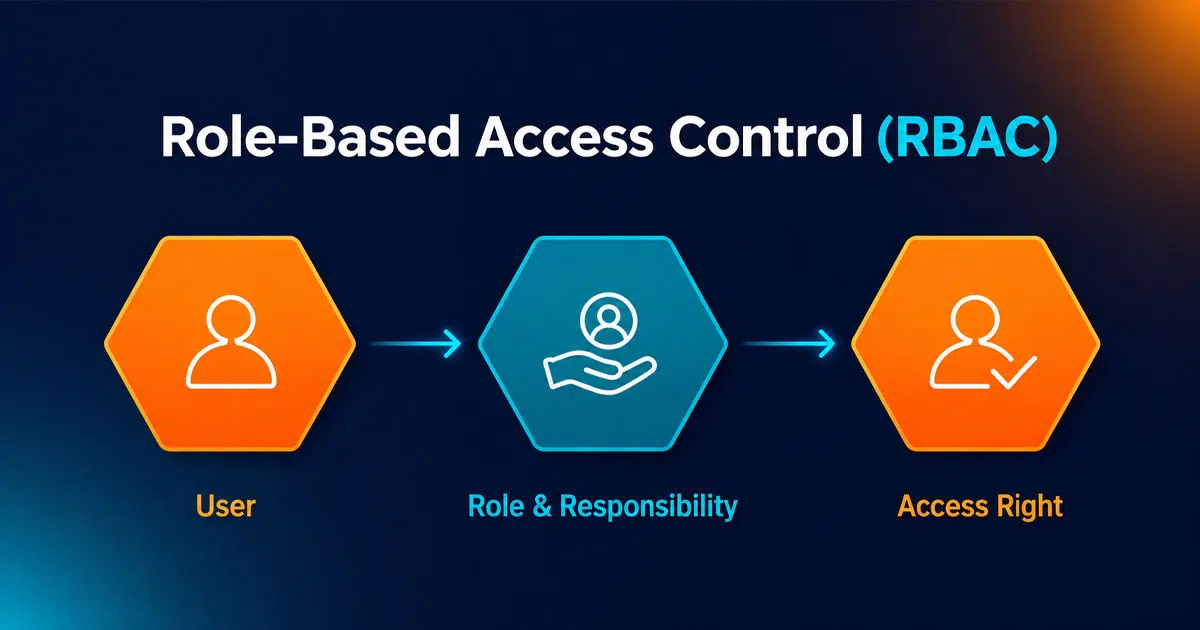
Role-based access control is a simple way to manage who can access what inside a system. It assigns permissions based on roles, not individual users. This approach helps businesses keep sensitive data safe while giving teams the access they need to work efficiently.
Many organizations use role-based access control to reduce errors and improve security. Instead of setting permissions one by one, teams define roles and apply rules to each role. This makes access management easier to control and scale. It also supports better compliance and reduces the risk of unauthorized access.
In this article, you will explore how role-based access control works, why it matters, and how to apply it effectively in your system.
What Is Role-Based Access Control
Role-based access control is a type of access control that helps organizations manage user access in a structured way. In this based access control rbac model, permissions assigned to a user role define what a user can do. Instead of granting access to individual users, the system uses role assignments to control access rights. This makes access management simpler and more secure, especially in large organizations and multiple systems.
The RBAC system follows three primary rules. A user must have a user role, permissions are assigned to that role, and the user only gets access through that role. This supports strong access control policies and helps restrict access based on job functions. It also allows system administrators to manage user permissions easily, improve data access security, and tailor access based on security requirements, job title, and role hierarchy. Role-based security is an approach to restricting system access to authorized users, and to implementing mandatory access control (MAC) or discretionary access control (DAC)
What Are The Principles Behind Role-Based Access Control
Role-based access control works on a clear set of principles that help organizations manage access in a structured way. These principles define how permissions are assigned, how users gain access, and how systems stay secure. Understanding them helps improve data protection and reduce risk across systems.
User Role Definition
User role definition is the base of role-based access control. Each role represents a job function inside an organization. A role includes a set of access rights and permissions assigned based on job needs. This approach supports efficient access management and reduces errors.
Many organizations define roles like system administrator, HR manager, or finance officer. Each role gets only the required permissions. According to the National Institute of Standards and Technology, over 80% of security breaches involve excessive access. Clear role definitions help prevent that risk. This structure also supports user role assignment and simplifies user permissions across systems.
Permission Assignment Model
Permission assignment defines what actions a role can perform. Permissions are assigned to roles, not users. This supports strong access control policies and reduces manual work. A role-based access control system uses this model to manage access rights across multiple systems.
Permissions can include read, write, edit, or delete access. System administrators assign these permissions based on job needs. This method follows the principle of least privilege. It ensures users only get access needed for their tasks. This also improves security clearance and limits unauthorized data access.
Role Hierarchy Structure
Role hierarchy allows roles to inherit permissions from other roles. A senior role can include all permissions of a lower role plus additional access privileges. This structure makes access management easier and more scalable.
For example, a manager role can inherit permissions from an employee role. This reduces duplication and improves efficiency. Large organizations use hierarchical RBAC to manage multiple users and roles. It also supports consistent access control and simplifies managing access across cloud resources and internal systems.
Separation Of Duties
Separation of duties helps prevent conflicts and fraud. It ensures that one user cannot perform conflicting tasks. This principle uses mutually exclusive roles to control access. It is a key part of secure access control systems.
For example, a user who approves payments should not create payments. This reduces risk in financial systems and human resources processes. Many organizations use this principle to meet compliance and audit standards. It also strengthens access control policies and supports better user assignments across teams.
Least Privilege Access
Least privilege means users get only the access they need. No extra permissions are granted. This principle limits damage if a user account gets compromised. It is one of the most important rules in role-based access control.
Organizations use this approach to manage system access and data protection. According to industry reports, limiting access reduces breach impact by up to 60%. This also improves security policies and supports better access control across internal systems, third-party users, and managed identities.
Key Benefits Of Role-Based Access Control For Businesses
Role-based access control brings clear value to modern businesses. It helps teams manage access in a structured way and reduces security risks. Organizations use it to improve control, support compliance, and protect sensitive data across systems.
Stronger Security Protection
Role-based access control improves security by limiting access based on user roles. Each user gets only the permissions needed for their job. This reduces the chance of unauthorized access and data leaks. It also strengthens access control policies across systems.
Cyber security reports show that over 60% of data breaches involve weak or mismanaged access. Role-based access helps reduce this risk. It blocks unnecessary access and supports secure data access across cloud resources and internal systems. This approach also helps system administrators manage access rights more effectively.
Simplified Access Management
Access management becomes easier with role-based access control. Instead of managing permissions for each user, teams assign roles. Each role comes with predefined permissions. This reduces manual work and improves efficiency.
This approach helps manage user permissions across large organizations. It supports multiple users and multiple systems without confusion. System administrators can quickly update permissions by editing roles. This makes access control more organized and reduces human error in user assignments.
Better Compliance Support
Role-based access control supports compliance with security standards. Many regulations require strict control over user access and data protection. RBAC helps meet these requirements by enforcing structured access rules.
Industries like finance and healthcare use RBAC to meet audit and compliance needs. It helps track access rights and user actions. This makes audits easier and improves accountability. It also supports access control policies that align with legal and industry standards.
Improved Operational Efficiency
RBAC improves efficiency by reducing the time needed to manage access. Teams can quickly assign roles instead of setting individual permissions, similar to how automated ticket assignment in support systems routes work based on predefined rules and responsibilities. This speeds up onboarding and access updates.
For example, new employees can get access through a predefined role. This saves time for HR and IT teams. It also reduces errors in assigning permissions. Many businesses use RBAC to streamline workflows and improve daily operations across departments.
Scalable Access Control System
Role-based access control scales easily as businesses grow. Organizations can add new roles without changing the entire system. This supports expansion across teams, locations, and systems.
Large companies use RBAC to manage thousands of users and permissions. It works well with cloud systems and distributed environments. This flexibility makes it a strong choice for modern businesses that need reliable and scalable access control solutions.
Real-World Use Cases Of Role-Based Access Control
Role-based access control plays a key role in real business environments. Many industries use it to manage access, protect data, and meet compliance needs. It helps organizations control user access in a clear and structured way across different systems.
Healthcare Data Protection
Healthcare systems use role-based access control to protect patient data. Modern hospital management software uses role-based access control to ensure that doctors, nurses, and administrative staff receive different levels of access based on their responsibilities. Each user role defines what data they can view or edit. This helps secure sensitive information, improve patient privacy, and maintain compliance with healthcare data security standards.
Hospitals follow strict rules like HIPAA in the United States. Studies show that healthcare breaches affected over 100 million patient records in recent years. RBAC reduces risk by limiting access to only authorized users. It also supports audit trails and improves compliance with data protection laws.
Financial System Security
Banks and financial institutions use role-based access control to secure transactions and sensitive data. Each employee role gets specific permissions based on job duties. For example, a teller cannot approve large transactions. This helps prevent fraud and unauthorized actions.
Financial systems rely on strong access control policies. RBAC supports security clearance levels and enforces strict user permissions. According to industry reports, financial fraud losses reached billions globally each year. RBAC helps reduce these risks by limiting access and strengthening internal controls.
Enterprise Software Management
Large organizations use role-based access control in enterprise software systems. It helps manage user access across multiple departments and tools. Roles define what users can see and do inside the system, just as cloud-based helpdesk ticketing software like EasyDesk uses structured roles to control who can view, update, or close tickets. This keeps data organized and secure.
Companies use RBAC to manage multiple users across multiple systems. For example, HR teams, sales teams, and IT teams get different access levels. This improves workflow and reduces confusion. It also supports user assignments and simplifies managing access in complex environments.
Cloud And SaaS Platforms
Cloud platforms use role-based access control to manage access to cloud resources. Services like AWS and Azure rely on RBAC to control user and service permissions. Each user or service principal gets a role with defined access rights.
According to cloud security reports, over 90% of cloud breaches involve misconfigured access. RBAC helps prevent that by enforcing strict access rules. It also supports managed identity and secure access to data across distributed systems. This makes cloud environments safer and easier to manage.
How To Implement Role-Based Access Control Step By Step
Role-based access control needs a clear and structured setup. A step-by-step approach helps organizations control access, improve security, and manage user permissions effectively. Each step builds a strong access control system that supports business growth and compliance.
Establish Access Control Policies
Strong access control policies set the foundation of a secure RBAC system. These policies define how access works across the organization. They help control system access and data access in a consistent way.
Organizations should align policies with security requirements and business goals. This includes defining how access rights, access permissions, and security clearance levels work. According to industry research, clear access policies can reduce unauthorized access attempts by up to 50%. Well-defined rules also support policy-based access control and improve overall cybersecurity posture.
Design Role-Based Structure
A well-designed role-based structure supports efficient access control (RBAC). It connects job functions with specific permissions. Each user role should reflect real work responsibilities. This ensures accurate access rights across the system.
Use role hierarchy where possible to simplify management. Assign multiple roles only when needed. Avoid unnecessary overlap to reduce complexity. This structure helps tailor access based on job title and improves access management across multiple systems. It also supports constrained RBAC by enforcing limits on role combinations.
Enable Permission Authorization
Permission authorization ensures only approved users get access. Each permission assigned to a role should match strict rules. This helps maintain control over sensitive data and system access.
Organizations must validate each permission before activation. This step supports data protection and prevents misuse. It also aligns with rule-based access control and mandatory access control models. Proper authorization reduces risks linked to encryption key instability and unauthorized changes. This strengthens overall system security and reliability.
Implement Access Control Tools
Modern tools make implementing RBAC easier and more reliable. These tools help manage roles, permissions, and user assignments across systems. They also support automation and reduce manual errors.
Many platforms use access control lists, managed identity, and service principal features. These tools help control access to cloud resources and third-party users. According to cybersecurity studies, automated access systems reduce administrative workload by up to 40%. This improves efficiency and ensures consistent access control across environments.
Monitor And Audit Access
Monitoring access keeps the system secure over time. Regular audits help track user access, role assignments, and permission changes. This ensures compliance and improves security policies.
Organizations should review logs and detect unusual activity. This includes checking multiple roles assigned to users and reviewing access privileges. Monitoring also supports the National Institute guidelines and security standards. Continuous tracking helps identify risks early and ensures strong internal access control systems across all platforms.
Best Practices For Managing Role-Based Access Control
Role-based access control works best when managed with clear practices and regular reviews. Strong management helps maintain security, improve access control, and support business growth. These best practices help organizations keep user access accurate, safe, and efficient.
Apply Least Privilege Model
The least privilege model gives users only the access they need. No extra permissions should be included. This reduces risk and keeps systems secure. It also supports better access rights and data protection across environments.
Security research shows that limiting access can reduce breach impact by more than 60%. Organizations should define strict access permissions for each role. This approach also supports user attributes and improves control over system access. It helps prevent unauthorized actions and strengthens overall cybersecurity. It's also very important for attribute-based access control.
Use Strong Role Governance
Strong role governance ensures roles stay accurate and useful. It defines how roles are created, approved, and updated. This process supports structured access control and better access management across systems.
Organizations should review roles regularly to avoid role sprawl. Too many roles can weaken security. Clear governance supports role permissions and improves policy-based access control. It also ensures consistent rules across teams and reduces confusion in assigning access privileges.
Enforce Separation Rules
Separation rules prevent conflicts of interest in access control. They ensure that no single user can perform conflicting actions. This supports strong security policies and protects sensitive operations.
For example, a user should not both approve and process the same transaction. This reduces fraud risks and supports internal access control systems. Many organizations follow these rules to meet audit standards and compliance requirements. It also improves accountability and strengthens access control policies.
Automate Access Management
Automation helps manage roles and permissions at scale. It reduces manual work and improves accuracy in access control systems. Automated tools can assign roles, update permissions, and manage user assignments quickly.
This approach improves efficiency across multiple systems and cloud resources. It also supports managed identity and service principal setups. Studies show automation can reduce access errors by up to 45%. In customer support, for example, EasyDesk’s automated workflows and multi-channel ticketing features apply similar principles to streamline how teams handle requests. This makes access management faster, more reliable, and easier to maintain.
Perform Regular Access Audits
Regular audits help ensure the system stays secure and compliant. Audits check user assignments, role permissions, and access rights. This helps identify unused or risky access.
Organizations should review all roles and permissions at set intervals. This includes checking third-party users and internal users. Audits also help align with national standards and compliance frameworks. Regular reviews improve access control and keep security policies strong over time.
Common Challenges Of Role-Based Access Control
Role-based access control improves security, but it also creates challenges during setup and management. Organizations often face issues with roles, permissions, and system structure. Understanding these problems helps improve access control and supports better access management across environments.
Policy Overlap And Conflicts
Policy overlap happens when access control policies conflict with each other. This creates confusion in permission authorization and weakens control over system access. Different rules may try to control the same access rights, which leads to errors.
This issue is common in complex environments with policy-based access control. Conflicting policies can affect user access and system behavior. It also impacts rule-based access control and makes it harder to enforce primary rules. Clear structure and regular reviews help reduce these conflicts and improve overall access control.
Scalability In Large Environments
Scalability becomes a challenge in large organizations with multiple systems and cloud resources. Managing RBAC permissions across different platforms can be difficult. As systems grow, managing roles and permissions becomes more complex and time-consuming.
Large environments often include multiple users and third-party users. This increases the load on access control systems. Without proper structure, access management can become inconsistent. Strong planning helps tailor access and maintain consistent access permissions across all systems, much like managing support tickets efficiently using EasyDesk requires clear workflows and ownership rules to keep growing volumes under control.
User Role Assignment Errors
User role assignment errors can create serious security risks. Incorrect role assignments may give users more access than required. This weakens data protection and increases exposure to threats.
System administrators must carefully assign users to roles based on job function and security requirements. Mistakes in role assignments can affect multiple users and disrupt workflows. Proper validation and regular checks help reduce these errors and improve control over user privileges.
Integration With Existing Systems
Integration challenges often arise when connecting RBAC with existing systems. Older systems may not fully support modern access control methods. This can create gaps in access control and data security.
Organizations must plan integration carefully to ensure smooth user adoption. This includes managing roles, permissions assigned, and user assignments across platforms. A proper integration timeline helps reduce disruption and ensures consistent access control across all systems. Evaluating tools such as the best ticket management system for your support team can also illustrate how well-designed software handles roles and permissions during deployment. It also supports better system compatibility and performance.
Balancing Security And Flexibility
Balancing security and flexibility is a key challenge in role-based access control. Too many restrictions can slow down work, while too much access can create risks. Finding the right balance is essential for smooth operations.
Organizations must control access while still allowing users to perform their tasks. This includes managing additional permissions and access privileges carefully. A well-designed RBAC model helps achieve this balance. It ensures strong security while supporting user needs and business efficiency.
How EasyDesk Enhances Role-Based Access Control
Role-based access control plays a key role in how EasyDesk helps teams stay organized and secure. At EasyDesk, we allow you to assign user roles with clear permissions, so each team member only sees and does what their role requires. This keeps access control simple and reduces the risk of unauthorized data access.
We built EasyDesk to help system administrators manage user access with ease. Our secure customer support approach focuses on keeping permissions clear while protecting customer data. You can manage roles, control permissions, and assign users without confusion. This makes access management more efficient across teams and supports strong data protection. With EasyDesk, you get better control over access rights while keeping your workflows smooth and secure.
FAQs
How Can Role-Based Access Control Support Policy-Based Access Control In Hybrid Environments?
Role-based access control can integrate with policy-based access control to enforce fine-grained rules across hybrid systems. It helps align access rights with user attributes, system access, and business policies. This combination improves control across cloud resources and internal systems.
Can Role-Based Access Control Coexist With Attribute-Based Access Control?
Yes, role-based access control can work alongside attribute-based access control. Organizations use both to improve flexibility and security. RBAC handles user roles, while ABAC adds conditions based on user attributes and context. This hybrid approach strengthens access control policies and permission authorization.
How Does Role-Based Access Control Handle Multiple Roles Assigned To Users?
Yes, RBAC can handle users assigned multiple roles through role hierarchy and constrained RBAC. The system evaluates combined permissions assigned to ensure consistent access. Proper design avoids conflicts and supports mutually exclusive roles where needed for stronger access control.
What Role Does RBAC Play In Secure Access For Service Principal And Managed Identity?
Role-based access control helps assign permissions to service principal and managed identity in cloud environments. It restricts access to cloud resources based on defined roles. This improves system security and ensures controlled access for automated services without exposing additional permissions.
How Does RBAC Handle Editing Permissions Without Disrupting System Access?
Yes, RBAC allows controlled editing permissions through structured role updates. System administrators can update role permissions without affecting user access directly. This ensures smooth system operation while maintaining strict access control and strong data protection across multiple systems.



