Year-end operations often create pressure across scheduling, customer support, compliance, invoicing, and field service coordination. Businesses face tighter deadlines, rising service requests, staff absences, and increased customer expectations during the final months of the year. Without organized systems, teams can quickly fall into reactive workflows, delayed communication, and operational bottlenecks that affect service quality and revenue performance.
Service management software helps organizations maintain structure and visibility during these high-demand periods. Automated scheduling, mobile workforce management, centralized reporting, customer portals, and workflow automation help teams manage workloads more efficiently. Businesses can reduce manual tasks, improve response times, maintain compliance records, and coordinate field operations more effectively. Strong operational visibility also helps managers make faster decisions while keeping technicians, office teams, and customers aligned throughout busy year-end service periods.
What Service Management Software Is
Service management software streamlines the delivery, management, and support of organizational services. In a field service setting, it is a digital platform that coordinates scheduling, dispatch, work orders, inventory management, customer management, and customer interactions for office teams and field technicians.
Field service management software is the more specialized category used for mobile and on-site work. Field service management software, often called FSM software, is primarily delivered as cloud-based services and mobile apps, allowing organizations to manage work and commercial interactions for mobile workforces effectively. It connects field teams, dispatchers, back office staff, and customers through a single platform.
Types Of Service Management Software
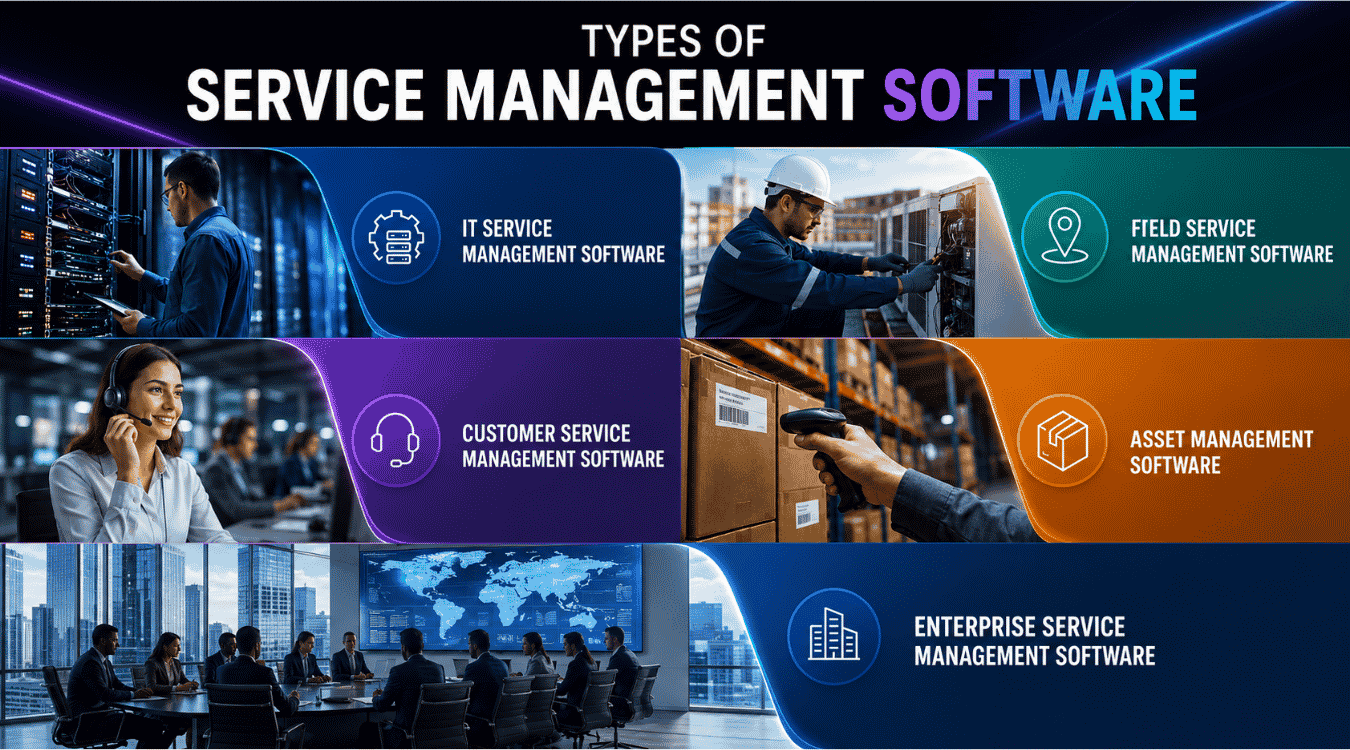
Service management software helps businesses streamline workflows, improve customer support, and increase productivity. Different solutions serve different operational needs, from IT support to field operations, while reducing manual intervention and supporting increased operational efficiency.
IT Service Management Software
IT Service Management (ITSM) software helps organizations manage IT-related services, incidents, and support requests. Businesses use ITSM platforms to automate ticket handling, monitor assets, and improve operational efficiency across departments. Features like workflow automation, reporting dashboards, and self-service portals reduce manual intervention and speed up issue resolution. Many ITSM tools also maintain detailed service history records to help teams track recurring problems and improve future support processes.
Field Service Management Software
Field service software helps companies coordinate technicians, field workers, and on-site service operations. Industries such as HVAC, telecom, utilities, and maintenance rely heavily on these platforms to manage distributed teams efficiently. Features often include technician scheduling, route optimization, mobile device access, digital forms, and real-time communication. Field service management systems also improve customer satisfaction by helping technicians respond faster and complete jobs accurately from any location.
Customer Service Management Software
Customer service management software focuses on handling customer inquiries, complaints, and support interactions across multiple channels, following the same principles as a multi-channel customer support strategy that centralizes conversations and performance tracking. Businesses use these platforms to centralize communication through chat, email, social media, and phone support using multi-channel customer support software that preserves context and improves response times.
Automated ticket routing and knowledge bases help teams respond quickly while improving customer satisfaction. Access to complete service history also helps support agents provide more personalized assistance and maintain consistent customer experiences, especially when they use a modern customer service management system that unifies multi-channel support and analytics.
Asset Management Software
Asset management software helps organizations monitor hardware, software, equipment, and infrastructure throughout their lifecycle. Businesses use these tools to track maintenance schedules, optimize inventory, and improve resource allocation. Advanced systems often include predictive maintenance capabilities that identify potential equipment failures before breakdowns occur. This proactive approach minimizes downtime, improves operational efficiency, and reduces repair costs across service operations.
Enterprise Service Management Software
Enterprise Service Management (ESM) software extends service management beyond IT into departments such as HR, finance, procurement, and facilities management. Organizations use ESM platforms to unify internal workflows and improve collaboration across distributed teams. Automation features reduce repetitive tasks and limit manual intervention while creating standardized processes across departments. Many businesses adopt ESM solutions to achieve increased operational efficiency and deliver faster internal services throughout the organization, often by deploying automated workflow software for smarter support across multiple departments.
How Service Management Software Smooths End-Of-Year Rushes
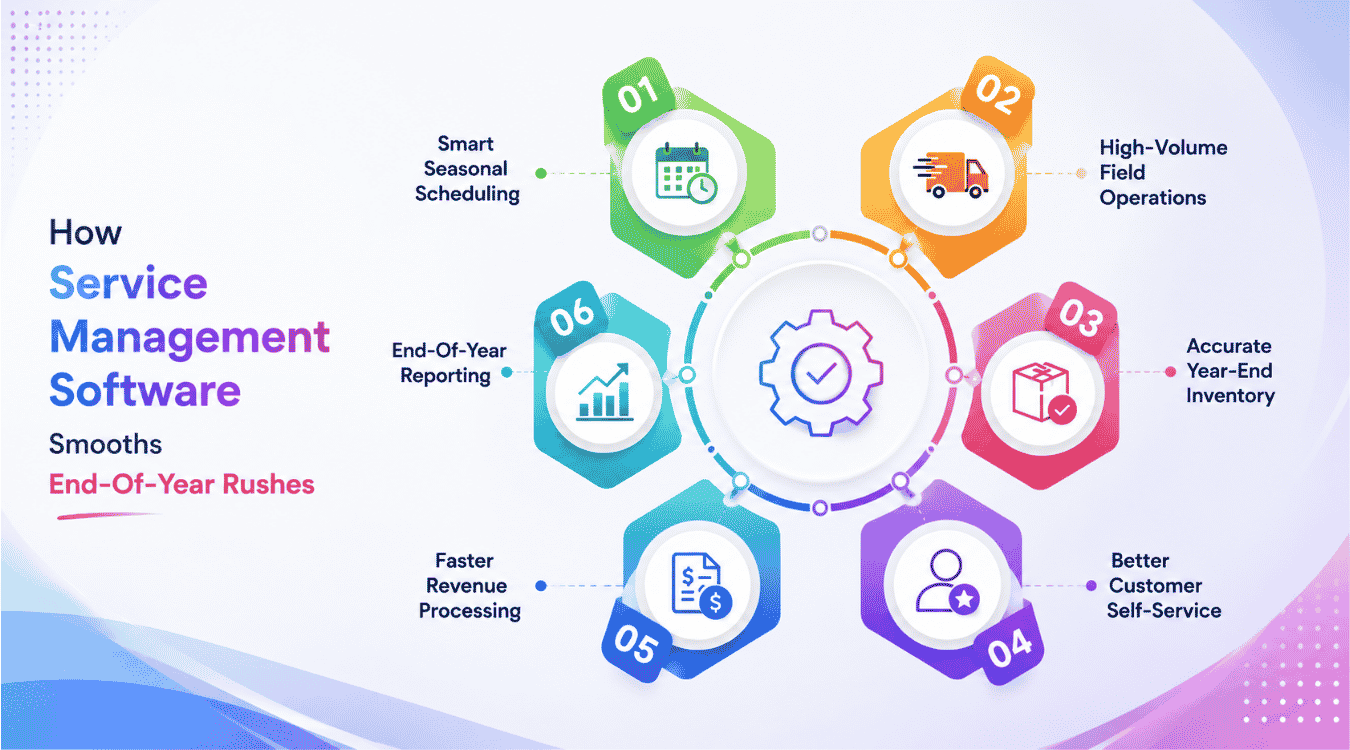
During the last two weeks of December and the first full working week of January, small delays can quickly become missed SLAs, invoice disputes, or unhappy customers. A field service management solution reduces that pressure through integrated workflows, automated workflows, and real-time data.
Calendar-Aware Scheduling And Dispatch
Year-end scheduling is not a normal calendar exercise. Dispatchers must factor in holidays, short workweeks, technician PTO, sickness, emergency jobs, and priority customers. Service management software gives office teams real-time visibility into availability, job assignments, and open capacity so they can deploy field technicians to the right job without overpromising.
Drag-and-drop planning, automated priority rules, and intelligent routing help teams optimize technician routes when the board is almost full. A utilities company completing hundreds of safety checks before 31 December can manage multiple locations centrally, reschedule missed appointments into January, and keep customer notes attached to each job.
Support For High-Volume Field Service Operations
Mobile functionality in field service management software is crucial for technicians who need to access job details, update work statuses, and communicate with the office while on the move. When plans shift, field technicians should not need to call dispatch after every change. They need mobile access to receive job details, view customer information, and complete jobs accurately.
Technicians benefit from mobile apps that allow them to capture customer signatures, upload photos, and complete digital forms directly from their devices, enhancing efficiency and accuracy in the field. Mobile access enables field technicians to work offline, ensuring they can still access critical information and complete tasks even in areas with poor connectivity, with data syncing automatically when they reconnect.
Accurate Inventory Management Before Stocktake
December often brings parts shortages, emergency purchases, last-minute installations, and year-end stocktakes. Integrated inventory management tracks parts across warehouses, vans, and customer sites, helping teams avoid write-offs and second visits when schedules are already packed.
For example, an HVAC provider can use operational data to forecast which parts are likely to spike during late December cold weather. Service management software can link parts usage in work orders to replenishment rules, asset management, and asset lifecycle management, helping teams enter January with cleaner records and stronger asset performance data.
Customer Experience And Self-Service During Peak Weeks
FSM software improves customer experiences by providing real-time updates and notifications, which help keep customers informed about service appointments and technician arrivals. A self service portal or customer portal lets clients book, reschedule, confirm appointments, check status, and access documents without calling overloaded teams, especially when it is backed by multi channel support software for customer service that centralizes all incoming messages.
Real-time communication features in FSM software allow for team messaging, photo attachments, and digital signatures, which help keep all team members updated on job status without the need for constant phone calls. Customers can track technician arrival, receive delay notices, and download proof of work, and service teams can coordinate public updates using dedicated social media support software when disruptions affect many customers at once. This level of customer communication helps teams exceed customer expectations even when weather or traffic causes disruption.
Support For Invoicing, Revenue Recognition, And Close
Completed work orders should move quickly into accurate invoices. In late December, delays can affect cash collection, revenue recognition, and financial close. Service management software with capabilities like EasyDesk’s smarter customer support features helps connect job notes, labor, parts, photos, and customer signatures to invoice lines, reducing disputes and manual checks.
Integrations with accounting tools and back office systems help finance teams separate jobs completed before 31 December from those slipping into January. A service provider can batch-send invoices on 29 to 31 December, accept secure payments, and use payment processing to start the new year with fewer billing gaps while SLA management with EasyDesk keeps response and resolution deadlines on track during the rush.
Reporting On End-Of-Year Performance
Dashboards turn the rush into useful insight. Managers can track key performance indicators such as first-time fix rate, resolution times, jobs completed per technician, SLA compliance, backlog, and agent workloads. Real-time metrics track Key Performance Indicators (KPIs) like resolution times and agent workloads to support data-driven decisions.
Data-driven strategies leverage analytics to identify bottlenecks and optimize resource allocation. A service management software lets teams filter by contract, region, technician, and service agreements to see where the crunch hit hardest. Reports dated 15 December or 5 January help leaders adjust staffing, training, and stock planning for next year.
Key Features Of Service Management Software
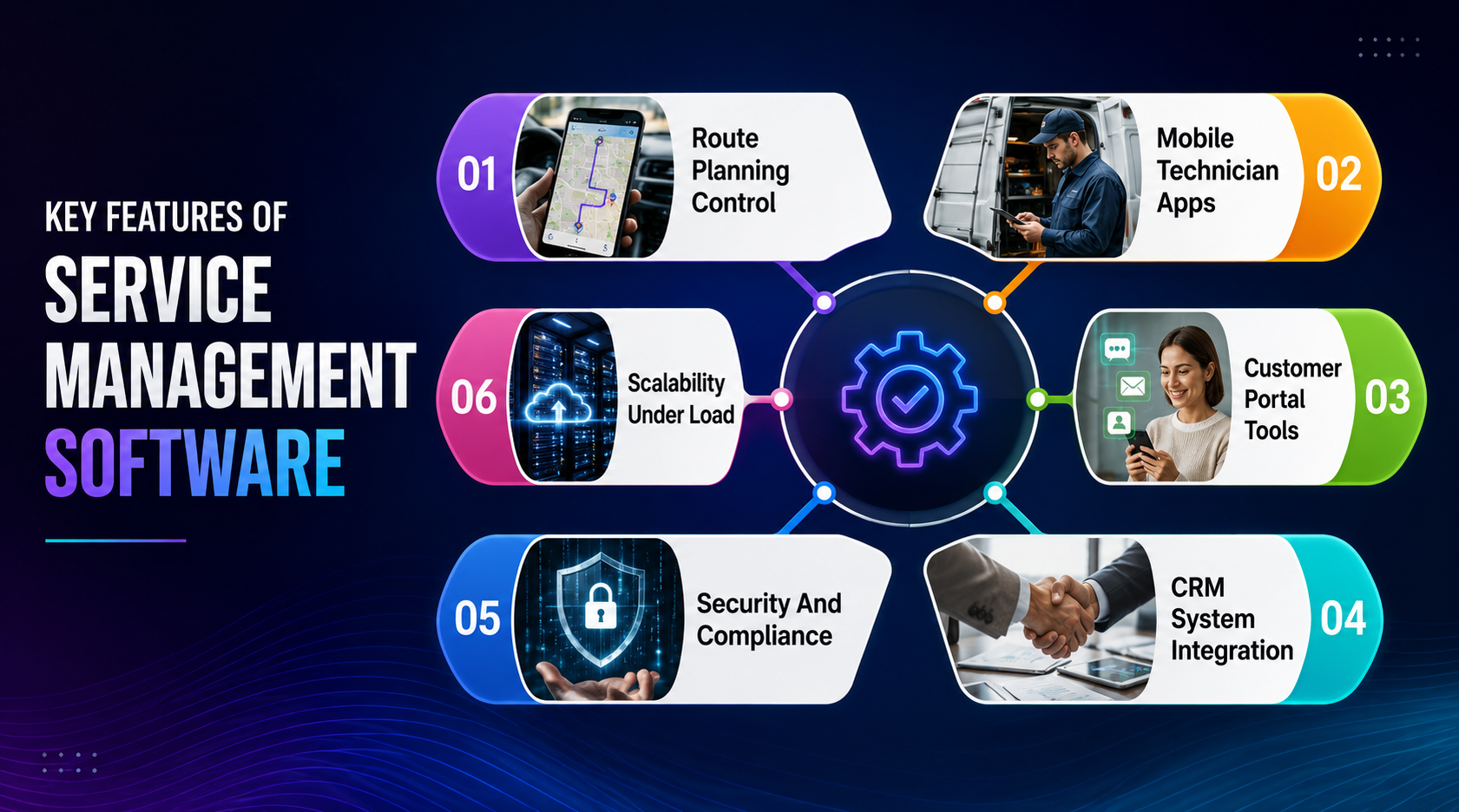
The most useful key features are the ones that remove friction when time is limited. Service management software transforms operations by moving businesses from reactive firefighting to proactive, structured service delivery.
Route Planning And Schedule Control
When calendars are nearly full, planners need conflict alerts, route planning, and fast reassignment tools. Systems that cluster jobs geographically can reduce travel time during short winter days and holiday traffic.
Advanced scheduling tools also help managers prioritize urgent service calls, balance technician workloads, and avoid costly delays during peak demand periods. Smart dispatch systems improve visibility across field operations and help businesses maintain service quality even when appointment volumes surge unexpectedly. Real-time scheduling updates also reduce communication gaps between office teams and technicians, helping companies respond faster to customer requests during year-end rushes, especially when paired with automated ticket management software on the customer support side.
Mobile Field Service Apps For Technicians
FSM software often provides mobile applications that empower technicians with access to customer histories, job forms requiring signatures, and the ability to generate invoices and accept payments on-site. This matters when technicians are moving between complex jobs and do not have time to return to the office. A user friendly interface keeps adoption high. Time tracking, job status updates, digital forms, photo capture, barcode scanning, offline functionality, and customer signatures all feed live dashboards so managers can steer the day with real time data, just as support teams use EasyDesk to manage support tickets efficiently from any location.
Mobile access also improves technician productivity by reducing paperwork and helping teams complete updates instantly from the field. Faster communication between technicians and dispatch teams supports smoother operations during high-pressure service periods and minimizes delays caused by missing information or disconnected workflows.
Customer Portal And Communication Tools
A customer portal reduces inbound calls by giving customers appointment options, documents, and status updates. Automated SMS or email alerts help customers plan around arrival windows during busy holiday periods. Automated routing and self-service portals eliminate bottlenecks in service delivery, especially when backed by well-structured knowledge base software and self-service content. For commercial customers, downloadable certificates and service reports can be the difference between a smooth close and a last-minute escalation.
Strong communication tools also improve transparency by keeping customers informed throughout every service stage. Faster updates and easier appointment management help businesses strengthen trust, reduce missed visits, and maintain higher customer satisfaction levels during peak seasonal demand.
CRM And Accounting System Integration
Seamless integration with CRM and accounting tools keeps contract terms, costs, invoices, and customer records aligned. This is especially important when sales teams are renewing accounts and finance teams are closing the year. Accurate integration capabilities reduce reconciliation work in early January and make service fusion across teams less chaotic, particularly when organizations rely on multichannel helpdesk software for faster customer support alongside field service tools.
Integrated systems also help eliminate duplicate data entry and reduce administrative errors during busy operational periods. Better synchronization between departments improves reporting accuracy and allows businesses to process invoices, renewals, and service records more efficiently before year-end deadlines.
Security, Compliance, And Audit Trails
Year end often brings certification renewals, compliance checks, and internal reviews. Compliance tracking should show which work was completed, when, by whom, and with which parts. Role-based access, audit logs, approvals, and safety protocols protect sensitive financial and customer data. A facilities company can use a service management software or a secure customer support platform like EasyDesk to prove all preventive maintenance visits and related communications were completed within the calendar year.
Detailed audit trails also help businesses prepare for external inspections and reduce risks associated with incomplete documentation. Centralized compliance records improve accountability and make it easier for management teams to verify service quality across multiple locations and technicians.
Scalability And Performance Under Load
Job volumes, portal logins, and integration traffic often peak in Q4. Cloud performance matters because slow scheduling boards or delayed mobile sync can push teams back into manual workarounds. According to market research summarized by FieldBoss, the global field service management market is projected to reach about US$8.06 billion by 2028, showing how strongly businesses are investing in more scalable field operations.
Scalable platforms help companies maintain stable performance even when workloads increase rapidly during seasonal demand spikes. Reliable cloud infrastructure supports faster synchronization, uninterrupted technician communication, and smoother customer experiences without forcing teams back into inefficient manual processes.
Best Practices For Preparing Field Service Teams For Year End
Smooth December operations usually start in September or October. Treat the year-end rush like a project with milestones, owners, and clear configuration decisions. Preparation should align people, processes, inventory, and reporting before the first urgent wave arrives, just as support leaders prepare to stay organized through winter ticket spikes on the helpdesk side.
Historical End-Of-Year Data Review
Review the previous two or three November to January periods. Look for patterns in job volume, emergency callouts, customer segments, regions, asset failures, and invoice delays. Dashboards can help teams share findings with operations and finance leaders. If emergency heating calls rise sharply after Christmas, leaders can plan coverage rather than react once the queue is already full, mirroring how support teams use ticketing software best practices to analyze historical spikes and refine workflows.
Historical analysis also helps businesses identify staffing gaps, seasonal bottlenecks, and recurring service issues before demand peaks. Accurate reporting gives managers stronger forecasting abilities and supports smarter scheduling, inventory planning, and technician allocation decisions during high-pressure year-end operations.
Standardized Workflows For Recurring Jobs
Standardization creates uniform policies across different departments, minimizing errors and improving collaboration. Create templates for annual inspections, preventive maintenance, warranty checks, and contract renewals. Customizable workflows, custom forms, and standardized checklists reduce technician variation under pressure. Experienced technicians should help design these templates so they reflect real field conditions and documentation requirements, just as small support teams rely on a smart ticketing tool to keep up with recurring request types and busy periods.
Consistent workflows also improve reporting accuracy and reduce confusion when teams handle high job volumes. Standardized processes help new technicians adapt faster, maintain service quality, and complete documentation requirements correctly during demanding seasonal service periods.
Team Training Before Peak Season
Training should focus on real peak-season scenarios, such as same-day cancellations, emergency callouts, urgent approvals, and no-access visits. Short guides and videos are useful for seasonal staff who cannot attend long sessions. Dispatchers should practice using dashboards, automation, and job assignments instead of spreadsheets, similar to how support teams follow holiday helpdesk setup tips to prepare for peak ticket volumes. Well-trained teams trust the system when every hour is booked.
Practical training sessions also help technicians respond confidently under pressure while improving coordination between field staff and office teams. Businesses that prepare teams early often experience fewer operational disruptions, faster response times, and smoother customer communication during peak workloads.
Inventory Policies For Busy Periods
Use forecast data to adjust reorder points and minimum stock for high-demand parts. Link parts usage on work orders to central inventory counts so purchasing teams can act before shortages delay work. Pre-positioning parts in regional depots can reduce travel and emergency shipping costs. Van stock checks before the final week of December help prevent avoidable second visits, just as thoughtful helpdesk configuration can simplify holiday support with your helpdesk app and prevent unnecessary back-and-forth.
Stronger inventory planning also helps businesses reduce downtime caused by unavailable parts during urgent service periods. Real-time inventory visibility allows managers to respond faster to shortages and maintain consistent service delivery throughout the busiest weeks of the year.
Key Customer Coordination In Q4
Contact major customers early to confirm which services must close before 31 December. A retail chain may agree on dedicated service windows before holiday trading peaks. Logging preferences and blackout dates helps scheduling rules protect those commitments.
Early communication also helps businesses avoid scheduling conflicts and maintain stronger customer relationships during busy periods. Clear coordination around deadlines, access restrictions, and service expectations reduces misunderstandings and supports smoother project completion before year-end reporting closes.
Contingency Plans For Disruptions
Severe weather, staff illness, supply delays, and urgent breakdowns are common in late December. Build rules for reassignment, escalation, and customer notifications before they are needed. Keep a small buffer of unscheduled capacity on critical days. Rehearsed contingency plans help office teams and field teams respond calmly when plans change.
Prepared contingency strategies also reduce operational panic when unexpected disruptions affect schedules or technician availability. Businesses with clear escalation plans can maintain customer communication, protect service quality, and minimize delays even during unpredictable year-end conditions.
Industries That Benefit Most From Year-End-Ready Service Management
Year-end service pressure affects industries with complex operations, mobile teams, compliance requirements, and seasonal demand spikes. Service management software helps organizations maintain visibility, improve coordination, and prevent operational disruptions during critical closing months.
Facilities Management And Building Services
Facilities teams handle fire safety checks, HVAC maintenance, emergency lighting tests, and building inspections. Multi-site portfolios need clear visibility so no location is missed before 31 December.
Service management platforms help facilities companies coordinate technicians, monitor compliance deadlines, and maintain complete maintenance records across multiple buildings. Centralized scheduling and reporting tools improve operational visibility and reduce the risk of missed inspections during busy year-end maintenance cycles.
Utilities, Energy, And Infrastructure Providers
Utilities often schedule maintenance during lower-demand periods while also responding to winter outages. Large mobile workforce coordination is difficult without accurate asset histories and location data. Route planning is valuable in rural areas with limited daylight. Network inspections, pipeline checks, and regulatory reports can be managed in a unified platform.
Real-time visibility helps utility providers respond faster to emergencies while maintaining preventive maintenance schedules. Centralized field service management systems also improve coordination between dispatch teams, technicians, and compliance managers during high-demand winter operational periods.
IT And Technology Service Providers
IT providers use holiday downtime for hardware refreshes, network upgrades, branch rollouts, and data center maintenance. These projects need both project management and service operations visibility.
Integrated service management tools help IT providers track project milestones, technician assignments, hardware inventories, and service tickets from a single platform. Better coordination reduces downtime risks and supports smoother infrastructure upgrades during limited maintenance windows.
Commercial And Residential Contractors
HVAC, plumbing, electrical, and security installers often balance emergency breakdowns with planned installations. Winter conditions and holiday schedules make every job site visit more sensitive. Mobile apps help crews capture photos, signatures, and job notes for faster invoicing. Customer portals are useful for residential clients juggling travel, guests, and access times.
Field service software also helps contractors improve scheduling accuracy, reduce paperwork delays, and maintain faster communication between office teams and technicians. Better operational coordination supports quicker response times and improves customer satisfaction during peak seasonal service demand.
Logistics, Warehousing, And Material Handling
Warehouses need conveyors, forklifts, storage systems, and loading dock equipment ready for peak shipping and January operations. Maintenance often must happen during off-peak hours. Precise asset and location data helps technicians find equipment quickly in large complexes. Integration with warehouse systems can show the operational impact of service windows.
Service management systems help logistics operators reduce equipment downtime and improve maintenance planning during critical shipping periods. Accurate scheduling, asset tracking, and technician coordination support smoother warehouse operations when delivery volumes and operational pressure increase significantly.
How To Select A Service Management Platform For Busy Seasons
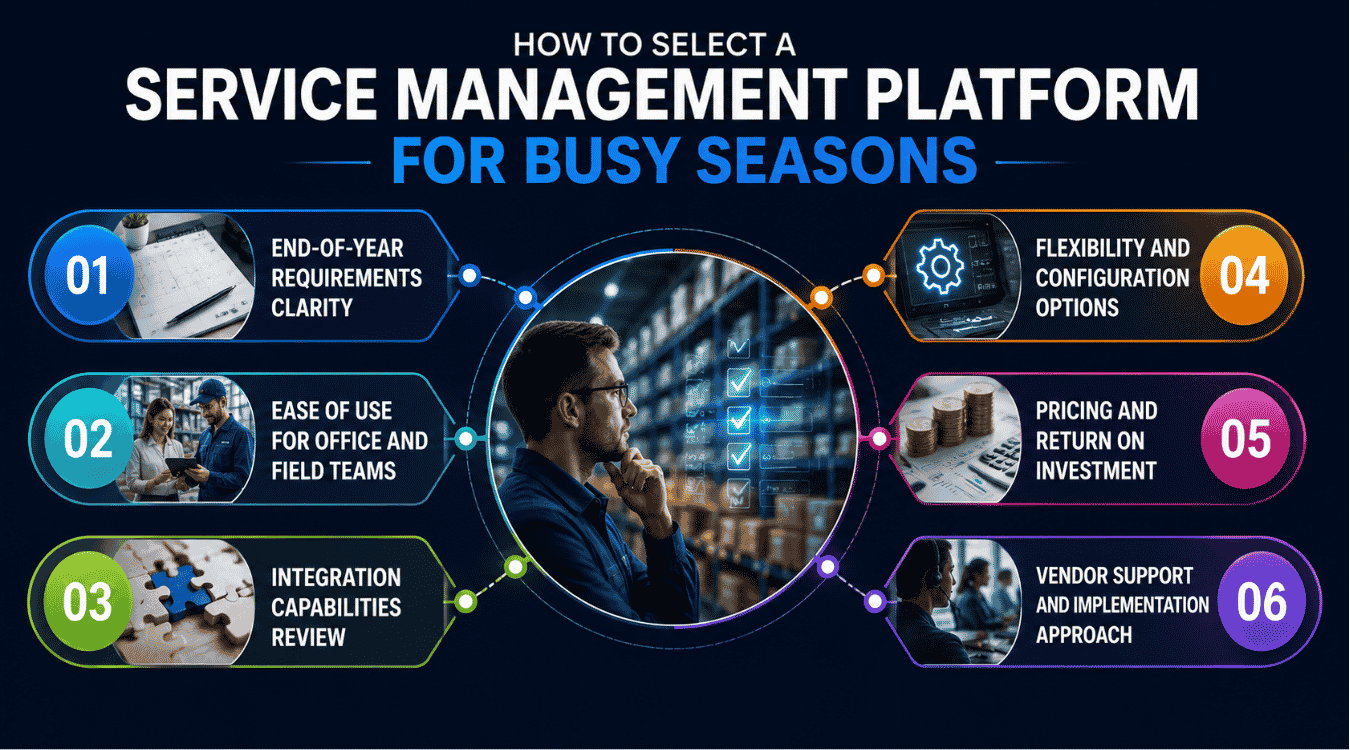
Selection should consider peak demand, not just average days. When comparing FSM software, organizations should consider factors such as ease of use, scalability, and whether the platform is an all-in-one solution or relies on third-party integrations for essential features.
End-Of-Year Requirements Clarity
Map your busiest scenarios: compliance deadlines, emergency spikes, staff shortages, invoice cutoffs, and customer reporting needs. Translate them into must-have platform requirements. Clear requirement planning helps businesses avoid feature gaps that create delays during peak operational periods. Well-defined priorities make vendor comparisons more accurate and ensure the selected platform supports critical year-end workflows efficiently.
Businesses should also evaluate reporting capabilities, automation rules, scheduling flexibility, and mobile access early in the selection process. Strong planning reduces operational bottlenecks and helps organizations maintain service quality once workloads rise sharply during the final months of the year.
Ease Of Use For Office And Field Teams
It is important to evaluate the ease of use of FSM software, as a user-friendly interface can significantly impact employee adoption and overall efficiency in both the office and field. Ask dispatchers, planners, technicians, and back office staff to test common tasks. Count clicks, review load times, and confirm job status visibility during busy schedules.
Simple interfaces reduce training requirements and help teams complete tasks faster during high-pressure operations. Strong usability also minimizes workflow disruptions, improves communication between departments, and helps field technicians manage updates, forms, and scheduling changes more efficiently throughout demanding year-end service periods.
Integration Capabilities Review
Integrations with CRM, ERP, and accounting platforms become critical when finance and sales teams focus heavily on year-end targets and reporting deadlines. Ask about connectors, APIs, synchronization frequency, error handling processes, and historical data migration support before making a decision. Reliable integrations improve data consistency across departments and reduce duplicate manual work during busy operational periods.
Better synchronization between systems also supports faster invoicing, accurate reporting, improved forecasting, and smoother coordination between service, finance, and customer support teams. Strong integration capabilities help businesses avoid operational confusion when workloads increase significantly near the end of the calendar year.
Flexibility And Configuration Options
End-of-year workflows often differ from standard service operations. Administrators may need new job types, approval rules, notification templates, escalation paths, and year-end audit categories to support changing operational requirements. Choose maintainable configuration over heavy customization whenever possible.
No-code or low-code setup options help businesses adapt quickly without waiting for long development cycles or external technical support. Flexible platforms also help organizations respond faster to customer demands, compliance updates, scheduling changes, and reporting requirements during high-volume seasonal service periods.
Pricing And Return On Investment
Look beyond license pricing when evaluating service management software for busy operational periods. Consider reduced overtime, fewer repeat visits, faster invoicing, lower administrative errors, improved scheduling accuracy, and better customer retention rates. Using FSM software can improve profitability by streamlining workflows and enabling more effective resource allocation across service teams.
Businesses should compare measurable efficiency gains against long-term platform costs instead of focusing only on upfront pricing. Strong return on investment often comes from operational improvements that support faster service delivery, lower operational costs, and more stable customer relationships during demanding year-end workloads.
Vendor Support And Implementation Approach
Ask about onboarding, training resources, implementation timelines, and year-end support availability before selecting a service management platform. Strong vendor guidance becomes especially valuable if deployment happens near a busy operational period. Businesses should also evaluate whether the software functions as an all-in-one platform or depends heavily on third-party integrations for critical features.
Reliable implementation support reduces deployment risks and helps teams adopt workflows faster. Effective onboarding also improves employee confidence, strengthens platform adoption across departments, and ensures businesses can use scheduling, invoicing, dispatching, and reporting features efficiently before seasonal workloads increase.
EasyDesk As Your Partner For Year-End Service Management
EasyDesk helps organizations manage field service and back-office workflows during high-pressure periods with clear scheduling, mobile access, automated workflows, and connected customer communication. Teams can manage job details, dispatch work, track progress, support recurring services, and maintain visibility across service agreements from one place, using the same principles described in our guide to smarter helpdesk setups for smoother support.
With EasyDesk, office teams can coordinate field service teams, monitor field service operations, and keep customers informed without constant manual updates. Field technicians can use mobile tools to access job details, complete digital forms, upload photos, collect customer signatures, and update statuses from the job site, all while relying on a platform that prioritizes secure, transparent customer support.
EasyDesk also supports integrated inventory management, customer portal capabilities, secure payments, accounting tools, and seamless integration with key systems involved in year-end close. For recurring compliance inspections, contract renewals, and preventive maintenance, customizable workflows help teams deliver high-quality service without losing control, while its multi channel customer support platform keeps all customer conversations organized in one place.
If your next year-end rush usually depends on spreadsheets, phone calls, and late-night reconciliation, consider piloting EasyDesk’s customer support platform and exploring its smarter support features well before peak season. A calmer December starts with better structure months earlier.
Frequently Asked Questions
How Early Should We Implement Service Management Software?
Businesses should ideally implement service management software at least three to six months before year-end. Early implementation gives teams enough time for setup, workflow adjustments, employee training, and testing. Starting early also helps organizations resolve operational issues before seasonal demand increases and workloads become more difficult to manage efficiently.
Can Smaller Field Teams Benefit From FSM Software?
Smaller field teams can benefit significantly from service management software during busy periods. Automation, scheduling tools, mobile access, and centralized communication help smaller teams manage higher workloads without adding unnecessary administrative pressure. Better visibility and coordination also improve response times, technician productivity, and overall customer satisfaction during seasonal demand spikes.
What If Our Organization Does Not Have A Traditional Year-End Peak?
Organizations without a traditional year-end rush can still benefit from service management software. The platform improves operational visibility, workflow consistency, reporting accuracy, and team coordination throughout the year. Businesses with seasonal demand at other times can also adapt scheduling, automation, and reporting tools to support their specific operational cycles.
How Does Service Management Software Help With Compliance Audits?
Service management software helps businesses maintain accurate records for inspections, maintenance activities, approvals, technician assignments, and completed work orders. Centralized audit trails make compliance documentation easier to access during reviews or inspections. Automated reporting also reduces manual paperwork and helps organizations demonstrate operational accountability more efficiently during audits.
Is It Possible To Start With Only A Few Features And Expand Later?
Many service management platforms support phased implementation, allowing businesses to start with essential features and expand later. Companies often begin with scheduling, dispatching, or ticket management before adding automation, reporting, customer portals, or advanced integrations. Gradual adoption helps teams adjust workflows without creating major operational disruptions during implementation.



