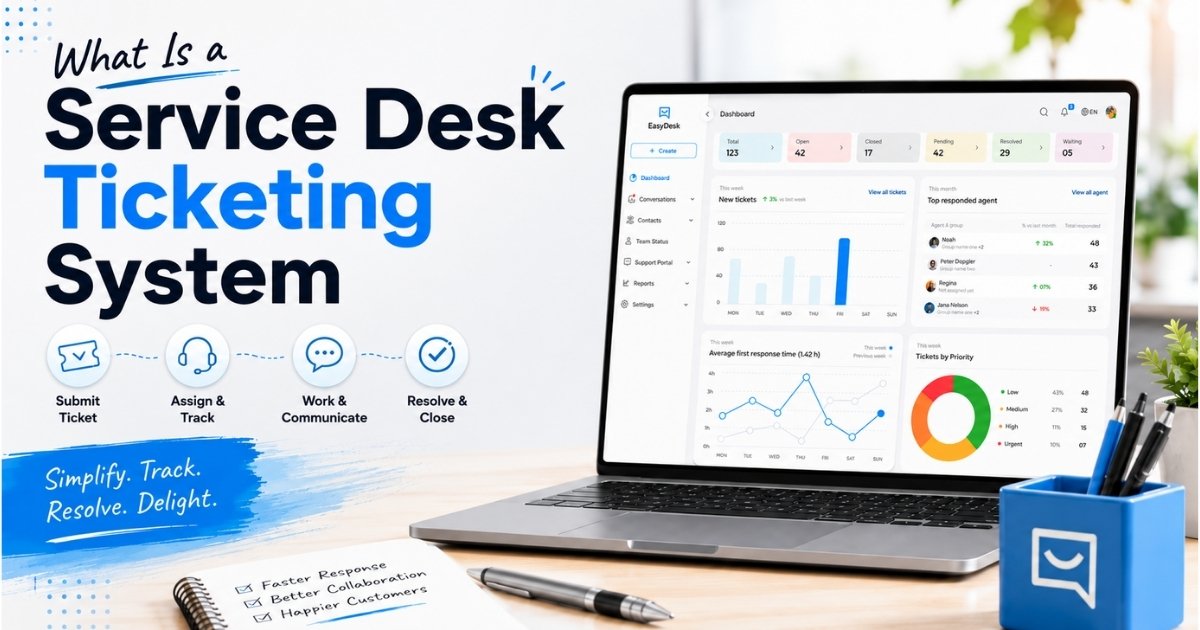
Managing support requests through scattered emails and chat messages creates confusion fast. A service desk ticketing system solves this by turning every customer request into a structured, trackable ticket. Help desk ticketing software streamlines support operations, improves response times, and ensures that no support request is overlooked.
The global help desk software market reached $2.5 billion in 2025, projected to grow at a 12.5 percent CAGR to $5.2 billion by 2030. This growth reflects what support teams already know: organized workflows beat inbox chaos every time. Businesses using ticketing systems report 30 percent faster resolution times and 25 percent higher customer satisfaction scores compared to email-only support.
Whether you handle IT requests internally or manage customer requests externally, the right desk system brings visibility, accountability, and reporting to your support operations.
What Is A Service Desk Ticketing System
A service desk ticketing system is a centralized software platform used to capture, manage, and resolve support requests. It converts every incoming message into a digital record known as a ticket, complete with unique identifiers, timestamps, and ownership details.
Unlike a shared inbox, where emails get lost or duplicated, a ticketing system enforces structure. Each ticket carries a status, priority level, and full history of interactions. Help desk ticketing software automates the ticket management process by assigning unique identifiers to each ticket, enabling agents to track, prioritize, and resolve issues systematically.
This approach works for both IT help desk teams handling password resets and customer support teams managing product questions. The core workflows remain the same.
How A Help Desk Ticketing System Works Day To Day
Daily operations in a desk ticketing system follow a structured loop from intake to resolution to analysis. Support teams globally process over 1.2 billion tickets annually, and systems handle 40 percent more volume through automation.
Ticket Submission Across Support Channels
Incoming tickets arrive through multiple support channels. Email accounts for 55 percent of tickets, chat handles 22 percent, web forms capture 15 percent, phone logs contribute 5 percent, and social media adds 3 percent. Multi-channel ticketing prevents the 20 percent request loss common in siloed systems.
Modern help desk software converts these varied inputs into unified tickets automatically. Each request receives a unique ID and a timestamp the moment it enters the queue, creating an immediate record regardless of the primary support channel used.
Automatic Ticket Assignment
Automated routing and assignment of tickets is based on agent skill, expertise, or workload. Rules route tickets by keywords, user groups, or categories, reducing assignment time from ten minutes to seconds.
Skill-based routing matches complex technical issues to experienced agents while directing simple requests to available team members. This ticket assignment process eliminates the daily triage meetings that waste hours of productive time. Teams using automated routing report 65 percent improved efficiency.
Priority And SLA Management
Ticket prioritization identifies urgent issues and sets priority levels for managing high-volume incidents. Priorities tier from low (informational requests) to critical (system outages), with SLA management tracking response and resolution times against Service Level Agreements.
Tools alert teams via email or SMS when breaches approach. Meeting an 80 percent first response target under four hours for high-priority issues becomes achievable when the system enforces these standards automatically. Non-compliance costs businesses $1,500 per minute in downtime during outages.
Agent Collaboration During Resolution
Agents add internal notes, mention colleagues, and link related tickets to share context without starting from scratch. This cuts duplicate work by 35 percent according to industry benchmarks. Every action taken on a ticket is logged with a timestamp and owner, creating a clear audit trail.
When an agent goes on vacation or shifts teams, anyone can pick up the ticket and understand its full history immediately. Attachments, screenshots, and customer data stay connected to the same ticket throughout its lifecycle.
Status Updates And Customer Communication
Consistent statuses like Open, In Progress, Waiting On Customer, and Resolved keep everyone aligned. Automated notifications keep users informed without overload. About 70 percent of customers prefer checking ticket portals over receiving constant email pings.
Transparency through ticket tracking reduces user frustration and improves satisfaction. Customers know their request exists, who owns it, and what stage it reached. This visibility transforms the support experience.
Ticket Closure And Reporting
Closure requires agent confirmation and often user approval through satisfaction surveys. Built-in reporting and performance monitoring features in ticketing systems allow for the generation of charts and reports to measure various performance metrics.
Reporting and analytics dashboards provide real-time metrics on ticket volume, average resolution times, and agent performance. Weekly reports reveal patterns like 18 percent ticket spikes on Mondays, helping managers plan staffing accordingly.
Features Every Desk Ticketing System Should Include
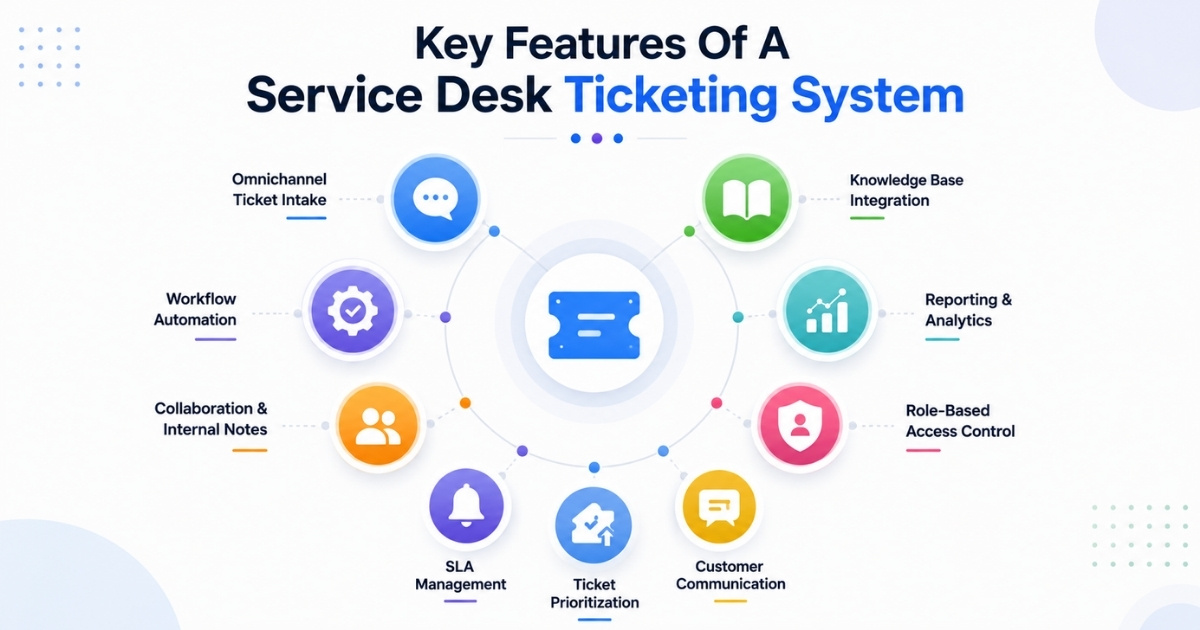
Essential features drive 28 percent productivity gains across support teams. About 82 percent of users demand automation as a core requirement when evaluating desk tools.
Omnichannel Ticket Collection
Centralized ticket management consolidates requests from various channels into a single searchable interface. Email, chat, social media, phone, and portal submissions all flow into one unified queue. This eliminates channel-switching that wastes 40 percent of agent time. When comparing ticketing systems, consider your primary support channel. Some tools optimize for email while others excel at live chat or omnichannel support. Match the tool to how your customers prefer reaching you.
Support teams gain faster visibility into customer issues when every interaction enters one organized system instead of remaining scattered across disconnected communication channels. Centralized ticket collection also improves response consistency, reduces duplicate conversations, and helps agents manage customer communication more efficiently during high-volume support periods.
Workflow Automation Rules
Workflow automation handles routine tasks like ticket categorization and status updates. Prebuilt automation rules for routing and escalation cut manual tasks by 50 percent. Common automations include auto-assigning tickets by category, adding tags for keywords, and sending follow-up surveys after resolution. Automation features in help desk ticketing software significantly reduce the time spent on manual tasks, allowing support teams to handle more tickets efficiently. Start with three to five high-impact rules, then refine after two weeks of real-world usage.
Automation workflows also improve consistency across support operations by reducing human error during ticket assignment, escalation handling, and repetitive status management tasks. Structured automation rules help teams maintain faster response times while allowing agents to focus more attention on complex customer support cases.
Internal Notes And Collaboration
Private threads and mentions foster teamwork without exposing internal discussions to customers. Using ticketing software provides transparency and accountability, enabling efficient collaboration among support teams. These notes become invaluable during escalations or handoffs. New agents reviewing a ticket see the full reasoning behind previous decisions rather than guessing at context from customer-facing messages alone.
Cross-functional collaboration becomes easier when support agents, technical teams, and managers can access shared ticket context without relying on external communication tools. Internal notes also reduce confusion during escalations by keeping operational discussions, troubleshooting updates, and resolution details connected within the ticket workflow.
Knowledge Base Integration
Integrating a knowledge base allows for faster resolution of recurring issues. Self-service knowledge bases provide users with a searchable repository of FAQs and troubleshooting guides, reducing ticket volume by 15 to 20 percent. A built in knowledge base that links directly to ticket workflows helps agents suggest articles during resolution. Self-service portals enable end-users to resolve common issues independently before creating tickets.
Well-structured knowledge resources also reduce agent workload by helping customers resolve repetitive issues independently before submitting support requests through official channels. Connected knowledge base systems improve support scalability while allowing teams to maintain faster resolution times without increasing operational complexity.
Reporting And Performance Tracking
Managers need more than inbox views to understand performance trends. The most useful custom reports cover ticket volume by channel, response and resolution times, SLA breaches, and top issue categories. Monthly reports might reveal that 35 percent of tickets stem from the same password reset problem. This insight justifies creating an automation or self service article to deflect those requests permanently.
Detailed performance analytics help support leaders identify recurring service gaps, optimize staffing decisions, and improve overall response efficiency across high-volume ticket environments. Accurate reporting also helps organizations measure operational performance, improve accountability, and make data-driven improvements to customer support workflows over time.
Role-Based Access Control
Admins set permissions ensuring compliance with security requirements. About 90 percent of enterprise users require role-based controls for GDPR or HIPAA compliance. Ticketing systems provide oversight for sensitive requests and can help identify suspicious patterns that reveal emerging threats. Limit who can see private tickets, attachments, and admin settings based on job responsibilities.
Permission-based access management also strengthens operational accountability by ensuring employees only access customer records and administrative controls relevant to their responsibilities. Structured access policies reduce security risks, improve compliance readiness, and protect sensitive operational information across large support environments.
When A Free Help Desk Software Plan Is Enough
Free plans suffice for 45 percent of small businesses handling under 500 tickets monthly. Understanding when free works and when to upgrade saves both money and frustration.
Small Team Support Operations
Very small teams of one to five agents thrive on free tiers like Zoho Desk’s free plan, which offers unlimited tickets and up to three agents. Basic queues and email-to-ticket conversion cover daily needs without subscription costs. The desk team can manage standard workflows, track ticket status, and maintain customer visibility. Manual effort stays manageable at this scale, and agents learn the system before complexity increases.
Small support teams also benefit from simpler onboarding and lower operational overhead while building internal processes before investing in advanced ticketing features or larger support infrastructure.
Low Monthly Ticket Volume
Under 250 tickets monthly fits most free plan limits comfortably. Free help desk tools often come with trade-offs, such as tight caps on users, inboxes, or contacts, which can limit their effectiveness as teams grow. Monitor your ticket volume quarterly. When you consistently exceed free tier limits, the paid plan becomes worthwhile. But rushing to premium features before you need them wastes budget.
Lower ticket volumes make it easier for teams to maintain response quality manually without depending heavily on automation, advanced reporting systems, or enterprise-level workflow management capabilities.
Basic Ticket Tracking Needs
Email-to-ticket conversion, status updates, and simple assignments cover 60 percent of small business needs according to industry analysis. A basic ticketing system handles these workflows without advanced automation or AI features. If your primary need is tracking who owns what and when things close, start simple. Prioritize tickets by urgency and resolve tickets consistently before adding complexity.
Organizations with straightforward support workflows often gain enough operational structure from basic ticket tracking tools without requiring expensive customization, integrations, or high-level administrative controls initially.
Limited Automation Requirements
Basic automation in free tiers handles routing by category and simple escalations. Until volumes exceed 100 tickets weekly, manual effort remains manageable alongside occasional rule-based assistance. Completely free options provide enough structure for teams just starting their ticketing process. Save advanced automation for when repetitive tasks consume significant agent hours.
Early-stage teams usually manage routine support activities successfully with limited automation while learning which repetitive processes actually require long-term workflow optimization and scalability improvements.
Early-Stage Startup Support
Startups save $5,000 annually by validating their support model on free plans before committing to paid subscriptions. The free tier becomes an entry point for testing workflows with real service requests. Zoho Desk and similar tools include SLAs even in free versions, giving startups enterprise-style structure without enterprise costs during lean validation phases.
Free platforms allow startups to experiment with support operations, customer communication processes, and internal ticket management before scaling into more advanced service desk environments.
Simple Internal Help Desk Use
HR and IT teams at companies with 50 employees use free tools like osTicket for internal requests. Tracking equipment requests, policy questions, and facility issues works well within free limitations. Phone support integration might require upgrades, but email-based internal ticketing stays affordable. These teams often manage tickets through basic ticket tracking without needing multilingual support or advanced reporting.
Internal support environments typically operate with predictable workflows, making free help desk systems practical for handling employee service requests without significant operational complexity or customization requirements.
How To Choose The Right Desk Ticketing System For Your Team
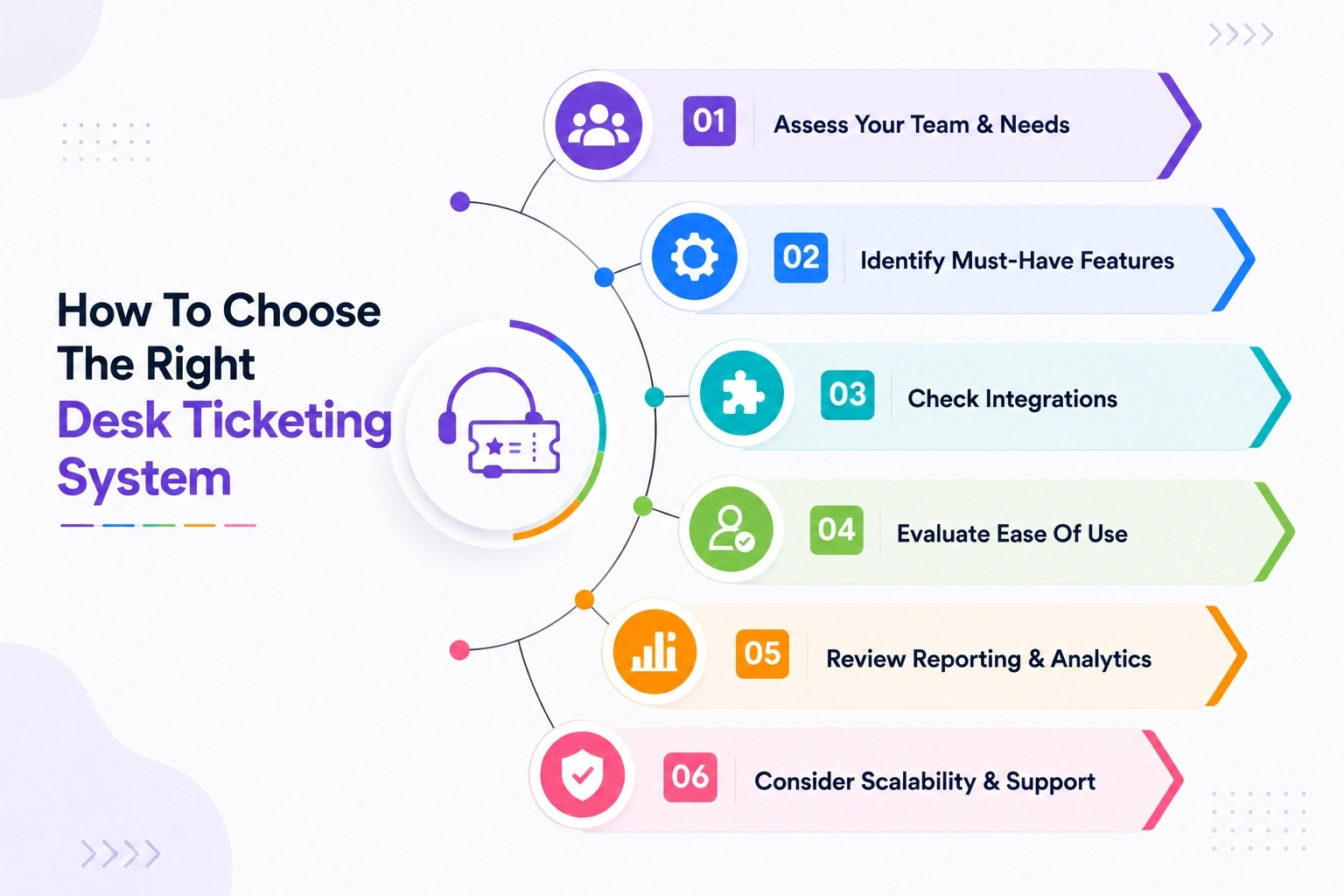
Selection directly impacts efficiency. Choosing the wrong tool leads to 22 percent agent churn according to industry research. Evaluate options through 30-day trials with real tickets.
Team Size And Ticket Volume
Solo agents and five-person teams need different capabilities than 50-person departments with multiple queues. Match your current size while considering growth. Modern service desk systems allow organizations to handle increasing support demands without requiring a linear increase in IT headcount. A tool handling 1,000 tickets monthly might struggle at 10,000. Check volume limits before committing.
Long-term scalability matters because switching platforms later often disrupts workflows, increases migration costs, and creates additional training challenges for support teams already managing high ticket volumes.
Required Automation Features
Basic needs fit Zoho Desk or similar free options. Advanced requirements like AI agents, complex routing, and multi-department workflows need tools like monday.com, Jira Service Management, or other top help desk software options from recent guides to scalable helpdesk ticketing software. Assess which manual tasks consume the most time. Route tickets automatically if triage takes hours daily. If basic categorization works, skip paying for features you won’t use.
Practical automation should solve real operational bottlenecks instead of adding unnecessary complexity that support teams rarely use during daily ticket management activities.
Integration And Compatibility Needs
Check native integrations with your existing tools. CRM connections, Slack notifications, and Microsoft Teams compatibility matter for daily operations. API availability becomes critical for custom workflows. Test key integrations during trials rather than trusting marketing claims. Broken connections disrupt workflows more than missing features.
Reliable integrations improve operational efficiency by keeping customer data, communication records, and support workflows connected across multiple business systems without repetitive manual updates.
Ease Of Use For Agents
Complex interfaces increase training requirements from days to weeks. Help desk team members need intuitive tools that work without extensive training. Look for platforms where new agents become productive within their first day. Setting up a help desk ticketing system can be accomplished in six steps: defining support channels, importing existing contacts and ticket history, setting up a knowledge base, configuring auto-routing and tagging rules, creating canned responses, and setting up basic reporting. Technical expertise requirements should match your team’s skills.
Simple interfaces improve adoption rates, reduce onboarding friction, and help support agents focus more on customer resolution instead of navigating complicated system workflows.
Reporting And Visibility Requirements
Some teams need basic charts showing ticket counts and response times. Others require reporting capabilities with trend analysis, custom exports, and scheduled deliveries. Custom reports on agent performance, category breakdowns, and SLA adherence help managers optimize staffing. Identify which metrics drive your decisions before evaluating dashboard options.
Clear reporting visibility also helps organizations identify recurring service issues, monitor team performance accurately, and improve long-term operational decision-making through reliable support analytics.
Scalability For Future Growth
Cloud platforms auto-scale to handle ten times your current volume without infrastructure changes. About 68 percent of organizations outgrow on-premise solutions within two years. Most modern help desk platforms can be fully operational in under a day, allowing teams to quickly start managing support requests. Choose systems where upgrading plans adds features without requiring migrations.
Future-ready platforms help businesses expand support operations smoothly without replacing existing workflows, rebuilding integrations, or disrupting customer service continuity during organizational growth.
How AI Capabilities Transform Service Desk Ticketing
AI adoption surged 45 percent in 2025, reducing resolution times by 37 percent. Modern AI processes 70 percent of routine tickets autonomously while keeping humans in control.
AI-Based Ticket Categorization
Natural language processing classifies 95 percent of tickets accurately. Systems tag issues like password reset or billing question within seconds of arrival, eliminating manual categorization delays. This automation handles ticket routing based on content patterns rather than rigid keyword rules. Categories update as language evolves, keeping assignments accurate over time.
Automated categorization also improves ticket prioritization accuracy, helping support teams respond faster to urgent issues while reducing manual sorting effort across high-volume service environments.
Automated Response Suggestions
AI suggests replies based on ticket content and historical resolutions. Agents accept 82 percent of suggestions, cutting response composition time in half. Help desk ticketing software can automatically route tickets to the appropriate support agent or team based on predefined rules or ticket categories, improving response times and efficiency. Suggested replies maintain consistent tone while speeding timely responses.
AI-generated responses help support teams maintain communication consistency while reducing repetitive writing tasks that often slow response handling during busy operational periods.
Smart Ticket Routing
AI matches tickets to agents with 88 percent precision based on skills and current workload. This reduces escalations by 40 percent compared to manual assignment. The system learns from successful resolutions, improving routing accuracy continuously. Complex issues reach experienced agents while routine requests distribute evenly across the team.
Intelligent routing also balances workloads more effectively, preventing agent burnout while ensuring customers reach the most qualified support representatives without unnecessary transfers or delays.
Predictive Issue Detection
AI forecasts ticket spikes from trend patterns, preventing 25 percent of capacity overloads. Integration with monitoring systems identifies emerging problems before user feedback arrives. Standardized workflows and instant access to historical data significantly compress mean time to resolve. Predictive capabilities turn reactive support into proactive service.
Predictive analysis gives support leaders more time to prepare staffing adjustments, improve workflow planning, and reduce operational disruption before issues impact larger customer groups.
AI-Powered Support Insights
Sentiment analysis identifies frustrated customers for priority handling, contributing to 15 percent CSAT improvements. Dashboards predict demand patterns and recommend staffing adjustments. Automation and self-service tools can reduce ticket volumes by as much as 30 percent and speed up fixes by over 50 percent. These insights transform reporting from backward-looking summaries into forward-looking guidance.
AI-driven analytics also uncover recurring operational bottlenecks, helping organizations improve long-term support strategies through data-backed decisions instead of relying only on historical reporting trends.
How To Organize Support Workflows Beyond Basic Ticketing
Advanced setups yield 42 percent faster cross-department resolutions. About 55 percent of firms now extend ticketing into enterprise service management covering HR, facilities, and operations.
Cross-Team Collaboration Workflows
Linking tickets across IT, HR, and operations reduces handoffs by 30 percent. When an employee onboarding request requires IT equipment and HR paperwork, connected tickets track both streams. Shared visibility prevents departments from working in isolation. Service quality improves when everyone sees how their piece connects to the whole request.
Collaborative workflows also improve accountability by giving every department clear visibility into task ownership, pending actions, and operational dependencies across shared service requests.
Centralized Communication Tracking
Single audit trails cut disputes by 50 percent. Every email, chat message, and phone note connects to the same ticket rather than scattering across separate tools. Ticket history becomes searchable institutional knowledge. Agents resolve tickets faster when similar past issues appear instantly during research.
Centralized communication records also reduce duplicate conversations while helping support teams maintain accurate context throughout escalations, follow-ups, and multi-department service coordination activities.
Task And Approval Management
Ticketing systems often include features for simplified incident and problem management, allowing users to link multiple incident tickets to a single problem ticket for better organization. Sub-tasks with approval requirements enforce processes for refunds, access requests, or equipment purchases. Clear approval paths prevent delays from unclear ownership. Managers see pending approvals in their queues rather than buried in email threads.
Structured approval workflows help organizations reduce operational confusion while maintaining compliance, accountability, and faster decision-making across internal service management processes and requests.
Knowledge Sharing Processes
Auto-suggesting articles during ticket resolution builds knowledge bases three times faster than manual documentation. Common solutions become reusable without separate documentation projects. User feedback on articles improves content quality over time. Community forums extend self-service beyond official documentation to peer assistance.
Consistent knowledge sharing also reduces repetitive troubleshooting work, helping support teams improve response efficiency while maintaining better service continuity during staff changes or escalations.
Workflow Visibility And Reporting
Real-time boards track SLAs across all teams, improving adherence by 28 percent. Managers spot bottlenecks before they become backlogs. Advanced reporting reveals patterns across departments. When facilities tickets spike every Monday morning, preventive maintenance on Friday afternoons solves the root cause.
Operational visibility allows organizations to identify recurring workflow inefficiencies early, optimize resource allocation, and improve long-term service performance across multiple support departments and processes.
Why EasyDesk Is A Smart Service Desk Ticketing Partner
EasyDesk positions itself for small and mid-sized teams seeking organized workflows without enterprise bloat. The platform delivers intuitive tools that launch fast and scale smoothly as your needs grow.
Core strengths include clean ticket queues with instant filtering, lightning-fast search across ticket histories, and prominent SLA timers on every ticket. Drag-and-drop workflow automation means non-technical managers set up rules in minutes rather than waiting for developer resources.
From day one, EasyDesk converts emails to support tickets seamlessly. Modular add-ons for chat widgets and customer portal capabilities become available as ticket volume grows to 5,000 monthly and beyond. The platform handles everything from basic ticketing to managing tickets across multiple departments.
Built-in AI capabilities generate ticket summaries for quick handoffs, apply smart tags based on content patterns, and offer context-aware reply suggestions. These ai features save roughly 25 percent of time per ticket while keeping agents in control of every customer interaction.
EasyDesk brings key features together in one streamlined platform. Automated workflows, ticket creation and management, canned responses, SLA management, feedback tracking, and social media integration work seamlessly in real-life support scenarios. The result is faster responses, organized queues, and customer satisfaction improvements without unnecessary manual effort.
Frequently Asked Questions
How Long Does It Take To Set Up A Service Desk Ticketing System
Cloud-based desk tools like EasyDesk activate basic email routing and queues in a single afternoon for small teams. You can process your first tickets the same day. Most modern help desk platforms can be fully operational in under a day, allowing teams to quickly start managing customer support requests. Advanced configurations with multiple departments, custom SLAs, and 50-plus integrations typically span one to three weeks of gradual tuning rather than disruptive overhauls.
What Is The Difference Between A Help Desk And A Service Desk
Help desk focuses on break-fix support and ticket handling, addressing immediate technical issues. Service desk covers a broader range of services, requests, and approvals including proactive services and cross-department coordination. In everyday conversation, many teams use the terms interchangeably.
Can I Use A Service Desk Ticketing System For Non IT Teams
Yes, HR, Finance, Operations, and Facilities teams use desk ticketing to organize requests and track turnaround times effectively. The same ticketing process that works for IT password resets handles HR onboarding checklists, policy questions, and equipment requests for new hires. Pilot one non-IT team with five to ten request types to demonstrate ROI before rolling out more broadly. Success with one department builds confidence for wider adoption.
How Do Service Desk Tools Handle Sensitive Data And Security
Reputable help desk vendors encrypt customer data in transit and at rest, offer role-based access controls, and provide audit logs for critical changes. Check for compliance certifications like ISO 27001 or SOC 2 that match your industry requirements. Carefully manage who can see private tickets, attachments, and admin settings. Departments handling payroll, legal, or health information need tighter restrictions than general support queues.
What Metrics Should I Track To Know If My Desk Ticketing System Works Well
Focus on first response time (target under two hours), average ticket resolution time (under 24 hours), reopened ticket count (below five percent), and CSAT ratings (above 4.3 out of 5). These metrics reveal whether your ticketing process delivers service quality improvements. Pick two or three primary metrics and review them weekly rather than tracking dozens of charts. Adjust SLAs, staffing, or workflows based on trends, turning reporting into an ongoing improvement loop rather than a one-time exercise.



