Digital businesses depend on well-structured service level agreements to keep IT services, SaaS platforms, and support teams running smoothly. Yet many organizations still struggle with vague SLAs that cause disputes over outages, slow response times, and unclear ownership. These gaps lead to frustrated customers, overworked teams, and missed business goals.
This guide focuses on practical, field-tested SLA habits rather than legal theory. Whether you manage a service desk team, lead customer success efforts, or oversee IT service delivery, you will find actionable guidance here.
We cover seven SLA best practices, essential metrics, monitoring strategies, common pitfalls, and how EasyDesk supports reliable service agreements, expanding on concepts from our broader service level agreement helpdesk guide for support teams. Concrete examples like 24/7 support with a 30-minute first response for critical incidents will ground each recommendation in real-world scenarios.
What Is A Service Level Agreement
A service level agreement SLA defines the documented agreement between a service provider and a customer, whether internal or external. The SLA defines service scope, performance targets, responsibilities, and what happens when commitments are not met. This mutual understanding forms the foundation for consistent service delivery and sets realistic expectations for everyone involved.
Key elements typically include services covered, response and resolution times, availability targets, support hours, escalation procedures, and remedies such as service credits. For example, a European cloud provider might commit to 99.95% uptime per calendar month, while an IT helpdesk promises 8-business-hour resolution for low-priority tickets logged via portal or email.
SLAs differ from internal operating level agreements, which coordinate handoffs between teams. However, both must work together. Poor internal coordination can cascade into customer-facing failures even when headline SLA metrics appear healthy.
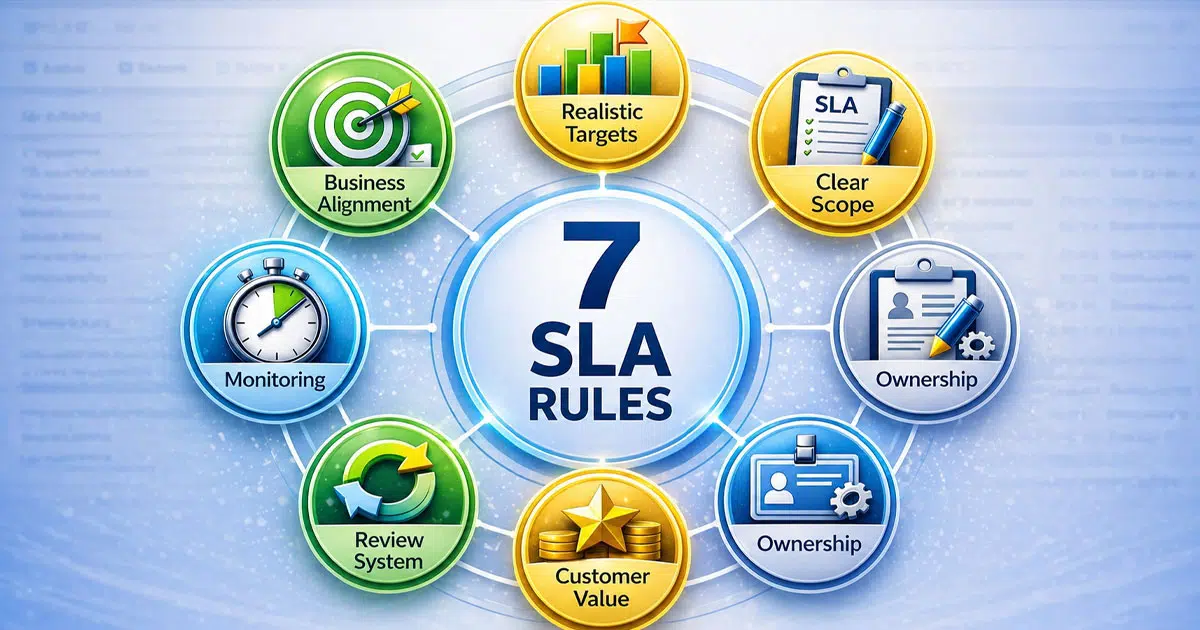
7 SLA Best Practices For Reliable Service Agreements
These seven practices apply to IT organizations, SaaS platforms, and managed service providers alike. Each practice is supported by realistic figures and examples from both internal enterprise service desks and external B2B contracts. EasyDesk users can apply these recommendations directly within their workflows to deliver services that meet client expectations consistently.
1. Align SLAs With Clear Business Outcomes
Translating strategic goals into SLA targets ensures your agreements support what matters most. If your 2025 objective is reducing downtime costs below $50,000 quarterly, your SLAs should prioritize uptime for core systems and response time SLAs for revenue-impacting incidents.
Consider an e-commerce scenario where a retailer maps 99.99% checkout availability to a payment gateway 30-minute response commitment. This alignment directly protects $1 million in monthly revenue. Historical data showing 2% downtime equating to 5% sales loss makes the business case clear.
EasyDesk facilitates this by linking services and priorities to business processes, helping teams focus SLAs on critical services first. Align SLAs across IT, finance, operations, and customer success to avoid setting targets in isolation. Watch for “watermelon SLAs” where metrics look green but customer experience suffers. Adding experience-oriented indicators alongside uptime helps reveal these gaps.
2. Define Realistic And Measurable Targets
Explicit numeric targets enable automated tracking and reduce ambiguity. Aim for commitments like 95% of P2 tickets resolved within 8 business hours or 99.9% monthly uptime. Base initial targets on historical performance data from 2023-2024 rather than optimism. Starting 10-20% above historical averages typically yields achievable goals.
Separate targets for response, resolution, workarounds, and communication frequency during major incidents keep expectations clear, especially when you actively work to cut average resolution time fast. A practical priority matrix might look like this:
| Priority | Response Time | Resolution Time |
|---|---|---|
| P1 Critical | 15 minutes | 3 hours |
| P2 High | 1 hour | 8 hours |
| P3 Low | 4 hours | 5 business days |
3. Use Clear Language And Concrete Scope
Reject vague terms like “reasonable efforts” or “as soon as possible.” Precise SLA definitions prevent disputes. For example, specify that “response begins when ticket is assigned post-triage” rather than leaving interpretation open.
Document in-scope and out-of-scope services clearly. A support SLA might cover tickets logged via the EasyDesk portal and email for CRM support, US and EU users, while excluding social media mentions and hardware faults. State customer responsibilities like providing accurate information and maintaining supported browser versions.
Regional clarity on time zones, languages, and contact channels reduces misinterpretation. When both parties share the same service expectations, disputes drop significantly, reinforcing why well-structured SLAs matter for service success.
4. Plan Transparent Monitoring And Reporting
SLAs must specify how service performance is measured, which tools are used, and how often reports are shared. Monthly dashboards and quarterly reviews are common cadences. EasyDesk tracks response and resolution times in real-time, alerting teams on breaches before they escalate.
Reports should include trend charts showing performance over time, root cause summaries for repeated sla breaches, and executive overviews. Both parties need access to the same data set with consistent definitions for metrics like “uptime” and “resolved.” Transparency builds trust and keeps discussions factual.
For mission-critical services, consider independent verification through third-party uptime monitors and dedicated SLA tracking software to improve response time. This provides customers with additional confidence in your availability commitments.
5. Build Flexible Review And Change Mechanisms
Set a defined review cadence. Quarterly reviews suit fast-changing SaaS environments, while semiannual works for stable IT services. Include a simple change process where either party can propose updated targets or new services with agreed lead times.
For example, after launching a self-service knowledge base in 2026 that reduces ticket volume by 30%, you might revise response SLAs from 1-hour to 2-hour targets. Document version history and effective dates for each revision. Regular reviews signal maturity rather than instability when driven by evidence.
Treat SLA changes as collaborative improvements focused on shared success metrics rather than adversarial renegotiations, supported by a robust SLA management system with automation and reporting.
6. Connect SLAs To Experience And Value
Beyond uptime, integrate experience metrics like customer satisfaction, effort scores, and survey feedback. These reveal gaps that raw performance metrics miss. A service might hit 99.9% uptime consistently while users still report slow-feeling responses or confusing workflows.
Track perception-based indicators alongside operational ones in EasyDesk dashboards. Use both in periodic reviews to get the complete picture of service quality, ensuring your customer support and customer experience strategies stay aligned. Convert experience insights into updated SLAs, such as adding response commitments for feedback on new features.
ServiceNow data shows experience metrics predict churn twice as effectively as uptime alone. Focusing on real value delivered keeps SLAs relevant to actual customer needs.
7. Assign Ownership And Escalation Paths Early
Clear ownership prevents delays when incidents escalate or response targets start slipping. Every SLA should identify who owns service delivery, who approves exceptions, and who steps in during high-priority issues. Defined roles across support, engineering, account management, and leadership reduce confusion during pressure situations.
A practical SLA should map escalation levels by severity. For example, a P1 outage may escalate from frontline support to engineering within 15 minutes, then to service leadership after 30 minutes if no workaround exists. This structure helps teams act faster and keeps communication consistent.
EasyDesk can support this approach by routing tickets automatically, assigning priorities, and maintaining visibility across teams, especially when you implement a structured ticket escalation process for faster support. Customers also benefit when escalation contacts and communication expectations are documented clearly. Strong ownership improves accountability, shortens recovery time, and ensures SLA commitments are supported by action rather than assumptions.
Key Components And Metrics Of Effective SLAs
Selecting the right components transforms SLA best practices into action. This section covers core building blocks and the metrics that EasyDesk customers typically track for service level management.
Service Scope And Catalog Alignment
SLAs should reference a service catalog listing specific services like “IT service desk,” “CRM support,” or “HR onboarding workflows.” Each service needs its own defined scope covering user groups, geographic coverage, and criticality level.
A mid-size company in 2025 might map business-critical applications to higher SLA tiers than internal back-office tools. Customer based SLA structures allow different commitments for different user segments. Service based SLA approaches organize targets around specific offerings. Clear scope reduces disputes about whether a given incident falls under the agreement.
Availability And Uptime Commitments
Define service availability precisely for cloud services, internal platforms, and key integrations. Specify calculation windows and exclusions such as planned maintenance of up to 8 hours monthly.
Common targets include 99.9% availability for production systems and 99% for non-production environments. Address how planned maintenance windows, public cloud outages, and customer-caused issues factor into calculations. Document measurement tools and data sources so both parties trust the numbers, ideally using dedicated SLA management software for monitoring and enforcement. Include escalation actions when availability falls below thresholds, not just automatic credits.
Response And Resolution Time Targets
Response time acknowledges the issue while resolution time delivers the fix or workaround. Both matter for user trust and can be governed through structured ticket SLA management for faster response. Practical priority-based examples include 15-minute first response for P1, 1-hour for P2, and 4-hours for P3 during business hours.
State how business hours are defined, including weekends and regional holidays. EasyDesk automatically starts timers when tickets are created and pauses for customer waiting states. Unrealistic resolution times lead to constant breaches that undermine confidence in your entire SLA framework.
Quality, Experience And Compliance Metrics
Add metrics like first contact resolution rate targeting 70%, backlog size keeping less than 5% of tickets open beyond 30 days, and CSAT by priority level. Regulated industries may need compliance-related metrics like 24-hour incident reporting windows, all supported by a balanced set of customer support metrics, KPIs, and best practices.
EasyDesk reports blend operational and experience metrics for monthly service review meetings. Avoid metric overload by limiting to 8-10 focused indicators that directly support business objectives and customer expectations.
Remedies, Credits And Escalation Paths
Define service credits, fee reductions, or additional support hours when SLA performance fails to meet thresholds. For example, offer service credits starting at 10% of monthly fees when uptime falls below 99.9%.
Escalation paths should include clear roles, response expectations, and communication channels up to senior management. Design remedies to encourage long-term improvement rather than just short-term financial compensation. Include structured post-incident reviews for serious or repeated SLA breaches as part of the escalation framework.
Monitoring, Reporting And Continuous Improvement
Even the best-designed SLA fails without consistent monitoring and transparent reporting. This section covers practical approaches to tracking, reviewing, and improving SLA performance over time.
Automated Data Collection And Dashboards
Automated timers on tickets and uptime monitoring tools reduce manual effort and errors in SLA tracking. Design dashboards highlighting breaches, near-breaches, trends by service, and recurring problem categories. A service desk manager in 2026 might check daily SLA performance by priority and queue in EasyDesk. Separate executive views showing high-level KPIs from operational views with detailed ticket lists. Data definitions must remain consistent across all dashboards to maintain trust in the numbers.
Effective dashboards support service management by aligning metrics with business needs and services required. Including performance reports and customer satisfaction scores ensures visibility into both technical delivery and user experience across all services provided, especially when you leverage comprehensive EasyDesk customer support features.
Regular Review Meetings With Stakeholders
Structure monthly or quarterly SLA review meetings including IT, business owners, and external providers when applicable. Key agenda items include reviewing performance metrics, discussing root causes of breaches, and agreeing on improvement actions. Keep reviews forward-looking, focusing on changes for the next period rather than only revisiting past failures. EasyDesk analytics can be exported or shared directly for these meetings to keep discussions factual and productive.
These meetings help validate that the SLA stands aligned with contractual obligations and evolving business needs. Reviewing services provided and support services ensures expectations remain realistic for both existing customers and internal stakeholders, and can surface improvements in how you manage support tickets efficiently using EasyDesk.
Root Cause Analysis And Problem Management
Move beyond incident-by-incident fixes to identify systemic issues causing repeated SLA breaches. Categorize recurring incident types, link them to underlying problems, and track permanent fixes. For example, recurring VPN outages every Monday morning might lead to capacity upgrades and improved change planning. Document agreed corrective actions and track completion in EasyDesk. Effective problem management directly improves SLA performance over time.
Addressing root causes reduces service disruptions and improves long-term service management outcomes. Tracking patterns across services required allows teams to prioritize fixes that directly impact customer satisfaction scores and stability of services provided, especially when paired with smarter helpdesk setups for smoother support.
Leveraging Feedback For Service Improvement
Formal surveys, ticket follow-up questions, and stakeholder interviews provide qualitative context to SLA metrics. Pay attention when users feel the SLA is met but experience is still poor. Build feedback review into the standard SLA review cycle rather than treating it as optional. EasyDesk workflows can tag and route feedback items into improvement backlogs for prioritization, connecting customer voice directly to service improvements.
Feedback from existing customers helps refine support services and align delivery with real business needs. Incorporating insights into service management ensures services provided continue evolving based on measurable expectations and user experience gaps, as shown in how EasyDesk improved response time for a growing team.
Adjusting SLAs Based On Insights
Insights from monitoring, reviews, and feedback should drive concrete SLA adjustments. Tightening targets makes sense after hiring more staff. Loosening them is sometimes more honest and sustainable when operational requirements change. Document rationale for each SLA change, including the data that triggered it. Pilot new SLA levels with a subset of services or specific customer segments before rolling them out widely. Continuous adjustment driven by evidence signals maturity in service level management.
Adjustments ensure the SLA stands relevant to changing business needs and contractual obligations. Using performance reports and customer satisfaction scores helps validate updates while maintaining consistency across services required and minimizing future service disruptions, especially when you refine ticket prioritization in customer support.
Common SLA Pitfalls And How To Avoid Them
Rushing SLA creation or treating SLAs as purely legal tools leads to recurring problems. These pitfalls appear frequently in organizations across IT services and customer support contexts.
Overpromising And Underestimating Capacity
Commercial pressure can lead teams to agree to unrealistically aggressive response and resolution times. Promises like 24/7 15-minute responses without on-call coverage are typically too ambitious for small teams.
Use EasyDesk reports and workload data to set realistic baselines and properly staff peak hours. Pilot new targets internally before committing to them contractually with customers, and consider how customer support software improves response time by 3x. Sustainable performance proves more valuable than short-lived commitments that lead to repeated sla breaches.
Vague Or Incomplete Definitions
Unclear definitions for priorities, business hours, and “resolved” status cause constant SLA disputes. Customers might think weekends count toward resolution times while the provider assumes business days only.
Create simple, published definitions shared with all stakeholders and embedded into EasyDesk workflows. Train the support team and account managers to communicate these definitions consistently. Review definitions periodically as services and user expectations evolve.
Ignoring Dependencies And Third Parties
Modern services often rely on other vendors, cloud providers, or internal teams. An application SLA might depend on a separate database or network team with its own internal SLA targets.
Document key dependencies and use internal operating level agreements to hold each team accountable on shared objectives. Customer-facing SLAs should clearly state where third-party limitations may affect commitments. EasyDesk helps map services to dependent components for better coordination.
Focusing Only On Numbers, Not Experience
Teams can hit all numerical SLA targets while users still feel service is slow or unhelpful. First responses might be quick but consist of unhelpful canned replies that do not move issues forward.
Integrate experience metrics and qualitative feedback into performance assessments. Coach the customer support team to improve the substance of support, not just speed. EasyDesk analytics surface patterns like repeated reopens or low satisfaction that point to deeper service reliability issues.
Failing To Communicate And Educate
Many SLA problems stem from customers or internal users not understanding what the agreement promises. Create onboarding sessions, help center articles, and internal training that explain SLAs in plain language.
Incorporate SLA summaries into EasyDesk portals so users see expectations when they log a service request. Notify customers proactively about SLA changes or temporary adjustments during major projects. Build a culture where SLAs are discussed regularly rather than mentioned only when breaches occur.
How EasyDesk Supports SLA Best Practices
EasyDesk helps organizations design, implement, and refine SLAs through a streamlined platform built for modern support teams. Configurable response and resolution targets let you set different policies for standard and premium support tiers. Automated timers track every ticket against your commitments without manual intervention.
Breach alerts notify managers before small issues become major problems. Performance dashboards provide valuable insights into SLA compliance trends, helping IT teams and customer success managers stay aligned on business priorities. The platform aligns SLAs with service catalogs, priorities, and user groups, making it straightforward to reflect critical services in your workflows.
Whether you are an IT service provider managing an internal SLA for enterprise applications or a software company supporting customers through multiple channels, EasyDesk helpdesk ticketing software operationalizes the best practices described throughout this article. Explore EasyDesk to implement reliable SLA management and support customers with clear expectations and consistent service delivery.
FAQs
How Often Should We Review And Update Our SLAs
Most organizations benefit from at least annual reviews, with quarterly reviews for critical services or rapidly changing environments. Tie review timing to major events like new product launches, platform migrations, or significant staffing changes. Use EasyDesk reports to compare performance across periods and spot where targets need adjustment. Document every SLA version and effective date to keep all parties aligned.
What Is The Best Way To Start With SLAs If We Have None Today
Start with a small, focused set of services and limited metrics like basic response and resolution times. Gather baseline data from a few months of ticket history to set realistic initial targets. Pilot SLAs internally or with a friendly customer segment before rolling them out organization-wide using a secure, efficient EasyDesk customer support platform. Communicate clearly that early SLAs are a starting point that will improve based on real performance data.
How Do We Handle SLA Breaches Without Damaging Relationships
Acknowledge breaches quickly with objective data and explain both immediate remediation and long-term prevention steps. Use scheduled review meetings rather than ad hoc emails to discuss breach patterns constructively. Frame conversations around shared goals like reducing downtime or improving satisfaction. Detailed logs from EasyDesk help keep discussions factual and solution-focused.
Can Small Teams Realistically Offer 24/7 SLA Coverage
True 24/7 coverage requires reliable on-call rotations, clear escalation paths, and enough staff to prevent burnout. Smaller teams should consider limited 24/7 coverage only for P1 incidents, with different SLAs for lower priorities. Use EasyDesk automation and self-service resources to reduce after-hours demand and choose the right EasyDesk pricing and support plan for your scale. Be honest with customers about what can and cannot be supported around the clock, and highlight how your secure, transparent customer support approach protects their data while keeping expectations clear.
How Do SLAs Fit With Agile And DevOps Ways Of Working
SLAs remain compatible with agile and DevOps when they focus on outcomes and guardrails rather than rigid processes. Product and platform teams can use SLAs as shared service-level objectives guiding reliability work and capacity planning. Tie SLAs to error budgets so reliability stays a priority alongside feature delivery. Revisit SLAs regularly in sprint reviews or retrospectives to maintain alignment with evolving effective strategies.