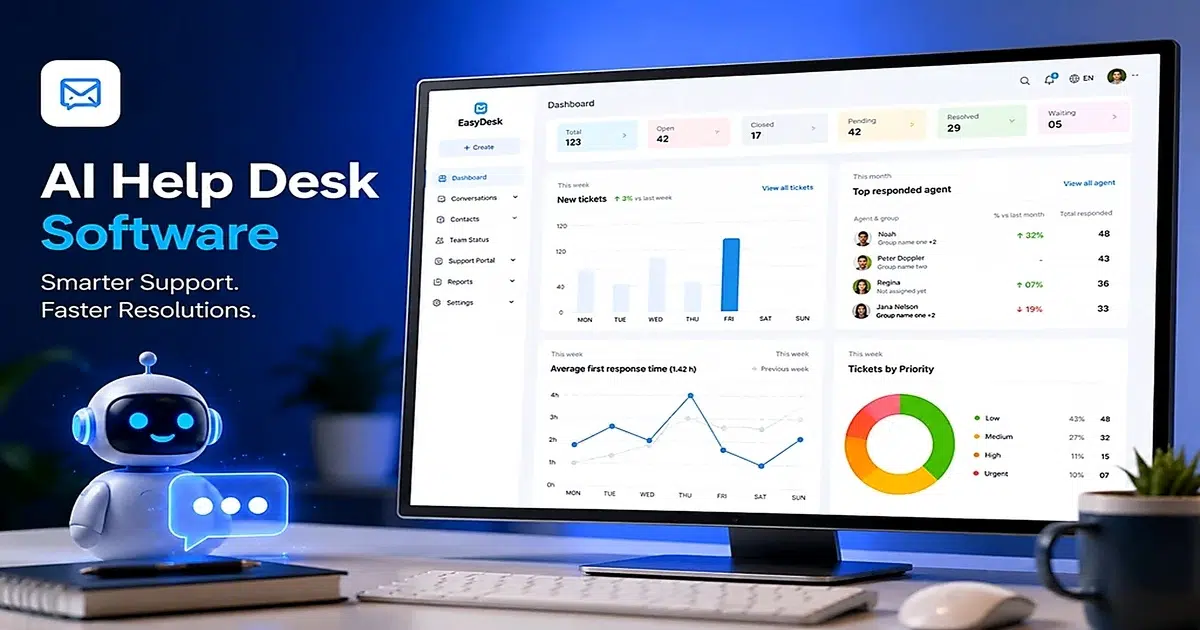
Customer support has changed significantly over the past few years. Teams are handling more conversations, across more channels, with higher customer expectations than ever before. That is where AI help desk software comes into play. It helps support teams manage ticket volumes, respond faster, and deliver personalized support without burning out.
AI help desk software uses natural language processing and machine learning to automate and optimize customer support workflows, significantly reducing response times and improving efficiency. Instead of manually sorting through hundreds of emails or chat messages, your team can rely on an AI assistant to categorize, prioritize, and even draft responses. The goal is not to replace human agents but to give them room to focus on conversations that require empathy, judgment, and creativity.
AI help desks are evolving to incorporate generative models and omnichannel integrations, which are changing customer expectations for modern service desks. This article walks through how these systems work, what features matter most, and how to choose the right AI solution for your support team.
What Is AI Help Desk Software
AI help desk software refers to customer service platforms that leverage artificial intelligence to automate ticket handling, response generation, and self-service across multiple channels. Unlike traditional desk tools that rely on manual routing and static FAQs, these systems process natural language inputs, classify intents, and draft context-aware replies from your knowledge base and past customer interactions.
The core difference between AI service desk options and older systems is the level of autonomy. AI agents can now complete multi-step tasks like updating account data, checking order status, or processing refunds directly from the help desk workspace. Human agents step in for exceptions, emotional conversations, and situations requiring judgment. This blended approach keeps your entire support operation running smoothly while ensuring customers get accurate responses at any hour.
How AI Help Desk Software Works In Modern Support Operations
Modern support operations integrate AI help desks as central hubs for managing customer queries efficiently. According to industry benchmarks, these systems process 70 to 80 percent of routine queries autonomously, which translates to significant cost savings and faster resolution times. The shift from basic bots to sophisticated AI agents handling multi-step tasks happened rapidly between 2023 and 2026.
AI-Based Ticket Categorization
AI-based ticket categorization uses natural language processing and machine learning models to analyze ticket text, sentiment, and metadata. The system auto-tags incoming tickets with up to 90 percent precision, which means your support team spends far less time on manual triage.
Platforms that implement AI summarize ticket content, enabling technicians to understand issues 40 percent faster than reading through lengthy threads. This capability pulls from millions of ticket patterns to classify topics accurately, whether the issue involves billing, access problems, or integration questions.
Smart QA systems also improve categorization accuracy by continuously learning from historical support conversations, helping teams classify customer issues faster while reducing repetitive manual review across large ticket volumes.
Smart Ticket Routing
Intelligent routing matches tickets to agents based on skills, workload, and availability. This approach reduces misroutes by approximately 60 percent compared to traditional round-robin distribution. When a high-value account submits an urgent request, the system can route conversations directly to senior agents without manual intervention.
The automation engine considers factors like language proficiency, product expertise, and current queue depth to make routing decisions that improve first-contact resolution. AI systems intelligently route tickets based on agent expertise, conversation priority, and operational workload.
Support teams reduce delays while improving first-response accuracy across multiple communication channels. Better routing accuracy also helps organizations balance workloads efficiently and maintain stronger customer satisfaction during high-volume support periods.
Automated Response Suggestions
AI drafts responses by pulling relevant information from your knowledge base, past conversations, and product documentation. Agents can review and edit these suggestions before sending, which cuts drafting time by about 50 percent.
This feature is particularly helpful for onboarding new team members who may not yet know every answer. The AI pulls context from the entire ticket history, so responses feel personalized rather than generic.
Automated suggestions improve efficiency gains by helping agents respond faster with consistent, context-aware replies that reduce repetitive writing tasks and maintain better communication quality during high-volume support operations.
SLA And Priority Management
Monitoring service level agreements manually becomes impractical at scale. AI-powered SLA management tracks timelines automatically and escalates tickets before breaches occur. Priority scoring combines sentiment analysis with urgency indicators to ensure critical issues get attention first.
Teams using these features report SLA compliance rates around 85 percent, even during high-volume periods. AI-driven priority management helps teams identify urgent conversations quickly while maintaining operational visibility across growing support environments.
Critical tickets receive immediate attention through automated prioritization workflows that reduce escalation delays, improve accountability, and help support organizations maintain stronger response consistency across customer communication channels.
AI-Powered Self-Service Support
Self service options powered by AI surface relevant knowledge base articles before customers even submit a ticket. Predictive search anticipates what users need based on the words they type.
When queries repeat frequently, the system flags gaps in your documentation so your team can create new content. This proactive approach achieves ticket deflection rates around 40 percent, meaning fewer conversations reach your agents in the first place.
Self-service automation provides immediate value by helping customers resolve common issues independently before contacting support agents, reducing ticket volume while improving overall customer satisfaction and response efficiency.
Real-Time Agent Assistance
AI copilot tools provide real-time support while agents work on tickets. These assistants summarize long conversation histories, suggest macros with citations, and recommend next best actions.
Some platforms offer one-click summaries for handoffs between shifts, preventing agents from losing context. This assistance keeps response quality high while reducing the cognitive load on your team.
Real-time AI copilots improve conversation quality by providing contextual suggestions, summarized histories, and smart QA recommendations that help support agents maintain accurate, consistent, and faster customer communication.
Features Every AI Help Desk Software Should Include
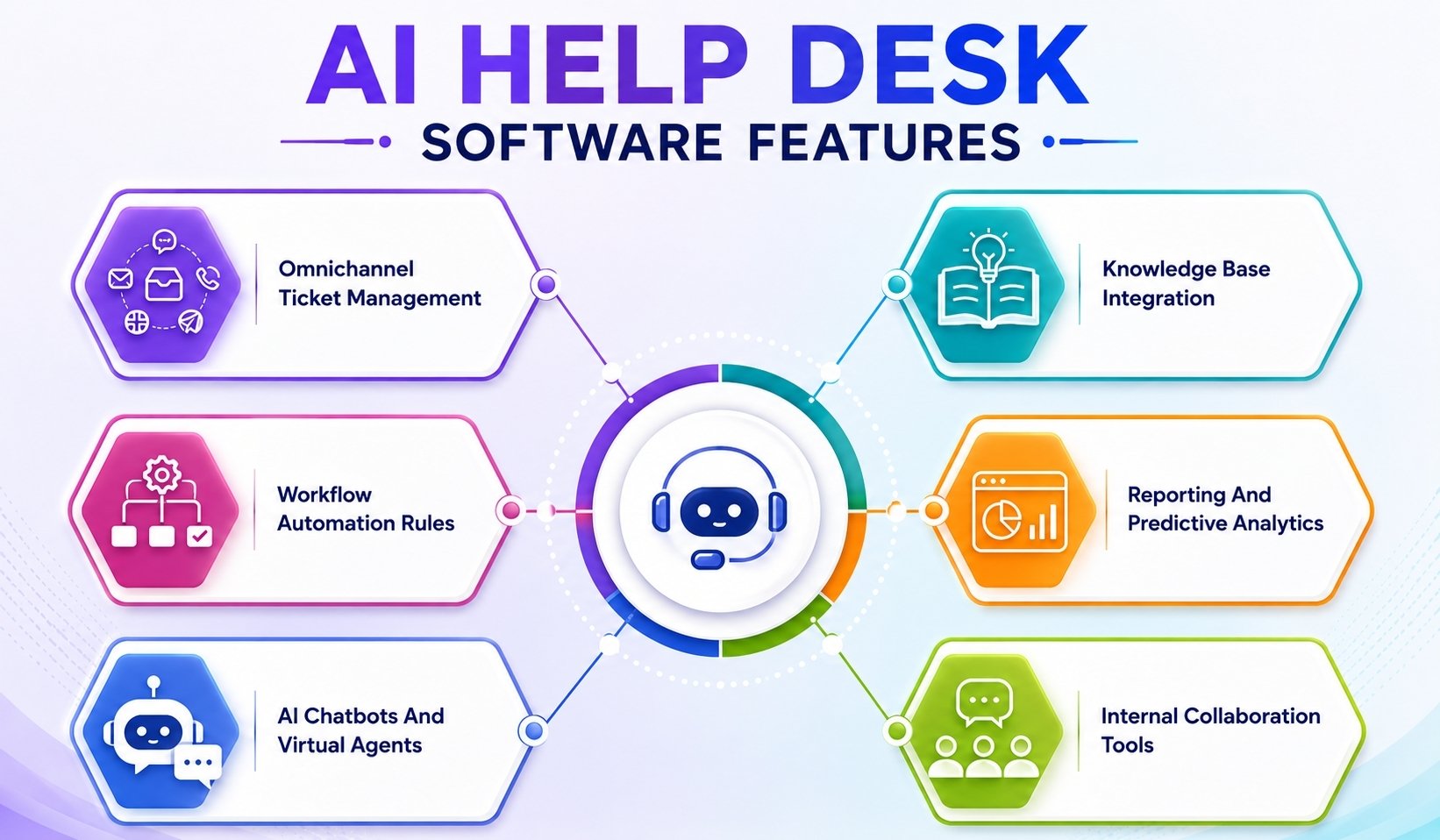
Not every tool labeled with AI offers the same depth of automation. Key features to look for in AI help desk software include intelligent ticket prioritization, automated ticket summaries, and the ability to provide knowledge base-grounded responses to prevent inaccuracies. By 2026, 80 percent of top platforms include voice support and sentiment analysis as standard capabilities.
Omnichannel Ticket Management
Omnichannel support brings email, chat, Slack, Teams, SMS, social media, and in app messaging into a unified inbox. Customers can switch channels without repeating themselves because the AI maintains context across touchpoints, building on multi-channel customer support foundations.
Real-time translation features allow AI to support customers in multiple languages, improving accessibility for global users. This unified approach prevents conversations from falling through the cracks and keeps your support team organized.
Centralized communication management also helps businesses maintain consistent customer experiences while improving visibility across every interaction, support request, and active conversation happening through different communication channels, aligning closely with modern ticketing software best practices.
Workflow Automation Rules
Visual builders let you create triggers for common scenarios without writing code. You can set up automations for escalations, status updates, or CRM actions based on ticket attributes.
The workflow automation capabilities in modern platforms handle event-triggered templates and conditional logic that adapts as tickets evolve. These rules remove manual steps from repetitive tasks and ensure consistent handling across your team, much like dedicated automated workflow software for support.
Automation workflows also improve operational efficiency by reducing repetitive administrative tasks, helping support teams manage larger ticket volumes without increasing manual workload or response delays; well-designed ticket automation workflows are especially valuable during peak seasons.
AI Chatbots And Virtual Agents
Conversational AI chatbots deflect approximately 30 percent of incoming volume by handling common questions instantly. Unlike basic bots that follow fixed scripts, AI agents can read full ticket context, access account data, and complete tasks like profile updates or order changes, similar to modern IT help desk software for teams.
The fin ai agent approach represents a new generation of virtual assistants that feel more like talking to a knowledgeable teammate than navigating a phone tree. Intelligent conversations improve customer engagement while reducing support queue pressure, especially when you move from manual vs automated ticketing toward AI-driven workflows.
AI-powered virtual agents also provide immediate value by maintaining round-the-clock availability, improving response speed, and supporting customers during peak traffic periods without additional staffing requirements.
Knowledge Base Integration
Grounded replies cite specific articles from your knowledge base, which prevents hallucinations and keeps answers accurate. The AI assistant learns from your existing documentation, email history, and chat transcripts, working in tandem with broader ticket automation software capabilities.
When it detects gaps in content, it can flag topics for your team to address or even auto-generate draft articles based on recurring patterns. This integration turns your knowledge base into a living resource that improves over time.
Knowledge-driven support systems also strengthen self-service experiences by helping customers find accurate answers faster while reducing repetitive support requests reaching live agents unnecessarily, particularly when paired with automated ticket creation across all channels.
Reporting And Predictive Analytics
Dashboards track resolution rates, first-response times, and AI insights across your operation. AI can track patterns, recurring issues, and performance metrics to enable proactive support, which is a core pillar of modern help desk solutions.
Predictive analytics forecast ticket volumes and identify emerging trends before they become problems. Proactive analytics can detect trends and alert teams to potential problems, allowing them to address issues before they escalate, especially when combined with automated ticket management software that streamlines routing and response.
Advanced reporting visibility also helps managers improve workforce planning, optimize operational performance, and make more accurate decisions using real-time support data and customer behavior insights, particularly when they implement robust ticket prioritization in customer support.
Internal Collaboration Tools
Threaded comments, mentions, and internal notes keep agents aligned on complex tickets. Some platforms let agents query the knowledge base directly from the reply composer, pulling relevant information without switching tabs.
Role-based access controls ensure that sensitive ticket data stays visible only to those who need it. These collaboration features reduce back-and-forth and speed up resolution for multi-department issues.
Connected collaboration workflows also improve internal coordination by helping support, technical, and operational teams share updates efficiently without relying on disconnected communication platforms or external tools.
Major Benefits Of AI Help Desk Software For Support Teams
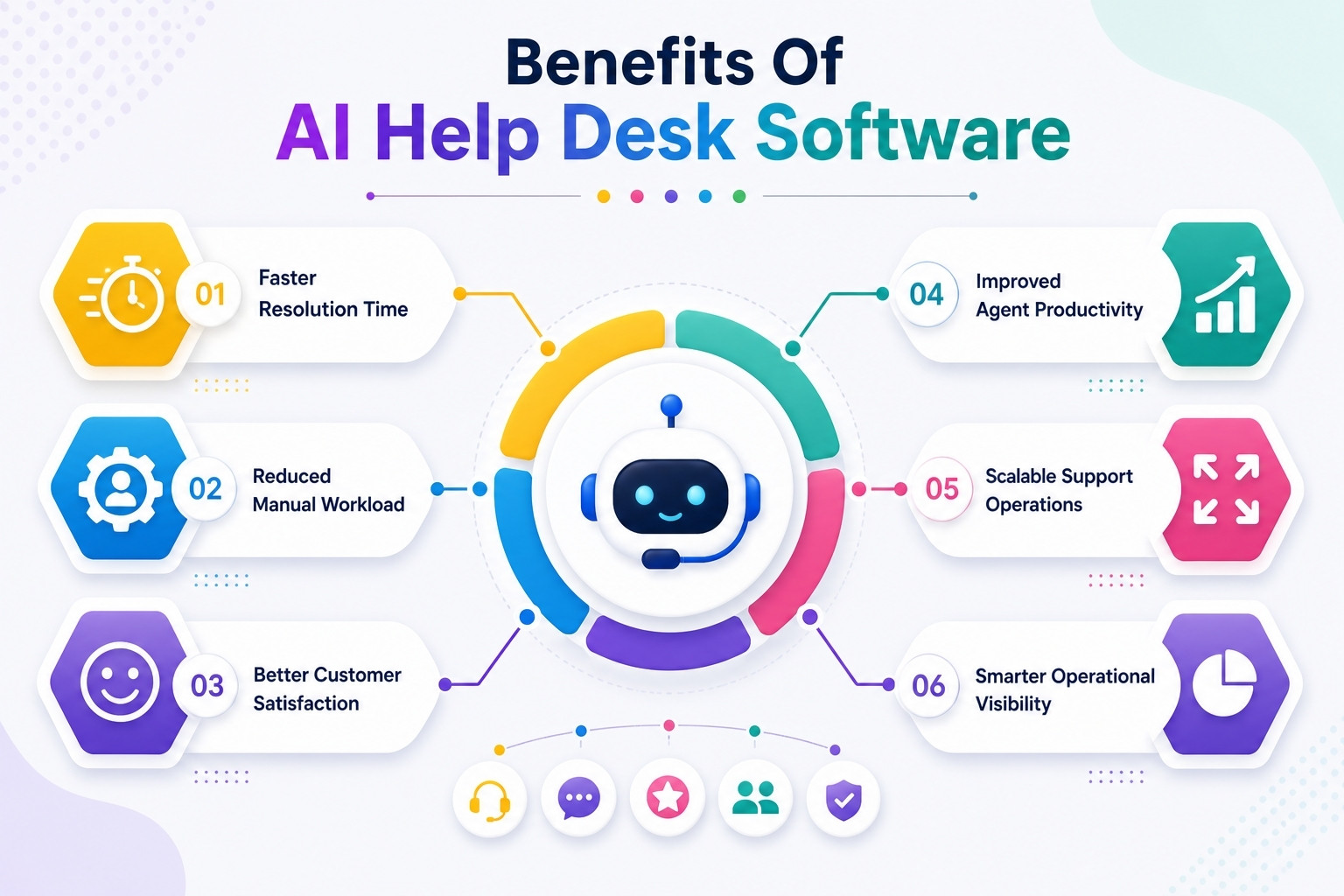
AI-powered help desks can handle a significant portion of customer inquiries automatically, which leads to lower operational costs and improved efficiency in support operations. Teams adopting these tools report 40 percent cost savings alongside 25 percent improvements in customer satisfaction scores, similar to organizations that choose from the best support desk software in their category.
Faster Resolution Time
Speed matters to customers, and AI delivers instant responses for routine questions. AI help desks can reduce response times by up to 97% by automating the categorization and resolution of customer queries.
What used to take hours now happens in seconds for straightforward issues like password resets, order tracking, or FAQ lookups. Human agents can then dedicate their time to conversations that require nuance, leading to better outcomes across the board, especially when they are supported by one of the best help desk software platforms.
Faster resolution workflows also reduce customer frustration while helping support teams maintain consistent service quality during peak traffic periods and high-volume support operations.
Reduced Manual Workload
By automating repetitive tasks, AI help desks help reduce agent burnout and improve team retention, allowing human agents to focus on more complex issues. The time your team spends on tagging, routing, and drafting standard replies drops significantly.
Agents freed from repetitive tasks report higher job satisfaction and stay engaged longer. This shift changes the nature of support work from mechanical processing to meaningful problem-solving.
Reduced operational workload also helps organizations improve efficiency gains by allowing support teams to focus more attention on customer experience and complex issue resolution.
Better Customer Satisfaction
Consistent responses, 24/7 availability, and personalized service based on customer history all contribute to higher satisfaction scores. Teams using AI assistance report NPS improvements of up to 20 points.
When customers receive instant answers that address their specific situation, they feel valued. The AI handles customer interactions in a way that feels helpful rather than robotic.
Personalized support experiences also strengthen customer trust by maintaining faster communication, accurate responses, and better service consistency across multiple support channels and conversations.
Improved Agent Productivity
AI assists raise individual output by approximately 35 percent according to industry data. Summaries prevent agents from scrolling through lengthy ticket histories. Suggested replies give agents a starting point rather than a blank page.
These productivity tools let small teams handle conversation volume that would otherwise require additional headcount. AI-powered assistance reduces repetitive effort while improving response accuracy during active customer support interactions.
Higher productivity levels also help support organizations scale operations efficiently without overwhelming agents or reducing service quality during periods of increased customer demand.
Scalable Support Operations
AI systems can handle sudden spikes in tickets without compromising service quality. AI-driven systems enable non-linear growth, allowing teams to handle volume spikes without additional headcount.
Whether you face a product launch, seasonal rush, or unexpected incident, your support operations can scale support without scrambling to hire and train temporary staff. This flexibility protects both your customer experience and your budget.
Scalable support infrastructure also helps businesses maintain operational stability while adapting quickly to changing customer expectations, growth targets, and evolving service demands across different communication channels.
Smarter Operational Visibility
Advanced analytics reveal bottlenecks, agent performance patterns, and areas for improvement. You gain visibility into which topics generate the most tickets, which agents need additional training, and where your knowledge base falls short.
This data-driven approach transforms support from a reactive function into a strategic operation that continuously improves. Operational insights help businesses identify recurring issues before they affect overall customer experience.
Smarter visibility tools also improve long-term planning by helping managers optimize staffing decisions, workflow performance, and resource allocation using accurate support analytics and operational trends.
Common Challenges AI Help Desk Software Helps Solve
Support teams in 2026 face persistent pain points that traditional tools struggle to address. High ticket volumes, inconsistent workflows, and agent burnout all undermine customer relationships. Modern AI service desk platforms tackle these challenges directly with automation and intelligence.
High Ticket Volume Management
When ticket volumes overwhelm your team, response quality suffers and backlogs grow. AI auto-deflects roughly 40 percent of incoming requests through self service options and chatbot interactions, and effective ticket automation software paired with automated ticket management platforms keeps queues under control.
Categorization at scale ensures that nothing gets lost, and prioritization surfaces urgent issues immediately. Teams managing hundreds of daily tickets can maintain quality without adding headcount.
Automated ticket management also improves operational efficiency by helping support teams process large request volumes faster while maintaining consistent customer communication and service quality standards.
Delayed Response Handling
Customers expect quick replies, and delays damage trust. Real-time bots provide instant answers for common questions while agents work on complex cases.
The AI assistant can handle initial triage and data gathering so that when human intervention becomes necessary, the agent already has context. This approach shrinks wait times dramatically.
Faster response handling also improves customer satisfaction by reducing frustration during support interactions and helping businesses maintain stronger service reliability across communication channels.
Repetitive Customer Requests
Questions about order status, password resets, and basic troubleshooting consume agent time without adding value. Automation handles approximately 70 percent of these repetitive tasks, freeing agents for work that requires creativity and judgment.
The AI learns from past customer interactions to improve its handling over time. Continuous learning capabilities help support systems respond more accurately to recurring customer issues and requests.
Reducing repetitive workload also allows support teams to focus more attention on strategic conversations, complex troubleshooting, and personalized customer experiences that require human involvement.
Inconsistent Communication Workflows
Different agents sometimes give different answers, which confuses customers and creates support debt. AI enforces brand voice through custom prompts and provides consistent suggestions based on approved knowledge.
This consistency builds trust and reduces follow-up tickets caused by conflicting information. Standardized communication workflows help organizations maintain better service quality and stronger customer confidence during support interactions.
Consistent support messaging also improves internal coordination by ensuring agents follow approved operational guidelines across tickets, escalations, and customer-facing communication processes.
Limited Support Visibility
Without clear metrics, support leaders make decisions based on intuition rather than data. Predictive dashboards clarify bottlenecks, highlight trending issues, and forecast future volume.
This visibility transforms support from a cost center into a function that demonstrably contributes to customer retention and revenue. Better reporting helps organizations identify operational inefficiencies before they become larger service problems.
Advanced analytics also improve strategic planning by helping managers optimize staffing, workflow management, and customer support performance using accurate operational insights and historical trends.
Agent Burnout And Overload
Handling the same questions repeatedly drains motivation and leads to turnover. AI offloads the tedious work while intelligent routing balances workloads across the team.
Sentiment tools can also flag emotionally charged tickets, giving managers visibility into which agents might need support. The result is a healthier team that stays engaged longer.
Balanced workload distribution also improves employee retention by reducing repetitive stress, preventing operational fatigue, and creating a more sustainable support environment for growing customer service teams.
AI Automation Workflows That Improve Service Desk Performance
Workflows powered by AI automate approximately 80 percent of routine tasks according to recent benchmarks. The future of AI help desks will focus on enhancing human capabilities by automating repetitive tasks, allowing support teams to concentrate on more complex issues. Teams typically see ROI within four to eight weeks when they implement focused automation.
Automatic Ticket Prioritization
Sentiment and urgency scoring determine which tickets need immediate attention. The AI analyzes language patterns, customer history, and issue type to assign priority levels automatically, mirroring the principles of structured ticket prioritization in support.
High-stakes conversations get routed to senior agents while routine questions flow to appropriate queues. This prioritization prevents critical issues from getting buried under lower-priority requests.
Automated prioritization workflows also improve response consistency by helping support teams identify urgent tickets faster while maintaining better operational visibility across active customer conversations and requests.
AI-Based Workflow Escalation
Skills-aware triggers escalate tickets when they exceed defined thresholds or require specialized expertise. The system considers agent availability, expertise areas, and current workload when making escalation decisions, supported by robust ticket creation and management tools.
Managers receive alerts for patterns that suggest systemic issues, enabling proactive intervention before problems compound. Intelligent escalation workflows reduce operational delays while improving collaboration between support tiers and technical teams.
AI-driven escalation systems also help organizations maintain service quality by ensuring complex customer issues reach qualified agents without unnecessary routing delays or communication gaps.
Intelligent Response Recommendations
AI answers questions by pulling from your knowledge base and citing specific sources. Agents can accept, modify, or reject suggestions based on their judgment.
This approach combines AI efficiency with human oversight, ensuring that customers receive accurate responses without waiting for an agent to research every question from scratch.
Response recommendation systems also improve communication quality by helping support teams maintain faster replies, better consistency, and more accurate customer interactions during high-volume service operations.
Predictive Support Analytics
Forecasting models anticipate ticket volumes based on historical patterns, product releases, and external factors. Teams can staff appropriately for expected surges rather than reacting after backlogs form, a core recommendation in modern help desk solution guides.
The analytics also identify emerging issues before they become widespread, giving your team time to create solutions proactively. Predictive visibility improves planning accuracy while reducing operational disruption during unexpected support spikes.
Advanced analytics capabilities also help managers optimize staffing decisions, monitor workflow performance, and improve long-term customer support strategies using real-time operational insights and reporting data.
Automated Follow-Up Management
Scheduled checks and closures keep tickets moving through your pipeline. The automation engine sends reminders when tickets await customer response and closes resolved conversations after appropriate waiting periods.
This automated follow-up prevents tickets from lingering indefinitely and keeps your metrics accurate. Structured follow-up workflows also improve customer communication consistency and reduce operational delays during ongoing support interactions.
Automated follow-up systems additionally help organizations maintain cleaner ticket pipelines, stronger SLA performance, and more reliable support processes across growing customer service environments.
How To Choose The Right AI Help Desk Software
By 2026, the market includes dozens of AI service desk options that sound similar on paper. Effective AI help desk solutions should offer seamless integration with existing tools, allowing for a unified support experience and minimizing disruption during implementation. Clear selection criteria help you find the right fit for your situation.
Team Size And Support Volume
Small teams with manageable volume have different needs than enterprise operations handling thousands of daily tickets. Budget-friendly options like Zoho Desk work well for SMBs, while larger organizations may need platforms like Zendesk or Salesforce Service Cloud with freddy ai or einstein ai capabilities. Resources like comprehensive help desk solution guides can help you compare options. Match your choice to your current scale and expected growth over the next two to three years.
Required AI Automation Features
Check whether platforms offer the specific AI features your workflows require. Look for natural language processing quality, knowledge base grounding to prevent inaccuracies, and the depth of automation available. Some platforms excel at chatbot deflection while others focus more heavily on agent assistance tools. The suite team, suite professional, and suite enterprise tiers often unlock different capabilities at different price points.
Integration And Compatibility Needs
Most AI help desk platforms offer integrations with CRM systems, ecommerce platforms, telephony providers, and BI tools, allowing for seamless data flow and improved operational efficiency. Successful AI adoption in help desks requires integration with existing support stacks, which can be challenging due to potential overlapping platforms and staff resistance to change. Open APIs and webhooks are essential for enabling custom integrations beyond marketplace apps, allowing organizations to tailor their AI help desk solutions to their specific needs. Confirm support for your existing tools like Salesforce, your existing help desk, or Microsoft 365 before committing.
Ease Of Use For Support Agents
Complex tools create adoption barriers. Look for copilot interfaces that feel intuitive to agents without extensive training. The best platforms let agents start seeing immediate value within days rather than weeks. Test the agent experience during evaluation to ensure your team will embrace the tool rather than resist it.
Reporting And Analytics Requirements
Custom dashboards and advanced analytics matter if you need to demonstrate ROI to leadership. Some platforms offer conversation quality scoring, trend detection, and forecasting built in, while others require third-party tools. Many AI help desk solutions emphasize the importance of transparent pricing structures, allowing organizations to forecast costs as they scale their support operations.
Scalability For Future Growth
Pricing models for AI help desk software can vary significantly, with some platforms offering per-agent pricing while others may use usage-based models that charge based on interactions or automated tasks. Some AI help desk platforms may require additional fees for advanced features, which can lead to variability in total cost of ownership depending on the features utilized. Consider whether the platform offers unlimited users options or paid plans that scale reasonably as your team grows. A free plan can help you test capabilities before committing, but confirm what features require upgrades.
Why EasyDesk Fits Modern AI-Powered Support Operations
EasyDesk brings together the capabilities modern support teams need in one platform. With built in AI for ticket categorization, intelligent routing, and agent assistance, teams can handle growing conversation volume without adding complexity, making it a powerful helpdesk ticketing software choice. The platform integrates with the tools you already use, including Slack, Teams, and popular CRM systems.
EasyDesk emphasizes practical AI powered automation that delivers results quickly. Teams report cutting backlogs significantly within the first 90 days while maintaining response times under one hour during peak periods. The knowledge base integration flags content gaps automatically, helping your documentation improve alongside your automation. As a broader customer support platform with rich EasyDesk feature sets, it also functions as a ticketing software built for support and enables teams to manage support tickets efficiently. If you want to see how EasyDesk fits your support workflows, exploring a guided demo or starting a free trial is a great next step. You can also contact sales to discuss your specific needs.
Frequently Asked Questions
How Is An AI Help Desk Different From A Simple Chatbot
A basic chatbot usually follows rules and fixed scripts, responding only to keywords it recognizes. An AI help desk uses conversational AI and deeper context to read full tickets, access account data, and complete tasks like refunds or profile updates. AI help desk software also supports internal workflows such as routing, tagging, and summarizing, which most basic chatbots cannot handle. The depth of understanding and the range of actions available set AI help desks apart from simpler alternatives.
Can AI Help Desk Software Work With My Existing Ticketing System
Most modern AI service desk platforms in 2026 are designed to integrate with popular desk tools rather than replace them outright, using APIs and native apps. Before signing a contract, confirm support for your specific stack, whether that includes Zendesk, Freshdesk, Microsoft 365, or other existing tools. Integration quality varies between vendors, so asking for documentation or a technical demo focused on your systems is worthwhile.
What Kind Of Data Do I Need To Train An AI Service Desk
The most useful data sources include knowledge base articles, macros, past ticket transcripts, product documentation, and internal runbooks. Teams should clean up outdated content and label their top 10 to 20 ticket topics so the AI assistant can learn from the best material first. Quality matters more than quantity, as training on inaccurate or inconsistent content creates problems later.
Will AI Replace Human Support Agents
In practice during 2026, AI agents handle repetitive tasks and low-risk work, which lets human agents focus on nuanced, emotional, or high-value conversations that still need judgment. Most successful deployments use a blended model where AI deflects a portion of volume while humans supervise and continuously improve the system. The goal is augmentation rather than replacement.
How Long Does It Take To See Results From An AI Help Desk Rollout
Teams often see measurable gains in first response time and ticket deflection within four to eight weeks if they start with one focused use case. Deeper optimization, including revising workflows, expanding automation to new channels, and fine-tuning AI models, usually unfolds over several months. Starting narrow and expanding based on proven results leads to better long-term outcomes than trying to automate everything at once.



