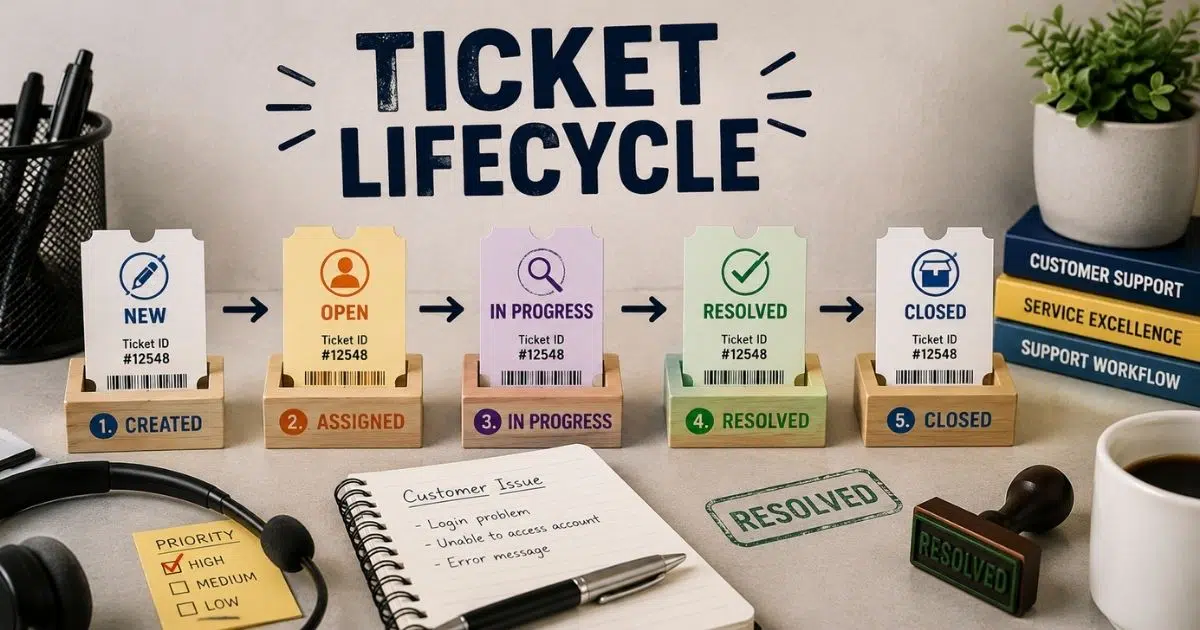
Customer support becomes messy when teams lose track of tickets. Some requests stay open for days. Some move between agents without updates. Customers get frustrated fast when nobody knows what happens next. That is where ticket lifecycle becomes important.
A clear ticket lifecycle helps support teams manage every request from start to finish. It shows how tickets move, who handles them, and when issues get resolved. Better visibility leads to faster responses, fewer delays, and stronger customer satisfaction.
Modern support teams rely on structured workflows to keep operations smooth. Businesses that understand ticket lifecycle can improve SLA performance, reduce workload, and create a more reliable support experience for every customer.
What Is Ticket Lifecycle In Customer Support
Ticket lifecycle is the complete life cycle of a support ticket from ticket creation to ticket closure. A new ticket can come from phone calls, chat systems, emails, self-service portals, or other various channels. Ticketing systems help support teams track ticket status, ticket assignment, and prioritization tickets through various stages. Every stage plays a vital role in the resolution process. A structured framework helps support agent teams handle customer inquiries, critical system issues, and support requests with the appropriate priority level.
Ticket lifecycle management helps many IT teams improve efficiency and reduce manual effort. Clear processes and structured workflows support timely resolution, improved service delivery, and better customer experience. Service desk teams can automate workflows, track ticket volume, and assign tickets to the appropriate team with relevant information.
Ticket lifecycle management understanding is important for business leaders, IT managers, cybersecurity professionals, and small businesses. Effective implementation supports service quality, customer satisfaction, user satisfaction, and continuous improvement. Post-incident review, lessons learned, root cause analysis, and customer feedback also help identify trends and support future reference after a ticket is closed.
Why Ticket Lifecycle Matters For Support Teams
A clear ticket lifecycle keeps support operations organized from the first support request to the final stage. Support teams can track ticket status, reduce delays, and improve service quality with a structured approach. Faster responses and better workflows now matter more than ever in today’s fast-paced customer support environment.
Faster Response And Resolution
Customers expect quick support across phone calls, chat systems, and self-service portals. Recent reports show 83% of customers expect immediate interaction after they contact support. A strong ticket lifecycle helps service desk teams respond faster and move support tickets through the right various stages.
Clear ticket assignment and prioritization tickets reduce confusion inside support teams. Support agents can identify critical issues faster and assign tickets to the appropriate team. Structured workflows also reduce manual effort during the resolution process.
Better Customer Satisfaction
Customer satisfaction depends heavily on timely resolution. Research shows 73% of customers leave after repeated bad support experiences. Ticket lifecycle management helps teams maintain clear processes and deliver consistent support across various channels.
Customers also want updates during the ticket life cycle. A visible ticket status gives users confidence that support teams are actively working on customer issues. Better communication improves user satisfaction and strengthens the overall customer experience.
Smarter Ticket Prioritization
Not every ticket has the same priority level. Some customer inquiries involve critical system issues, while others need simple answers. Ticket lifecycle management matters because it helps teams categorize assignment tickets based on urgency, impact, and relevant information.
Support teams can automate workflows and reduce delays with ticketing systems that support ticket prioritization in customer support. Many IT teams now rely on automation to improve efficiency and handle growing ticket volume. Reports show automation can reduce ticket resolution time by nearly 30%.
Improved Team Collaboration
Support becomes messy when teams struggle with unclear ownership. Ticket lifecycle management creates a structured framework where every support agent understands their role. Ticket creation, ticket assignment, and ticket closure follow clear processes that reduce confusion.
Modern service management platforms also offer integration capabilities with several tools. Teams can connect chat systems, emails, and knowledge bases inside one multi-channel customer support service desk platform. Better collaboration supports improved service delivery and reduces duplicate work.
Better Reporting And Future Planning
Ticket lifecycle management understanding also helps business leaders and IT managers make smarter decisions. Tracking tickets across various stages gives teams valuable data for performance analysis and future trends. Managers can identify trends, monitor service quality, and improve support operations over time.
Post-incident review and lessons learned also become easier after a ticket is closed. Teams can analyze the root cause of customer issues and store details for future reference. Continuous improvement becomes possible when support teams use customer feedback and reporting data correctly.
Key Stages Of A Ticket Lifecycle Explained
Every ticket follows a series of key stages before resolution. Each stage plays a vital role in service delivery and customer satisfaction. Using a ticketing system with a clear ticket lifecycle helps support teams reduce delays, improve efficiency, and manage support tickets with better accuracy across various channels.
Ticket Creation
The ticket lifecycle starts with ticket creation. Customers submit a support request through chat systems, emails, self-service portals, or phone calls. Ticket creation and management tools in ticketing systems collect relevant information like issue type, priority level, and customer details.
A clear ticket creation process helps support teams avoid missing important data. Reports show nearly 67% of customers prefer self-service options before contacting support. (zendesk.com) Better ticket management at this stage improves customer experience and reduces manual effort for support agents.
Ticket Assignment
After ticket creation, support teams assign tickets to the appropriate team or support agent. Ticket assignment depends on ticket status, issue category, and appropriate priority level. Critical issues usually move faster through the resolution process.
Structured workflows help service desk teams avoid confusion during ticket assignment. Many IT teams now use automated ticket assignment to automate workflows and reduce delays. Studies show automated ticket routing can improve first response times by over 25%.
Investigation And Resolution
Support agents investigate customer issues and identify the root cause during this stage. Teams may use several tools, integration capabilities, and automated ticket management software to resolve support tickets faster. Clear processes help teams handle large ticket volume without delays.
Customer inquiries sometimes move to an on-hold status if extra details are needed. A quick response still matters because customers expect regular updates. Strong ticket lifecycle management improves service quality and supports timely resolution across various stages.
Ticket Review And Approval
Some support tickets require review before ticket closure. Managers or cybersecurity professionals may verify fixes for critical system issues. This step ensures delivering consistent support and reduces repeat problems later.
Post-incident review also helps teams collect lessons learned and customer feedback. Business leaders and IT managers often use performance analysis data from this stage for continuous improvement. Better reviews support improved service delivery and help identify trends for future trends planning.
Ticket Closure
Ticket closure marks the final stage of the ticket life cycle. Support teams close the ticket after resolution confirmation from the customer or support agent. A ticket is closed only after teams verify that customer issues no longer exist.
Closed tickets also help future reference and reporting. Service desk teams can analyze ticket lifecycle management data to improve efficiency and optimize structured workflows. Research shows companies with strong support processes can improve customer satisfaction by nearly 20%.
How Ticket Lifecycle Works Inside A Help Desk System
Modern helpdesk ticketing software platforms use structured workflows to manage every stage of the ticket lifecycle. A support request moves through different steps inside ticketing systems until resolution. Clear automation, tracking tools, and service management features help support teams deliver faster and more consistent customer support.
Ticket Capture Across Channels
Help desk systems collect support tickets from various channels like emails, phone calls, chat systems, and self service portals. Every new ticket enters the same structured framework regardless of where the customer submits it, especially when teams use ticketing software built for better customer support.
Centralized ticket management helps support teams reduce missed customer inquiries. Reports show businesses now handle customer support across more than six communication channels on average. (salesforce.com) A single service desk platform improves customer experience and gives support agents access to all relevant information in one place.
Automatic Ticket Routing
Ticket lifecycle management becomes faster when systems use ticket automation software to automate workflows for ticket assignment. Help desk software checks issue type, priority level, and support categories before assigning tickets to the appropriate team.
Automation also reduces manual effort for support agents. Critical system issues can move directly to specialized teams without delays. Research shows automated workflows can lower ticket resolution time by up to 35%. Faster routing supports timely resolution and improved service delivery.
Real Time Ticket Tracking
Tracking tickets in real time helps teams monitor ticket status through various stages. Managers can see whether a ticket is open, on hold, pending review, or near ticket closure. Better visibility helps many IT teams avoid delays during the resolution process.
Support agents also use dashboards and several tools for performance analysis and workload balancing. Clear tracking supports service quality and helps business leaders identify trends in ticket volume. Better visibility also improves customer satisfaction because users receive faster updates.
Workflow Automation And SLA Control
Modern ticketing systems use structured workflows to maintain ticket SLA management targets and service delivery standards. Help desk platforms can send alerts, escalate critical issues, and trigger follow-ups automatically when response times slow down.
Ticket lifecycle management matters even more in today’s fast-paced support environment. Reports show 78% of customers expect consistent interactions across departments. Automation helps teams deliver consistent support while improving efficiency and reducing operational pressure.
Reporting And Continuous Improvement
Help desk systems also support post-incident review and future reference. Managers can analyze customer feedback, lessons learned, and root cause data after a ticket is closed. Reports from the ticket life cycle help teams improve service management strategies over time.
IT managers and cybersecurity professionals often use reporting dashboards to track future trends and customer issues. Integration capabilities with analytics platforms make performance analysis easier. Effective implementation of reporting tools supports continuous improvement and stronger user satisfaction across support operations.
Common Ticket Lifecycle Challenges And Their Solutions
Even the best support teams face problems during the ticket lifecycle. Delays, poor ticket assignment, and weak communication often hurt customer satisfaction. A structured approach helps service desk teams solve these issues faster and improve service quality across every stage of the resolution process.
Slow Ticket Response Times
Customers expect a quick response after ticket creation. Delayed replies often lead to poor customer experience and low user satisfaction. Research shows 62% of customers expect support within one hour after a support request.
Support teams struggle when ticket volume increases suddenly. Clear processes and structured workflows help support agents prioritize tickets faster. Ticketing systems with automation features can automate workflows, reduce manual effort, and improve timely resolution across various channels.
Poor Ticket Assignment
Wrong ticket assignment creates delays in the ticket life cycle. A support ticket may move between several teams before reaching the appropriate team. Critical issues can remain on hold when support agents lack the right information.
Ticket lifecycle management helps reduce assignment tickets errors through automation and predefined rules. Many IT teams now use service management platforms with integration capabilities for smarter routing. Better ticket management improves service delivery and reduces resolution process delays.
Lack Of Ticket Visibility
Teams often lose track of ticket status during busy support periods. Poor visibility makes tracking tickets difficult for support agents and business leaders. Customers also become frustrated when they receive no updates after ticket creation.
Modern ticketing systems solve this problem with real-time dashboards and alerts. Managers can monitor support tickets across various stages and identify trends quickly. Understanding the differences between manual vs automated ticketing helps ensure clear visibility supports continuous improvement and helps deliver consistent support experiences.
High Ticket Volume Pressure
Large ticket volume creates pressure on service desk operations. Small businesses and growing companies often face challenges during peak support periods. Customer inquiries from phone calls, chat systems, and self-service portals can overwhelm support teams.
Ticket lifecycle management matters because automation reduces repetitive tasks and improves efficiency. Reports show AI-powered support systems can lower operational workload by nearly 30%. Structured workflows also help teams maintain service quality during busy periods.
Weak Post Resolution Analysis
Some teams close tickets without proper post-incident review. This creates repeated customer issues and reduces improved service delivery over time. Lessons learned and root cause analysis often get ignored after ticket closure.
Effective implementation of reporting tools helps support teams collect customer feedback and relevant information for future reference. IT managers and cybersecurity professionals can use performance analysis reports to identify future trends and improve support operations. Better analysis strengthens customer satisfaction and long-term service management strategies.
Best Practices To Improve Ticket Lifecycle Management
Strong ticket lifecycle management helps support teams reduce delays, improve service quality, and deliver faster resolutions. Clear processes and structured workflows keep support operations organized across various channels. Businesses that follow proven practices often achieve better customer satisfaction and long term service delivery results.
Set Clear Ticket Priorities
Every support ticket should have an appropriate priority level from the start. Critical issues need immediate action, while low impact customer inquiries can follow normal workflows. Clear prioritization tickets help support teams avoid confusion during busy support periods.
Ticketing systems with automated rules make ticket assignment faster and more accurate. Reports show companies with priority based workflows improve timely resolution by nearly 28%. (freshworks.com) Better prioritization also improves customer experience because urgent support requests receive faster attention.
Use Automation For Repetitive Tasks
Manual effort slows down the resolution process and increases errors. Ticket lifecycle management becomes more efficient when teams use ticket automation to automate workflows like ticket creation, ticket status updates, and assignment tickets.
Modern service management platforms can route support tickets to the appropriate team automatically. Support agents spend less time on repetitive tasks and more time solving customer issues. Research shows automation can reduce service desk workload by almost one third.
Keep Communication Consistent
Customers expect updates throughout the ticket life cycle. Poor communication often reduces user satisfaction, even when the issue gets resolved quickly. A quick response and regular status updates build trust during the resolution process.
Support teams should use clear communication across chat systems, phone calls, and self-service portals. Ticket lifecycle management matters because consistent multi-channel support communication improves customer satisfaction and supports delivering consistent support experiences across various stages.
Track Performance Metrics Regularly
Performance analysis helps business leaders and IT managers improve support operations over time. Teams should monitor ticket volume, ticket closure rates, response times, and customer feedback regularly.
Modern ticketing systems provide dashboards for tracking tickets and identifying trends. Data from the post-incident review and lessons learned also supports continuous improvement. Reports show data-driven support teams improve service quality much faster than teams without structured reporting processes.
Build A Strong Knowledge Base
A strong knowledge base helps reduce repetitive customer inquiries. Customers can solve simple problems through self-service portals before creating a new ticket. This reduces pressure on support agents and improves efficiency across service desk operations.
Knowledge bases also support future reference for many IT teams and cybersecurity professionals. Relevant information from previous customer issues, root cause analysis, and critical system issues helps teams resolve support requests faster. Effective implementation of self-service resources improves improved service delivery and customer experience.
How Automation Improves Ticket Lifecycle Efficiency
Automation helps support teams handle support tickets with less manual effort and better accuracy. Modern ticketing systems use workflow automation in customer support to improve efficiency across every stage of the ticket lifecycle. Faster workflows, better ticket assignment, and quicker responses all help improve customer satisfaction and service quality.
Faster Ticket Routing
Automation helps service desk teams assign tickets to the appropriate team without delays. Ticketing systems can check priority level, keywords, and issue types during ticket creation. Critical issues move directly to experienced support agents for faster action.
Manual ticket assignment often creates delays during busy periods. Automated workflows reduce human errors and improve timely resolution. Research shows businesses that automate workflows improve first response times by nearly 37%. Faster routing also improves customer experience across various channels.
Better Response Time Management
Customers expect quick updates after creating a support request. Automated alerts and reminders help support teams manage ticket status before SLA deadlines get missed. A quick response keeps customers informed during the resolution process.
Many IT teams now use service management platforms with automated escalation rules. Tickets can move from on hold to active status automatically when customers reply. Better response tracking supports delivering consistent support and improves user satisfaction over time.
Reduced Manual Workload
Support agents often spend hours updating ticket status, sending follow-ups, and tracking tickets manually. Automation reduces repetitive tasks and gives teams more time to solve customer issues.
Modern help desk systems can automate workflows across chat systems, emails, phone calls, and self-service portals. Reports show automation reduces service desk workload by almost 30%. Lower manual effort also improves service delivery and reduces burnout inside support teams.
Improved Ticket Accuracy
Automation improves ticket lifecycle management by reducing mistakes during various stages. Systems can collect relevant information, categorize customer inquiries, and set the appropriate priority level automatically. Clear structured workflows improve ticket management accuracy from start to finish.
Better accuracy also helps business leaders and IT managers analyze ticket volume and identify trends more effectively. Support teams can avoid duplicate support tickets and reduce delays during ticket closure. Accurate data strengthens continuous improvement efforts across service management operations.
Stronger Reporting And Insights
Automated reporting tools help support teams track performance analysis data without extra work. Managers can review customer feedback, ticket closure rates, and root cause reports inside one dashboard. Better insights support improved service delivery and future trends planning.
Post-incident review also becomes easier after a ticket is closed. Cybersecurity professionals and support managers can review lessons learned for future reference. Effective implementation of automation tools helps small businesses and large enterprises improve service quality and customer satisfaction consistently.
Metrics And KPIs To Track Ticket Lifecycle Performance
Tracking the right metrics helps support teams improve ticket lifecycle management and service quality. Performance data shows where delays happen and how teams handle support tickets across various stages. Strong reporting also helps business leaders improve customer satisfaction and overall service delivery.
First Response Time
First response time measures how quickly support agents reply after ticket creation. Customers expect a quick response, especially during critical issues or service disruptions. Faster replies improve customer experience and reduce frustration during the resolution process.
Reports show 90% of customers rate immediate responses as important for customer support. Ticketing systems with automation features help service desk teams automate workflows and reduce delays. Better response times also improve user satisfaction across various channels.
Average Resolution Time
Average resolution time tracks how long support tickets stay open before ticket closure. This KPI helps teams understand how efficiently they solve customer issues during the ticket life cycle, and applying ways to cut average resolution time can significantly boost performance.
Long resolution times often signal weak ticket assignment, poor prioritization tickets, or workflow gaps. Structured workflows and integration capabilities help many IT teams improve efficiency and reduce manual effort. Faster resolution also supports delivering consistent support and improved service delivery.
Ticket Volume Trends
Ticket volume shows how many support requests teams receive during a specific period. Business leaders and IT managers use this metric for performance analysis and future trends planning.
High ticket volume can overload support teams and reduce service quality. Tracking tickets across self-service portals, phone calls, and chat systems helps managers identify trends faster. Reports show companies using predictive analytics improve workforce planning by nearly 25%.
Customer Satisfaction Score
Customer satisfaction score measures how customers feel after a ticket is closed. Customer feedback gives direct insight into service delivery, support agent performance, and the overall customer experience.
Strong ticket lifecycle management matters because satisfied customers are more likely to stay loyal to a business. Support teams often collect ratings after ticket closure through ticketing systems and self-service portals. Better satisfaction scores usually reflect clear processes and timely resolution.
Ticket Reopen Rate
Ticket reopen rate tracks how often customers reopen support tickets after resolution. High reopen rates usually point to incomplete fixes, poor root cause analysis, or weak communication during the final stage.
Post-incident review and lessons learned help teams reduce repeated customer inquiries. Cybersecurity professionals and service management teams often use this KPI for continuous improvement planning. Effective implementation of structured workflows improves ticket management accuracy and reduces repeat customer issues over time.
How EasyDesk Simplifies Ticket Lifecycle Management
EasyDesk helps support teams manage the entire ticket lifecycle with clear processes and smart automation. A new ticket from chat systems, phone calls, emails, or self-service portals enters one centralized service desk platform. Support agents can manage support tickets efficiently using EasyDesk to track ticket status, handle ticket assignment, and manage support tickets through every stage of the resolution process.
EasyDesk also helps businesses automate workflows for smarter support and reduce manual effort. Teams can prioritize critical issues, route assignment tickets to the appropriate team, and improve timely resolution with structured workflows. Real-time dashboards support tracking tickets, ticket volume, and performance analysis across various stages.
Ticket lifecycle management becomes easier with EasyDesk features for smarter customer support such as integration capabilities, customer feedback tracking, and reporting tools. Business leaders and IT managers can identify trends, improve service quality, and support continuous improvement for better customer satisfaction and improved service delivery.
FAQs
Can Small Businesses Improve Support Operations With Ticket Lifecycle Management?
Yes. Small businesses can use ticket lifecycle management to organize support tickets, reduce manual effort, and improve service delivery. Structured workflows also help support teams handle ticket volume more efficiently across various channels.
Does Ticket Lifecycle Affect SLA Performance?
Yes. A well-managed ticket SLA management process helps support teams meet SLA targets through timely resolution, proper ticket assignment, and faster ticket closure. Clear ticket status updates also improve customer satisfaction and service quality.
Can Self-Service Portals Reduce Ticket Volume?
Yes. Self-service portals help customers solve common customer issues without creating a new ticket. This reduces ticket volume and allows support agents to focus on critical issues and complex support requests, especially when using a customer support platform like EasyDesk.
What Causes Support Tickets To Stay On Hold For Too Long?
Poor ticket assignment, missing relevant information, and unclear priority level settings often delay the resolution process. Weak communication between support teams can also slow ticket lifecycle progress across various stages.
Why Do Businesses Use Reporting Tools In Ticketing Systems?
Reporting tools help business leaders and IT managers track performance analysis, customer feedback, and ticket lifecycle trends. Better insights support continuous improvement, future reference, and stronger customer experience strategies.



