
Customer support starts simple. A few emails, some chat messages, maybe a shared inbox. But as a business grows, customer questions increase, channels multiply, and keeping track of every conversation becomes harder than expected. Important requests get buried, follow-ups are missed, and customers end up repeating the same issue to different people. This is where a ticketing system comes in.
Instead of reacting to messages as they arrive, support teams gain a structured way to manage, prioritize, and resolve customer issues. Every request is captured, assigned, and tracked until it is resolved. In this guide, we’ll explain what a ticketing system is in customer support, how it works in practice, and why growing teams rely on it to deliver consistent, reliable support without adding unnecessary complexity.
What Is A Ticketing System
A ticketing system is a centralized platform that helps businesses manage customer issues, internal requests, and technical support tasks through structured ticket management workflows. Unlike traditional ticketing systems that rely on spreadsheets, emails, or manual coordination, modern IT ticketing software creates a more organized and scalable support process. A help desk ticketing system records every request, supports ticket organization, and simplifies tracking tickets from submission to resolution.
An effective ticketing system helps support teams assign tickets based on priority, department, or agent availability. Advanced platforms can also automatically assign tickets to the right team member, reducing delays and improving response times. Many businesses search for the best IT ticketing system because efficient ticket management directly impacts customer satisfaction, operational visibility, and support performance across growing organizations.
Why Customer Support Needs Structure as Requests Grow
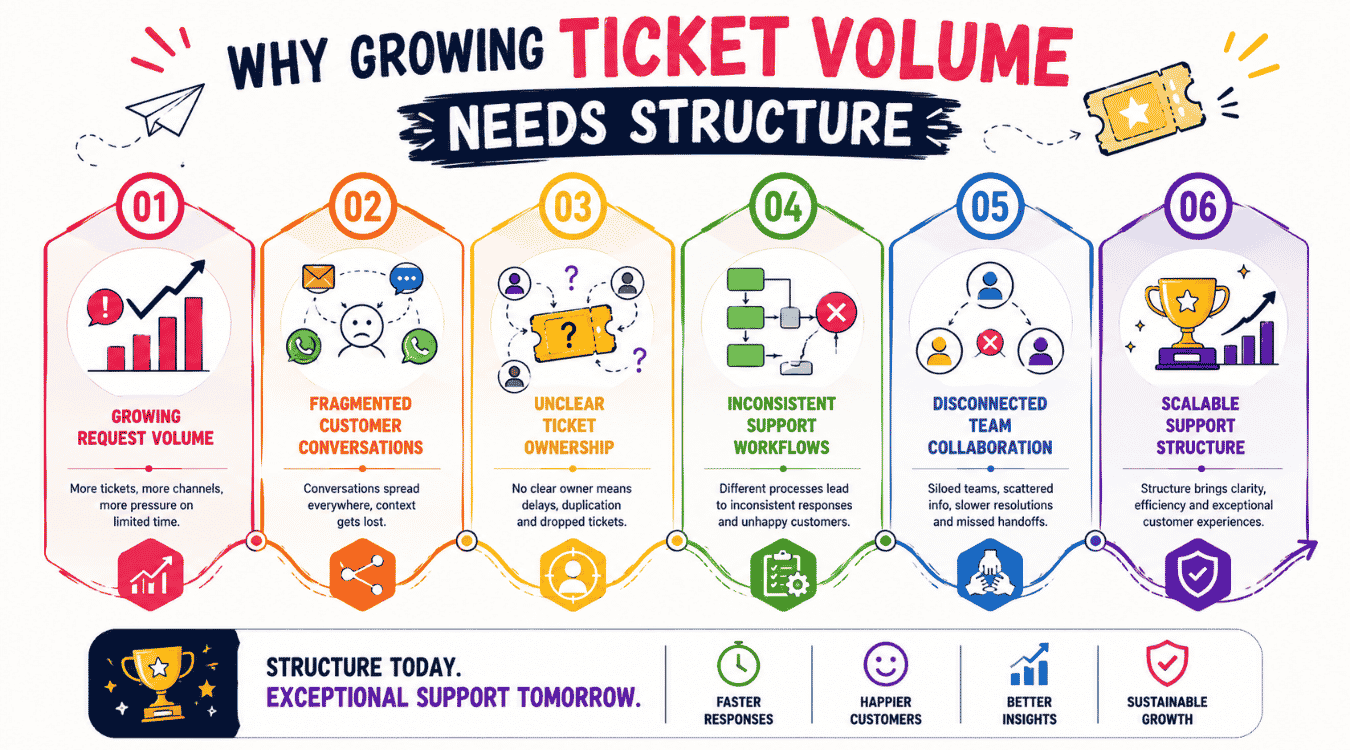
Employee support issues don’t usually fail because of effort. They fail because growing volumes overwhelm informal processes. As request numbers rise, structure becomes essential to protect customer satisfaction and keep customer support consistent and reliable.
Growing request volume overwhelms informal handling
As businesses scale, the number of customer support requests increases across email, chat, and other channels. What once felt manageable quickly turns reactive. Individual customer requests pile up faster than teams can respond, making it difficult to track priorities or ensure nothing is missed. Without structure, response times slip and frustration builds on both sides.
Conversations spread across too many places
When messages arrive through different inboxes and platforms, customer interactions lose continuity. Support agents spend time searching for context instead of solving problems. Customers are often asked to repeat themselves, which weakens trust and makes even simple issues feel harder than they should be.
Lack of ownership slows down resolution
Without clear assignment, support agents and customer service agents may assume someone else is handling an issue. Requests bounce between people or sit untouched. This lack of accountability delays responses and creates uneven workloads, increasing stress while reducing overall effectiveness.
Teams struggle to scale without clear workflows
As support teams expand, coordination becomes more complex. Different customer service teams may follow their own methods, leading to inconsistent responses. Without shared workflows, knowledge gets siloed, and collaboration breaks down, making it harder to maintain quality at scale.
Structure enables consistency and long-term growth
A dedicated ticketing system brings order by capturing every request in one place, assigning ownership, and tracking progress. When combined with customer relationship management, teams gain full visibility into history and context. This structure allows organizations to deliver exceptional customer service consistently, even as volume grows, without adding unnecessary complexity.
What a Ticketing System Does in Simple Terms
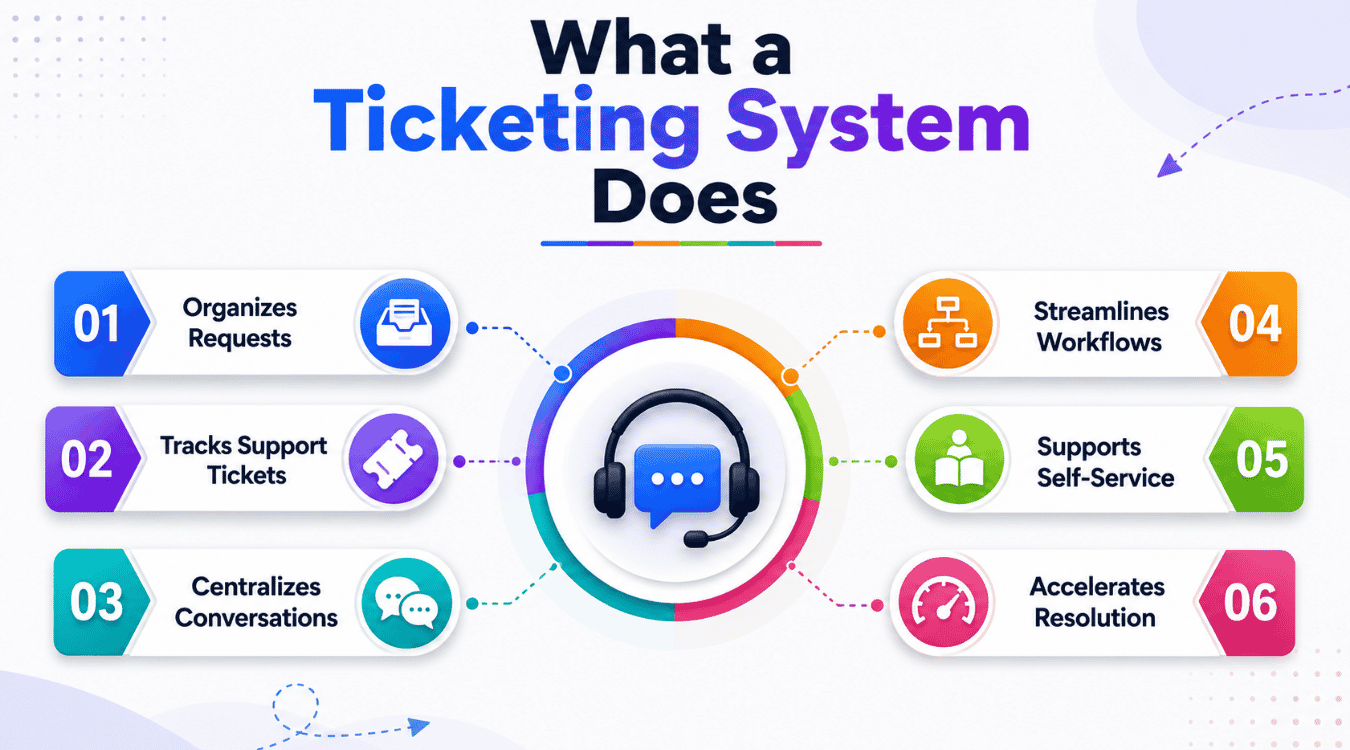
Customer support becomes easier to manage when every request follows a clear path. A ticketing system adds that structure by organizing incoming messages, guiding responses, and helping teams work consistently without overthinking daily support work.
Turns incoming messages into trackable work
A ticketing system converts emails, chats, and forms into organized tasks so nothing gets lost as ticket volume increases. Each issue becomes a record that can be followed from start to finish. This structure helps teams turn emails into trackable tickets and respond to customer inquiries in the order and priority they deserve, instead of reacting randomly.
Keeps all requests in one place
A proper support ticket system acts as a single hub for incoming support requests. Instead of checking multiple inboxes or tools, agents work from one queue. Centralization improves focus, reduces missed messages, and makes it easier to understand what needs attention at any moment.
Brings clarity to the support process
Without structure, the support process often depends on individual habits. A ticketing system introduces shared rules for assignment, status updates, and escalation. Clear ticket management helps teams know who owns an issue, what stage it’s in, and what the next step should be.
Reduces load through self-service
Many common questions do not need direct agent involvement. Built-in self-service features like help articles allow customers to solve simple issues on their own. When self-service options are available, support teams handle fewer repetitive requests and focus more on complex problems that need human attention.
Speeds up resolution across teams
A robust ticketing system supports automation, prioritization, and collaboration. For internal technical issues, an it ticketing system applies the same principles to keep work moving smoothly. Clear routing and ticket automation software visibility lead to faster customer service, even when request volume grows.
Key Features Of A Modern Ticketing System
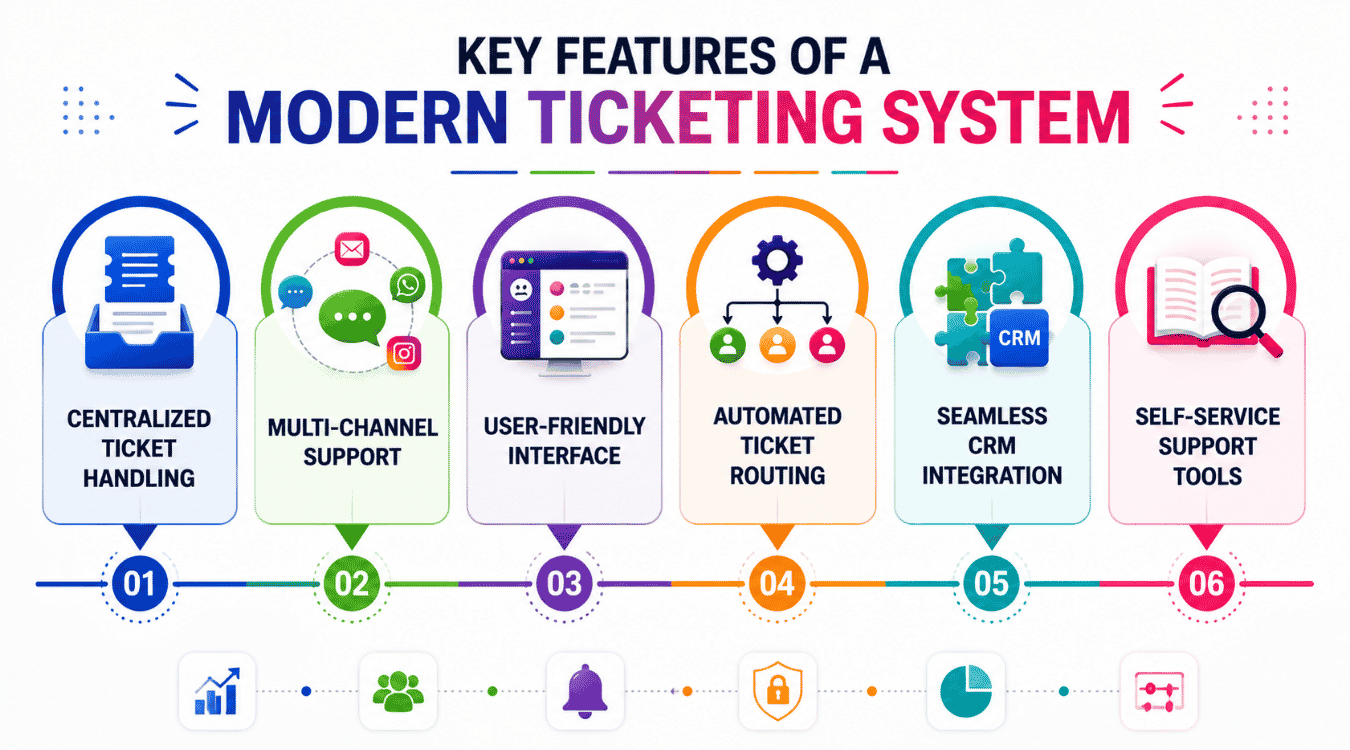
A modern ticketing system is no longer just a place where messages land and wait. It acts as the operational backbone of customer support, shaping how issues are captured, prioritized, resolved, and learned from. As support demands grow, the features inside the system determine whether teams stay in control or fall into constant firefighting.
Centralized ticket handling built for real teams
A modern desk ticketing system brings every incoming issue into a single, organized workspace. Instead of agents switching between inboxes, chat tools, and spreadsheets, all requests follow one structured flow. This clarity reduces duplicate responses, prevents tickets from being forgotten, and makes it easier for teams to maintain consistency. Centralized handling also supports smoother handovers between shifts, ensuring unresolved issues continue without loss of context.
Support across channels without losing context
Customers rarely stick to one channel when they need help. Multi-channel support allows messages from email, chat, social platforms, and web forms to arrive in one unified view. Agents can see the entire conversation history, even if the customer switches channels midway. This continuity saves time, avoids repeated explanations, and creates a more natural support experience that feels attentive rather than fragmented.
Simple design that teams actually enjoy using
A user-friendly interface plays a major role in daily efficiency. When agents can quickly locate tickets, understand statuses, and collaborate with teammates, work moves faster with fewer mistakes. Clean layouts reduce cognitive load and shorten onboarding time for new hires. A well-designed interface also encourages consistent usage, which is essential for maintaining accurate records and reliable reporting.
Built-in intelligence that routes work automatically
A modern ticketing system creates efficiency by removing the need for manual sorting. Automated ticket routing directs requests based on predefined rules such as category, urgency, or team availability. This ensures tickets reach the right people quickly, reduces response delays, and balances workloads more evenly. Automated ticket management software also helps prevent burnout by avoiding situations where certain agents are overloaded while others wait idle.
Connected tools that support the full service workflow
Support teams do not work in isolation from the rest of the business. Seamless integration with tools like a crm system allows agents to see customer history, previous interactions, and account details in one place. When ticketing connects with broader service management processes, teams respond with better context and confidence. This connected view improves handling of customer complaints and reduces unnecessary back-and-forth between departments.
Empowering customers while reducing support load
Modern systems increasingly focus on helping customers help themselves. Self-service customer support best practices and capabilities such as help centers, FAQs, and guided resources allow users to resolve common issues without waiting for an agent. This lowers incoming volume and frees support teams to focus on more complex or sensitive cases. Well-designed self-service improves response times overall and gives customers a sense of control.
Flexibility to adapt as teams and volume grow
Support environments rarely stay static. As products evolve and customer bases expand, workflows need to adjust. Modern ticketing platforms support flexible configurations that adapt to new categories, priorities, and team structures. This flexibility ensures the system continues to support growth rather than becoming a constraint. Teams can refine how issues move through the system as patterns change.
Visibility that supports smarter decisions
Beyond handling requests, ticketing systems provide insight into support performance. Clear visibility into trends, response times, and resolution patterns helps leaders understand where bottlenecks form. These insights support planning, training, and staffing decisions without relying on guesswork. Over time, data-driven adjustments improve consistency and service quality.
Consistency that builds long-term trust
Customers judge support not only by speed, but by reliability. A modern ticketing system enforces consistent handling through defined workflows and shared visibility. Even when different agents respond, customers experience the same level of care and clarity. This consistency strengthens trust and reinforces the perception of a well-organized support operation.
Together, these features define what separates a modern ticketing system from basic tools. They replace scattered effort with structure, support teams as they scale, and turn customer support into a predictable, manageable process rather than a daily scramble.
How a Ticketing System Improves Daily Work for Support Teams
Daily support work becomes far more manageable when teams operate with clear structure and shared visibility. A ticketing system reduces chaos by organizing requests, clarifying ownership, and giving support teams the tools they need to work efficiently without unnecessary pressure.
Brings clarity to priorities and customer needs
A ticketing system helps service professionals quickly understand customer intent by keeping conversations and history in one place. Instead of guessing what a customer needs or searching through past messages, agents see the full context immediately. This clarity allows teams to assist customers more accurately and respond with confidence, even when requests are complex or time-sensitive.
Reduces repetitive work and manual coordination
Without a system, support work often involves copying information, forwarding emails, and tracking updates manually. Ticketing platforms reduce repetitive tasks by automating assignment, status updates, and follow-ups. Automated workflow software means less manual effort so agents spend more time solving problems instead of managing process gaps, improving overall productivity and morale.
Improves collaboration across support teams
Modern ticketing tools include collaboration tools that make teamwork easier. Internal notes, mentions, and shared views allow service teams to work together without switching apps or losing context. When issues require input from multiple people, everyone stays aligned, reducing delays and miscommunication, especially when supported by a structured help desk system.
Strengthens day-to-day support operations
A ticketing system connects conversations from multiple channels into a single workflow. This unified approach strengthens support systems and creates consistency across support operations. Teams respond faster, manage workloads more evenly, and maintain quality even as volume increases. Over time, this structure makes daily support work more predictable and far less stressful for everyone involved.
Self-Service VS Automation in Customer Support
Modern customer support depends on faster resolutions, better coordination, and reduced manual effort. Self-service tools and automation features help businesses improve operational efficiency while giving support agents and support staff better visibility across service requests, workflows, and customer interactions, especially when they streamline customer support with ticket automation.
| Feature Area | Traditional Support Process | Modern Self-Service And Automation |
|---|---|---|
| Ticket Handling | Manual service requests through emails or spreadsheets | Automated workflows through a centralized email ticketing system |
| Knowledge Access | Limited documentation and scattered resources | Searchable knowledge base with detailed knowledge base articles |
| IT Service Management | Basic tracking with limited management capabilities | Structured IT service management with advanced automation features |
| Change Management | Slow approvals and disconnected workflows | Streamlined change management and release management processes |
| Collaboration | Separate tools with delayed communication | Connected third party apps like Microsoft Teams |
| AI Support | Minimal automation and manual analysis | AI capabilities and AI features improve response efficiency |
| Data Management | Disorganized internal data and incomplete records | Centralized digital record for better visibility and compliance |
| User Experience | Complex workflows and slower resolutions | Intuitive interface that improves employee service efficiency |
Knowledge Base Improves Self-Service Access
A well-structured knowledge base allows customers and employees to solve common issues without contacting a service desk directly. Detailed knowledge base articles provide troubleshooting steps, policy explanations, onboarding guidance, and technical instructions in one centralized location. Many organizations also connect their service catalog with self-service portals so users can submit service requests more efficiently. An intuitive interface helps users quickly find relevant resources, which improves employee service experiences and reduces repetitive workloads for support teams.
Automation Features Reduce Manual Workloads
Automation features simplify ticket routing, approvals, and escalation workflows inside modern IT service management platforms. Businesses use escalation rules to prioritize urgent issues and direct requests to the correct departments automatically. Advanced management capabilities also help organizations standardize approvals, notifications, and assignment processes across departments. Automated workflows reduce repetitive tasks for support agents while improving response consistency. Many companies also rely on change management capabilities and release management workflows to handle updates, deployments, and operational modifications with fewer delays or communication gaps.
AI Capabilities Support Faster Decision-Making
Modern support platforms now include AI capabilities that improve workflow accuracy and operational speed. AI features can classify tickets, recommend solutions, detect recurring issues, and analyze internal data to identify service trends. Support teams use AI-powered suggestions to improve response quality and reduce handling time for high-volume requests. Intelligent automation also helps businesses maintain a digital record of customer interactions, approvals, and issue histories for reporting and compliance purposes. Strong IT service management systems combine AI with automation to improve productivity without increasing support complexity.
Third-Party Apps Strengthen Team Collaboration
Support environments often require seamless communication between departments, tools, and external platforms. Many organizations integrate third party apps with their service desk to centralize collaboration and data access. Platforms like Microsoft Teams allow support staff to communicate instantly, share updates, and coordinate service requests in real time. Connected systems improve visibility across departments while reducing delays caused by disconnected workflows. Integrated collaboration tools also help businesses maintain better coordination during change management processes and operational incidents.
Service Management Supports Long-Term Efficiency
Effective IT service management depends on structured processes, scalable workflows, and consistent service delivery. Modern platforms combine management capabilities, automation, and self-service tools to improve operational control across departments. Businesses that invest in organized service desk operations can handle employee service requests faster while maintaining better visibility into workloads and performance metrics. Strong systems also support change management, release management, and long-term process optimization through centralized workflows and reliable reporting structures.
Ticketing System Vs Shared Inbox Vs CRM
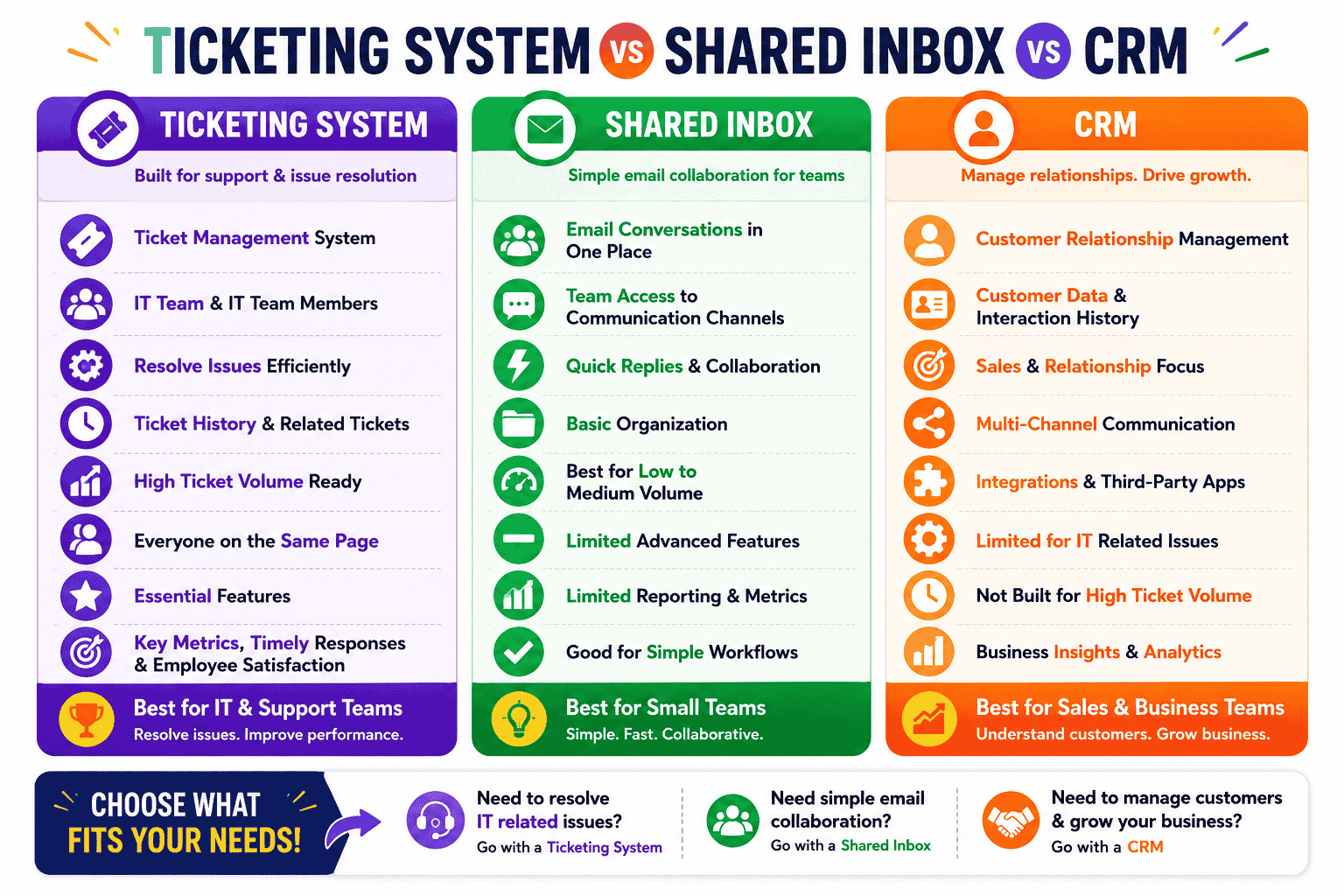
Businesses use different support platforms to manage customer communication, internal operations, and issue resolution workflows. A ticket management system, shared inbox, and CRM each serve different purposes, but choosing the right platform depends on workflow complexity, collaboration requirements, and support volume.
Ticketing System Supports Structured Issue Resolution
A ticket management system helps organizations organize, prioritize, and track support requests through centralized workflows. Most ticketing systems work by converting incoming requests into trackable tickets with assigned priorities, ownership, and status updates. This structure helps an IT team resolve issues efficiently without losing visibility across multiple requests.
Modern desk software also stores ticket history, which allows support teams to review previous interactions, recurring problems, and related tickets during troubleshooting. For businesses that handle high ticket volume, especially small teams during peak seasons, a smart ticketing tool improves organization and accountability while helping IT team members stay on the same page across departments and support queues.
Shared Inbox Simplifies Team Communication
A shared inbox focuses primarily on managing emails and customer conversations across multiple communication channels. Small teams often use shared inbox platforms because they allow multiple employees to access, reply to, and organize conversations collaboratively. Shared inbox tools can help businesses maintain timely responses without requiring advanced workflows or automation.
However, shared inbox systems may struggle when businesses need deeper tracking, reporting, or structured escalation processes. Unlike desk solutions designed specifically for support operations, shared inbox tools usually offer limited ticket history visibility and fewer essential features for handling complex IT related issues. Growing companies often outgrow shared inbox platforms once support requests become more technical or operationally demanding, and may look to a more complete shared inbox software guide when evaluating next steps.
CRM Platforms Focus On Customer Relationship Management
CRM platforms primarily manage customer records, sales pipelines, account histories, and long-term business relationships. While some CRM systems include support functions, their main purpose centers around customer engagement rather than operational issue resolution. Businesses use CRM tools to monitor interactions, analyze customer behavior, and improve retention strategies.
CRM platforms can support communication channels such as email, chat, and phone integrations, but they may lack specialized workflows needed for technical support environments. Many organizations combine CRM software with desk software to improve collaboration between customer-facing teams and support departments.
Desk Solutions Improve Operational Visibility
Dedicated desk solutions provide broader functionality for service operations, technical support, and internal workflows. Advanced platforms like EasyDesk help organizations resolve issues faster by combining automation, reporting, assignment workflows, and performance tracking tools in one centralized environment, showing exactly how to manage support tickets efficiently.
Support leaders often rely on key metrics such as response time, resolution speed, and workload distribution to evaluate team performance. Strong visibility into operational data helps businesses improve employee satisfaction while maintaining service consistency across departments. Structured ticket workflows also help IT team members coordinate more effectively during complex support situations.
Choosing The Right Platform Depends On Business Needs
The right platform depends on business size, workflow complexity, and operational priorities. Shared inbox tools work well for lightweight communication management, while CRM systems support long-term customer relationship tracking. Businesses that handle technical requests, internal operations, or high ticket volume usually benefit more from a dedicated ticket management system with advanced essential features and structured workflows, such as the best ticket management system for growing teams.
How EasyDesk Helps Teams Manage Customer Support Tickets
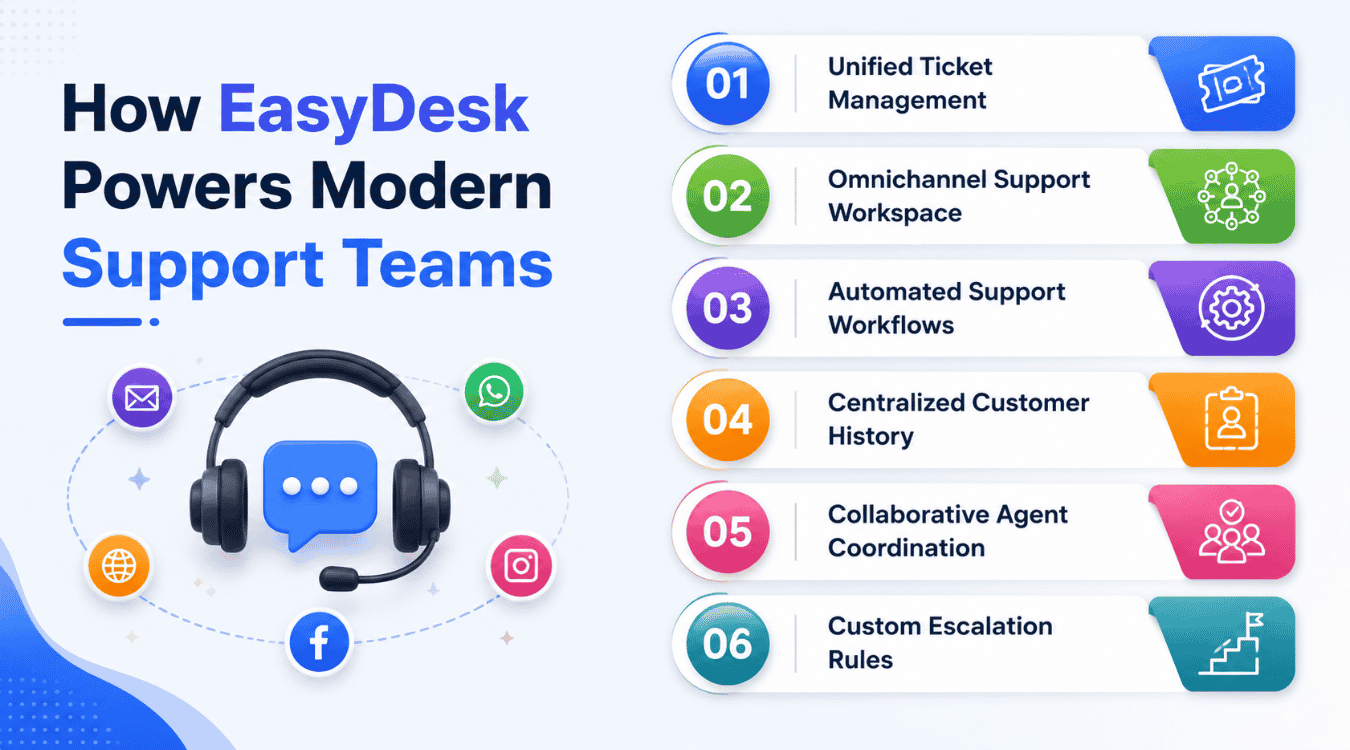
EasyDesk is built to help growing support teams stay organized, responsive, and consistent as customer conversations increase. Instead of juggling tools and processes, teams get a focused, secure customer support platform designed around real support workflows.
EasyDesk brings all conversations together so agents can see a customer’s history in one place. This context helps teams respond with confidence and avoid asking customers to repeat themselves. As a practical ticketing software, EasyDesk offers structured ticket creation and management that turns every request into a trackable item, ensuring nothing slips through the cracks during busy periods.
The platform acts as a reliable ticketing tool that supports day-to-day execution without adding complexity. Clear ownership, shared visibility, and internal notes improve team collaboration, especially when multiple agents need to work on the same issue. Built-in omnichannel support in this helpdesk ticketing software allows teams to manage conversations from different sources while keeping context intact.
EasyDesk also adapts to how teams work. Customizable workflows let support leads define priorities, approvals, and escalation paths that match their process. This flexibility improves team performance by reducing confusion and unnecessary handoffs during support interactions.
Designed with usability in mind, EasyDesk does not require extensive training to get started. Agents can onboard quickly, focus on solving problems, and deliver consistent support with the #1 ticketing software system. The result is a support operation that feels structured, efficient, and ready to scale without added pressure, supported by a rich set of EasyDesk features for smarter support.
FAQs
How Does A Ticketing System Improve Support Team Efficiency?
A ticketing system improves efficiency by creating a structured workflow for handling support requests across multiple channels. Instead of relying on scattered inboxes or manual coordination, teams can assign ownership, prioritize urgent issues, automate repetitive tasks, and track every interaction from one centralized workspace. Advanced ticket routing, SLA management, and workflow automation reduce response delays while helping support teams manage growing ticket volumes without losing visibility or consistency.
What Is The Difference Between A Help Desk And A Ticketing System?
A ticketing system mainly focuses on organizing, tracking, and resolving support requests. A help desk platform usually includes broader customer support capabilities such as knowledge bases, live chat, automation, reporting, customer satisfaction tracking, and multi-channel communication tools. Modern help desk software often includes a built-in ticketing system as the operational core of the platform.
Why Is Omnichannel Support Important In Ticket Management?
Omnichannel support allows businesses to manage conversations from email, live chat, social media, web forms, and messaging platforms within a single interface. This unified approach prevents fragmented communication, preserves customer context, and improves response accuracy. Agents can view complete interaction history without switching tools, which leads to faster resolutions and a better customer experience.
How Do Automation Features Help Support Teams?
Automation features reduce manual work by handling repetitive processes such as ticket assignment, categorization, escalation, status updates, and follow-up reminders. Automated workflows help teams maintain consistency, meet SLA targets, and reduce operational bottlenecks. As ticket volume increases, automation becomes essential for maintaining support quality without significantly increasing staffing requirements.
What Should Businesses Look For In A Modern Ticketing System?
Businesses should prioritize scalability, workflow customization, omnichannel support, reporting capabilities, automation tools, internal collaboration features, and integration flexibility. A modern ticketing system should also provide knowledge base functionality, customer history tracking, SLA controls, and analytics that help support leaders measure performance and improve operational efficiency over time.



