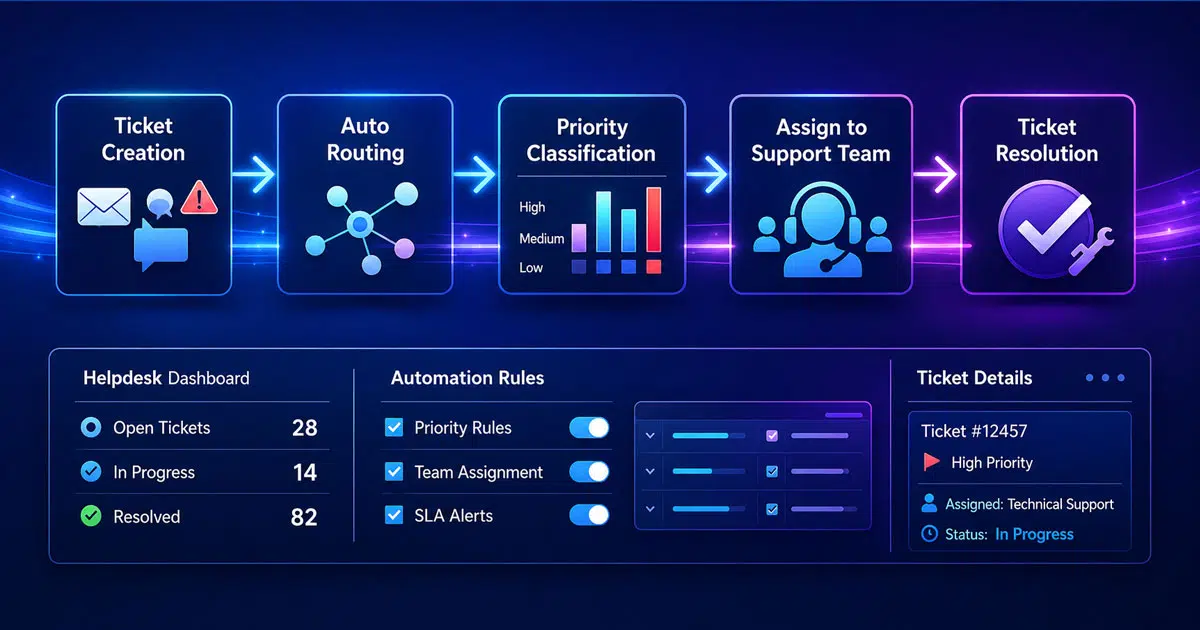
IT support teams handle hundreds or even thousands of support requests every month. Large ticket volume increases workload for support agents and slows response time. A clear ticketing workflow helps teams organize requests, assign priorities, and manage support operations more efficiently.
Ticketing workflow automation improves how support teams handle daily tasks. Automated routing sends tickets to the right agents based on category, urgency, or department. Automated ticketing systems improve first response time by about 37% and help resolve issues up to 52% faster.
Businesses that implement workflow automation also reduce operational costs by 20–30%. Process cycle time can drop by as much as 80%. A well-structured ticketing workflow helps teams deliver faster support and maintain consistent service quality.
What Is Ticketing Workflow Automation
Ticketing workflow automation improves how a support team handles support tickets in modern ticketing systems. Automated ticketing systems use predefined rules and automation rules to manage ticket routing, ticket assignments, and routine tasks. Automated ticketing software helps support agents automate repetitive tasks and organize ticket management across customer support operations. A well-structured automated ticketing solution helps streamline support operations, reduce ticket volumes, and improve team efficiency, especially when you follow workflow automation in customer support.
Modern help desk software and customer service platforms include automation features such as SLA management, omnichannel support, and self-service options. These cloud help desk software solutions route customer inquiries and service requests to the right team while prioritizing high-priority tickets. AI-powered automation also helps support agents resolve complex issues faster.
Seamless integration with existing systems and project management tools improves collaboration tools and existing workflows, which is a key requirement when choosing fast and scalable helpdesk software. Advanced reporting and customer insights track key performance metrics, support continuous improvement, and help deliver personalized support that increases customer satisfaction.
Key Benefits Of Ticketing Workflow Automation For Helpdesk Operations
Automated ticketing systems accelerate support operations by removing manual bottlenecks that slow down customer service. The benefits extend beyond speed to include workload reduction, service consistency, and measurable cost savings, reflecting many core benefits of using a ticketing system.
Faster Response And Resolution Times
Ticketing workflow automation cuts response times through intelligent intake and triage. Automation reduces response times by accelerating ticket intake, routing, and agent resolution. Response times dropped by 50% in one implementation, falling from 2 hours to under 1 hour on average. First response times plummeted from 15 minutes to just 23 seconds in another organization, a 97% decrease.
The speed gains come from eliminating manual sorting and assignment delays. Over 80% of routine tickets get triaged and assigned without human intervention. AI classification slashes response times by as much as 81% by flagging urgent issues and routing them to technical experts right away. Automated routing will give tickets to the right agent without delay using rules based on skill sets, availability, language, account type, SLAs, and region.
Reduced Workload For Support Teams
Support agents spend less time on repetitive tasks when automation handles routine inquiries. IT support teams saved an estimated 65 hours per month previously spent on manual triage and communication. Automated ticketing systems provide assistance through AI and LLM-assisted recommendations, giving first responses to queries and reassuring customers. Compared with manual processes, automated vs manual ticketing shows clear gains in speed and accuracy, and support agents can then pick up tickets based on their availability.
Automation removes the mismatch between ticket complexity and agent skills that guides to unnecessary escalations. The biggest problem behind ticket escalation is assigning tickets to agents lacking expertise to solve the problem. Automated ticketing systems assign tickets based on agent skills to give timely resolution and improved responses. Templates and macros cut average handling times by 30% to 50% and reach up to 80% reduction for complex tickets.
Consistent Service Quality In Any Channel
Workflow automation delivers standardized service across all customer touchpoints. Automated workflows follow a standardized set of steps for each request type and reduce the likelihood of errors or oversights.
SLA management features enable support teams to set response and resolution time targets for different ticket types and give customer inquiries that are addressed within agreed timeframes. Live sentiment and tonality analysis recognize customer tone to identify potential risks in advance. The system gave an explanation into customer satisfaction levels and allows teams to address concerns before they escalate.
Better Resource Allocation And Cost Savings
Ticketing workflow automation delivers measurable ROI through multiple cost reduction mechanisms. Organizations adopting intelligent automation in service desks expect to reduce costs by 31%. Service desk automation delivers ROI by reducing ticket resolution time, lowering operational support costs and boosting employee productivity. Companies using advanced automation saw a 32% drop in costs because they could do more with less.
Automation stabilizes workflows and prevents resource drain. Companies reduce operational costs through fewer manual interventions, fewer errors and leaner processes by automating processes and preventing ticket creation. B2B support teams can manage 2x to 5x more tickets without expanding their workforce by automating repetitive administrative tasks using automated ticket management software.
Essential Workflow Automation Capabilities For IT Ticketing Systems
Your automated ticketing system needs specific capabilities to handle modern support operations. These features determine whether workflow automation transforms team efficiency or simply adds complexity to existing processes, so it helps to review core EasyDesk features for smarter support.
Intelligent Ticket Routing And Assignment
Automated ticket routing assigns support requests to the right team or agent using predefined rules, AI models, or workflow conditions. The system reviews tickets based on category, priority, channel, or customer status without manual intervention. A high priority billing question from a top tier customer goes straight to a senior finance agent. General product questions route to Tier 1 support.
Routing logic can combine multiple factors including issue type, product line, SLA level, customer tier, or preferred language. Automated routing prevents delays caused by manual sorting and reduces reassignment rates by a lot when combined with clear ticket prioritization in customer support.
Automated Ticket Classification And Prioritization
AI ticket prioritization uses artificial intelligence to assess and rank incoming support tickets by urgency and effect. Machine learning models analyze historical ticket data to predict urgency. Natural language processing extracts sentiment and intent from ticket text.
Accurate tagging improves SLAs, reduces customer friction, and saves agents time. Urgent issues receive attention right away while standard requests follow defined workflows when tickets are prioritized. Strong ticket SLA management plus AI reduces cognitive load and decision fatigue for agents by automating triage of routine and low priority tickets.
SLA Tracking And Escalation Management
SLA management creates accountability, improves service delivery, and will give every support request timely attention. Support teams monitor response time, resolution time, and first response performance using SLA metrics and SLA tracking software. Teams can monitor deadlines with precision and get visibility into potential SLA breaches before deadlines expire through immediate tracking.
Service managers can spot bottlenecks, rebalance workloads, or step in before deadlines are missed with immediate visibility. Support agents see which tickets require attention right away based on SLA commitments rather than assumptions.
Self-Service And Knowledge Base Integration
A self-service knowledge base is a centralized, organized collection of information that helps customers solve problems without contacting support. These knowledge base software tools are searchable and include how-to instructions that address common questions. They reduce service requests, save agents from answering repetitive questions, and enable teams to focus on complex issues.
Knowledge bases provide round-the-clock assistance to agents and customers and reduce waiting time. They ease pressure on delivery teams by deflecting minor queries to self-help channels. Organizations report that 91% of survey respondents would use an online knowledge base if it were available and tailored to their needs.
Immediate Reporting And Analytics
Immediate reporting systems provide access to data right away and enable users to monitor and analyze events as they happen. Support teams track key metrics like ticket resolution times, SLA performance, and user satisfaction, often through dedicated SLA management software. Performance monitoring helps identify bottlenecks and areas that need improvement in support operations.
Dashboards show which tickets are approaching response or resolution thresholds while there is still time to act. Teams measure SLA performance, identify bottlenecks, and track average response time with precision. This visibility supports informed decisions and continuous improvement for evolving business needs.
Common Helpdesk Workflows You Can Automate Today
Support teams can automate several high-volume workflows to reduce ticket volumes and improve response times right away. These common processes deliver quick wins when you implement ticketing workflow automation, especially if you start with simple ticket automation workflows.
Password Reset And Access Requests
Password resets account for 20-30% of all IT tickets. A 10,000 person organization spends about $300,000 each year on password reset requests at service desks. The average IT helpdesk labor cost for just one password reset reaches $70.
Automated ticketing systems handle password resets through omnichannel options like virtual agents, mobile apps, service portals and login screens. Users trigger automated reset requests that verify identity through multi-factor authentication. The system resets passwords without IT intervention and enables employees to regain access right away, just as email-to-ticket flows streamline customer support with ticket automation for other routine requests.
Ticket Status Updates And Notifications
Automated notifications keep support agents and customers informed throughout the ticket lifecycle. Automation rules trigger email or SMS alerts when specific conditions are met, such as ticket creation, assignment or resolution.
When customers respond to resolved tickets, automation can reopen them and place them back in agent queues. Freshdesk provides pre-configured automation rules that assign tickets to first responders and send customer satisfaction surveys upon resolution. Teams configure notifications for priority changes, SLA warnings and stale ticket alerts to prevent issues from falling through cracks.
Incident Management And Outage Communication
Incident communication requires stakeholder notification right away and regular status updates during outages. Automated systems establish a single source of truth through dedicated status pages. Predefined stakeholder lists receive automatic notifications through preferred contact methods when incidents occur.
Automation triggers status updates as teams progress through resolution steps. Support operations send updates every hour to maintain transparency for issues that affect customers. Templates with pre-approved language speed up initial communications while automated workflows notify internal teams, support staff and external customers at the same time.
Approval Workflows And Multi-Team Coordination
Multi-level approval workflows require requests to pass through multiple reviewers before final approval. The Approval Coordinator activity manages approval outcomes from one or more child activities that include user approvals, group approvals and manual approval steps.
Organizations configure approval processes to wait for any child activity approval, all child activities to approve, or the first approval or rejection. HappyFox Workflows captures approval trails that include approver email, comments and decision timestamps. Automation triggers subsequent actions based on approval decisions, such as notifying stakeholders or assigning tasks to specific team members.
How To Implement Ticketing Workflow Automation In Your Organization
Successful implementation requires a methodical process that begins with understanding your current state. Organizations can't install software and expect immediate transformation without proper planning.
Audit Your Current Ticketing Processes
Start by documenting how tickets move through your support operations now. Map ticket reception, categorization, and assignment workflows. Analyze historical ticket data to identify common request types, average ticket volume, resources required for resolution, and average resolution times. Review recurring delays, gaps, or inconsistencies that slow down resolution, including manual steps that could benefit from automated ticket creation and routing. Gather input from support teams, end users, and leadership about priorities and concerns. This assessment reveals automation opportunities and helps set expectations for workflow automation that are grounded in reality.
Identify High-Volume Repetitive Tasks
Focus on tasks performed with defined steps like ticket routing, ticket assignment, and follow-ups. Consider where you can turn emails into trackable tickets to eliminate inbox chaos. Research shows AI tools boost productivity by over 60% when handling repetitive tasks. Assess each task's feasibility for automation based on complexity, frequency, and business value. Password resets, status updates, and access requests offer the greatest effect on team efficiency.
Select The Right Automated Ticketing System
Choose a platform supporting automation rules with uninterrupted integration into existing tools. Assess AI capabilities, especially natural language processing accuracy and machine learning strength. Verify the system meets data protection and regulatory requirements. Think over customization flexibility, scalability for future growth, and user experience for both support agents and customers, especially if you are evaluating free helpdesk ticket systems as a starting point.
Configure Automation Rules And Test Workflows
Define clear routing criteria including issue type, product line, SLA level, customer tier, or preferred language. Set up logic assigning tickets based on defined criteria using fixed rules and dynamic conditions. Test automation rules in a sandbox environment first before production deployment. Run scenario testing using real or sample tickets to watch for misrouted cases and rule conflicts.
Train Your Team And Monitor Performance
Provide training that ensures your support team understands automation features and workflows. Use customizable dashboards to monitor ticket flow, reassignment rates, and SLA trends. Track performance and gather feedback to refine the system over time. Continuous improvement comes from adapting workflow configurations based on real-life use.
Advanced Automation With Agentic AI For Helpdesk Operations
Agentic AI adds intelligence to modern ticketing workflow automation. Traditional automated ticketing systems follow predefined rules. Agentic AI analyzes context, customer behavior, and ticket history to make decisions, making it a natural extension of modern cloud help desk software. Support teams resolve customer queries faster, reduce support costs, and improve overall customer support operations.
AI-Driven Ticket Routing
AI-powered automation improves ticket routing inside modern ticketing systems. An advanced ticketing system analyzes customer inquiries, ticket content, and urgency level. The system then assigns tickets to the right team or support agents automatically.
Research from Zendesk shows that AI-driven ticket routing reduces response time by nearly 35%. Automated ticket assignments also reduce human errors in ticket management. Customer support teams receive fewer misrouted service requests. A clear routing structure also helps teams meet service level agreements and resolve high-priority tickets faster.
Automated Ticket Resolution For Routine Tasks
Many support tickets come from repetitive tasks such as password resets or simple service requests. Automated ticketing software handles such routine tasks without human intervention. Automation tools follow predefined rules to resolve tickets or provide self-service options.
Gartner reports that automation can resolve up to 30% of customer service requests without agent involvement. Automated ticketing systems reduce ticket volumes and free support agents for complex issues. Customer support operations become faster and more efficient while customer expectations stay fulfilled.
AI Insights For Better Customer Support
Agentic AI analyzes large sets of customer interactions to produce useful customer insights. Advanced reporting tools inside automated ticketing systems track key performance metrics, ticket volumes, and customer behavior patterns.
A report from McKinsey states that companies that use AI in customer support processes improve customer satisfaction by up to 20%. Support teams use such insights to adjust support processes and improve customer engagement. Customer service platforms also help teams deliver personalized support and maintain stronger customer relationships.
Workflow Automation Across Support Systems
A strong automated ticketing solution integrates with existing systems and existing tools across the organization, just like leading options in any helpdesk software guide. Help desk software often connects with project management tools, asset management tools, and collaboration tools to streamline support operations.
Forrester research shows that organizations that implement workflow automation reduce service process cycle time by up to 80%. Seamless integration allows team members to manage customer requests from one customer service platform. Such systems improve team efficiency and maintain up-to-date support processes across the entire organization.
Continuous Improvement With AI Automation
Agentic AI supports continuous improvement across customer support operations. Automation capabilities analyze support tickets, service requests, and support processes to detect patterns and inefficiencies. Support teams then adjust automation rules and customizable workflows.
According to IBM, AI-assisted service management reduces support costs by up to 30%. Top automated ticketing systems also provide SLA management and advanced reporting dashboards. Customer support teams measure performance and refine existing workflows. A successful implementation of automation tools ensures ongoing support quality and stronger customer engagement.
How EasyDesk Automates Ticketing Workflow For Faster Helpdesk Operations
EasyDesk simplifies helpdesk operations with structured ticketing workflows and smart automation. The platform organizes customer requests, assigns tickets automatically, and keeps every interaction visible in one workspace. Support teams handle requests faster without manual sorting, and EasyDesk stands out as one of the best ticket management systems for small and growing teams.
Automation features guide tickets through predefined workflows so every request follows the correct process. EasyDesk also supports SLA tracking, multi-channel communication, and reporting tools that improve response time and service quality.
A unified dashboard centralizes email, chat, and other channels, giving support agents full context for each ticket. This structure improves team coordination, reduces missed requests, and helps businesses maintain consistent customer support operations as ticket volume grows, especially when using ticketing software built for better customer support or a smart ticketing tool for small teams. You can enjoy EasyDesk at a suitable price.
FAQs
Can Ticketing Workflow Automation Work For Small Support Teams?
Yes. Ticketing workflow automation helps small customer support teams manage support tickets without large staffing needs. Automated ticketing systems handle ticket routing, automate repetitive tasks, and reduce manual work. A compact automated ticketing solution helps small teams maintain efficient support operations and consistent customer satisfaction.
Does Ticketing Workflow Automation Improve Customer Satisfaction?
Yes. Automated ticketing systems improve response time and ticket resolution speed across customer support operations. Faster ticket routing and clear ticket management reduce delays in customer interactions. Consistent workflows and SLA management help customer support teams meet customer expectations and improve overall customer satisfaction.
What Types Of Customer Requests Benefit Most From Automated Ticketing Systems?
High-volume service requests such as account access issues, billing questions, order status inquiries, and product support queries benefit the most. Automated ticketing software routes such customer requests quickly through predefined rules. Customer support teams resolve customer queries faster and maintain smoother support processes.
Can Automated Ticketing Systems Support Omnichannel Customer Support?
Yes. Modern automated ticketing systems support omnichannel support across email, live chat, web forms, and social channels. A unified customer service platform collects customer inquiries from multiple channels and organizes them into a single ticket management system. Support agents maintain consistent customer engagement across all touchpoints.
How Do Automation Tools Help Reduce Support Costs In Customer Service Operations?
Automation tools reduce support costs by automating routine tasks, ticket assignments, and ticket routing. Support teams spend less time on repetitive tasks and focus on complex issues. Efficient workflow automation allows customer support operations to handle higher ticket volumes without expanding the support team.



